
Last updated on
Oct 31, 2026

Get the free Maryland Withholding Tax Exemption Form MW507M
We are not affiliated with any brand or entity on this form

Fill out
Complete the form online in a simple drag-and-drop editor.

eSign
Add your legally binding signature or send the form for signing.

Share
Share the form via a link, letting anyone fill it out from any device.

Export
Download, print, email, or move the form to your cloud storage.
Why pdfFiller is the best tool for your documents and forms


End-to-end document management
From editing and signing to collaboration and tracking, pdfFiller has everything you need to get your documents done quickly and efficiently.
Accessible from anywhere
pdfFiller is fully cloud-based. This means you can edit, sign, and share documents from anywhere using your computer, smartphone, or tablet.
Secure and compliant
pdfFiller lets you securely manage documents following global laws like ESIGN, CCPA, and GDPR. It's also HIPAA and SOC 2 compliant.
What is MW507M Exemption Form
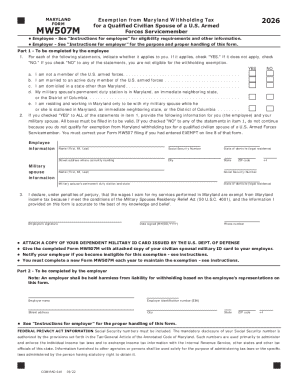
The Maryland Withholding Tax Exemption Form MW507M is a tax exemption certificate used by qualified civilian spouses of U.S. Armed Forces servicemembers to apply for exemption from Maryland withholding tax.
pdfFiller scores top ratings on review platforms




Who needs MW507M Exemption Form?
Explore how professionals across industries use pdfFiller.

MW507M Exemption Form is needed by:
-
Civilian spouses of U.S. Armed Forces personnel
-
Employees working in Maryland with military spouses
-
Tax professionals assisting military families
-
Individuals claiming state tax exemptions
-
Employers processing tax exemption claims
-
Military families seeking financial benefits
Comprehensive Guide to MW507M Exemption Form
What is the Maryland Withholding Tax Exemption Form MW507M?
The Maryland Withholding Tax Exemption Form MW507M is a crucial document for civilian spouses of U.S. Armed Forces members. This form serves the purpose of applying for exemption from Maryland withholding tax, enabling eligible individuals to save on tax payments while affirming their residency status. Specifically designed for military spouses, this form clarifies the tax situation based on their unique circumstances.
Qualified spouses can ensure that their tax status accurately reflects their domicile outside of Maryland. The form MW507M template plays a vital role in this process, providing a standardized way to apply for withholding tax exemptions.
Eligibility Criteria for the Maryland Withholding Tax Exemption Form MW507M
Eligibility for the Maryland withholding tax exemption under the Military Spouse Residency Relief Act hinges on specific criteria. To qualify, the applicant must demonstrate that their domicile is outside of Maryland, primarily due to the military member’s duty station.
-
Spouse must be a civilian.
-
The servicemember must be assigned to duty in Maryland.
-
The spouse's domicile must be established in another state.
-
Proof of residency and military affiliation must be provided.
These criteria ensure that military families can benefit from tax exemptions tailored to their unique needs.
Purpose and Benefits of Using the Maryland Withholding Tax Exemption Form MW507M
Utilizing the Maryland withholding tax exemption form MW507M offers multiple benefits that can enhance financial wellbeing for military spouses. By claiming the exemption, eligible individuals can significantly reduce their Maryland income tax withholding amounts.
This form simplifies the exemption process, allowing qualified spouses to concentrate on their families rather than complex tax issues. The ease of submission and clear eligibility criteria contribute to its overall utility.
How to Fill Out the Maryland Withholding Tax Exemption Form MW507M Online (Step-by-Step)
Filling out the MW507M form online is straightforward. Follow these steps to access and complete the form efficiently:
-
Visit the pdfFiller website.
-
Search for the fillable MW507M form.
-
Open the form and enter your personal information in the designated fields.
-
Edit any required sections for accuracy.
-
Save or print the completed MW507M form for submission.
pdfFiller offers features that enhance the ease of form filling, including text editing and saving capabilities for later use.
Field-by-Field Instructions for the Maryland Withholding Tax Exemption Form MW507M
Each section of the MW507M form requires specific information to ensure a successful application. Here is a breakdown of the fields you will encounter:
-
Personal information: Name, address, and Social Security number.
-
Military affiliation details: Include the servicemember's information.
-
Tax exemption eligibility confirmation: Provide residence state information.
Applicants should take care to avoid common mistakes, such as incorrect entry of personal information. It’s advisable to have necessary documentation, such as a dependent military ID card, on hand while completing the form.
Submission Methods for the Maryland Withholding Tax Exemption Form MW507M
Once you've completed the MW507M form, various submission methods are available. Applicants can submit the form either physically or electronically, depending on their preferences.
-
Physical Submission: Mail the completed form to your employer’s payroll department.
-
Electronic Submission: Email a scanned copy to your employer if permitted.
Processing times may vary, so applicants should check with their employers regarding expected timelines and any confirmation of receipt post-submission.
What Happens After You Submit the Maryland Withholding Tax Exemption Form MW507M
After submitting the MW507M form, applicants should familiarize themselves with the follow-up process. Confirmation of receipt may be provided by the employer, allowing tracking of the exemption request.
Failing to file the form or submitting it late could lead to potential consequences, such as increased tax withholding or disruptions in exempt status. Thus, timely submission is crucial for maintaining financial benefits.
Renewal Process for the Maryland Withholding Tax Exemption Form MW507M
The MW507M exemption is not permanent and requires an annual renewal to remain valid. Applicants must pay attention to the timeline for renewal to avoid lapses in their withholding tax exemption.
-
Renewal notice is typically sent out annually.
-
Complete and submit the form before the deadline.
-
Ensure all information is up to date to prevent processing issues.
Maintaining an updated application is essential for continued benefits under the Maryland tax exemption framework.
Security and Privacy when Handling the Maryland Withholding Tax Exemption Form MW507M
When dealing with sensitive information on the MW507M form, users should prioritize security and privacy. pdfFiller implements stringent safety measures to protect personal data throughout the form filling and submission process.
Compliance with regulations such as HIPAA and GDPR further enhances trust in handling sensitive documents, ensuring that your information remains confidential and secure.
Get Started with pdfFiller to Easily Fill Out the Maryland Withholding Tax Exemption Form MW507M
Embrace the convenience and security offered by pdfFiller for filling out the Maryland Withholding Tax Exemption Form MW507M. The platform provides robust support and user-friendly features, making the completion and submission of tax forms smooth and hassle-free.
Users can access efficient tools for editing, eSigning, and managing forms, all while ensuring their data remains protected.
How to fill out the MW507M Exemption Form
-
1.To begin, access the Maryland Withholding Tax Exemption Form MW507M on pdfFiller by searching for the form title or browsing tax forms in the state category.
-
2.Once the form appears, click to open it. Familiarize yourself with the fillable fields and layout, including checkboxes and signature lines.
-
3.Before filling out the form, gather necessary information such as your personal details, and the servicemember's duty station, and have a copy of the dependent military ID ready.
-
4.As you navigate through the form, click on each blank field to enter your information. Make sure to only provide accurate responses per the guidelines provided in the form.
-
5.For questions requiring a yes or no answer, click the corresponding checkbox beside your choice. Fill in any blanks with the requested personal or identification information.
-
6.After completing all required sections, review your answers carefully. Ensure all fields are filled out correctly and that your information matches the required eligibility criteria.
-
7.Once verified, proceed to sign the form electronically. Ensure you date your signature accurately as it's part of the submission requirements.
-
8.When finalizing, use the 'Save' option to keep your form on pdfFiller. You may also select 'Download' to get a copy for your records.
-
9.To submit the completed form, follow instructions provided by your employer. You may need to attach a copy of your dependent military ID card if not submitted previously.

Who is eligible to use the MW507M form?
The MW507M form is designed for qualified civilian spouses of U.S. Armed Forces servicemembers. Eligibility depends on specific conditions, such as being domiciled outside Maryland and the servicemember's military duty location.
What documents do I need when filling out the MW507M?
When completing the MW507M, you'll need personal information, details about your servicemember's duty station, and a copy of the dependent military ID card to submit with the form.
How do I submit the MW507M form?
Completed MW507M forms must be submitted to your employer. Make sure to include any required supporting documents, such as a copy of the military ID, to ensure proper processing.
Are there deadlines for submitting the MW507M form?
The exemption granted through the MW507M is valid for the calendar year but must be renewed annually. Submit your form before the tax withholding deadlines to ensure timely processing.
Can I make mistakes on the MW507M form?
Yes, common mistakes such as incorrect personal information or failing to sign can delay processing. Review the form thoroughly before submission to avoid errors.
How long does it take to process the MW507M form?
Processing times may vary based on your employer's policies. It's best to submit the form as early as possible to prevent withholding discrepancies.
Is notarization required for the MW507M form?
No, notarization is not required for the Maryland Withholding Tax Exemption Form MW507M. Simply complete, sign, and submit it to your employer.
Related Forms



Related Catalogs
Get the latest insights from our blog


If you believe that this page should be taken down, please follow our DMCA take down process
here
.
This form may include fields for payment information. Data entered in these fields is not covered by PCI DSS compliance.