
Last updated on
Oct 31, 2026

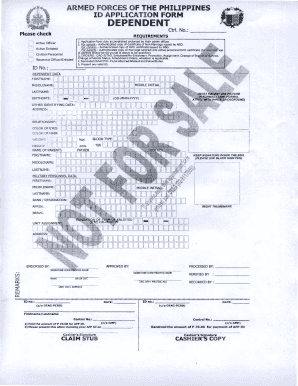
Get the free Unified Multi-Purpose ID (UMID) Card Application Form
We are not affiliated with any brand or entity on this form

Fill out
Complete the form online in a simple drag-and-drop editor.

eSign
Add your legally binding signature or send the form for signing.

Share
Share the form via a link, letting anyone fill it out from any device.

Export
Download, print, email, or move the form to your cloud storage.
Why pdfFiller is the best tool for your documents and forms


End-to-end document management
From editing and signing to collaboration and tracking, pdfFiller has everything you need to get your documents done quickly and efficiently.
Accessible from anywhere
pdfFiller is fully cloud-based. This means you can edit, sign, and share documents from anywhere using your computer, smartphone, or tablet.
Secure and compliant
pdfFiller lets you securely manage documents following global laws like ESIGN, CCPA, and GDPR. It's also HIPAA and SOC 2 compliant.
What is UMID Application
The Unified Multi-Purpose ID (UMID) Card Application Form is a government document used by individuals in the Philippines to apply for a multi-purpose identification card.
pdfFiller scores top ratings on review platforms




Who needs UMID Application?
Explore how professionals across industries use pdfFiller.

UMID Application is needed by:
-
Individuals seeking government-issued identification in the Philippines
-
Social Security System (SSS) members requiring a UMID card
-
Residents needing a valid ID for various legal and official purposes
-
Citizens applying for benefits or services linked to their identity
-
Applicants for employment opportunities needing a recognized ID
Comprehensive Guide to UMID Application
What is the Unified Multi-Purpose ID (UMID) Card Application Form?
The Unified Multi-Purpose ID (UMID) card serves as a multi-purpose identification card in the Philippines, facilitating access to various government services for Filipino citizens. This application form is crucial for verifying identity and status with the Social Security System (SSS), ensuring a smooth process for obtaining the UMID card. The UMID card application form is essential for applicants seeking to secure their identification and integrate into government systems.
Purpose and Benefits of the Unified Multi-Purpose ID (UMID) Card Application Form
The UMID card application form offers several advantages to applicants. Firstly, it provides convenient access to government services, simplifying interactions with various agencies. Additionally, the UMID card streamlines the identification process across multiple platforms, allowing for easier verification of identity. By applying for this card, citizens can enjoy enhanced recognition in official dealings with the government.
Eligibility Criteria for the UMID Card Application Form
Applicants must meet specific eligibility criteria to successfully apply for the UMID card. To qualify, individuals must be of legal age and a resident of the Philippines. Furthermore, potential applicants need to have affiliations with the SSS or other recognized government agencies, which can be verified through the application form. Ensuring these requirements are met is vital for a smooth application process.
How to Fill Out the Unified Multi-Purpose ID (UMID) Card Application Form Online (Step-by-Step)
Filling out the UMID card application form online requires following these steps:
-
Visit the official UMID application portal.
-
Input your full name as it appears on your identification documents.
-
Enter your SSS number accurately to verify your status.
-
Complete your birth date and other personal details.
-
Review all entries to ensure accuracy before submission.
Essential fields such as full name, SSS number, and birth date must be completed carefully to avoid complications during processing.
Common Errors and How to Avoid Them When Filling Out the UMID Application Form
Many applicants encounter common errors while filling out the UMID card application form. Potential pitfalls include:
-
Submitting an incorrect SSS number.
-
Overlooking required signatures in the form.
-
Failing to provide complete personal details.
To avoid these mistakes, applicants should follow a validation checklist to ensure all information is correct before submission.
How to Submit Your UMID Card Application Form
There are several methods for submitting the completed UMID card application form:
-
Submit online through the official portal.
-
Send your form via mail to the designated office.
-
Submit the form in person at your local SSS or government office.
Regardless of the method chosen, timely submission is crucial to avoid unnecessary delays in processing your application.
What Happens After You Submit Your UMID Card Application?
Once you submit your UMID card application, the following steps typically occur:
-
Your application will undergo a processing phase where your details are verified.
-
You can check the status of your application through the designated online portal.
-
If accepted, await further instructions regarding card issuance; if rejected, you will receive guidance on correcting the situation.
Understanding this process can help you stay informed about your application status and next steps.
Privacy and Security with the Unified Multi-Purpose ID (UMID) Card Application Form
Ensuring the privacy and security of your personal information during the UMID application process is paramount. Security measures, such as 256-bit encryption, safeguard sensitive documents from unauthorized access. Additionally, compliance with data protection regulations, including HIPAA and GDPR, ensures that applicants’ data is handled with the utmost care and integrity throughout the process.
Using pdfFiller to Simplify Your UMID Card Application Process
pdfFiller offers tools to enhance the UMID application process efficiently. Key features include:
-
Fillable forms that allow easy completion of your application.
-
eSigning capabilities for secure and quick signature addition.
-
Compliant document handling to ensure your information stays protected.
By utilizing pdfFiller, users can simplify the application process significantly and manage their documents more effectively.
Get Started with Your Unified Multi-Purpose ID (UMID) Card Application Today!
Applying for the UMID card can be a straightforward process, especially with tools like pdfFiller. By leveraging its features, applicants can enjoy efficient completion and submission of their application forms. Begin your journey towards obtaining a UMID card by utilizing resources that make the process easier and more accessible than ever.
How to fill out the UMID Application
-
1.Start by accessing pdfFiller’s homepage and logging into your account, or sign up for a new account if you don’t have one.
-
2.In the search bar, type 'Unified Multi-Purpose ID (UMID) Card Application Form' and locate the correct document listed in the results.
-
3.Once you find the form, click on it to open it in pdfFiller’s editing interface.
-
4.Begin filling out the form by entering your personal information in the appropriate fields. Ensure that your full name, SSS number, and birth date are entered correctly.
-
5.Refer to the application date field, and select the current date when you are completing the application.
-
6.Use the blank field designated for your signature by either typing your name or drawing your signature using the provided tools in pdfFiller.
-
7.Make sure to review each section for completeness, double-checking all entered information for accuracy before proceeding.
-
8.Once satisfied with your inputs, take a moment to review the instructions on the form, ensuring that all required sections are filled out correctly.
-
9.Save your progress frequently as you work by clicking the ‘Save’ button located on the top right corner of the interface.
-
10.When you finalize your application, check the preview to confirm all fields are correct and nothing is missing.
-
11.To download or submit the completed form, click ‘Download’ for a copy, or select the submission method indicated, which may vary based on local procedures.

What are the eligibility requirements for applying for the UMID card?
To apply for the UMID card, applicants need to be citizens of the Philippines and must be members of the Social Security System (SSS). They should provide valid personal identification details and may need to meet additional requirements based on SSS guidelines.
What documents are required to submit this application?
Applicants typically need to submit valid identification such as a birth certificate, government-issued ID, or any document that verifies their identity. Additional documents may be necessary based on specific submission guidelines from SSS.
How can I submit my UMID card application?
Once the application form is completed, it can usually be submitted in person at the nearest Social Security System (SSS) office or through online submission portals designated by SSS, if available.
Is there a processing fee for the UMID card application?
There is generally no processing fee for the application of the UMID card. However, applicants should verify with SSS regarding any changes in policy or requirements that might introduce a fee.
How long does it take to process the UMID card application?
Processing times can vary, but applicants typically receive their UMID card within 7 to 15 working days from the date of submission, depending on the volume of applications received by SSS.
What should I do if I made a mistake on my UMID application?
If you notice a mistake after submitting your application, contact the SSS immediately to ask about the correction process. Providing accurate information is crucial for the processing of your ID.
Can I track the status of my UMID card application?
Yes, applicants can often track the status of their UMID card application through the SSS online portal or by directly inquiring at their local SSS office for updates.
Related Forms




Get the latest insights from our blog


If you believe that this page should be taken down, please follow our DMCA take down process
here
.
This form may include fields for payment information. Data entered in these fields is not covered by PCI DSS compliance.