
Last updated on
Oct 23, 2026
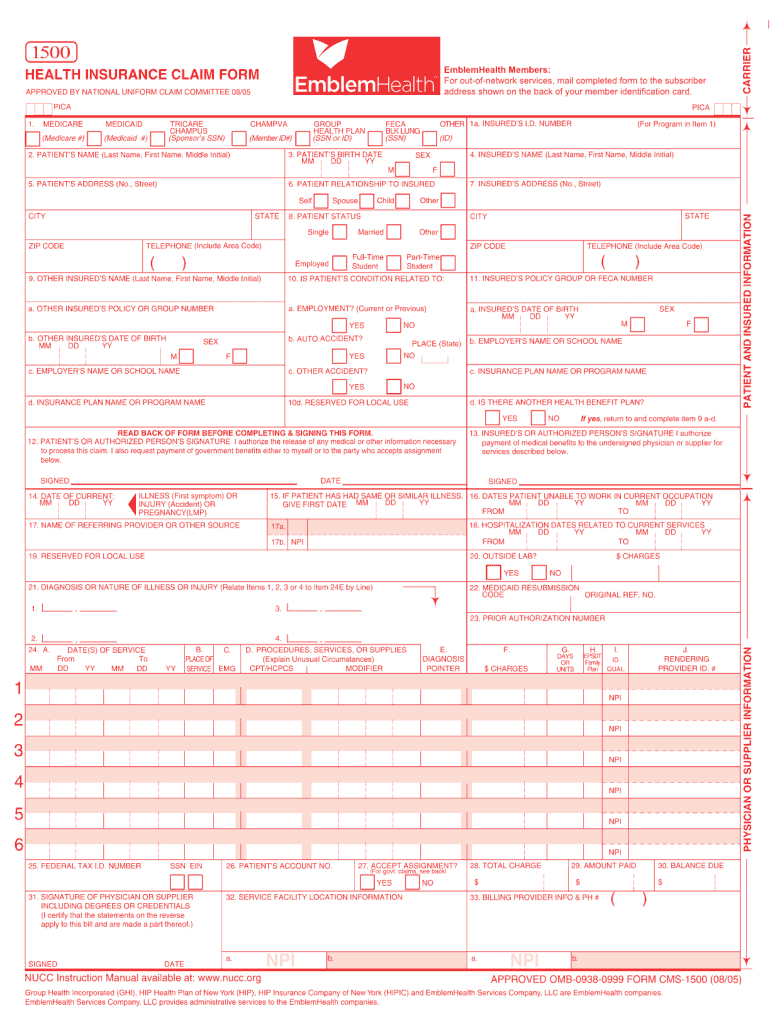
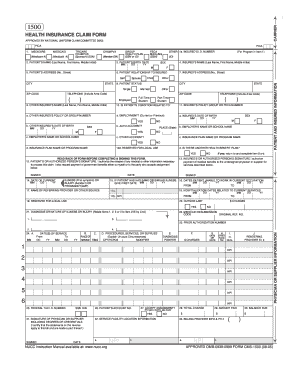
EmblemHealth CMS-1500 2005 free printable template
pdfFiller is not affiliated with any government organization

Fill out
Complete the form online in a simple drag-and-drop editor.

eSign
Add your legally binding signature or send the form for signing.

Share
Share the form via a link, letting anyone fill it out from any device.

Export
Download, print, email, or move the form to your cloud storage.
Why pdfFiller is the best tool for your documents and forms


End-to-end document management
From editing and signing to collaboration and tracking, pdfFiller has everything you need to get your documents done quickly and efficiently.
Accessible from anywhere
pdfFiller is fully cloud-based. This means you can edit, sign, and share documents from anywhere using your computer, smartphone, or tablet.
Secure and compliant
pdfFiller lets you securely manage documents following global laws like ESIGN, CCPA, and GDPR. It's also HIPAA and SOC 2 compliant.
What is EmblemHealth CMS-1500
The EmblemHealth CMS-1500 is a medical claim form used by healthcare providers to submit insurance claims for reimbursement for medical services rendered.
pdfFiller scores top ratings on review platforms




Who needs EmblemHealth CMS-1500?
Explore how professionals across industries use pdfFiller.

EmblemHealth CMS-1500 is needed by:
-
Healthcare providers including doctors and clinics
-
Billing specialists and claims processors
-
Insurance companies reviewing claims
-
Patients to understand billing statements
-
Medical administrative staff managing claims
Comprehensive Guide to EmblemHealth CMS-1500
What is the EmblemHealth CMS-1500?
The EmblemHealth CMS-1500 form is a crucial document in healthcare billing. It serves as a standardized claim form that healthcare providers use to bill insurance companies for services rendered. Understanding its role is vital for efficient payment processing.
Historically, the CMS-1500 form has evolved to meet changing healthcare billing needs, reflecting updates in policies and regulations. Accuracy while completing this form is imperative, as even minor errors can lead to claim denials or payment delays.
Utilizing the EmblemHealth CMS-1500 appropriately ensures that the billing process runs smoothly, promoting financial efficiency in healthcare transactions.
Purpose and Benefits of the EmblemHealth CMS-1500
The EmblemHealth CMS-1500 serves multiple purposes, primarily for submitting healthcare claims for reimbursement. It benefits both healthcare providers and patients by facilitating timely and accurate reimbursements.
Key advantages include:
-
Timely reimbursement for services provided
-
Proper documentation for claims submitted to insurers
-
Enhanced communication between healthcare facilities and insurance companies
-
Support for efficient financial workflows and patient care
By implementing the EmblemHealth CMS-1500, healthcare providers can streamline their billing processes and improve overall patient satisfaction.
Who Needs the EmblemHealth CMS-1500?
Healthcare providers who bill insurance companies are the primary users of the EmblemHealth CMS-1500 form. This includes independent practitioners, clinics, hospitals, and other medical facilities.
Specific instances when the CMS-1500 is necessary include:
-
Submitting claims for outpatient services
-
Billing for diagnostic and treatment procedures
-
When transitioning from previous billing formats
Understanding the distinction between individual providers and larger healthcare organizations is essential for accurate claim processing.
Eligibility Criteria for the EmblemHealth CMS-1500
To utilize the EmblemHealth CMS-1500, certain eligibility criteria must be met. Healthcare services must be covered under the EmblemHealth plan, requiring familiarity with the complete list of services.
Patient eligibility is another critical factor, including:
-
Insurance card requirements to authenticate coverage
-
Conditions that may impact eligibility, such as out-of-network services
Providers must ensure that they are aware of the eligibility requirements to avoid claim rejections.
How to Fill Out the EmblemHealth CMS-1500 Online
Filling out the EmblemHealth CMS-1500 is simplified through pdfFiller’s features. Here’s how to get started:
-
Access the form through pdfFiller’s online platform.
-
Fill in the required fields accurately, paying attention to details.
-
Use pdfFiller’s validation tools to check for potential errors.
Common mistakes to avoid include leaving fields blank or misusing codes. Visual aids and walkthroughs are often available to guide users through the process.
Common Errors and How to Avoid Them
Identifying common mistakes when completing the CMS-1500 will help ensure correct submissions. Frequent errors include:
-
Incorrect patient information
-
Missing provider details
-
Submitting without proper signatures
Tips for reviewing submitted information include double-checking all entries and utilizing pdfFiller’s error-checking features to enhance accuracy.
Submission Methods for the EmblemHealth CMS-1500
Once the EmblemHealth CMS-1500 is completed, users must choose between electronic submission and traditional mail. Each method has its specifics:
-
Electronic submissions are often faster and more efficient.
-
Mail submissions may involve additional processing time and fees.
It’s essential to know where to submit the form based on state requirements to ensure compliance and prompt processing.
What Happens After You Submit the EmblemHealth CMS-1500?
After submission, users can expect a processing period where claims are evaluated. Notifications regarding claim status will typically be sent, indicating whether the claim has been approved or denied.
Users should confirm receipt of their submissions and track the claims through appropriate channels. For further inquiries, relevant contact information should be kept handy for follow-ups.
Security and Compliance for the EmblemHealth CMS-1500
Security is a critical consideration when handling personal and sensitive information on the CMS-1500 form. Protecting patient data is essential for maintaining compliance and trust.
pdfFiller provides robust security features, including:
-
256-bit data encryption
-
Compliance with HIPAA and GDPR regulations
Ensuring privacy at the submission stage is necessary for safeguarding patient information.
Why Choose pdfFiller for Your EmblemHealth CMS-1500 Needs
Utilizing pdfFiller for completing the EmblemHealth CMS-1500 simplifies the process, offering numerous advantages, including a user-friendly interface and strong security protocols.
Users have shared positive experiences with pdfFiller regarding its efficient handling of the CMS-1500, with added features like eSigning and comprehensive document management enhancing the overall experience.
How to fill out the EmblemHealth CMS-1500
-
1.Access pdfFiller and log in to your account. If you don’t have an account, create one to begin.
-
2.Search for 'EmblemHealth CMS-1500' within the pdfFiller dashboard to locate the form. Click on the form to open it.
-
3.Familiarize yourself with the layout of the form. Ensure you have all necessary patient and service information on hand before completing it.
-
4.Start filling in the required fields as indicated. Input patient information, provider details, and details regarding the medical services offered.
-
5.Use pdfFiller’s editing tools to easily add text and make adjustments. Ensure accuracy as this will be used for claims processing.
-
6.Once you complete the form, review all the entries for correctness. Check for missing information and confirm that everything is filled out clearly.
-
7.After reviewing, use the 'Finish' option to proceed to save your work. You can download, print, or share the completed form from pdfFiller.

Who is eligible to use the EmblemHealth CMS-1500 form?
Healthcare providers including physicians, allied health practitioners, and facilities that render medical services can use the EmblemHealth CMS-1500 form to submit claims.
Are there deadlines for submitting the CMS-1500 form?
Yes, submissions should ideally occur within the timeframe specified by the patient's insurance policy. Delays can lead to denials or reduced payments.
How do I submit the completed CMS-1500 form?
The completed CMS-1500 form can typically be submitted electronically via an insurance company’s online portal or through traditional mail to the insurer's designated claims address.
What supporting documents are required with the CMS-1500 form?
Common supporting documents include patient treatment notes, billing statements, and any referrals or authorizations required by the insurance provider.
What are common mistakes to avoid when filling out the EmblemHealth CMS-1500 form?
Common mistakes include missing signatures, incomplete fields, and incorrect coding for services rendered. Always double-check entries before submitting.
How long does processing take for claims submitted on the CMS-1500 form?
Processing times can vary but typically range from a few days to several weeks based on the insurance company's workload and claim accuracy.
Can patients get a copy of the CMS-1500 form after submission?
Yes, patients may request a copy for their records. It is advisable to keep a copy of the submitted form for personal reference.
EmblemHealth CMS-1500 Form Versions
Related Content
Related Forms


Related Catalogs
Get the latest insights from our blog


If you believe that this page should be taken down, please follow our DMCA take down process
here
.
This form may include fields for payment information. Data entered in these fields is not covered by PCI DSS compliance.