
Last updated on
Nov 9, 2026

OH Voter Registration and Information Update Form - Medina County 2008 free printable template
pdfFiller is not affiliated with any government organization

Fill out
Complete the form online in a simple drag-and-drop editor.

eSign
Add your legally binding signature or send the form for signing.

Share
Share the form via a link, letting anyone fill it out from any device.

Export
Download, print, email, or move the form to your cloud storage.
Why pdfFiller is the best tool for your documents and forms


End-to-end document management
From editing and signing to collaboration and tracking, pdfFiller has everything you need to get your documents done quickly and efficiently.
Accessible from anywhere
pdfFiller is fully cloud-based. This means you can edit, sign, and share documents from anywhere using your computer, smartphone, or tablet.
Secure and compliant
pdfFiller lets you securely manage documents following global laws like ESIGN, CCPA, and GDPR. It's also HIPAA and SOC 2 compliant.
What is OH Voter Registration and Information Update Form - Medina County
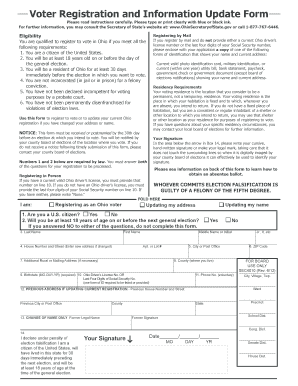
The Ohio Voter Registration Form is a government document used by residents of Ohio to register to vote or update their current voter registration information.
pdfFiller scores top ratings on review platforms




Who needs OH Voter Registration and Information Update Form - Medina County?
Explore how professionals across industries use pdfFiller.

OH Voter Registration and Information Update Form - Medina County is needed by:
-
Ohio residents who are first-time voters
-
Individuals who have changed their address or name in Ohio
-
Citizens seeking to update their voter registration information
-
People interested in voting in upcoming elections
-
Residents looking to obtain an absentee ballot
-
Individuals fulfilling voter identification requirements
Comprehensive Guide to OH Voter Registration and Information Update Form - Medina County
What is the Ohio Voter Registration Form?
The Ohio Voter Registration Form is a crucial document that allows residents to register to vote or update their existing registration details. This form plays a significant role in ensuring that individuals can participate in elections. By filling out the form, voters can maintain current personal information, which is vital for accurate representation in the electoral process.
This document is utilized by eligible residents of Ohio, including first-time voters and individuals who have recently changed their name or address. You can find the Ohio Voter Registration Form through state websites and local election offices.
Purpose and Benefits of the Ohio Voter Registration Form
Filling out the Ohio Voter Registration Form serves multiple beneficial purposes. First and foremost, it enables individuals to register to vote, which is essential for participating in Ohio's democratic process. Additionally, the form provides an opportunity to keep personal information up to date, ensuring that voters receive accurate ballots and election materials.
The process of filling out the form increases civic engagement and encourages voter participation, which is fundamental to a healthy democracy. Current and accurate information allows for efficiently managing elections and maintaining the integrity of the voter rolls.
Who Needs the Ohio Voter Registration Form?
The Ohio Voter Registration Form is necessary for several groups of individuals. First-time voters must fill out this form to register, ensuring they meet the eligibility criteria required by the state. Additionally, current voters must re-register if they change their name or address.
Eligibility mandates include being at least 18 years old by election day and a resident of Ohio for at least 30 days before the election. Understanding these requirements is vital for ensuring successful registration and participation in future elections.
How to Fill Out the Ohio Voter Registration Form Online (Step-by-Step)
To complete the Ohio Voter Registration Form online, follow these sequential steps:
-
Visit the official Ohio Secretary of State website.
-
Select the option to fill out the voter registration form online.
-
Input your personal information, including your full name and birthdate.
-
Provide identification details, either your Ohio driver's license number or the last four digits of your Social Security number.
-
Review the form for accuracy and ensure all fields are filled in correctly.
-
Submit the completed form electronically.
Before finalizing your submission, double-checking all entries is crucial to avoid any mistakes that could delay your registration.
Common Errors and How to Avoid Them
Many individuals encounter common pitfalls when filling out the Ohio Voter Registration Form. Errors can include providing incorrect personal information, such as misspelled names or incorrect addresses. These mistakes can lead to processing delays or rejections, preventing voter participation.
To avoid such issues, consider these suggestions:
-
Carefully review all information before submission.
-
Ensure that the signature is affixed properly, as this is a critical part of the application.
-
Check eligibility requirements to confirm that all conditions are met.
Submission Methods and Delivery of the Ohio Voter Registration Form
Once the Ohio Voter Registration Form is completed, there are several methods for submitting it. You can submit your form online, by mail, or in person at designated locations. Each method has specific deadlines that applicants must be aware of, ensuring that registrations are processed in time for upcoming elections.
Additionally, tracking the status of your submission can be done through state election offices, providing peace of mind regarding your voter registration status.
What Happens After You Submit the Ohio Voter Registration Form?
After submitting the Ohio Voter Registration Form, applicants will receive a confirmation of their registration status. It’s crucial to monitor for this confirmation to ensure that the registration has been processed successfully.
If there are issues with the application, election officials may reach out for additional information. Understanding the implications of late filing or not filing at all is vital for prospective voters to avoid missing election opportunities.
Sample or Example of a Completed Ohio Voter Registration Form
Providing a visual reference can greatly assist individuals in completing the Ohio Voter Registration Form. A sample form annotated with explanations of each section can guide users through the submission process.
Best practices include ensuring all sections are filled out accurately, and common entries can be highlighted to give potential applicants a clearer understanding of how to complete their forms effectively.
How pdfFiller Can Help with the Ohio Voter Registration Form
pdfFiller offers essential features for individuals looking to complete the Ohio Voter Registration Form seamlessly. With capabilities to edit, fill out, and eSign documents, pdfFiller makes the form completion process hassle-free and accessible from any device.
Security is a top priority, as pdfFiller employs advanced encryption technologies to protect sensitive information. Utilizing pdfFiller ensures users can handle their electoral documents with confidence.
Secure Your Vote with pdfFiller
Engaging with pdfFiller for completing the Ohio Voter Registration Form simplifies the registration process while ensuring the utmost security of personal information. Users can experience ease of use across multiple devices, enabling efficient form completion from anywhere, any time.
How to fill out the OH Voter Registration and Information Update Form - Medina County
-
1.Access the Ohio Voter Registration Form through pdfFiller. Search for the form in the pdfFiller template library or enter the form’s name in the search bar.
-
2.Once opened, review the form layout and identify the fillable fields. pdfFiller allows you to click directly on each field to enter your information smoothly.
-
3.Prepare the necessary information before you begin filling out the form. You will need your name, address, birthdate, Ohio driver’s license number, or the last four digits of your Social Security number.
-
4.Begin completing the form by inputting your last name, first name, and birthdate in the designated fields. Ensure that all details are accurate.
-
5.If you are uncertain about eligibility questions, select the appropriate checkboxes as needed.Completing these fields is crucial for your application to be valid.
-
6.After filling in all required fields, review the form carefully. Check that your information matches your identification documents and look for any errors.
-
7.Once you are satisfied with the content of the form, navigate to the options for saving, downloading, or submitting the form through pdfFiller. Make sure that you retain a copy for your records.
-
8.Choose the submit option to send your completed voter registration form directly to the appropriate Ohio election office or download it for manual submission.

Who is eligible to use the Ohio Voter Registration Form?
Any resident of Ohio who is a U.S. citizen and meets age requirements can use the Ohio Voter Registration Form to register to vote.
What deadlines should I be aware of for voter registration in Ohio?
In Ohio, the voter registration deadline is typically 30 days before an election. Make sure to submit your form before this deadline to participate in upcoming elections.
How can I submit the Ohio Voter Registration Form?
You can submit the form online through pdfFiller or print it out to send via mail to your local election office in Ohio.
Are there any documents I need to provide when registering?
While you usually do not need to send documents with your registration form, you must provide your Ohio driver’s license number or the last four digits of your Social Security number.
What are common mistakes to avoid when filling out the form?
Common mistakes include providing incorrect personal information, not signing the form, or failing to include necessary identification numbers. Always double-check your details.
How long does it take to process the Ohio Voter Registration Form?
Once submitted, Ohio voter registration forms are typically processed within a few weeks. Always allow sufficient time before elections to ensure you are registered.
Can I update my voter registration with this form?
Yes, the Ohio Voter Registration Form can be used to update your registration information if you have changed your address or name.
OH Voter Registration and Information Update Form - Medina County Form Versions
Related Forms




Related Catalogs
Get the latest insights from our blog


If you believe that this page should be taken down, please follow our DMCA take down process
here
.
This form may include fields for payment information. Data entered in these fields is not covered by PCI DSS compliance.