
Last updated on
Nov 9, 2026
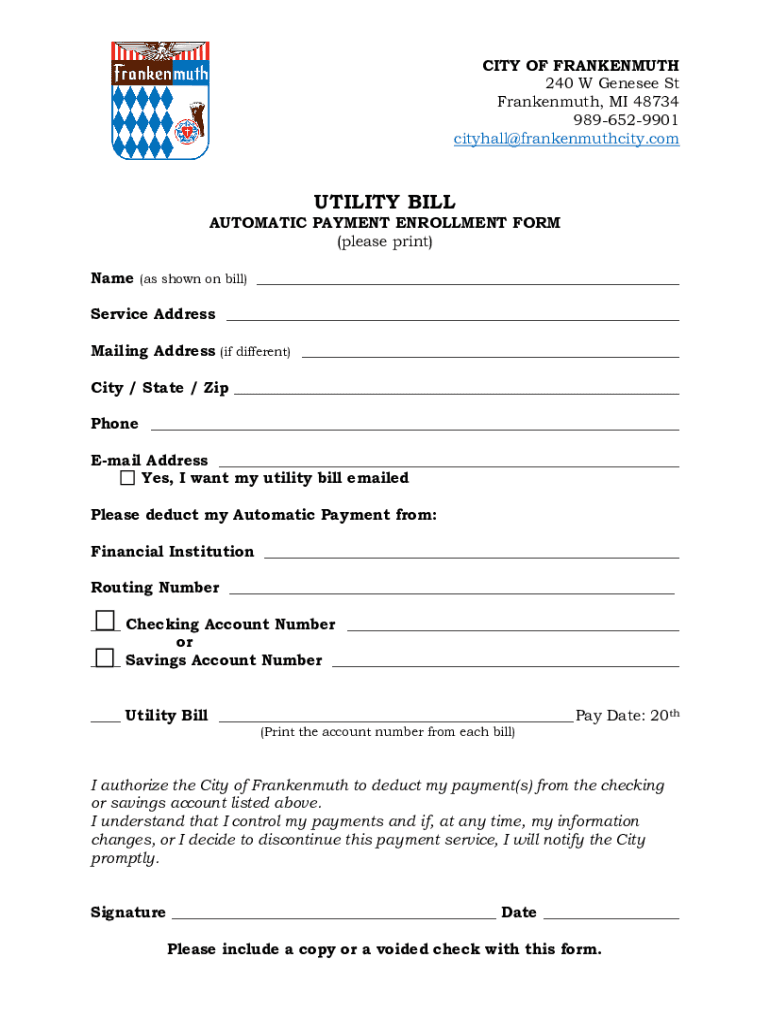
MI Utility Bill Automatic Payment Enrollment Form - City of Frankenmuth 2021-2026 free printable...
pdfFiller is not affiliated with any government organization

Fill out
Complete the form online in a simple drag-and-drop editor.

eSign
Add your legally binding signature or send the form for signing.

Share
Share the form via a link, letting anyone fill it out from any device.

Export
Download, print, email, or move the form to your cloud storage.
Why pdfFiller is the best tool for your documents and forms


End-to-end document management
From editing and signing to collaboration and tracking, pdfFiller has everything you need to get your documents done quickly and efficiently.
Accessible from anywhere
pdfFiller is fully cloud-based. This means you can edit, sign, and share documents from anywhere using your computer, smartphone, or tablet.
Secure and compliant
pdfFiller lets you securely manage documents following global laws like ESIGN, CCPA, and GDPR. It's also HIPAA and SOC 2 compliant.
What is MI Utility Bill Automatic Payment Enrollment Form - City of Frankenmuth
The Utility Bill Automatic Payment Enrollment Form is a billing document used by residents of Frankenmuth, Michigan, to set up automatic payments for their utility bills.
pdfFiller scores top ratings on review platforms




Who needs MI Utility Bill Automatic Payment Enrollment Form - City of Frankenmuth?
Explore how professionals across industries use pdfFiller.

MI Utility Bill Automatic Payment Enrollment Form - City of Frankenmuth is needed by:
-
Homeowners in Frankenmuth
-
Renters with utility accounts
-
Account holders at local utility providers
-
Business owners in Frankenmuth
-
Residents wishing to simplify bill payments
Comprehensive Guide to MI Utility Bill Automatic Payment Enrollment Form - City of Frankenmuth
What is the Utility Bill Automatic Payment Enrollment Form?
The Utility Bill Automatic Payment Enrollment Form is designed for residents of Frankenmuth, Michigan, to facilitate automatic payments for their utility bills. This form streamlines the payment process and is a valuable resource for those who prefer not to handle payments manually. Eligible users include account holders and anyone responsible for utility bills, ensuring that the service remains uninterrupted.
Key terms associated with the form include automatic payments, which refer to bank transactions scheduled to occur on a regular basis without the need for manual input. This form provides essential details for setting up those transactions effectively.
Benefits of Using the Utility Bill Automatic Payment Enrollment Form
Utilizing the Utility Bill Automatic Payment Enrollment Form offers several advantages:
-
Ensures timely payments, preventing service interruptions.
-
Saves users time and significantly reduces the risk of incurring late fees.
-
Automated deductions simplify budgeting by providing clarity and consistency in monthly expenses.
This form is particularly beneficial for those managing several bills, as it centralizes payment management.
Key Features of the Utility Bill Automatic Payment Enrollment Form
The Utility Bill Automatic Payment Enrollment Form includes essential fillable fields that users must complete:
-
Name
-
Service Address
-
Mailing Address
-
Phone Number
-
Email
-
Financial Institution
-
Routing Number
-
Account Number
-
Signature Line
To ensure successful enrollment, users will need specific documents, such as a voided check, and must sign the form, affirming their authorization for automatic deductions.
Who Should Use the Utility Bill Automatic Payment Enrollment Form?
This form is primarily intended for account holders of utility services, but it can also benefit secondary users like family members or authorized representatives. Specific households, such as those with one or more utility accounts, are likely to find this form advantageous. Residents of Michigan particularly benefit, as the enrollment process is tailored to local regulations and service providers.
How to Fill Out the Utility Bill Automatic Payment Enrollment Form Online
Filling out the Utility Bill Automatic Payment Enrollment Form online involves a straightforward process:
-
Access the form via the provided online portal.
-
Complete all required fields, ensuring accuracy in your personal and banking details.
-
Review the information for any common errors, such as misspellings or incorrect account numbers.
-
Securely input sensitive information, following any guidelines for data protection.
By following these steps, you can successfully complete the form with minimal hassle.
Submitting Your Utility Bill Automatic Payment Enrollment Form
There are multiple methods to submit the Utility Bill Automatic Payment Enrollment Form, including:
-
Online submission directly through the utility provider's portal.
-
Mailing the completed form to the appropriate service provider.
-
In-person delivery at designated payment locations.
It's essential to check for any associated fees with submission and ensure the completed form reaches the correct destination to avoid delays.
What Happens After You Submit the Form?
Upon submission of the Utility Bill Automatic Payment Enrollment Form, users can expect the following:
-
Processing times may vary, and it's advisable to keep track of submission dates.
-
Confirmation of receipt can often be obtained through the service provider's contact channels.
-
Outcomes may include immediate activation of automatic payments or requests for additional information if needed.
Users should monitor their accounts for changes post-submission.
Security and Compliance with the Utility Bill Automatic Payment Enrollment Form
Understanding how personal and financial information is protected is crucial when filling out the Utility Bill Automatic Payment Enrollment Form. pdfFiller employs robust security measures, including 256-bit encryption and compliance with standards such as HIPAA and GDPR. These measures are essential for safeguarding sensitive data throughout the submission process.
Maximizing Your Experience with pdfFiller
pdfFiller offers additional services that enhance the experience of using the Utility Bill Automatic Payment Enrollment Form. Users can take advantage of features such as:
-
eSigning capabilities for quick authorization.
-
The ability to save forms for future reference.
-
Tools for easy document management and organization.
Leveraging these capabilities can help users streamline their document handling and ensure efficient completion of their forms.
Example of a Completed Utility Bill Automatic Payment Enrollment Form
Viewing an example of a completed Utility Bill Automatic Payment Enrollment Form can provide clarity. Key fields highlighted in such examples include:
-
Name and Address
-
Bank Account Details
-
Signature
Referencing an example can help avoid common pitfalls and ensure accurate entries.
How to fill out the MI Utility Bill Automatic Payment Enrollment Form - City of Frankenmuth
-
1.To begin, access pdfFiller and search for the 'Utility Bill Automatic Payment Enrollment Form' using the search bar.
-
2.Once located, click on the form to open it in the pdfFiller editor interface.
-
3.Review the form to familiarize yourself with the fields you need to complete.
-
4.Prepare all required information, including your personal details, banking information, and a copy or voided check for reference.
-
5.Start filling in the fields such as Name, Service Address, Mailing Address, and Phone in the designated areas.
-
6.Use the type tool to enter your email address, financial institution, routing number, account number, and any other necessary details.
-
7.Ensure to print clearly and double-check all entries for accuracy, paying close attention to the signature line.
-
8.After completing all fields, review the entire document to ensure all required information has been provided and that it is filled out correctly.
-
9.To finalize, save your progress using the 'Save' option in pdfFiller.
-
10.You can choose to download the filled form as a PDF or submit it electronically via the provided submission options on pdfFiller.

Who is eligible to use the Utility Bill Automatic Payment Enrollment Form?
Residents of Frankenmuth, Michigan, who are account holders for utility services can use this form to enroll in automatic payments.
What documents do I need to submit with this form?
It is important to include a copy or voided check along with the completed form to provide your banking details for automatic deductions.
How can I submit the Utility Bill Automatic Payment Enrollment Form?
You can submit the form either electronically through pdfFiller or print it and mail it to your utility provider, based on their submission guidelines.
What common mistakes should I avoid when filling out this form?
Make sure to double-check your banking information for accuracy, avoid leaving any required fields blank, and ensure your signature is present before submission.
What is the processing time for automatic payment enrollment?
Processing times can vary, but typically, it may take a few business days for your enrollment to be processed and activated by the utility provider.
Are there any fees associated with automatic payment enrollment?
Most providers do not charge a fee for enrolling in automatic payments; however, always check with your utility provider to confirm any terms.
Can I edit the form after saving it on pdfFiller?
Yes, you can edit the form in pdfFiller after saving. Just re-open the form and make any necessary changes before finalizing.
Related Forms




Get the latest insights from our blog


If you believe that this page should be taken down, please follow our DMCA take down process
here
.
This form may include fields for payment information. Data entered in these fields is not covered by PCI DSS compliance.