
Last updated on
Nov 6, 2026

Get the free Workshop Health and Safety Symbols Form
We are not affiliated with any brand or entity on this form

Fill out
Complete the form online in a simple drag-and-drop editor.

eSign
Add your legally binding signature or send the form for signing.

Share
Share the form via a link, letting anyone fill it out from any device.

Export
Download, print, email, or move the form to your cloud storage.
Why pdfFiller is the best tool for your documents and forms


End-to-end document management
From editing and signing to collaboration and tracking, pdfFiller has everything you need to get your documents done quickly and efficiently.
Accessible from anywhere
pdfFiller is fully cloud-based. This means you can edit, sign, and share documents from anywhere using your computer, smartphone, or tablet.
Secure and compliant
pdfFiller lets you securely manage documents following global laws like ESIGN, CCPA, and GDPR. It's also HIPAA and SOC 2 compliant.
What is Workshop Safety Form
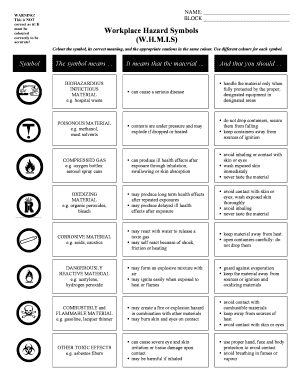
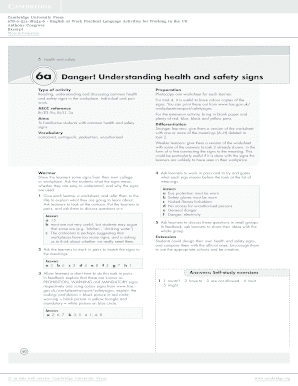
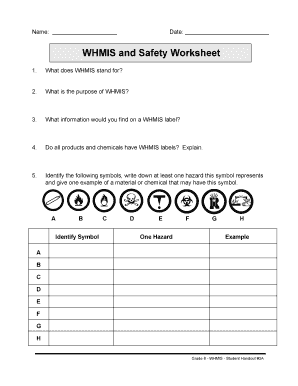
The Workshop Health and Safety Symbols Form is an educational document used by students to learn and understand various health and safety symbols in workshops.
pdfFiller scores top ratings on review platforms




This site is very easy to understand, support dept is amazing. I love it!!
it's a little bit too expensive for me. I will not have to use it very often, maybe only once or twice a month for work, but i do require the premium package for all of the features that i need to have. so it just seems crazy to me to pay almost $200 a year for something im only going to use 24 times the whole year. other than the too high price, i think its a great program!
Who needs Workshop Safety Form?
Explore how professionals across industries use pdfFiller.

Workshop Safety Form is needed by:
-
Teachers facilitating workshop safety training
-
Students participating in safety education programs
-
Workplace safety coordinators promoting health awareness
-
Curriculum developers creating educational materials
-
Parents ensuring safety knowledge in children
Comprehensive Guide to Workshop Safety Form
What is the Workshop Health and Safety Symbols Form?
The Workshop Health and Safety Symbols Form is an educational tool designed to enhance safety symbol recognition among students. It plays a crucial role in teaching health and safety awareness in workshop settings. This form contains essential components such as fillable fields for names and dates, which facilitate organized completion and tracking of student information. By utilizing this health and safety symbols worksheet, educators can systematically introduce safety concepts in a structured format.
Purpose and Benefits of the Workshop Health and Safety Symbols Form
This form is vital for both students and educators as it promotes understanding of health and safety symbols used in workshops. The advantages of using this workshop safety symbols form include:
-
Enhancing students' abilities to identify critical safety symbols.
-
Encouraging awareness of safety protocols within educational environments.
-
Facilitating more engaging workplace safety education through interactive learning.
By incorporating this safety symbol matching activity, educators can significantly enrich students' learning experiences.
Key Features of the Workshop Health and Safety Symbols Form
The Workshop Health and Safety Symbols Form includes several unique features that enhance its effectiveness:
-
Multiple fillable fields for streamlined completion.
-
Clear instructions for accurately matching safety symbols with their descriptions.
-
Integration with pdfFiller for digital completeness, ensuring ease of use and accessibility.
This workshop safety template is specifically designed to be user-friendly, catering to both student and educator needs.
Who Needs the Workshop Health and Safety Symbols Form?
The target audience for the Workshop Health and Safety Symbols Form encompasses:
-
Students in various educational environments.
-
Educators or trainers tasked with imparting safety knowledge.
-
Organizations focused on providing safety training programs.
Incorporating this workplace safety education form into curriculum planning benefits all parties involved in the learning process.
How to Fill Out the Workshop Health and Safety Symbols Form Online
Filling out the Workshop Health and Safety Symbols Form online through pdfFiller can be done easily by following these steps:
-
Gather necessary information, such as student names and dates.
-
Access the form through pdfFiller's platform.
-
Systematically fill in the required fields, ensuring accuracy.
By adhering to these guidelines, users can complete the health and safety symbols worksheet effectively.
Review and Validation Checklist for the Workshop Health and Safety Symbols Form
Before submitting the Workshop Health and Safety Symbols Form, it is essential to review for completeness and accuracy. Key elements to check include:
-
Correctness of matched symbols and their descriptions.
-
Completeness of all fillable fields.
-
Avoiding common errors such as misspellings or omissions.
Validating the information related to health and safety symbols ensures the integrity of the completed form.
Security and Compliance for the Workshop Health and Safety Symbols Form
pdfFiller prioritizes user security while filling out and submitting the Workshop Health and Safety Symbols Form. The platform employs 256-bit encryption and complies with regulations such as HIPAA and GDPR. This approach ensures:
-
Safe handling of sensitive data.
-
Reliable storage and sharing options for completed forms.
Students and educators can fill out the health and safety symbols worksheet confidently, knowing their information is protected.
Where to Submit the Workshop Health and Safety Symbols Form
Proper submission of the completed Workshop Health and Safety Symbols Form is crucial. Users should consider:
-
Identifying specific locations, such as schools or organizations, for submission.
-
Utilizing electronic submission options available through pdfFiller.
-
Adhering to submission guidelines and deadlines to ensure successful processing.
Understanding the requirements for the workplace safety education form is key for effective compliance.
What Happens After You Submit the Workshop Health and Safety Symbols Form?
After submission, individuals can track the status of the Workshop Health and Safety Symbols Form. Expect the following:
-
Feedback or approval from the reviewing authority.
-
Instructions on next steps if corrections are needed or additional information is required.
These aspects are critical following the safety symbol matching activity as they ensure that all submissions are handled appropriately.
Maximize Your Experience with pdfFiller
To get the most out of your experience with the Workshop Health and Safety Symbols Form, consider leveraging the capabilities offered by pdfFiller. Users can:
-
Edit, sign, and share their forms seamlessly online.
-
Effortlessly manage document workflows from any browser, enhancing productivity.
Engaging with this trusted document management system can significantly streamline form-related tasks.
How to fill out the Workshop Safety Form
-
1.Access the Workshop Health and Safety Symbols Form by navigating to pdfFiller's homepage and searching for the form name in the search bar.
-
2.Once you find the form, click on it to open it in pdfFiller’s editing interface.
-
3.Review the form to see the sections available for filling out, including fields for student names, dates, and symbol descriptions.
-
4.Before starting, gather any necessary information such as the student's name, the date, and a list of health and safety symbols.
-
5.Use the fillable fields to input the student’s name and the date of completion at the top of the form.
-
6.Navigate through the form, using the matching activity prompts to write descriptions under each symbol, ensuring you accurately represent the safety message.
-
7.Once completed, double-check all inputted information for accuracy and clarity.
-
8.Finalize the form by reviewing the filled descriptions and ensuring all fields are completed.
-
9.When satisfied, click on the save option to preserve your work or download the form in your preferred format.
-
10.Consider submitting the form electronically if your teacher or institution accepts digital submissions, or print it out for physical submission.

Who is eligible to fill out the Workshop Health and Safety Symbols Form?
The form is primarily designed for students participating in educational programs focused on health and safety in workshops. Teachers may also use it for instructional purposes.
Is there a deadline for submitting the Workshop Health and Safety Symbols Form?
The submission deadline typically aligns with the associated educational activities or lessons. It is advised to check with the instructor for specific deadlines.
How can I submit the form after it is completed?
The Workshop Health and Safety Symbols Form can be submitted electronically via pdfFiller or printed out for physical submission to your teacher or educational institution.
Are there any supporting documents required with the form?
Generally, no additional documents are required with the Workshop Health and Safety Symbols Form. However, educators may request additional materials for context.
What are common mistakes to avoid when filling out the form?
Ensure that all fields are filled out completely and accurately. Avoid leaving descriptions vague and check for spelling errors before finalizing the form.
How long does it take to process the Workshop Health and Safety Symbols Form?
Processing is usually immediate if submitted electronically, but check with the instructor for specifics regarding feedback or grades related to the submission.
Can parents also use this form for home educational activities?
Yes, parents can use the Workshop Health and Safety Symbols Form to engage their children in learning about workshop safety symbols in a home setting.




Get the latest insights from our blog


If you believe that this page should be taken down, please follow our DMCA take down process
here
.
This form may include fields for payment information. Data entered in these fields is not covered by PCI DSS compliance.