
Last updated on
Nov 9, 2026

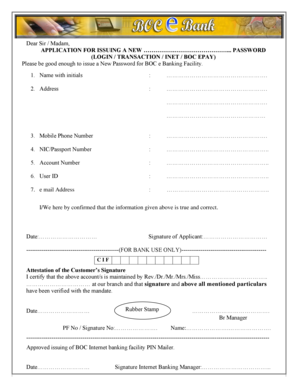
LK Bank of Ceylon Application for BOC Internet Banking Facility 2019-2026 free printable template
We are not affiliated with any brand or entity on this form

Fill out
Complete the form online in a simple drag-and-drop editor.

eSign
Add your legally binding signature or send the form for signing.

Share
Share the form via a link, letting anyone fill it out from any device.

Export
Download, print, email, or move the form to your cloud storage.
Why pdfFiller is the best tool for your documents and forms


End-to-end document management
From editing and signing to collaboration and tracking, pdfFiller has everything you need to get your documents done quickly and efficiently.
Accessible from anywhere
pdfFiller is fully cloud-based. This means you can edit, sign, and share documents from anywhere using your computer, smartphone, or tablet.
Secure and compliant
pdfFiller lets you securely manage documents following global laws like ESIGN, CCPA, and GDPR. It's also HIPAA and SOC 2 compliant.
What is LK Bank of Ceylon Application for BOC Internet Banking Facility
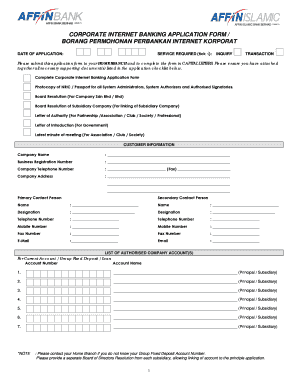
The BOC Internet Banking Application Form is a business document used by companies in Sri Lanka to apply for internet banking services from the Bank of Ceylon.
pdfFiller scores top ratings on review platforms




The discovery has truly changed my life. I am not kidding you!! For a technophobe it is awesome
It's the easiest PDF alteration software I've ever used. Highly recommend it to anyone!
Who needs LK Bank of Ceylon Application for BOC Internet Banking Facility?
Explore how professionals across industries use pdfFiller.

LK Bank of Ceylon Application for BOC Internet Banking Facility is needed by:
-
Limited liability companies seeking internet banking access
-
Public companies in Sri Lanka wishing to manage banking online
-
Financial officers responsible for business banking solutions
-
Company directors who need signing authority on banking applications
-
Business administrators handling company registration and licensing
Comprehensive Guide to LK Bank of Ceylon Application for BOC Internet Banking Facility
What is the BOC Internet Banking Application Form?
The BOC Internet Banking Application Form is a crucial document for companies in Sri Lanka seeking to access e-banking services from the Bank of Ceylon. It is designed to collect necessary details about the company, such as its structure and delegated authorities. This form streamlines the process of applying for internet banking services, making it relevant for businesses aiming to enhance their banking efficiency.
Completing this form is essential for limited liability and public companies as it initiates their eligibility for internet banking. The application process involves submitting the form, which must be signed by the company's directors.
Purpose and Benefits of the BOC Internet Banking Application Form
Filling out the BOC Internet Banking Application Form offers numerous advantages for businesses. Firstly, internet banking provides accessibility to a wide range of banking services tailored for company needs, such as online transactions, account management, and access to financial statements.
Moreover, companies benefit from enhanced efficiency in their banking operations, leading to significant cost savings. The ability to perform transactions electronically simplifies financial tasks, allowing businesses to focus more on core activities.
Eligibility Criteria for the BOC Internet Banking Application Form
To apply via the BOC Internet Banking Application Form, businesses must meet specific eligibility criteria. Only limited liability and public companies can qualify for this service. Additionally, the directors of these companies must provide necessary authorization and signatures on the application.
Other considerations may include ownership structure and compliance with regulatory requirements, ensuring that applicants meet the bank's standards for internet banking services.
How to Fill Out the BOC Internet Banking Application Form Online
Filling out the BOC Internet Banking Application Form online is a straightforward process. Follow these steps to complete the form correctly:
-
Access the form through the designated platform.
-
Enter the company details in the specified fields, including business name and registration number.
-
Designate individuals with delegate authority as required.
-
Review all inputted information for accuracy.
Pay special attention to common mistakes, such as mismatching signatures with provided names. Ensuring accuracy will smooth the process of application approval by the bank.
Review and Validation Checklist for the BOC Internet Banking Application Form
Before submitting the BOC Internet Banking Application Form, it's essential to verify several key items. Here are crucial aspects to double-check:
-
Ensure all signatures are included and match the designated signatories.
-
Verify the accuracy of all provided information, including dates and figures.
-
Confirm internal approval processes have been followed if applicable.
Completeness and accuracy are vital in facilitating a swift approval process from the bank.
How to Submit the BOC Internet Banking Application Form
Submitting the BOC Internet Banking Application Form can be done through multiple methods. Companies may choose from the following options:
-
Online submission through the bank's designated portal.
-
In-person delivery at the nearest bank branch.
After submission, the bank will verify the application at both the branch and central office. Applicants can expect to receive confirmation regarding their submission and further instructions promptly.
What Happens After You Submit the BOC Internet Banking Application Form
Once the BOC Internet Banking Application Form is submitted, the application undergoes a processing period. Companies should be aware of the following:
-
Processing times vary based on the volume of applications received.
-
Applicants can track the status of their application through the bank's online services.
-
In the event of a rejection, the bank provides reasons and guidance on the next steps.
Understanding the post-submission process helps manage expectations during the approval stages.
Security and Compliance with the BOC Internet Banking Application Form
Security is a paramount concern when dealing with sensitive business information. The BOC Internet Banking Application Form adheres to stringent security protocols to protect data.
Compliance with local and international standards ensures that all sensitive data is managed responsibly. Best practices for maintaining data privacy throughout the application process include using secure channels for document submission and employing encryption methods to safeguard sensitive details.
How pdfFiller Can Help with the BOC Internet Banking Application Form
pdfFiller provides an effective platform for completing the BOC Internet Banking Application Form with numerous helpful features. Users can utilize e-signing capabilities, enabling quick and secure signature processes. Additionally, the platform allows easy editing and filling of forms, making it user-friendly.
Businesses leveraging pdfFiller for their application benefit from high reliability and robust security measures, ensuring that their sensitive information remains protected throughout the process.
Final Steps: Make Your BOC Internet Banking Application Easy
Utilizing pdfFiller to complete your BOC Internet Banking Application simplifies the entire process tremendously. By following the proper steps outlined, companies can ensure that their applications are filled out correctly and submitted efficiently.
Accessing the BOC Internet Banking Application Form via pdfFiller offers an advantageous approach, making the experience convenient and secure for businesses in Sri Lanka.
How to fill out the LK Bank of Ceylon Application for BOC Internet Banking Facility
-
1.Access pdfFiller and search for the BOC Internet Banking Application Form in the templates section.
-
2.Open the form, which will display various fields and checkboxes ready for data entry.
-
3.Before starting, gather required company information such as company registration details, director names, and banking purposes.
-
4.Begin filling in the company name and other basic information accurately in the appropriate fields.
-
5.For sections requiring delegation, specify the roles and authority levels of each delegate clearly.
-
6.Proceed to check all boxes that apply to your banking needs as per the instructions provided within the form.
-
7.Once all sections are completed, review each field to ensure accuracy and completeness.
-
8.Use the annotation tools in pdfFiller to add any notes or comments that may be necessary.
-
9.Check the signing area; ensure that the designated director’s signature will be included.
-
10.When all necessary fields are filled and reviewed, save your work using pdfFiller’s save option.
-
11.You can download the completed form in your preferred format or submit it directly to the bank through pdfFiller.

Who is eligible to use the BOC Internet Banking Application Form?
Limited liability and public companies in Sri Lanka can use this form to apply for internet banking services from the Bank of Ceylon.
What documents are required to complete this application?
You will need the company registration details, director details, and information regarding the authority levels of delegates to fill out the BOC Internet Banking Application Form correctly.
How do I submit the completed form?
You can submit the completed form through pdfFiller by downloading it and then sending it directly to the Bank of Ceylon, or you may directly submit it if pdfFiller supports online submission to the bank.
Is notarization required for this form?
No, the BOC Internet Banking Application Form does not require notarization; however, it must be signed by the company director.
What common mistakes should I avoid when filling out the form?
Ensure all fields are completed accurately and avoid missing the signature section, as the company's director must sign the form for it to be valid.
How long does it take for the application to be processed?
Processing times can vary but typically depend on the bank's workload. Make sure to check directly with the Bank of Ceylon for specific timelines.
What is the purpose of the BOC Internet Banking Application Form?
The form is primarily used to apply for internet banking services, allowing companies to manage their banking operations online efficiently.
LK Bank of Ceylon Application for BOC Internet Banking Facility Form Versions
Related Forms




Get the latest insights from our blog


If you believe that this page should be taken down, please follow our DMCA take down process
here
.
This form may include fields for payment information. Data entered in these fields is not covered by PCI DSS compliance.