
Last updated on
Nov 9, 2026

WonderSlim Grocery Food Selection List 2018-2026 free printable template
We are not affiliated with any brand or entity on this form

Fill out
Complete the form online in a simple drag-and-drop editor.

eSign
Add your legally binding signature or send the form for signing.

Share
Share the form via a link, letting anyone fill it out from any device.

Export
Download, print, email, or move the form to your cloud storage.
Why pdfFiller is the best tool for your documents and forms


End-to-end document management
From editing and signing to collaboration and tracking, pdfFiller has everything you need to get your documents done quickly and efficiently.
Accessible from anywhere
pdfFiller is fully cloud-based. This means you can edit, sign, and share documents from anywhere using your computer, smartphone, or tablet.
Secure and compliant
pdfFiller lets you securely manage documents following global laws like ESIGN, CCPA, and GDPR. It's also HIPAA and SOC 2 compliant.
What is WonderSlim Grocery Food Selection List
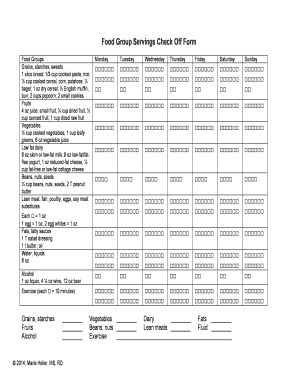
The Grocery Food Selection List is a budget template used by individuals for effective diet planning and meal preparation.
pdfFiller scores top ratings on review platforms




I needed a IRS documents where I could make changes to and this Website was VERY helpful
this has made filling out forms super esy
Who needs WonderSlim Grocery Food Selection List?
Explore how professionals across industries use pdfFiller.

WonderSlim Grocery Food Selection List is needed by:
-
Individuals planning healthy meals
-
Nutritionists assisting clients with diets
-
Families managing food budgets
-
Fitness enthusiasts tracking meals
-
Diet planners organizing grocery lists
Comprehensive Guide to WonderSlim Grocery Food Selection List
What is the Grocery Food Selection List?
The Grocery Food Selection List is a valuable tool designed for effective diet planning and meal preparation. It provides users with a structured format to define their food selections, helping them manage their nutritional intake proficiently. The document encompasses various categories, such as Budget Templates, ensuring a comprehensive approach to food management.
Purpose and Benefits of Using the Grocery Food Selection List
This grocery food selection list serves multiple purposes, notably aiding users in tracking their food servings and assessing their nutritional intake. It plays a crucial role in meal preparation, promoting healthy eating habits by supporting structured dietary planning. Additionally, it considers financial aspects, making budget meal planning simpler and more effective.
Key Features of the Grocery Food Selection List
The Grocery Food Selection List includes several key features that enhance its usability:
-
Fillable fields for specific food types and serving sizes.
-
Categorization of items into protein, vegetables, fruits, dairy, starch, and beverages.
-
Calorie counts provided for various food items.
Who Needs the Grocery Food Selection List?
This form is particularly beneficial for individuals focused on dietary planning, including:
-
People seeking to manage their weight or enhance their overall health.
-
Families aiming to plan meals effectively while adhering to a budget.
-
Nutritionists and dietitians who use the list for client meal planning.
How to Fill Out the Grocery Food Selection List Online
Filling out the Grocery Food Selection List online is straightforward. Follow these steps:
-
Access the form using pdfFiller.
-
Edit the document by highlighting important fields and entering the required data.
-
Review and validate your completed entries to ensure accuracy.
Common Mistakes to Avoid When Completing the Grocery Food Selection List
Users should be aware of potential errors when filling out the Grocery Food Selection List:
-
Misunderstandings related to serving sizes can lead to inaccurate entries.
-
Neglecting to check calorie counts may skew dietary assessments.
-
Improper categorization of food items can disrupt meal planning.
Security and Compliance When Using the Grocery Food Selection List
Users can rely on pdfFiller for secure data handling. The platform employs 256-bit encryption, which ensures that all sensitive information remains protected. Furthermore, pdfFiller complies with both HIPAA and GDPR regulations, underscoring its commitment to privacy and data security.
How to Save and Share Your Completed Grocery Food Selection List
Once you have completed filling out the Grocery Food Selection List, you can easily save and share it. Options include:
-
Downloading the document as a PDF for offline access.
-
Printing the completed Grocery Food Selection List PDF directly.
-
Utilizing pdfFiller's sharing options for quick dissemination.
Benefits of Using pdfFiller for Your Grocery Food Selection List
pdfFiller enhances the experience of filling out the Grocery Food Selection List in several ways:
-
Provides a user-friendly platform for easy form creation and editing.
-
Offers access to a variety of templates and document types.
-
Includes options for eSigning and seamless sharing of completed forms.
Take Control of Your Diet with the Grocery Food Selection List
Utilizing the Grocery Food Selection List empowers users to take charge of their meal planning effectively. It not only reinforces the benefits associated with structured dietary management but also encourages users to explore pdfFiller for a convenient approach to form handling and management.
How to fill out the WonderSlim Grocery Food Selection List
-
1.Access the Grocery Food Selection List by visiting pdfFiller and searching for the form name in the search bar.
-
2.Once the form is visible, click on it to open the document in the pdfFiller interface.
-
3.Take a moment to gather all necessary information, such as the types of foods you plan to consume and their corresponding serving sizes and calorie counts.
-
4.Using pdfFiller's editing tools, click on each field to fill in details such as food categories, serving sizes, and quantities you intend to purchase or prepare.
-
5.Make sure to move at a comfortable pace, checking each entry for accuracy before moving on to the next field.
-
6.If needed, utilize the 'Comment' or 'Drawing' tools to annotate the document for any special notes.
-
7.Review all entered information to confirm that everything is complete and accurate.
-
8.Once satisfied with the form, save your progress frequently by clicking the 'Save' button.
-
9.You can also download the completed form to your device or submit it directly through pdfFiller depending on your intended use.

Who can use the Grocery Food Selection List?
This form is ideal for anyone looking to plan their meals more effectively, including families, fitness enthusiasts, and nutritionists. It helps users track servings and make informed dietary choices.
What information do I need to complete the Grocery Food Selection List?
Before starting, gather the types of foods you usually consume, their serving sizes, calorie counts, and any dietary preferences you might have. This will help you fill in the template accurately.
Can I edit the Grocery Food Selection List after saving it?
Yes, once you save the form, you can return to pdfFiller to edit the document as needed, ensuring you can update your food selections and serving amounts at any time.
Is there a fee to use pdfFiller for this form?
While pdfFiller offers many features for free, access to premium functionalities may incur a fee. Check their pricing details to know more about any associated costs.
How do I submit the Grocery Food Selection List once completed?
After filling out the form on pdfFiller, you can submit it directly through their platform or download it for offline use. Choose the method that best suits your needs.
What should I do if I make a mistake while filling out the form?
If you make an error, pdfFiller allows you to easily edit the fields. Click on the field you wish to change and update your entry. Always remember to save changes.
How does the Grocery Food Selection List help with meal planning?
This template categorizes food items and provides serving sizes and calorie counts, making it easy to plan meals while ensuring you meet dietary goals and budget constraints.
WonderSlim Grocery Food Selection List Form Versions
Related Forms

Get the latest insights from our blog


If you believe that this page should be taken down, please follow our DMCA take down process
here
.
This form may include fields for payment information. Data entered in these fields is not covered by PCI DSS compliance.