
Last updated on
Nov 7, 2026

University Hospital UH-4948 2020-2026 free printable template
pdfFiller is not affiliated with any government organization

Fill out
Complete the form online in a simple drag-and-drop editor.

eSign
Add your legally binding signature or send the form for signing.

Share
Share the form via a link, letting anyone fill it out from any device.

Export
Download, print, email, or move the form to your cloud storage.
Why pdfFiller is the best tool for your documents and forms


End-to-end document management
From editing and signing to collaboration and tracking, pdfFiller has everything you need to get your documents done quickly and efficiently.
Accessible from anywhere
pdfFiller is fully cloud-based. This means you can edit, sign, and share documents from anywhere using your computer, smartphone, or tablet.
Secure and compliant
pdfFiller lets you securely manage documents following global laws like ESIGN, CCPA, and GDPR. It's also HIPAA and SOC 2 compliant.
What is University Hospital UH-4948
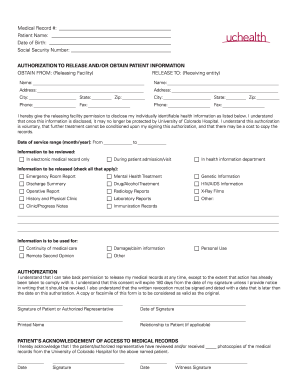
The Authorization for Release of Patient Records is a healthcare form used by patients or their legal guardians to authorize University Hospital to disclose their medical records to specified recipients.
pdfFiller scores top ratings on review platforms




Who needs University Hospital UH-4948?
Explore how professionals across industries use pdfFiller.

University Hospital UH-4948 is needed by:
-
Patients seeking access to their medical records.
-
Legal guardians managing healthcare decisions for minors.
-
Authorized representatives acting on behalf of the patient.
-
Healthcare providers requiring patient consent for record disclosure.
-
Insurance companies needing information for claims processing.
-
Legal professionals involved in patient case management.
Comprehensive Guide to University Hospital UH-4948
What is the Authorization for Release of Patient Records?
The Authorization for Release of Patient Records is a form used by patients or their legal guardians to consent to the disclosure of medical records. This authorization is crucial, as it ensures that healthcare providers can share important medical history with specified recipients, facilitating better care and communication. Common use cases for this form include transferring records to a new healthcare provider, sharing information with specialists, or fulfilling legal requirements.
Purpose and Benefits of the Authorization for Release of Patient Records
The primary purpose of the authorization form is to empower patients and their guardians to manage access to their health information. Using this form grants individuals control over their personal health records, which can enhance privacy and security regarding sensitive data. By authorizing timely access to medical records, patients can prevent delays in treatment and ensure continuity of care, ultimately improving their overall health outcomes.
Key Features of the Authorization for Release of Patient Records
This form includes several main features essential for proper authorization:
-
Patient information fields to identify the individual whose records are to be released.
-
Recipient information to specify who will receive the medical records.
-
Dates of treatment to indicate which records are relevant.
-
Details on types of records to be released, such as lab results or treatment notes.
-
Options for delivery methods, allowing users to select how they wish the records to be sent.
Who Needs the Authorization for Release of Patient Records?
The form is typically required by various individuals and organizations, including healthcare providers, insurance companies, and legal representatives. Eligibility to sign this form may depend on factors such as age and legal guardianship; for example, a parent or legal guardian may need to complete the form for minor patients. The authorization becomes necessary in situations involving transfers of care or when information is required for legal investigations.
How to Fill Out the Authorization for Release of Patient Records Online (Step-by-Step)
Filling out the Authorization for Release of Patient Records online via pdfFiller is straightforward. Follow these steps:
-
Access the form through pdfFiller’s platform.
-
Complete patient identification fields accurately.
-
Specify the recipient and the types of medical records to be released.
-
Select the delivery method according to your preference.
-
Review all entries for accuracy before signing the document.
Common mistakes while filling out the form include omitting essential details or mismatching the recipient information. Ensuring accuracy from the start can prevent delays in processing your request.
Review and Validation Checklist for the Authorization for Release of Patient Records
Before submitting the completed form, it's crucial to review it thoroughly. Here’s a checklist of items to validate:
-
Ensure all patient and recipient information is complete and correct.
-
Confirm that all necessary fields have been filled out, particularly types of records and delivery method.
-
Check for signatures in required sections.
Common errors include missing signatures or providing incorrect treatment dates, which can lead to processing delays. Adhering to best practices ensures that the form is correctly filled out and processed promptly.
Submission Methods and Delivery for the Authorization for Release of Patient Records
There are several ways to submit the authorization form after completion. Common methods include:
-
Directly uploading the form to the healthcare provider's online portal.
-
Mailing the completed form to the designated address.
-
Delivering the form in person at the healthcare facility.
Be aware of any associated fees that may apply for processing requests. After submission, some providers may offer tracking options so that you can monitor the status of your request and anticipate the next steps in the process.
Security and Compliance for the Authorization for Release of Patient Records
When handling sensitive medical information, security is paramount. The authorization process must comply with HIPAA regulations and other relevant laws to protect patient privacy. pdfFiller emphasizes security through robust measures, including 256-bit encryption and adherence to SOC 2 Type II, HIPAA, and GDPR standards. These practices ensure that your data remains confidential and secure throughout the authorization process.
Sample or Example of a Completed Authorization for Release of Patient Records
Having a visual reference can assist users in completing the form correctly. A completed Authorization for Release of Patient Records typically highlights the following sections:
-
Patient identification complete with personal details.
-
Clearly specified recipient name and contact information.
-
Detailed explanations of the types of records and purpose of disclosure.
Referring to a sample can help users understand what information is required in each section, minimizing errors during completion.
Elevate Your Process with pdfFiller
pdfFiller significantly simplifies the process of filling out, signing, and managing the Authorization for Release of Patient Records. With features that allow users to edit, eSign, and manage forms with ease, pdfFiller streamlines documentation tasks. Utilizing this platform enhances the form completion experience, making it more efficient and secure for users who wish to maintain control over their health information.
How to fill out the University Hospital UH-4948
-
1.To start, access the pdfFiller website and search for 'Authorization for Release of Patient Records' in the template library.
-
2.Click on the form to open it in the pdfFiller interface, providing you with a user-friendly environment to fill out the document.
-
3.Before completing the form, gather all necessary patient information, recipient details, treatment dates, and the type of records to be released.
-
4.Begin filling in the required fields, ensuring you input accurate patient and recipient information in the designated sections.
-
5.Utilize the checkboxes to indicate the types of records you authorize for release and state the purpose of the disclosure clearly.
-
6.After completing all fields, carefully review the entered information for accuracy to avoid any mistakes.
-
7.In the signature section, ensure that the patient or authorized representative signs the form digitally, as pdfFiller provides this option.
-
8.Once you’re satisfied with the information and signature, proceed to save the document.
-
9.You can download the filled form in various formats or submit it directly to the intended recipient through pdfFiller’s options.

Who is eligible to complete this Authorization for Release of Patient Records?
Patients or their legal guardians, as well as authorized representatives, can complete this form to give consent for the release of medical records.
Is there a deadline for submitting the Authorization form?
While there's no specific deadline, it is advisable to submit the form as soon as possible to ensure timely access to the requested medical records.
How do I submit the completed Authorization form?
Completed forms can be submitted directly to University Hospital by handing it in person or sending it via fax or email, depending on the hospital's instructions.
What supporting documents are required with the authorization form?
Typically, no additional documents are required unless specified by the recipient. However, you should verify with the relevant parties beforehand.
What are common mistakes to avoid when filling out this form?
Common mistakes include missing signatures, incorrect patient or recipient information, and failing to specify the types of records or purpose of disclosure.
How long does it take to process the Authorization for Release of Patient Records?
Processing times vary but can generally take a few days. Contact University Hospital for specific timelines related to your request.
Can I revoke the authorization after submitting the form?
Yes, you can revoke the authorization. Ensure to follow the instructions provided on the form for revocation procedures.
University Hospital UH-4948 Form Versions
Related Forms






Get the latest insights from our blog


If you believe that this page should be taken down, please follow our DMCA take down process
here
.
This form may include fields for payment information. Data entered in these fields is not covered by PCI DSS compliance.