
Last updated on
Oct 31, 2026
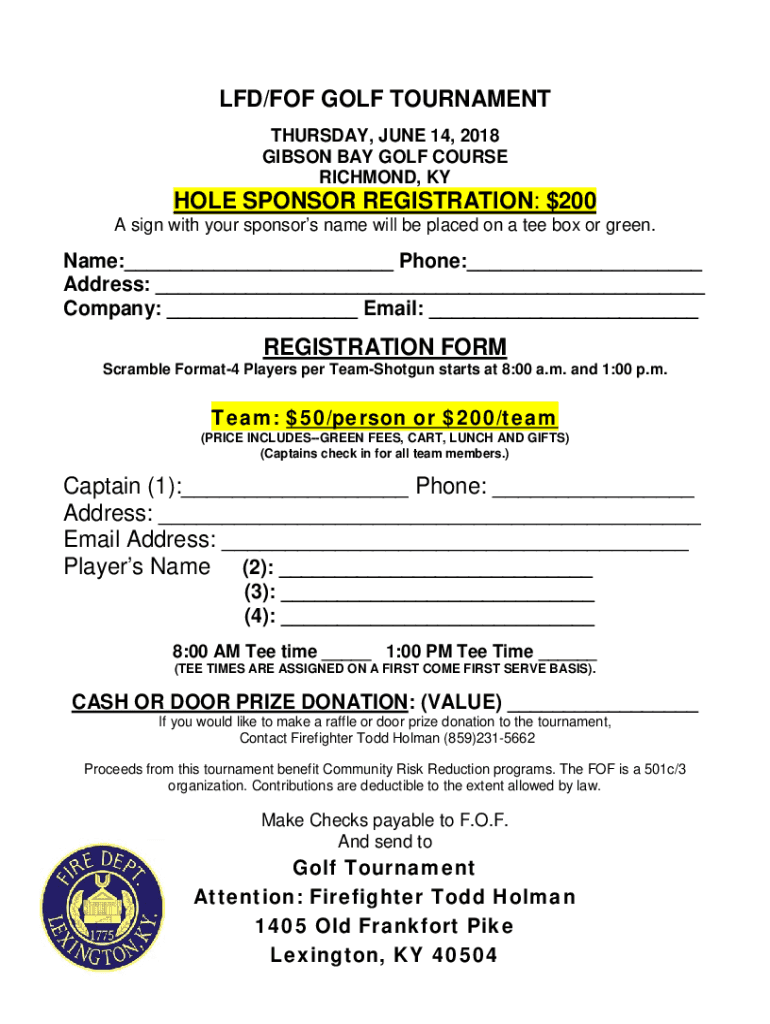
KY LFD/FOF Golf Tournament Registration Form 2018-2026 free printable template
pdfFiller is not affiliated with any government organization

Fill out
Complete the form online in a simple drag-and-drop editor.

eSign
Add your legally binding signature or send the form for signing.

Share
Share the form via a link, letting anyone fill it out from any device.

Export
Download, print, email, or move the form to your cloud storage.
Why pdfFiller is the best tool for your documents and forms


End-to-end document management
From editing and signing to collaboration and tracking, pdfFiller has everything you need to get your documents done quickly and efficiently.
Accessible from anywhere
pdfFiller is fully cloud-based. This means you can edit, sign, and share documents from anywhere using your computer, smartphone, or tablet.
Secure and compliant
pdfFiller lets you securely manage documents following global laws like ESIGN, CCPA, and GDPR. It's also HIPAA and SOC 2 compliant.
What is KY LFD/FOF Golf Tournament Registration Form
The LFD/FOF Golf Tournament Registration Form is a document used by participants to register teams and hole sponsors for a golf tournament benefiting Community Risk Reduction programs.
pdfFiller scores top ratings on review platforms




Who needs KY LFD/FOF Golf Tournament Registration Form?
Explore how professionals across industries use pdfFiller.

KY LFD/FOF Golf Tournament Registration Form is needed by:
-
Individuals or teams wanting to participate in the golf tournament.
-
Businesses interested in sponsoring holes at the event.
-
Local organizations supporting the Community Risk Reduction programs.
-
Golf enthusiasts looking to support charity events.
-
Event coordinators managing tournament logistics.
Comprehensive Guide to KY LFD/FOF Golf Tournament Registration Form
What is the LFD/FOF Golf Tournament Registration Form?
The LFD/FOF Golf Tournament Registration Form is essential for registering teams and hole sponsors participating in a charity golf tournament at Gibson Bay Golf Course in Richmond, KY. This form plays a significant role in organizing the event, which aims to support Community Risk Reduction programs. By simplifying the registration process, it ensures that all necessary details are collected efficiently, providing clarity for all participants.
Purpose and Benefits of the LFD/FOF Golf Tournament Registration Form
This form is designed to streamline the organization of participation in the tournament. By using the golf tournament registration form, users can easily register their teams and sponsors, thereby ensuring that all contributions support important community initiatives. The convenience and effectiveness of the registration process help fulfill the event's goals and enhance community engagement.
Key Features of the LFD/FOF Golf Tournament Registration Form
The registration form includes multiple fillable fields that collect essential information, such as:
-
Team Member Names
-
Sponsor Information
-
Contact Details
-
Tee-Time Selection
-
Cash or Door Prize Donations
Additionally, users can electronically submit their completed forms through pdfFiller, which adds a layer of convenience to the registration process.
Who Needs the LFD/FOF Golf Tournament Registration Form?
The form is ideal for various participants, including golfers, sponsors, and organizers. Community members who wish to contribute to the charity or participate in the event must complete this registration. Accurate registration is crucial for effective planning and ensuring a successful tournament for everyone involved.
How to Fill Out the LFD/FOF Golf Tournament Registration Form Online
Filling out the registration form online involves several key steps:
-
Gather all necessary information for each field, including personal and team details.
-
Complete each required field, ensuring no sections are left blank.
-
Review your entries against a checklist to confirm accuracy.
-
Submit the form electronically through pdfFiller.
To avoid common errors, double-check that all information is correct and complete before submission.
Submission Methods for the LFD/FOF Golf Tournament Registration Form
Users can submit the registration form through various methods:
-
Online submission via pdfFiller
-
Mail
-
Fax
Timely registration is crucial, as it helps ensure all planning requirements are met. It may also be beneficial to track the submission status to avoid any discrepancies.
Security and Compliance for the LFD/FOF Golf Tournament Registration Form
Users can trust pdfFiller's robust security measures when submitting their forms, which include:
-
256-bit encryption
-
HIPAA and GDPR compliance
-
Secure handling of sensitive information
Protecting personal data is vital during the registration process, and pdfFiller prioritizes privacy to ensure user confidence.
How pdfFiller Enhances Your Experience with the Golf Tournament Registration Form
pdfFiller significantly enhances the user experience with the registration form. The platform offers cloud-based capabilities that facilitate easy access and submission from any browser. Users can enjoy features like eSigning and document management without needing to download additional software, streamlining the whole process.
Next Steps After Submission of the LFD/FOF Golf Tournament Registration Form
Once your registration form is submitted, you can expect a confirmation process. The timeline for response may vary, and it is critical to follow up on any necessary actions or preparations for the tournament. Ensuring the form is completed accurately will help prevent any issues for participants and organizers alike.
Join Us in Supporting Community Risk Reduction Programs Through the LFD/FOF Golf Tournament
Participating in the LFD/FOF Golf Tournament is a wonderful opportunity to support Community Risk Reduction programs. By completing your registration using pdfFiller, you can ensure a smooth and enjoyable experience while joining others in making a positive community impact. This event is not just about golf; it’s about coming together for a cause that matters.
How to fill out the KY LFD/FOF Golf Tournament Registration Form
-
1.To begin, access pdfFiller and search for the LFD/FOF Golf Tournament Registration Form using the search bar.
-
2.Once you locate the form, click to open it in the pdfFiller interface.
-
3.Before filling in the form, gather necessary information including team member names, sponsor contact details, and any donations planned.
-
4.Navigate through each fillable field by clicking on 'Name', 'Phone', or 'Address' and enter the requested details.
-
5.Ensure to fill out all required sections, indicated clearly on the form, such as player names and sponsor information.
-
6.If your team has specific tee time preferences, select your desired time from the provided options.
-
7.After completing all sections, carefully review the entered details to ensure accuracy and completeness.
-
8.Check for any missing information or errors before finalizing the form.
-
9.Once satisfied, choose the 'Save & Download' option to keep a copy of your completed form, or use 'Submit' to send your registration directly through pdfFiller.

What are the eligibility requirements for participating in the golf tournament?
Eligibility typically includes being part of a registered team or an individual looking to join one. Participants must provide accurate personal information and payment for registration.
Is there a registration deadline for the golf tournament?
Yes, it's advisable to register well in advance to ensure your spot and finalize tee times. Specific deadlines may be announced closer to the event date.
How do I submit the completed registration form?
After filling out the form, you can submit it via pdfFiller by selecting the 'Submit' button or download it to email or send it to the tournament organizers directly.
What supporting documents are needed for registration?
Usually, only the completed registration form is required, but sponsorship might need additional agreements or proofs which should be confirmed by the tournament organizers.
What common mistakes should I avoid when filling out the form?
Ensure that all required fields are completed and double-check contact details for accuracy to avoid issues in communication.
What is the processing time for my registration?
Processing times can vary; however, registrations are generally confirmed within a few days of submission. For immediate needs, contact the event organizers.
Can I update my registration information after submission?
Yes, you typically can, but it’s best to contact the event organizers directly to ensure your updates are processed in time for the tournament.
KY LFD/FOF Golf Tournament Registration Form Form Versions
Related Forms








Get the latest insights from our blog


If you believe that this page should be taken down, please follow our DMCA take down process
here
.
This form may include fields for payment information. Data entered in these fields is not covered by PCI DSS compliance.