
Last updated on
Oct 31, 2026
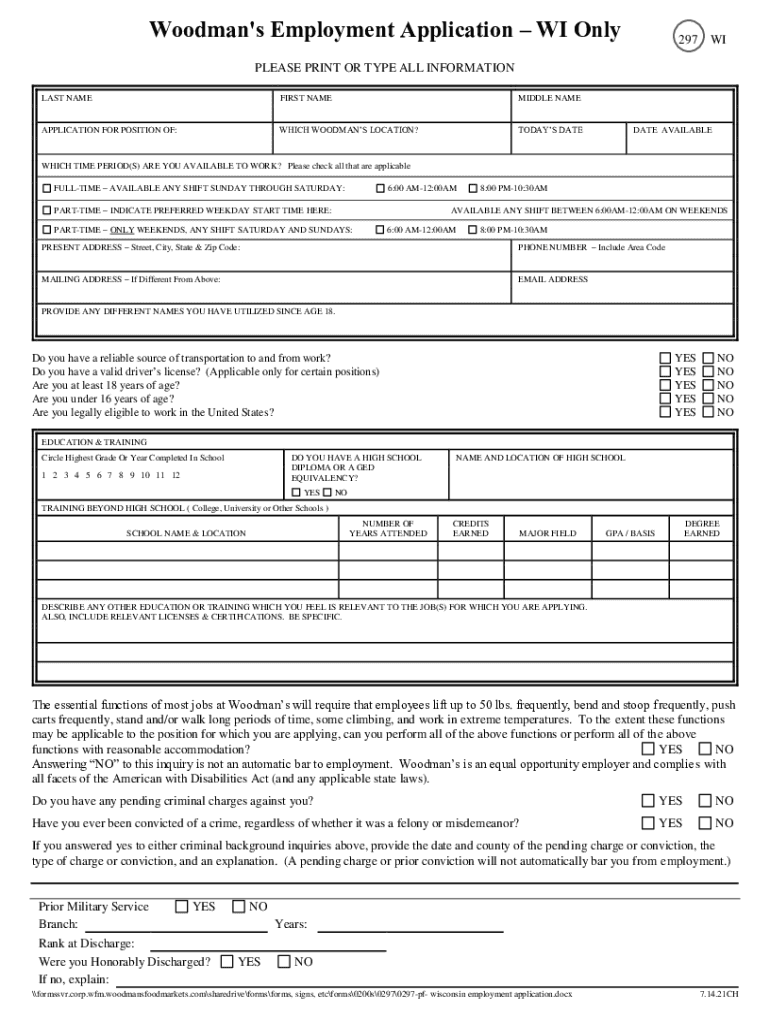
WI Woodmans Employment Application 2021-2026 free printable template
pdfFiller is not affiliated with any government organization

Fill out
Complete the form online in a simple drag-and-drop editor.

eSign
Add your legally binding signature or send the form for signing.

Share
Share the form via a link, letting anyone fill it out from any device.

Export
Download, print, email, or move the form to your cloud storage.
Why pdfFiller is the best tool for your documents and forms


End-to-end document management
From editing and signing to collaboration and tracking, pdfFiller has everything you need to get your documents done quickly and efficiently.
Accessible from anywhere
pdfFiller is fully cloud-based. This means you can edit, sign, and share documents from anywhere using your computer, smartphone, or tablet.
Secure and compliant
pdfFiller lets you securely manage documents following global laws like ESIGN, CCPA, and GDPR. It's also HIPAA and SOC 2 compliant.
What is WI Woodmans Employment Application
The Woodman's Employment Application is an employment form used by individuals seeking positions at Woodman's Food Markets to provide personal and professional information.
pdfFiller scores top ratings on review platforms




Who needs WI Woodmans Employment Application?
Explore how professionals across industries use pdfFiller.

WI Woodmans Employment Application is needed by:
-
Job seekers in Wisconsin applying for positions at Woodman's Food Markets.
-
Individuals looking for employment in the retail grocery sector.
-
Those requiring a structured job application format.
-
Candidates with relevant work experience or education to submit.
-
People seeking to explore career opportunities in the food and market industry.
Comprehensive Guide to WI Woodmans Employment Application
What is the Woodman's Employment Application?
The Woodman's Employment Application is an essential document for job seekers aiming to join Woodman's Food Markets in Wisconsin. This form collects key personal information, such as names, addresses, education, and work history, helping to provide a complete profile of each applicant. By accurately filling out the Woodman's Food Markets application, candidates ensure that their qualifications and experiences are properly assessed.
Purpose and Benefits of the Woodman's Employment Application
This employment application serves a crucial role in the hiring process at Woodman's, streamlining the evaluation of applicants. Accurately completing the form increases the chances of being considered for open positions, as it reflects the applicant's attention to detail. Additionally, a thorough application allows hiring managers to swiftly compare candidates against job requirements.
Requirements to Submit the Woodman's Employment Application
Applicants must meet specific eligibility criteria to complete the Woodman's application form. Necessary supporting documents might include proof of education and identification. Ensuring all required documentation is submitted with the application prevents delays in the hiring process.
How to Complete the Woodman's Employment Application Online (Step-by-Step)
-
Visit the pdfFiller platform to access the Woodman's Employment Application.
-
Gather personal details, including contact information, education history, and previous employment details.
-
Enter your information into the respective fields of the application form.
-
Review all entered data for accuracy and completeness.
-
Sign the application digitally using the eSigning feature of pdfFiller.
-
Submit the application upon final verification of all details.
Common Fields in the Woodman's Employment Application
Several important fields require attention in the Woodman's application form. Applicants should expect to provide details about work history, including previous employers, job titles, and dates of employment. Additionally, fields regarding availability and questions about criminal history and military service must be carefully completed to provide a comprehensive overview of the applicant's background.
Digital Signature vs. Wet Signature Requirements for the Woodman's Employment Application
Signing the Woodman's Employment Application can be done digitally or with a traditional wet signature. Utilizing digital signatures through pdfFiller simplifies the application process while ensuring compliance with necessary consent for background checks. Applicants should be aware of the significance of their signature in validating the authenticity of their application.
Submitting the Woodman's Employment Application
Completed applications can be submitted either online via pdfFiller or in person at a designated Woodman's location. Applicants should be mindful of any application deadlines and potential fees associated with submission. After submitting, candidates can track the status of their application to stay informed about their progress.
Security and Privacy in the Woodman's Employment Application Process
pdfFiller prioritizes the security and privacy of applicants throughout the form-filling process. The platform adheres to stringent security standards, including GDPR and HIPAA compliance, to protect sensitive information. Applicants can have confidence that their personal data is securely handled and stored.
Review Checklist Before Submitting the Woodman's Employment Application
-
Verify that all personal details are correct and up to date.
-
Ensure that educational and work history fields are accurately filled.
-
Cross-check spelling and grammar for clarity.
-
Review availability and answer all required questions.
-
Confirm that the digital signature is applied if submitting online.
Take the First Step Towards Your New Job with pdfFiller
By using pdfFiller, applicants can efficiently fill out the Woodman's Employment Application. The platform offers features such as easy editing, eSigning, and document management, making the application process straightforward and user-friendly. Leverage these tools to streamline your job application experience.
How to fill out the WI Woodmans Employment Application
-
1.To access the Woodman’s Employment Application, go to the pdfFiller website and search for the document in their form library or use a direct link if available.
-
2.Once opened, familiarize yourself with the pdfFiller interface to efficiently navigate through the form. Use toolbar options to zoom in for better visibility.
-
3.Gather all necessary personal details, including your full name, contact information, education history, work experience, and references before beginning to fill out the form.
-
4.Begin by entering your personal information in the designated fields. Be thorough and ensure accuracy in spelling and formatting.
-
5.Move on to the education and training section, providing details about your academic background and any relevant certifications.
-
6.Next, fill in your work experience, listing previous employers, positions held, and duties performed. This should include details that showcase your qualifications for the job you are applying for.
-
7.Proceed to answer questions regarding your availability, criminal history, and military service. Make sure to respond honestly and accurately.
-
8.Once all fields are filled, carefully review the entire application for completeness and correctness. Look out for any required signature fields.
-
9.Sign the form digitally in the provided area, and date your signature to indicate your understanding and agreement with the application terms.
-
10.Finally, save your completed application. You can download it to your device or submit it directly through the pdfFiller platform if there is a submission feature available.

Who is eligible to fill out the Woodman's Employment Application?
Anyone seeking a job at Woodman's Food Markets in Wisconsin is eligible to complete this application, including entry-level positions and experienced roles.
Are there any deadlines for submitting the Woodman's Employment Application?
The application can typically be submitted at any time, but check with specific job postings or announcements for any closing dates.
How should I submit the Woodman's Employment Application?
Completed applications can be submitted online through pdfFiller or printed and delivered in person to Woodman’s Food Markets, depending on the instructions provided in the job posting.
What supporting documents do I need when submitting the application?
You may be required to provide a resume, references, and, if applicable, certifications or transcripts. Always check the specific job listing for document requirements.
What are some common mistakes to avoid when completing this application?
Common mistakes include providing incomplete information, errors in your contact details, and failing to sign the application. Ensure thoroughness before submission.
How long does it take to process my application after submission?
Processing times may vary by location and job position. Typically, applicants can expect communication within a few weeks, but follow up if you don’t hear back.
Can I edit my submitted application after sending it?
Once submitted, changes to the application may not be allowed. Contact the hiring manager or HR department if you need to make corrections post-submission.
WI Woodmans Employment Application Form Versions
Related Content
Related Forms



Get the latest insights from our blog


If you believe that this page should be taken down, please follow our DMCA take down process
here
.
This form may include fields for payment information. Data entered in these fields is not covered by PCI DSS compliance.