
Last updated on
Oct 31, 2026

Get the free Composite Application Form for Subscriber Registration
We are not affiliated with any brand or entity on this form

Fill out
Complete the form online in a simple drag-and-drop editor.

eSign
Add your legally binding signature or send the form for signing.

Share
Share the form via a link, letting anyone fill it out from any device.

Export
Download, print, email, or move the form to your cloud storage.
Why pdfFiller is the best tool for your documents and forms


End-to-end document management
From editing and signing to collaboration and tracking, pdfFiller has everything you need to get your documents done quickly and efficiently.
Accessible from anywhere
pdfFiller is fully cloud-based. This means you can edit, sign, and share documents from anywhere using your computer, smartphone, or tablet.
Secure and compliant
pdfFiller lets you securely manage documents following global laws like ESIGN, CCPA, and GDPR. It's also HIPAA and SOC 2 compliant.
What is NPS Registration Form
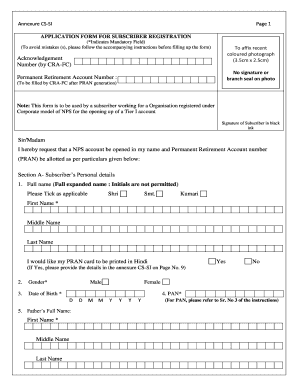
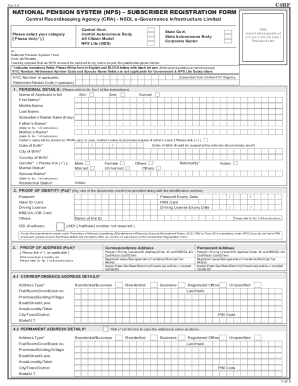
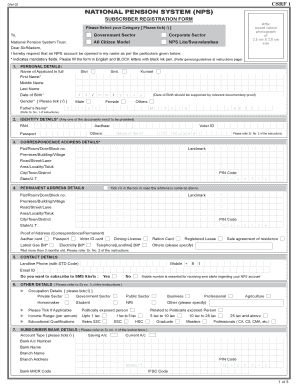
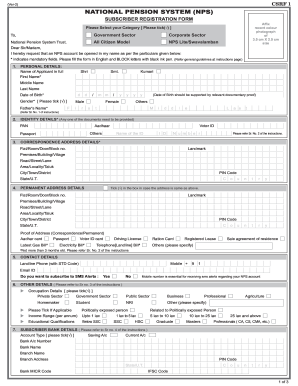
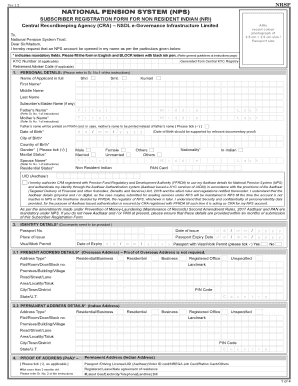
The Composite Application Form for Subscriber Registration is a personal finance document used by individuals in India to open a fresh Tier I and Tier II account under the National Pension System (NPS).
pdfFiller scores top ratings on review platforms




The staff service is impeccable
The staff service is impeccable. The online platform works like magic. I am just happy with the service I received, and how good the quality of their online platform is. 20 stars for excellent customer service and 20 stars for excellent platform
Time is Money
The document import feature, text alignment tools, and being able to directly type into the document has saved me a lot of time hand-writing statements. This is a good product. Thanks!
Who needs NPS Registration Form?
Explore how professionals across industries use pdfFiller.

NPS Registration Form is needed by:
-
Individuals looking to register as NPS subscribers
-
New investors seeking Tier I and Tier II pension accounts
-
Persons wanting to secure their retirement plans
-
Financial advisors assisting clients with NPS enrollment
-
Students and young professionals interested in pension savings
-
Self-employed individuals aiming to invest in pension funds
Comprehensive Guide to NPS Registration Form
What is the Composite Application Form for Subscriber Registration?
The Composite Application Form for Subscriber Registration is a crucial document for individuals looking to open a Tier I and Tier II account under the National Pension System (NPS) in India. This form serves as the official application for becoming a subscriber of the NPS, streamlining the registration process.
This form is essential for unlocking the benefits of the NPS, which is designed to provide individuals with a structured, long-term savings plan for retirement. Completing this form correctly is critical for ensuring a smooth account opening experience.
Purpose and Benefits of the Composite Application Form for Subscriber Registration
Registering for the NPS using the Composite Application Form offers numerous advantages to subscribers. Primarily, it facilitates effective financial planning for retirement, allowing individuals to secure their financial future.
Moreover, subscribers can take advantage of certain tax benefits provided under the Income Tax Act, making the NPS an attractive option for retirement savings. Filling out this form correctly opens the door to a reliable pension scheme and potential growth of funds over time.
Who Needs the Composite Application Form for Subscriber Registration?
This form is necessary for anyone looking to enroll in the National Pension System as a subscriber. Generally, individuals from various employment backgrounds, including government employees, private sector workers, and self-employed persons, qualify to fill out this form.
-
Any Indian citizen aged 18 or above is eligible to become a subscriber.
-
There may be specific requirements based on employment status or existing pension schemes.
-
Individuals seeking to open Tier I and Tier II accounts must complete this form.
How to Fill Out the Composite Application Form for Subscriber Registration Online
Filling out the Composite Application Form online is a straightforward process if you follow the right steps. First, access the digital form through the official NPS website, ensuring you have the necessary software for viewing PDFs.
Next, break down the form into sections, paying close attention to important fields. Each section requires specific information, such as personal identification and banking details. Here are some key areas to focus on:
-
Nominee details: Include accurate information about your nominee.
-
Declaration: Understand the legal implications and provide a clear declaration.
Common Errors and How to Avoid Them on the Composite Application Form for Subscriber Registration
Applicants often make several common errors when completing the Composite Application Form. Being aware of these pitfalls can help you ensure a successful application.
-
Incorrectly entering personal and banking information.
-
Omitting required fields, which can lead to delays.
To avoid errors, create a validation checklist to review all provided details before submitting the form. This proactive approach can prevent rejections and help streamline the process.
Submission Methods and Delivery for the Composite Application Form for Subscriber Registration
Once the Composite Application Form is filled out, you can submit it through various methods. There are both online and offline submission options available to cater to different preferences.
Be aware of submission deadlines and processing times. Taking note of any associated fees is also essential for a smooth experience.
What Happens After You Submit the Composite Application Form for Subscriber Registration?
After you submit the Composite Application Form, the NPS will process your application according to their established procedures. Typically, you will receive a confirmation of your submission and details on how to track your application status.
-
Be prepared to address any issues that may arise during processing, including potential rejections.
-
Follow up to ensure any problems with your application are resolved promptly.
Security and Compliance for the Composite Application Form for Subscriber Registration
Your personal information is protected through robust security measures during the submission of the Composite Application Form. The NPS complies with regulations such as the Prevention of Money Laundering Act, ensuring the highest standards of data protection.
It’s crucial to handle all sensitive documents securely during this process to maintain your privacy and security.
How pdfFiller Can Help You with the Composite Application Form for Subscriber Registration
pdfFiller offers an efficient solution for managing the Composite Application Form. With its capabilities, users can easily edit, fill, and eSign the form, making document management a straightforward task.
-
Utilizing pdfFiller ensures secure document handling throughout the process.
-
Discover additional resources available on pdfFiller for comprehensive document management.
Sample or Example of a Completed Composite Application Form for Subscriber Registration
To assist users, a hypothetical example of a completed Composite Application Form can provide insights into accurately filling out the necessary fields. Key sections often cause confusion, and viewing an example can help clarify what information is expected.
Using reference materials, like completed sample forms, can significantly improve your chances of a successful submission.
How to fill out the NPS Registration Form
-
1.Access pdfFiller and search for the Composite Application Form for Subscriber Registration. Select the appropriate template to open the form.
-
2.Familiarize yourself with the layout of the form, noting the categories such as personal information, bank details, and nominee information.
-
3.Before starting, gather necessary documents which include your identification proof, date of birth, bank account details, and any nominee information you wish to include.
-
4.Begin filling in the form by entering your full name in the designated field. Ensure the spelling is correct to avoid issues later.
-
5.Continue filling out personal fields, such as your date of birth. Utilize the calendar feature if available to ensure accuracy.
-
6.For bank information, clearly provide your account number, IFSC code, and branch details. Double-check for any typos.
-
7.When adding nominee details, be prepared to enter their names and relationship to you, ensuring to meet any additional legal requirements.
-
8.Review each filled section, making sure to print in capital letters where instructed or as indicated by the form.
-
9.Add your signature or thumb impression in the required field, as this verifies your application and consent.
-
10.Review the entire form again for any omissions or errors before finalizing.
-
11.Once completed, save your document on pdfFiller. Use the 'Download' option to save a copy to your device, or use the 'Submit' feature if required by your institution.

Who is eligible to use the Composite Application Form for Subscriber Registration?
Any individual in India aged 18 and above can use the Composite Application Form to register as a subscriber under the National Pension System, provided they have valid identification.
What documents are required to fill out this application form?
You will need to provide identification proof, your date of birth, bank account details, and nominee information. Ensure all documents are accessible before starting the form.
How do I submit the Composite Application Form once completed?
You can submit the form electronically through pdfFiller by using the 'Submit' option, or download it to your device and submit it physically to your financial institution.
What common mistakes should I avoid while completing the form?
Ensure that all personal details are accurate and spelled correctly. Avoid leaving any required fields blank, and double-check your signature and bank details for accuracy.
How long does it take for my application to be processed?
Processing times can vary, but typically you can expect a response within 15 to 30 days after submitting the form, depending on the institution's procedures.
Are there any fees associated with registering through this application form?
There are generally no direct fees for filling out the application form itself. However, be sure to check with your specific pension fund provider for any associated costs.
Can I edit my form after I have submitted it?
Once submitted, modifications to the application may not be allowed. If changes are necessary, contact your financial institution for guidance on updating your information.
Related Content
Related Forms



Related Catalogs
Get the latest insights from our blog


If you believe that this page should be taken down, please follow our DMCA take down process
here
.
This form may include fields for payment information. Data entered in these fields is not covered by PCI DSS compliance.