
Last updated on
Oct 24, 2026
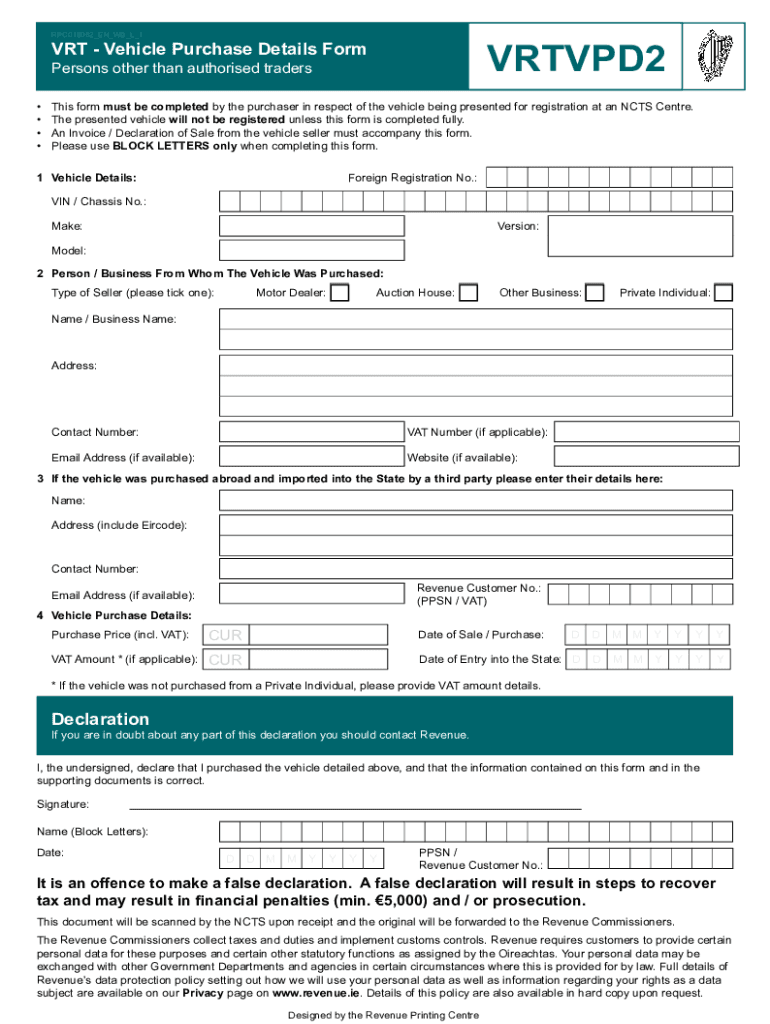
IE VRTVPD2 2022-2026 free printable template
We are not affiliated with any brand or entity on this form

Fill out
Complete the form online in a simple drag-and-drop editor.

eSign
Add your legally binding signature or send the form for signing.

Share
Share the form via a link, letting anyone fill it out from any device.

Export
Download, print, email, or move the form to your cloud storage.
Why pdfFiller is the best tool for your documents and forms


End-to-end document management
From editing and signing to collaboration and tracking, pdfFiller has everything you need to get your documents done quickly and efficiently.
Accessible from anywhere
pdfFiller is fully cloud-based. This means you can edit, sign, and share documents from anywhere using your computer, smartphone, or tablet.
Secure and compliant
pdfFiller lets you securely manage documents following global laws like ESIGN, CCPA, and GDPR. It's also HIPAA and SOC 2 compliant.
What is IE VRTVPD2
The Vehicle Purchase Details Form is a document used by purchasers in Ireland to register a vehicle at an NCTS Centre, ensuring compliance with local regulations.
pdfFiller scores top ratings on review platforms




Who needs IE VRTVPD2?
Explore how professionals across industries use pdfFiller.

IE VRTVPD2 is needed by:
-
Individuals purchasing a vehicle in Ireland
-
Car dealerships facilitating vehicle sales
-
Business entities acquiring vehicles for operations
-
Importers of vehicles to Ireland
-
Financial institutions providing auto loans
-
Legal professionals assisting clients with vehicle transactions
Comprehensive Guide to IE VRTVPD2
What is the Vehicle Purchase Details Form?
The Vehicle Purchase Details Form is an essential document in Ireland, facilitating the vehicle registration process at NCTS Centres. This form serves a critical role in the purchasing process by providing necessary details for registration, ensuring that all vehicle transactions comply with legal requirements. By completing this specific form, buyers can streamline their vehicle registration and mitigate potential legal issues.
Purpose and Benefits of the Vehicle Purchase Details Form
The primary purpose of the Vehicle Purchase Details Form is to accurately record vehicle transactions during the registration process. This ensures that the information is in alignment with legal expectations and helps maintain detailed records for both buyers and sellers. The form promotes compliance with regulations, making it indispensable for those involved in vehicle transactions.
Among the benefits of utilizing this form are:
-
Accurate transaction records
-
Compliance with legal mandates
-
Clear declaration of sale for both parties
Who Needs the Vehicle Purchase Details Form?
The Vehicle Purchase Details Form is primarily intended for individuals and businesses engaging in vehicle purchases within Ireland. The eligibility criteria for submitting this form generally include any purchaser involved in the transaction. This includes private buyers as well as companies that are acquiring vehicles for business use. Understanding when to complete this form is crucial for ensuring compliance with vehicle registration requirements.
Key Features of the Vehicle Purchase Details Form
The Vehicle Purchase Details Form contains several important components that need to be filled out, such as:
-
Vehicle details including make, model, and VIN
-
Seller's information
-
Specifics of the purchase transaction, including price
Additionally, the form features a declaration section that requires the buyer’s signature, confirming the accuracy of the provided details. Users should also be aware that variations of the form may exist based on specific requirements.
How to Fill Out the Vehicle Purchase Details Form Online (Step-by-Step)
Filling out the Vehicle Purchase Details Form online is a straightforward process that can be accomplished using platforms like pdfFiller. Here’s a step-by-step guide:
-
Access the form on the website.
-
Enter vehicle details, including the make, model, and registration number.
-
Input seller information accurately.
-
Specify the purchase price and any applicable VAT details.
-
Review the information to ensure accuracy and completeness.
-
Sign the declaration section to validate the form.
Prioritizing accuracy is crucial to avoid complications in the registration process.
Common Errors and How to Avoid Them
While completing the Vehicle Purchase Details Form, individuals often make several common mistakes. These can include:
-
Entering incorrect vehicle details
-
Omitting essential seller information
-
Failing to sign the declaration section
To prevent these inaccuracies, it is advisable to double-check all entries and review the form thoroughly before submission.
Submission Methods for the Vehicle Purchase Details Form
Once the Vehicle Purchase Details Form is completed, it can be submitted through several methods. Options for submission include both online and offline avenues. Specific requirements may vary, but generally, forms can be submitted:
-
Electronically via the relevant government portal
-
Physically at designated NCTS Centres
It is also important to be aware of processing timelines following submission, which may differ based on the chosen method.
Understanding Vehicle Purchase Details Form Fees and Processing Times
There may be associated fees for submitting the Vehicle Purchase Details Form, which can vary based on specific circumstances. It is essential to understand the payment methods accepted for these fees. Processing times can also differ, and expedited processing options may be available in certain situations, facilitating faster vehicle registration.
Maintaining Compliance and Privacy When Using the Vehicle Purchase Details Form
When filling out sensitive documents like the Vehicle Purchase Details Form, security and compliance with regulations, such as GDPR, are essential. Utilizing tools like pdfFiller helps ensure data protection through several measures:
-
256-bit encryption to safeguard user information
-
Regular audits for compliance with security standards
-
Privacy policies that comply with international regulations
Experience Seamless Document Management with pdfFiller
pdfFiller offers a user-friendly platform for managing the Vehicle Purchase Details Form. The website provides integrated features such as eSign capabilities and easy document sharing, making the entire process smooth and efficient. Leveraging pdfFiller allows users to focus on completing their forms securely and conveniently.
How to fill out the IE VRTVPD2
-
1.Access the Vehicle Purchase Details Form on pdfFiller by searching for it in the document library or using the provided link.
-
2.Open the form to view the fillable fields organized for easy navigation.
-
3.Before starting, gather essential details including vehicle information, seller's information, and a copy of the Invoice/Declaration of Sale.
-
4.Begin filling in the form by entering the vehicle details first, including make, model, year, and VIN.
-
5.Next, fill in the seller's details, providing their name, address, and contact information.
-
6.Complete the fields regarding the purchase information, including the purchase price and VAT details if applicable.
-
7.Ensure that all sections of the form are accurate and complete as per the gathered information.
-
8.Once filled, review the entire form for any missing or inconsistent information that may need correction.
-
9.Use the signature field to include your signature electronically, confirming the accuracy of the entries.
-
10.Finalize the form by saving your work regularly and ensuring all required fields are filled.
-
11.After completing the form, download it as a PDF and save it to your device for future reference or submission.
-
12.You may need to submit it at an NCTS Centre along with supporting documents, such as the Invoice/Declaration of Sale.

Who needs to complete the Vehicle Purchase Details Form?
The form is required by anyone purchasing a vehicle in Ireland, including individuals, businesses, dealerships, and importers to ensure proper registration.
What supporting documents are needed when filing this form?
You must include an Invoice/Declaration of Sale with the Vehicle Purchase Details Form to validate the transaction during registration.
Is it necessary to notarize the Vehicle Purchase Details Form?
No, there is no requirement to notarize the Vehicle Purchase Details Form, simplifying the registration process for purchasers.
How can I submit the Vehicle Purchase Details Form?
The completed form can be submitted at an NCTS Centre in Ireland along with required documentation to finalize the vehicle registration.
What are common mistakes when filling out this form?
Common mistakes include entering incorrect vehicle information, missing signatures, or not providing necessary supporting documents like the Invoice/Declaration of Sale.
Is there a deadline to submit the Vehicle Purchase Details Form?
It is advisable to submit the form promptly after purchase to avoid any delays in vehicle registration and to comply with local laws.
How long does it take to process the Vehicle Purchase Details Form?
Processing times may vary, but typically registration can take a few days once submitted, depending on the NCTS Centre's workload.
IE VRTVPD2 Form Versions
Related Content
Related Forms




Get the latest insights from our blog


If you believe that this page should be taken down, please follow our DMCA take down process
here
.
This form may include fields for payment information. Data entered in these fields is not covered by PCI DSS compliance.