
Last updated on
Oct 28, 2026
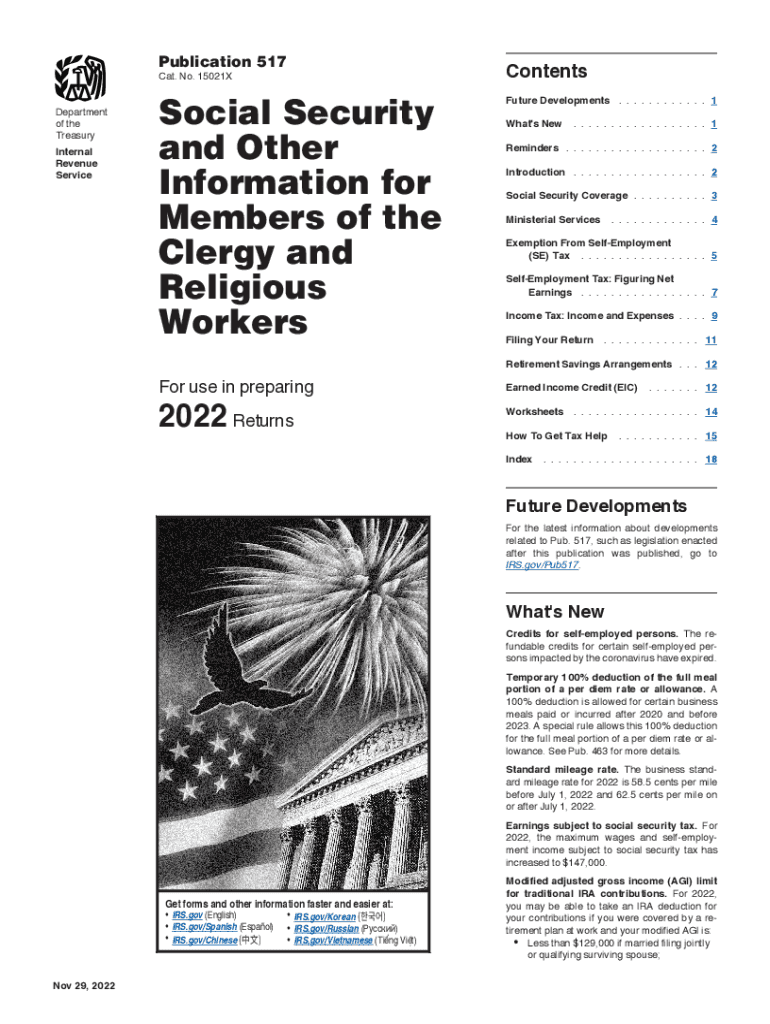
IRS Publication 517 2022 free printable template
pdfFiller is not affiliated with IRS

Fill out
Complete the form online in a simple drag-and-drop editor.

eSign
Add your legally binding signature or send the form for signing.

Share
Share the form via a link, letting anyone fill it out from any device.

Export
Download, print, email, or move the form to your cloud storage.
Why pdfFiller is the best tool for your documents and forms


End-to-end document management
From editing and signing to collaboration and tracking, pdfFiller has everything you need to get your documents done quickly and efficiently.
Accessible from anywhere
pdfFiller is fully cloud-based. This means you can edit, sign, and share documents from anywhere using your computer, smartphone, or tablet.
Secure and compliant
pdfFiller lets you securely manage documents following global laws like ESIGN, CCPA, and GDPR. It's also HIPAA and SOC 2 compliant.
What is IRS Publication 517
The Publication 517 is a tax guide used by members of the clergy and religious workers to understand their tax obligations related to Social Security and Medicare taxes.
pdfFiller scores top ratings on review platforms




Who needs IRS Publication 517?
Explore how professionals across industries use pdfFiller.

IRS Publication 517 is needed by:
-
Clergy members looking for tax obligations guidance
-
Religious workers seeking information on self-employment tax
-
Members of recognized religious sects needing tax advice
-
Individuals applying for FICA and SECA exemptions
-
Ministers preparing for tax filing
-
Tax preparers assisting clients in religious professions
Comprehensive Guide to IRS Publication 517
What is Publication 517?
Publication 517 is a critical IRS tax guide focusing on social security and Medicare taxes for clergy and religious workers in the United States. This document provides a comprehensive overview of tax obligations, including which earnings fall under these taxes and how to navigate exemptions.
Its structure includes essential worksheets and references to other relevant IRS forms, making it an indispensable resource for those involved in ministerial services. Understanding this publication is vital for compliance with federal tax regulations.
Purpose and Benefits of Publication 517
The purpose of Publication 517 is to help clergy and religious workers comprehend their tax obligations effectively. By leveraging this guide, these individuals can better navigate exemptions and accurately calculate their net earnings.
Using Publication 517 also aids in ensuring compliance with FICA and SECA regulations, which are crucial for maintaining the integrity of tax filings for religious occupations.
Who Needs Publication 517?
Publication 517 is essential for members of the clergy or those affiliated with recognized religious sects. This demographic includes those involved in ministerial services or religious work, which often involves unique tax situations.
Self-employed clergy should also rely on this publication to understand their specific tax requirements, ensuring full compliance with IRS regulations.
Key Features of Publication 517
Publication 517 boasts several standout features that enhance its usability as a tax resource. It includes comprehensive forms and worksheets designed to assist users in filing their taxes accurately.
-
Relevant IRS forms that support the content of the publication.
-
User-friendly elements such as examples and annotations to simplify tax filing.
How to Fill Out Publication 517 Online
Filling out Publication 517 online can streamline the tax preparation process. To begin, access pdfFiller to efficiently complete the publication.
-
Navigate to pdfFiller and upload your document.
-
Fill out the required fields, ensuring accuracy.
-
Save your work regularly and utilize sharing options as needed.
Be mindful of common pitfalls, such as inputting incorrect information, to avoid delays in your filing process.
Important Filing Guidelines for Publication 517
Filing Publication 517 requires adherence to specific guidelines to prevent complications. It is important to know when to submit your publication, as late filings can result in penalties.
Additionally, ensure that you prepare the necessary supporting documents that must accompany your submission to satisfy IRS requirements.
-
Methods of submission include online platforms, which offer convenient options.
Security and Compliance Information for Publication 517
When handling sensitive tax information, security measures are paramount. pdfFiller implements features that protect users’ personal and financial data.
This includes compliance with crucial regulations such as HIPAA and GDPR, ensuring that users can manage their tax documents with confidence.
Common Errors and How to Avoid Them When Using Publication 517
Many users encounter mistakes while filling out Publication 517. Common errors include calculation inaccuracies and omitted information, which can delay processing.
To minimize these mistakes, it is useful to double-check entries before submission. Additionally, resources available on pdfFiller can aid in preventing errors, providing users with validation options.
How to Amend Publication 517 After Submission
If errors are detected post-submission, it is essential to understand how to amend Publication 517. Begin by identifying the mistake and follow the necessary steps to correct it.
-
Resubmit the amended document promptly to avoid penalties.
-
Check the status of your submission using IRS tools to confirm receipt.
Optimizing Your Experience with pdfFiller for Publication 517
Maximizing your experience with pdfFiller can greatly enhance your efficiency in managing Publication 517. pdfFiller simplifies the editing of PDFs, eSigning documents, and sharing completed forms with others.
-
User testimonials often highlight the practicality and efficiency of pdfFiller for tax document management.
-
Security features ensure that sensitive information remains protected throughout the process.
How to Fill Out Small Business Tax Forms Online with pdfFiller
Struggling with your Schedule C or not sure how to file business taxes as a sole proprietor, LLC, or self-employed professional? This step-by-step pdfFiller tutorial walks you through completing IRS Schedule C quickly and accurately — no printing, no scanning, no stress. Whether you're handling small business tax deductions, tracking self-employed taxes, or preparing your full business tax return, pdfFiller makes it simple right in your browser.

How to fill out the IRS Publication 517
-
1.To begin, access pdfFiller and search for 'Publication 517'. Open the document to view the tax guide.
-
2.Familiarize yourself with the layout of the form. Use the zoom feature if needed to clearly read the text.
-
3.Before starting to fill out the form, gather your earnings information relevant to ministerial services, including any self-employment earnings.
-
4.Utilize the search function to reference specific sections of the guide that pertain to your case, particularly FICA and SECA regulation guidance.
-
5.As you read through the document, make notes on key points that relate to your individual tax situation, such as applicable exemptions and worksheets.
-
6.Once you have completed your notes, review the document to ensure you understand each section thoroughly.
-
7.Use pdfFiller’s edit tools to highlight or mark essential sections if needed; this can help with your final review.
-
8.When satisfied with your understanding, save your notes and any filled sections on pdfFiller for future reference.
-
9.For submission, consult the guide for any required additional forms or documentation you may need to provide with your tax filings.
-
10.Finally, download or print your finalized notes and any additional documentation through pdfFiller, or submit online if applicable.

Who is eligible to use Publication 517?
Publication 517 is primarily for members of the clergy, religious workers, and people involved in recognized religious sects who need to understand their tax obligations concerning Social Security and Medicare taxes.
What are the deadlines for filing taxes related to this guide?
The typical deadline for filing taxes in the U.S. is April 15. However, if this falls on a weekend or holiday, the deadline may be adjusted. Always check the IRS website for specific deadlines each year.
How do I submit my completed tax information?
After completing your tax forms, you can submit them by mail, or electronically if your state allows. Always ensure to follow the guidelines specified in Publication 517 for your submission procedures.
What supporting documents do I need when using this form?
You may need documentation regarding your earnings from ministerial services, any self-employment tax records, and completed worksheets referenced in Publication 517 that calculate your taxable income.
What common mistakes should I avoid when filling out my taxes?
Common mistakes include miscalculating self-employment taxes, forgetting to report all sources of income, and not reviewing eligibility for potential exemptions outlined in Publication 517.
How long does it take to process my tax forms?
Processing times can vary. Typically, if filed electronically, forms may be processed within a few weeks, while paper filings can take 6-8 weeks. Checking the IRS status tool can provide updates.
What if I have specific questions about my tax situation?
For personalized queries, consult a tax professional or contact the IRS directly. They can provide tailored guidance based on the specifics of your situation as covered by Publication 517.
IRS Publication 517 Form Versions
Related Content
Related Forms



Get the latest insights from our blog


If you believe that this page should be taken down, please follow our DMCA take down process
here
.
This form may include fields for payment information. Data entered in these fields is not covered by PCI DSS compliance.