
Last updated on
Nov 6, 2026

OR DoR 40N 2022 free printable template
pdfFiller is not affiliated with any government organization

Fill out
Complete the form online in a simple drag-and-drop editor.

eSign
Add your legally binding signature or send the form for signing.

Share
Share the form via a link, letting anyone fill it out from any device.

Export
Download, print, email, or move the form to your cloud storage.
Why pdfFiller is the best tool for your documents and forms


End-to-end document management
From editing and signing to collaboration and tracking, pdfFiller has everything you need to get your documents done quickly and efficiently.
Accessible from anywhere
pdfFiller is fully cloud-based. This means you can edit, sign, and share documents from anywhere using your computer, smartphone, or tablet.
Secure and compliant
pdfFiller lets you securely manage documents following global laws like ESIGN, CCPA, and GDPR. It's also HIPAA and SOC 2 compliant.
What is OR DoR 40N
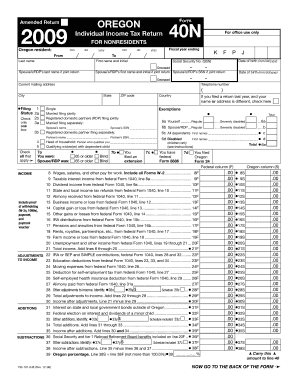
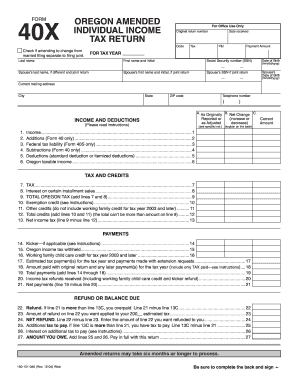
The 2022 Form OR-40-N is a tax document used by nonresidents of Oregon to report and file their individual income tax returns with the Oregon Department of Revenue.
pdfFiller scores top ratings on review platforms




After my documents were found I was happy.
What do you like best?
All the functions have served me well but.the one I used the most is the fax option. I recently started using PDf fillable now that I'm completely online as it help for those clients that do not have access to printers, scanners or fax machines
What do you dislike?
That I can not save it as a template and upload it to my cloud service
Recommendations to others considering the product:
Would mike to integrate it but I don't know how
What problems are you solving with the product? What benefits have you realized?
Making it easier for people to sign, fill out documents, receive email fax and store documents
What do you like best?
Easy to use and effective. PDF Filler has decreased the amount of redundant work for me.
What do you dislike?
Sign now sometimes has a glitch and I have to redo the task
What problems are you solving with the product? What benefits have you realized?
Tracking documents. Customers say "I didn't know" or "I didn't get it", I can view the audit log.
What do you like best?
Really a good tool to utilize for editing and transforming the documents.
What do you dislike?
Erasing any content in the document is little difficult.
Recommendations to others considering the product:
Very good and useful product to use.
What problems are you solving with the product? What benefits have you realized?
we used this tool mostly for the editing and get some digitizing the document.
What do you like best?
It is a seemless application to use and very ease to meet small business demands.
What do you dislike?
nothing, useful for all my needs and tasks
Recommendations to others considering the product:
Great software and easy to use.
What problems are you solving with the product? What benefits have you realized?
easy to fill out and send back documents, works as advertised.
Very simple and easy to use
Very simple and easy to use.
Who needs OR DoR 40N?
Explore how professionals across industries use pdfFiller.

OR DoR 40N is needed by:
-
Nonresidents who earned income in Oregon during 2022
-
Individuals filing Oregon state income tax for the first time
-
Tax professionals assisting nonresidents with Oregon tax filings
-
Students living in Oregon but maintaining residency in another state
-
Freelancers or contractors working in Oregon from out of state
Comprehensive Guide to OR DoR 40N
What is the 2022 Form OR-40-N Oregon Nonresident Income Tax Return?
The 2022 Form OR-40-N is a crucial document for nonresidents filing taxes in Oregon. This form facilitates the accurate reporting of income earned within the state. Nonresidents must complete this form to fulfill their tax obligations, ensuring compliance with Oregon’s tax laws.
The form requires personal information, income reporting, and specific calculations related to the state’s tax regulations. It is essential for maintaining legal compliance and managing individual tax liabilities.
The Oregon Department of Revenue oversees the processing of this form, providing guidance and support for taxpayers.
Who Needs the 2022 Form OR-40-N Oregon Nonresident Income Tax Return?
Nonresidents must file the 2022 Form OR-40-N if they earned income in Oregon during the tax year. Understanding who qualifies as a nonresident is fundamental for accurate tax reporting. Generally, anyone who has not established permanent residency in Oregon but has sourced income from within the state qualifies.
Income thresholds may trigger the necessity for filing this form. Therefore, it's critical for individuals to assess their earnings against these thresholds to avoid compliance issues. Filing this form also helps maintain good standing with the tax authorities.
Why is the 2022 Form OR-40-N Important?
Filing the 2022 Form OR-40-N is vital for both legal and financial reasons. Failure to file or submitting it late can lead to penalties and interest charges, significantly increasing the total tax liability. Keeping accurate and timely submissions can prevent these drawbacks.
Benefits of correctly filing this form include potential refunds for overpaid taxes and ensuring legal compliance, which can affect future tax situations. Understanding the importance of this form will aid taxpayers in making informed decisions regarding their tax obligations in Oregon.
How to Fill Out the 2022 Form OR-40-N Online (Step-by-Step)
Filling out the 2022 Form OR-40-N online can be streamlined with this step-by-step guide. Begin by visiting a reliable platform such as pdfFiller. Follow these steps:
-
Access the 2022 Form OR-40-N template.
-
Enter your First name and Last name in the designated fields.
-
Provide your Social Security number accurately.
-
Fill in your income details, ensuring all figures are correct.
-
Review the completed form for any errors or missing information.
-
Submit the form as directed.
Pay attention to key fields to ensure accuracy and prevent common mistakes that could delay processing.
Required Documents and Pre-Filing Checklist
Before starting the filing process for the 2022 Form OR-40-N, gather essential documentation. The following items are necessary:
-
W-2 forms from all employers.
-
Other income statements or 1099 forms.
-
Records of any deductions you plan to claim.
It is crucial to have accurate and complete information to facilitate accurate tax calculations and avoid unnecessary complications during filing.
How to Submit the 2022 Form OR-40-N Oregon Nonresident Income Tax Return
Submitting the 2022 Form OR-40-N involves several steps. Here’s how to ensure a successful submission:
-
Choose to submit online or mail the form to the designated address.
-
Be aware of deadlines to avoid penalties.
-
Track your submission status through the Oregon Department of Revenue's website.
Understanding the submission methods and processing times will help ensure that your form is accurately filed and timely processed.
Security and Compliance When Filing the 2022 Form OR-40-N
When filing the 2022 Form OR-40-N, security and compliance are paramount. pdfFiller employs robust security measures, including 256-bit encryption, to protect sensitive information during online submissions. Users can rest assured that their data is handled securely, abiding by federal and state regulations.
Data protection should always be a consideration when submitting sensitive documents, highlighting the importance of choosing a reputable platform like pdfFiller.
What Happens After You Submit the 2022 Form OR-40-N?
Once you submit the 2022 Form OR-40-N, it's important to be aware of the post-filing process. Processing times can vary, so be prepared for potential delays. You can check the status of your submitted form through the Oregon Department of Revenue.
Additionally, understanding possible rejection reasons, such as missing information or discrepancies in reported income, will enable you to address issues swiftly and secure your tax status.
Why Choose pdfFiller for Your 2022 Form OR-40-N Needs?
pdfFiller offers enhanced features for completing the 2022 Form OR-40-N, making the tax filing process more efficient. With its intuitive interface, users can navigate through the form easily and utilize powerful tools designed for seamless document handling.
User testimonials highlight the ease of use and the secure environment provided by pdfFiller, ensuring confidence when managing your tax documents.
Start Your Filing Process with pdfFiller Today!
Utilizing pdfFiller’s tools can streamline the process of filling out your 2022 Form OR-40-N. The platform ensures that your documentation is not only secure but also filled out accurately, enhancing your overall filing experience.
Take action today to simplify your filing process and experience the benefits of using a reliable online platform for your tax needs.
How to fill out the OR DoR 40N
-
1.Begin by accessing the pdfFiller website and log in or create an account if you don’t have one.
-
2.In the search bar, type '2022 Form OR-40-N' to locate the form, then click on the form to open it.
-
3.Once the form is open, familiarize yourself with the layout and required fields.
-
4.Gather necessary information such as your personal details, income earned in Oregon, and any deductions you plan to claim.
-
5.Using pdfFiller, click on each field to fill in your First name, Last name, Social Security number, and Date of birth.
-
6.Refer to your income documents to accurately fill out the sections related to income earned and deductions applicable to your case.
-
7.Once all fields have been filled, review the form carefully for any errors or missing information.
-
8.Utilize pdfFiller's review tools to check for compliance with Oregon tax laws and submit the form.
-
9.After finalizing any edits, use the save feature to keep a copy of your completed form.
-
10.You can download the completed form or submit it electronically through pdfFiller according to the submission guidelines.

Who is eligible to file the 2022 Form OR-40-N?
Nonresidents of Oregon who earned income within the state during the tax year 2022 are eligible to file the 2022 Form OR-40-N for their income tax returns.
What is the deadline for submitting the 2022 Form OR-40-N?
The deadline for submitting the 2022 Form OR-40-N is typically April 15, 2023, unless it falls on a weekend or holiday, in which case the deadline may extend to the next business day.
What documents do I need when filling out the 2022 Form OR-40-N?
You will need your personal identification details, proof of income received from Oregon sources, and any supporting documents for deductions you wish to claim while filling out the form.
How can I submit the 2022 Form OR-40-N once it is completed?
Once the form is complete, you can submit it electronically through pdfFiller or download a copy to mail to the Oregon Department of Revenue, following their specific submission guidelines.
What are common mistakes to avoid when filing the OR-40-N?
Common mistakes include incorrect Social Security numbers, failure to report all income earned in Oregon, and not signing the form before submission. Always double-check your entries.
How long does it take to process the 2022 Form OR-40-N?
Processing times for the 2022 Form OR-40-N can vary, but it generally takes about 4 to 6 weeks after submission for the Oregon Department of Revenue to process the return.
Are there any fees associated with filing the 2022 Form OR-40-N?
There are no direct fees for filing the 2022 Form OR-40-N itself; however, you may incur fees for using third-party e-filing services or if you owe taxes due.
OR DoR 40N Form Versions
Related Content
Related Forms



Get the latest insights from our blog


If you believe that this page should be taken down, please follow our DMCA take down process
here
.
This form may include fields for payment information. Data entered in these fields is not covered by PCI DSS compliance.