
Last updated on
Nov 7, 2026
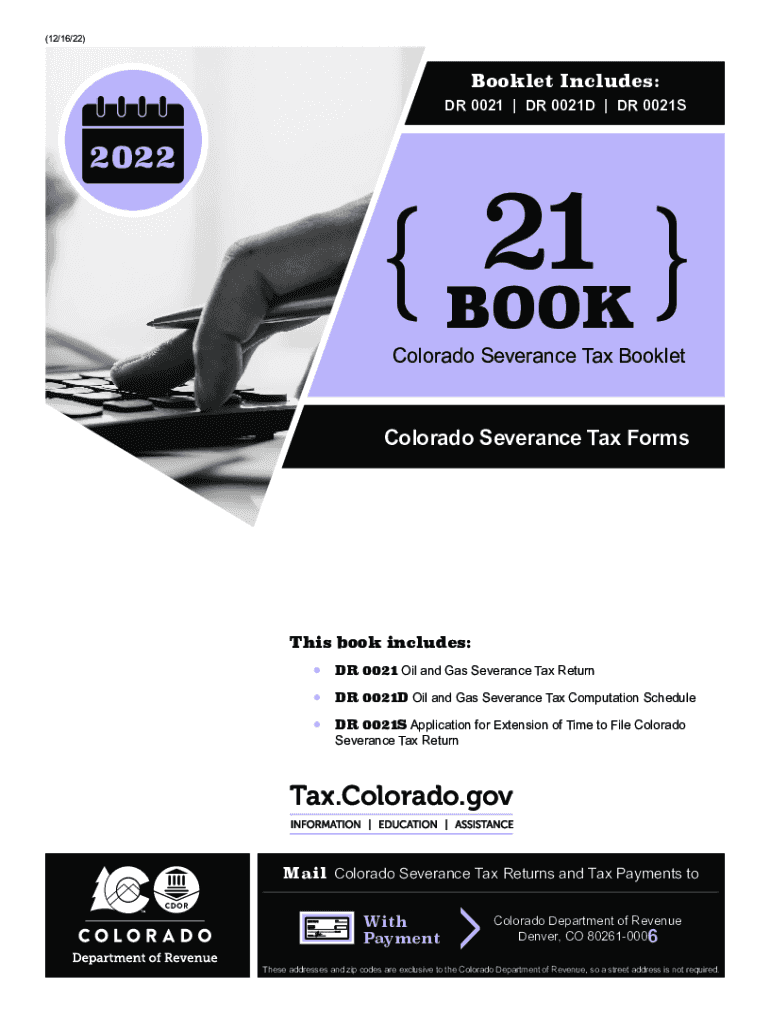
CO DoR DR0021 Booklet 2022 free printable template
pdfFiller is not affiliated with any government organization

Fill out
Complete the form online in a simple drag-and-drop editor.

eSign
Add your legally binding signature or send the form for signing.

Share
Share the form via a link, letting anyone fill it out from any device.

Export
Download, print, email, or move the form to your cloud storage.
Why pdfFiller is the best tool for your documents and forms


End-to-end document management
From editing and signing to collaboration and tracking, pdfFiller has everything you need to get your documents done quickly and efficiently.
Accessible from anywhere
pdfFiller is fully cloud-based. This means you can edit, sign, and share documents from anywhere using your computer, smartphone, or tablet.
Secure and compliant
pdfFiller lets you securely manage documents following global laws like ESIGN, CCPA, and GDPR. It's also HIPAA and SOC 2 compliant.
What is CO DoR DR0021 Booklet
The Colorado Oil and Gas Severance Tax Return is a tax document used by individuals and entities to report and pay severance taxes related to oil and gas production in Colorado.
pdfFiller scores top ratings on review platforms




Was looking for a fast PDF fillable form. I found it here. Even has e-sign which really makes me look professional. Always wanted to try it and now I'm glad I did.
Excellent choice. Love it. Very user-friendly
What do you like best?
We have used PDFFiller for years. I like the ability to use editing tools other apps charge extra for. The ability to use the mobile app was especially useful when we were in a bidding war for the purchase of our home. We were able to edit and sign purchase agreement on the fly.
What do you dislike?
User interface has not been updated in a while and feels a little clunky.
What problems are you solving with the product? What benefits have you realized?
We have clients sign documents and contracts. We are able to edit PDFs directly rather than scanning or retyping documents in a word prove easier.
What do you like best?
Able to quickly modify documents and create professional presentations.
What do you dislike?
Can't really think of any negatives. Maybe wish it were free.
What problems are you solving with the product? What benefits have you realized?
Easily convert invoices into delivery tickets. Cuts down on time spent creating documents.
What do you like best?
It is so easy to upload a document and make any edits to it. It saves you work so you can continue to use the same document! You can email, print or save PDF. Super helpful for property management when you have several notices!
What do you dislike?
Sometimes it's hard to make everything set up perfectly
What problems are you solving with the product? What benefits have you realized?
We are able to reuse the same document over and over!
What do you like best?
Being able to bill my clients in a timely manner
What do you dislike?
The fact that you cannot delete entries all at once
Recommendations to others considering the product:
It's a great program to use when your clients need to be billed on 1 500 claim form
What problems are you solving with the product? What benefits have you realized?
Being able to bill my clients
Who needs CO DoR DR0021 Booklet?
Explore how professionals across industries use pdfFiller.

CO DoR DR0021 Booklet is needed by:
-
Oil and gas producers operating in Colorado
-
Businesses receiving income from Colorado oil or gas
-
Tax professionals assisting clients with severance tax filings
-
Individuals involved in oil or gas extraction in Colorado
-
Accountants and tax preparers specializing in state tax forms
Comprehensive Guide to CO DoR DR0021 Booklet
Understanding the Colorado Oil and Gas Severance Tax Return
The Colorado Oil and Gas Severance Tax Return is a crucial document for taxpayers involved in the state’s oil and gas industry. It serves as a mechanism to report and pay severance taxes to the Colorado Department of Revenue. Understanding this form's significance is essential for compliance and financial accuracy.
Accurate filing helps taxpayers avoid penalties and ensures contributions to state resources, aiding in infrastructure and public services. This form aligns with regulations specified in the Colorado severance tax booklet.
Purpose and Benefits of the Colorado Oil and Gas Severance Tax Return
Filing the Colorado Oil and Gas Severance Tax Return offers several benefits to individuals and businesses. Maintaining accurate reports of oil and gas income is not only a legal obligation but also supports fair taxation practices. Compliance enhances the reputation of taxpayers and helps in risk mitigation during audits.
Moreover, timely filing qualifies taxpayers for potential deductions and credits specific to the oil and gas sector, encouraging healthy business practices.
Key Features of the Colorado Severance Tax Booklet
The Colorado Severance Tax Booklet provides essential resources for taxpayers. It includes several forms vital for a complete submission:
-
DR 0021 - Oil and Gas Severance Tax Return
-
DR 0021D - Oil and Gas Severance Tax Computation Schedule
-
DR 0021S - Application for Extension of Time to File Colorado Severance Tax Return
In addition, the booklet outlines comprehensive filing instructions, making it easier for taxpayers to understand their responsibilities and comply effectively.
Who Needs to File the Colorado Oil and Gas Severance Tax Return?
Taxpayers required to file the Colorado Oil and Gas Severance Tax Return include both individuals and entities engaged in oil and gas production. Obligations arise under various scenarios, such as producing oil or gas within the state or receiving income from such activities.
Entities like partnerships and corporations are also included in the filing requirements, ensuring that all parties contributing to Colorado’s economy participate in the taxation process.
When and How to File the Colorado Oil and Gas Severance Tax Return
The deadline for filing the Colorado Oil and Gas Severance Tax Return is the 15th day of the fourth month following the end of the taxable year. Taxpayers are encouraged to familiarize themselves with this timeline to avoid unnecessary penalties.
Forms can be submitted through various methods, including online platforms and traditional mail. Ensure you have access to the required forms online for a streamlined filing process.
Step-by-Step Guide to Filling Out the Colorado Oil and Gas Severance Tax Return
Completing the Colorado Oil and Gas Severance Tax Return involves detailed steps. Begin with filling out the DR 0021 form, paying special attention to each field’s requirements:
-
Provide accurate income figures derived from oil and gas production.
-
Ensure all deductions applicable to your situation are included.
-
Double-check the calculations to minimize errors.
Common errors include misreporting figures and failing to account for all relevant income streams. Be meticulous in your approach to avoid these pitfalls.
Submission and Confirmation Process for the Colorado Oil and Gas Severance Tax Return
Submitting the Colorado Oil and Gas Severance Tax Return can be done through online services or by mail. Each taxpayer should choose a method that suits their preference and ensures timely delivery.
After filing, keep track of your submission by confirming receipt. This can often be done online, providing peace of mind following your completion of the process.
Common Issues and Solutions Related to the Colorado Oil and Gas Severance Tax Return
Taxpayers may encounter several issues while filing the Colorado Oil and Gas Severance Tax Return. Common rejection reasons include discrepancies in reported income and failure to meet filing deadlines.
If a return is rejected, the process for correction involves reviewing the submission for errors and amending the return as necessary. Knowing how to check your application status can expedite resolutions.
Security and Compliance When Filing the Colorado Oil and Gas Severance Tax Return
When handling the sensitive information required for the Colorado Oil and Gas Severance Tax Return, security should be a priority. pdfFiller utilizes advanced security features, including 256-bit encryption, ensuring that your documents are safely managed and compliant with regulations.
Maintaining privacy during the tax filing process is essential for protecting your personal and financial information. Utilize reliable platforms to ensure document security.
Streamlining Your Colorado Severance Tax Filing with pdfFiller
pdfFiller offers a simple solution for completing the Colorado Oil and Gas Severance Tax Return, making the filing experience smoother. The platform allows users to edit, eSign, and submit forms efficiently from any browser.
Utilizing key features such as cloud storage, document editing tools, and eSignature capability enhances your ability to manage tax documents securely and effectively.
How to fill out the CO DoR DR0021 Booklet
-
1.To complete the Colorado Oil and Gas Severance Tax Return using pdfFiller, start by accessing the pdfFiller website and logging into your account. If you do not have an account, you will need to register for free.
-
2.Once you are logged in, use the search function to find the Colorado Oil and Gas Severance Tax Return form. You can enter keywords like 'DR 0021 form' or 'Colorado severance tax' to quickly locate the document.
-
3.After opening the form, carefully review the available fields. Ensure you have all necessary documents and information at hand, including details on oil and gas production, to accurately fill in the required fields on the form.
-
4.To navigate through the form, click on the individual fields to enter your data. pdfFiller allows you to type directly into text boxes and select options from dropdown menus for specific questions. Make sure to fill in all mandatory fields indicated by asterisks.
-
5.As you complete each section, regularly save your progress using pdfFiller’s save feature. This ensures that you won’t lose any information if you need to take a break or if there is a loss of internet connection.
-
6.Once you have filled in all required fields, carefully review the entire form for any errors or missing information. Utilize pdfFiller's preview option to see how your completed form will appear.
-
7.After confirming that all information is accurate, you can proceed to finalize your form. There will be options to save a copy, download the form in multiple formats, or submit it directly to the Colorado Department of Revenue if applicable.

Who needs to file the Colorado Oil and Gas Severance Tax Return?
The Colorado Oil and Gas Severance Tax Return must be filed by individuals or entities that generate income from the production of oil and gas in Colorado. This includes businesses directly involved in extraction and those receiving royalty payments.
What are the deadlines for filing this tax return?
The Colorado severance tax return must be filed annually by the 15th day of the fourth month after the end of the taxable year. Ensure you check specific dates annually to avoid penalties.
How can I submit my completed severance tax return?
You can submit your completed Colorado Oil and Gas Severance Tax Return electronically through platforms like pdfFiller or by mailing a printed copy to the Colorado Department of Revenue. Be sure to verify submission methods for any updates.
What documents do I need to submit with my tax return?
You will typically need information regarding your oil and gas production, income details, and any supporting documentation related to deductions. Review the instructions in the Colorado Severance Tax Booklet for specifics.
What common mistakes should I avoid when filing this form?
Common mistakes include neglecting to provide all required information, miscalculating severance tax amounts, and missing submission deadlines. Always double-check your entries and use guidance available in the booklet.
How long does it take to process the Colorado severance tax return?
Processing times can vary but generally expect a few weeks after submission. For more timely updates, contact the Colorado Department of Revenue or check your application status if submitted online.
Can I request an extension for filing my severance tax return?
Yes, you can apply for an extension to file your Colorado severance tax return using the DR 0021S form. Be sure to submit the extension request before the original deadline to avoid late penalties.
CO DoR DR0021 Booklet Form Versions
Related Content
Related Forms




Get the latest insights from our blog


If you believe that this page should be taken down, please follow our DMCA take down process
here
.
This form may include fields for payment information. Data entered in these fields is not covered by PCI DSS compliance.