
Last updated on
Nov 7, 2026
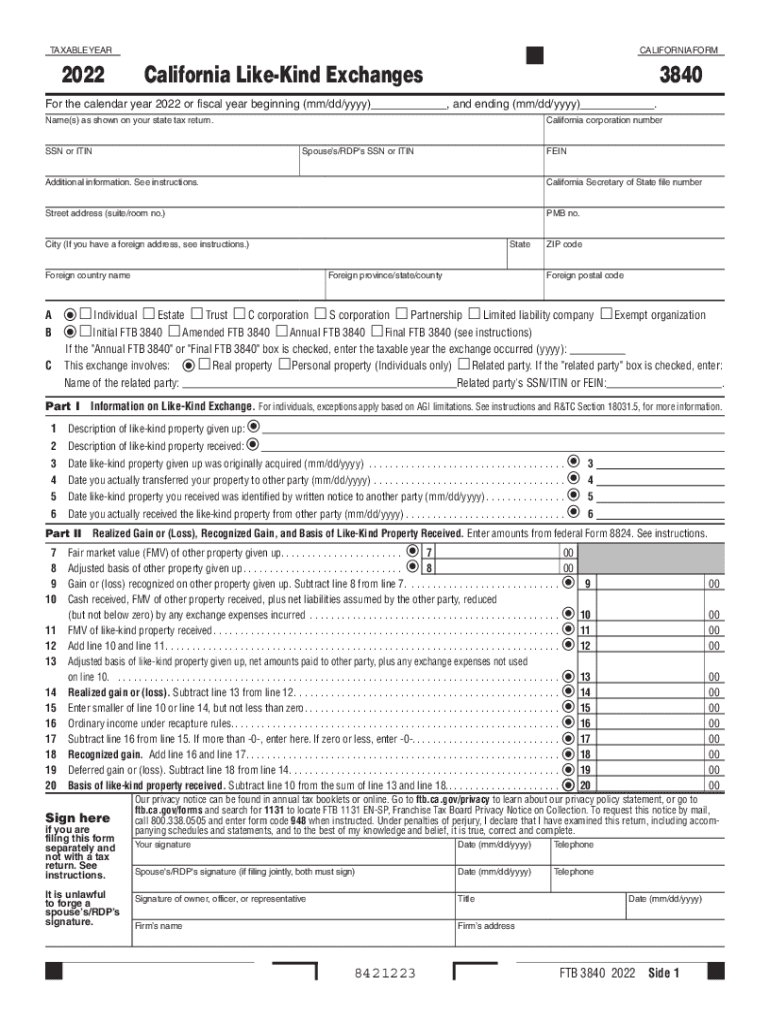
CA Form 3840 2022 free printable template
pdfFiller is not affiliated with any government organization

Fill out
Complete the form online in a simple drag-and-drop editor.

eSign
Add your legally binding signature or send the form for signing.

Share
Share the form via a link, letting anyone fill it out from any device.

Export
Download, print, email, or move the form to your cloud storage.
Why pdfFiller is the best tool for your documents and forms


End-to-end document management
From editing and signing to collaboration and tracking, pdfFiller has everything you need to get your documents done quickly and efficiently.
Accessible from anywhere
pdfFiller is fully cloud-based. This means you can edit, sign, and share documents from anywhere using your computer, smartphone, or tablet.
Secure and compliant
pdfFiller lets you securely manage documents following global laws like ESIGN, CCPA, and GDPR. It's also HIPAA and SOC 2 compliant.
What is CA Form 3840
The California Like-Kind Exchanges Form 3840 is a state tax document used by individuals and businesses in California to report like-kind exchanges of real or personal property.
pdfFiller scores top ratings on review platforms




Who needs CA Form 3840?
Explore how professionals across industries use pdfFiller.

CA Form 3840 is needed by:
-
California taxpayers completing state income tax returns
-
Married couples or RDPs filing jointly in California
-
Businesses engaging in property exchanges in California
-
Tax professionals assisting clients with California tax filings
-
Real estate investors reporting property transactions
-
Individuals exchanging real or personal property in California
Comprehensive Guide to CA Form 3840
What is the California Like-Kind Exchanges Form 3840?
The California Like-Kind Exchanges Form 3840 is a crucial document in California tax regulations, used to report like-kind exchanges of real or personal property. It enables taxpayers to accurately report property exchanges, ensuring compliance with state tax laws. Like-kind exchanges are property swaps that allow taxpayers to defer paying capital gains taxes on the exchanged properties under specific conditions.
This form serves as an official report when taxpayers exchange properties, detailing the properties involved and their relevant finances. For couples filing jointly, both the taxpayer and their spouse or registered domestic partner (RDP) must sign the form, affirming the information provided.
Purpose and Benefits of the California Like-Kind Exchanges Form 3840
The primary purpose of Form 3840 is to facilitate tax compliance for property exchanges in California. Accurate completion of this form can lead to several tax advantages, including potential tax deferrals on capital gains from property sales.
Taxpayers can benefit from completing Form 3840 in various scenarios, such as exchanging residential properties, commercial buildings, or investment properties. The form guarantees that property transactions are legally recognized and properly reported, thus avoiding penalties and ensuring tax benefits are realized.
Who Needs the California Like-Kind Exchanges Form 3840?
This form is essential for a broad range of taxpayers, including individuals and businesses engaged in property exchanges. Anyone who has participated in a like-kind exchange within California must file this form to report their transactions accurately.
For taxpayers filing jointly, it is crucial that both the taxpayer and spouse or RDP are involved in the filing process to ensure compliance. Common types of property exchanges eligible for Form 3840 include residential property swaps, exchanges of commercial real estate, and the exchange of similar personal properties.
Eligibility Criteria for Filing Form 3840
To qualify for filing Form 3840, the properties involved must be classified as like-kind, which generally includes properties of the same nature or character. Special attention must be given to the timing of the exchange, as it plays a critical role in determining eligibility.
Additionally, unique situations, such as exchanges involving mixed-use properties—where a property is used partially for business and partially for personal use—may have different criteria. Understanding these nuances is important for ensuring a successful filing.
How to Fill Out the California Like-Kind Exchanges Form 3840 Online
Filling out the California Like-Kind Exchanges Form 3840 online can be simplified by following these key steps:
-
Navigate to the section requiring the names as shown on your state tax return.
-
Provide your SSN or ITIN in the appropriate field for identification.
-
Detail the street address of the property exchanged.
-
Ensure to sign the form accurately, which is required for submission.
-
Utilize pdfFiller's user-friendly features to streamline the process, such as autofill and interactive guides.
These steps ensure that you provide all necessary information correctly, reducing the chances of errors.
Common Errors and How to Avoid Them
When completing Form 3840, taxpayers often make several common errors that can lead to complications, such as inaccuracies in property descriptions or incorrect dates. It is vital to confirm that all details align with the supporting documents related to the property exchanged.
To avoid these mistakes, double-check your information after filling out the form. Additionally, pay close attention to the required signatures and the dates they are affixed, as these can lead to disapprovals if not completed correctly.
Submission Methods for the California Like-Kind Exchanges Form 3840
After completing Form 3840, taxpayers have a choice between electronic submission and traditional paper filing. Each method has specific guidelines and deadlines that must be adhered to in order to ensure compliance.
When submitting electronically, verify the submission process outlined by the California tax authorities. For those opting to file by paper, be aware of any associated fees and the expected processing times post-submission. Understanding what to anticipate after submission can help manage taxpayer expectations effectively.
What Happens After You Submit the California Like-Kind Exchanges Form 3840?
Once you've submitted Form 3840, it is important to be aware of the subsequent steps involved. Processing times may vary, and keeping track of follow-up actions may be necessary to resolve any issues.
Taxpayers can check the status of their submission with local tax authorities. If you find discrepancies after submission, be mindful of the process to amend the form efficiently, ensuring that all inaccuracies are corrected promptly.
Security and Compliance in Handling the California Like-Kind Exchanges Form 3840
When using pdfFiller for completing Form 3840, users can rest assured about the security of their sensitive information. pdfFiller employs 256-bit encryption and complies with SOC 2 Type II, HIPAA, and GDPR regulations to safeguard your data.
Maintaining confidentiality is critical when handling financial documents, and pdfFiller’s secure eSigning options enhance this protection by ensuring that only authorized users can access and sign your forms.
Maximize Your Experience with pdfFiller: The Smart Way to Complete Form 3840
Leveraging pdfFiller not only simplifies the process of completing Form 3840 but also enhances the user experience with its advanced features. From eSigning capabilities to secure sharing options, pdfFiller efficiently meets your form-filling needs.
Potential users can benefit from special incentives, including free trials that make getting started easy and effective. Experience the convenience of filling out the California Like-Kind Exchanges Form 3840 with pdfFiller's intuitive tools and solutions.
How to fill out the CA Form 3840
-
1.Access pdfFiller and log in to your account. If you do not have an account, create one by providing necessary information.
-
2.In the search bar, type 'California Like-Kind Exchanges Form 3840' to locate the form and select it from the results.
-
3.Open the form on pdfFiller. Familiarize yourself with its structure, including all sections and fields you’ll need to fill out.
-
4.Gather all required information before starting. This may include property descriptions, dates of exchange, financial details, and identification numbers.
-
5.Begin filling out the form by clicking on the fields. Use the side toolbar to navigate between sections as needed.
-
6.Ensure you accurately enter your name(s) as shown on your state tax return, Social Security Number (SSN) or Individual Taxpayer Identification Number (ITIN), and street address.
-
7.Complete all fields, including checkboxes where applicable, and provide thorough details in any required descriptions.
-
8.Review your entries to ensure that all information is correct and complete. Pay attention to any highlighted fields indicating necessary input.
-
9.Once satisfied with your entries, proceed to finalize the form. Use the 'Submit' button or equivalent option in pdfFiller once ready.
-
10.You can save your completed form, download a copy as PDF, or submit it directly through pdfFiller, following the prompts as needed.

Who is eligible to use the California Like-Kind Exchanges Form 3840?
Individuals or businesses in California engaged in like-kind exchanges of real or personal property are eligible to use Form 3840. It applies specifically to taxpayers completing state income tax returns and those filing jointly with a spouse or RDP.
What is the deadline for submitting Form 3840?
The deadline for submitting the California Like-Kind Exchanges Form 3840 typically aligns with the state income tax filing deadline. Ensure submission by April 15th or the next business day if it falls on a weekend or holiday.
How do I submit the completed Form 3840?
Once you've filled out the California Like-Kind Exchanges Form 3840, you can submit it electronically through pdfFiller, or download and mail it to the appropriate California tax authority. Follow the instructions provided by pdfFiller for electronic submissions.
What supporting documents do I need for Form 3840?
When filing Form 3840, ensure you have supporting documents that verify your transactions, such as property deeds, financial records of the exchange, and identification numbers. These documents will help substantiate the information reported.
What are common mistakes to avoid when filling out Form 3840?
Common mistakes include omitting required fields, entering inaccurate property details, and failing to sign the form if applicable. Always double-check your entries to ensure accuracy before submission.
How long does it take for the form to be processed?
Processing times for the California Like-Kind Exchanges Form 3840 may vary. Typically, expect a few weeks if submitted by mail. Electronic submissions may be processed faster. Check the California tax authority's website for specific processing times.
Is notarization required for Form 3840?
No, notarization is not required for the California Like-Kind Exchanges Form 3840, but it must be signed by the taxpayer and spouse or RDP if filing jointly.
CA Form 3840 Form Versions
Related Forms




Get the latest insights from our blog



If you believe that this page should be taken down, please follow our DMCA take down process
here
.
This form may include fields for payment information. Data entered in these fields is not covered by PCI DSS compliance.