
Last updated on
Nov 7, 2026

CA FTB 100S 2022 free printable template
pdfFiller is not affiliated with any government organization

Fill out
Complete the form online in a simple drag-and-drop editor.

eSign
Add your legally binding signature or send the form for signing.

Share
Share the form via a link, letting anyone fill it out from any device.

Export
Download, print, email, or move the form to your cloud storage.
Why pdfFiller is the best tool for your documents and forms


End-to-end document management
From editing and signing to collaboration and tracking, pdfFiller has everything you need to get your documents done quickly and efficiently.
Accessible from anywhere
pdfFiller is fully cloud-based. This means you can edit, sign, and share documents from anywhere using your computer, smartphone, or tablet.
Secure and compliant
pdfFiller lets you securely manage documents following global laws like ESIGN, CCPA, and GDPR. It's also HIPAA and SOC 2 compliant.
What is CA FTB 100S
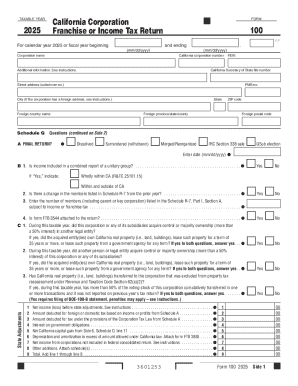
The California S Corporation 100S Form 2022 is a state tax return form used by S corporations in California to report their franchise or income tax for the taxable year 2022.
pdfFiller scores top ratings on review platforms




Who needs CA FTB 100S?
Explore how professionals across industries use pdfFiller.

CA FTB 100S is needed by:
-
S corporations based in California
-
Tax professionals assisting S corporations
-
Business officers required to sign tax forms
-
Entrepreneurs operating as S corporations
-
Accountants specializing in state tax returns
Comprehensive Guide to CA FTB 100S
What is the California S Corporation 100S Form 2022?
The California S Corporation 100S Form 2022 is a crucial state tax return form utilized by S corporations in California for reporting franchise or income tax. This form plays a significant role in ensuring compliance with state tax laws, facilitating the accurate reporting of essential financial details. To complete the form, specific financial information such as income, deductions, and credits must be provided, helping to determine the corporation's tax liability for the year.
Filing the California S Corporation tax return for 2022 is essential for maintaining compliance and avoiding potential penalties. Both the accuracy of the information reported and adherence to deadlines are critical factors in the filing process.
Purpose and Benefits of the California S Corporation 100S Form 2022
The California S Corporation 100S Form 2022 is necessary for S corporations as it directly impacts tax liabilities and compliance. Properly completing the form allows corporations to accurately report income, deductions, and credits, ultimately benefiting their financial health.
-
Ensures compliance with state tax obligations
-
Helps prevent penalties associated with late or incorrect filings
-
Facilitates the calculation of potential refunds or amounts owed
Who Needs the California S Corporation 100S Form 2022?
The individuals required to file the California S Corporation 100S Form include S corporations, which meet specific eligibility criteria set by the state. Generally, an S corporation is defined by its tax structure, whereby income is passed through to shareholders.
Corporation officers are mandated to sign the form, confirming that the information provided is accurate and complete. The form is ordinarily required during the tax season, making it vital for corporations to be aware of their filing obligations.
How to Fill Out the California S Corporation 100S Form 2022 Online (Step-by-Step)
To complete the California S Corporation 100S Form 2022 online, follow these steps:
-
Access the fillable form through an online document platform.
-
Carefully enter the required financial information in the relevant sections.
-
Review each section for completeness and accuracy before submission.
-
Submit the form electronically once all information is entered.
Utilizing a reliable online platform can enhance your experience and ensure that your submission meets all necessary requirements.
Field-by-Field Instructions for the California S Corporation 100S Form 2022
Each field in the California S Corporation 100S Form 2022 serves a specific purpose. Essential fields include:
-
Corporation name
-
California corporation number
-
Federal Employer Identification Number (FEIN)
-
Street address, City, State ZIP code
-
Date and signature of an authorized officer
Understanding the importance of each field can help in calculating tax liabilities correctly. Additionally, common errors occur when completing these fields, which can be avoided by double-checking the entered information.
Digital Signing and Submission Process for the California S Corporation 100S Form 2022
When submitting the California S Corporation 100S Form 2022, firms may opt for either a digital signature or a wet signature. The choice of signature type will depend on the submission method chosen.
-
Online submission is preferred for its convenience and speed.
-
Mail submissions are also acceptable but require careful attention to delivery times.
-
Timely submission is critical to avoiding late penalties.
Confirmation and Tracking for Your California S Corporation 100S Form 2022 Submission
Upon submission of the California S Corporation 100S Form 2022, a confirmation process will typically occur. This will allow users to track the status of their submission easily. Understanding common rejection reasons can help in rectifying issues quickly.
-
Common reasons for submission rejection include missing fields or incorrect data.
-
To resolve these issues, promptly review any feedback received post-submission.
Security and Compliance for Handling the California S Corporation 100S Form 2022
When managing sensitive documents like the California S Corporation 100S Form 2022, security and compliance are paramount. Data protection and privacy policies are integral to maintaining the integrity of sensitive information.
Utilizing secure platforms, such as pdfFiller, ensures compliance with regulations like HIPAA and GDPR, providing peace of mind for users handling their tax filings.
Utilizing pdfFiller for Your California S Corporation 100S Form 2022
pdfFiller offers a robust solution for managing the California S Corporation 100S Form 2022. The platform streamlines the process of filling out and eSigning the form, enhancing the user experience.
-
Features include editing abilities, document sharing, and secure storage options.
-
The ease of using pdfFiller ensures that users have a seamless experience in completing the form.
How to fill out the CA FTB 100S
-
1.Access pdfFiller and search for 'California S Corporation 100S Form 2022'. Locate the form in the search results and click on it to open the fillable document.
-
2.Navigate the form using pdfFiller’s interface. Use the mouse or tab key to move between fields efficiently.
-
3.Prior to completing the form, gather all necessary financial documents, including income statements, deduction records, and any applicable credit information.
-
4.Fill in the 'Corporation name', 'California corporation number', 'FEIN', 'Street address', 'City', 'State ZIP code'. Make sure all entered information is accurate and complete.
-
5.Review your entries carefully. Ensure all fields are filled out correctly, and there are no missing signatures or dates.
-
6.Finalize the form by clicking the 'Sign' feature. As an officer, ensure you sign and date the form where indicated.
-
7.After reviewing the completed form, save your work. Use the download option to save a copy, or choose 'Submit' if you are ready to file the form directly.

Who needs to file the California S Corporation 100S Form?
S corporations operating in California are required to file the California S Corporation 100S Form to report their franchise or income tax for the taxable year.
What is the deadline for submitting the California S Corporation 100S Form?
Typically, the form is due on the 15th day of the third month after the end of the taxable year. For the 2022 tax year, ensure you check for specific deadline adjustments.
Can the California S Corporation 100S Form be submitted electronically?
Yes, the form can be submitted electronically. Use approved methods or services that comply with California's e-file requirements.
What supporting documents are needed when filing this form?
You will need financial records, including profit and loss statements, documentation of deductions, and any credits claimed. It’s essential to have the S corporation's FEIN and California corporation number ready.
What common mistakes should be avoided when filling out the form?
Ensure all financial entries are accurate, double-check for missing signatures, and verify the correct FEIN and corporation number are used to avoid processing delays.
How long does it take to process the California S Corporation 100S Form?
Processing times can vary, but once submitted, it typically takes several weeks for the California tax authorities to process the form, especially during peak times.
Is notarization required for the California S Corporation 100S Form?
No, notarization is not required for the California S Corporation 100S Form. However, the form must be signed by an authorized officer of the corporation.
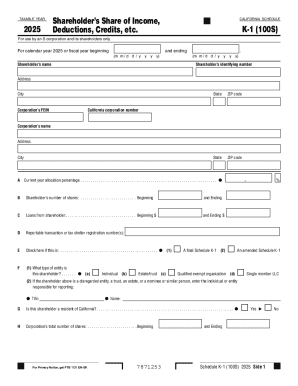
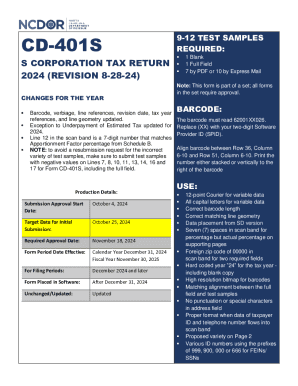
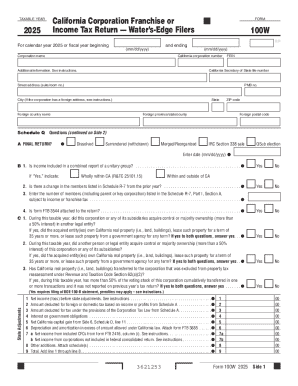
CA FTB 100S Form Versions
Related Content
Related Forms



Get the latest insights from our blog


If you believe that this page should be taken down, please follow our DMCA take down process
here
.
This form may include fields for payment information. Data entered in these fields is not covered by PCI DSS compliance.