
Last updated on
Oct 31, 2026
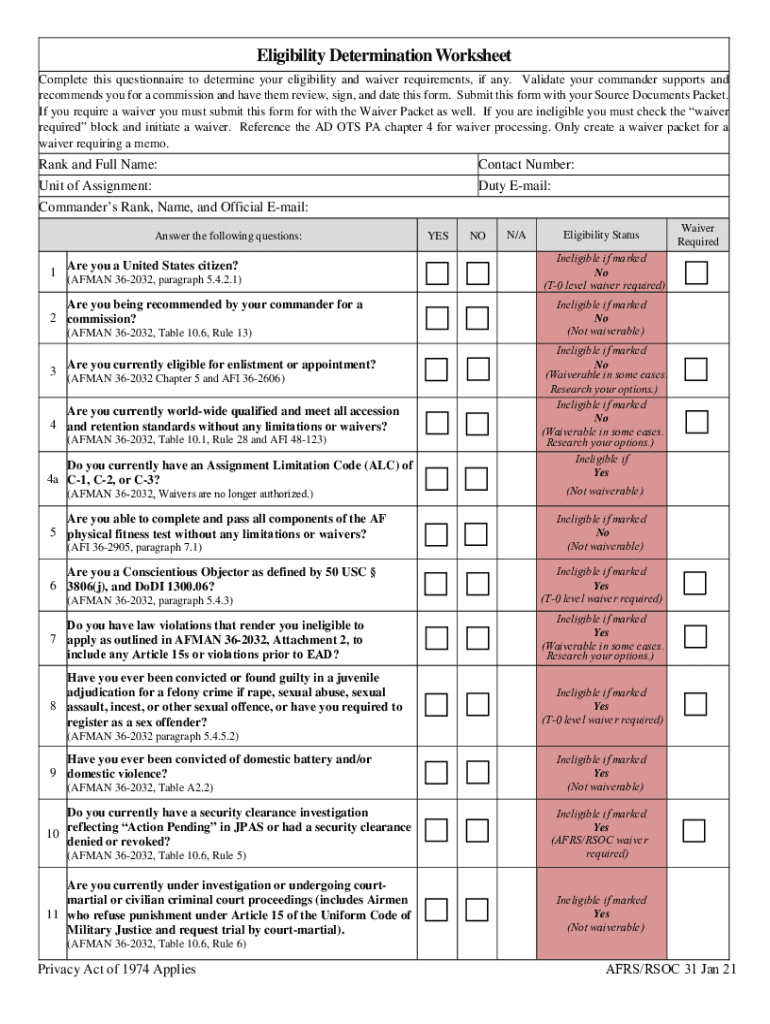
Get the free Eligibility Determination Worksheet
We are not affiliated with any brand or entity on this form

Fill out
Complete the form online in a simple drag-and-drop editor.

eSign
Add your legally binding signature or send the form for signing.

Share
Share the form via a link, letting anyone fill it out from any device.

Export
Download, print, email, or move the form to your cloud storage.
Why pdfFiller is the best tool for your documents and forms


End-to-end document management
From editing and signing to collaboration and tracking, pdfFiller has everything you need to get your documents done quickly and efficiently.
Accessible from anywhere
pdfFiller is fully cloud-based. This means you can edit, sign, and share documents from anywhere using your computer, smartphone, or tablet.
Secure and compliant
pdfFiller lets you securely manage documents following global laws like ESIGN, CCPA, and GDPR. It's also HIPAA and SOC 2 compliant.
What is Eligibility Worksheet
The Eligibility Determination Worksheet is an application form used by prospective U.S. Air Force officers to assess their eligibility for military commission.
pdfFiller scores top ratings on review platforms




Who needs Eligibility Worksheet?
Explore how professionals across industries use pdfFiller.

Eligibility Worksheet is needed by:
-
Air Force applicants seeking commission eligibility
-
Unit Commanders for reviewing applicant submissions
-
Military personnel applying for waivers
-
Recruitment officers assessing candidate qualifications
-
Administrative staff managing application processes
Comprehensive Guide to Eligibility Worksheet
What is the Eligibility Determination Worksheet?
The Eligibility Determination Worksheet is a crucial form for those applying for a military commission in the U.S. Air Force. It serves to confirm the applicant's eligibility status and streamline the commission application process. Completing this eligibility determination worksheet is essential for prospective officers, as it ensures adherence to military guidelines and regulations.
This form plays a vital role in assessing applicants, referencing official documentation such as AFMAN 36-2032 and AFI 36-2606 for compliance and accuracy in the application process.
Purpose and Benefits of the Eligibility Determination Worksheet
The Eligibility Determination Worksheet is indispensable for applicants pursuing a military commission. It aids in evaluating eligibility concerning citizenship, legal status, and military service history.
-
This form enables a streamlined application process by clearly outlining eligibility criteria.
-
It fosters better communication with unit commanders, ensuring all necessary details are thoroughly reviewed.
-
Adhering to military guidelines when completing this worksheet is essential to prevent any unnecessary delays in application processing.
Who Needs to Complete the Eligibility Determination Worksheet?
The target audience for the Eligibility Determination Worksheet primarily includes applicants seeking military commissioning, as well as unit commanders responsible for the verification process. Both parties have specific roles in the completion and signing of this form.
-
Applicants must provide accurate personal details and may need this worksheet if they are seeking military waivers.
-
Unit commanders are tasked with reviewing and signing the completed form to affirm the applicant's eligibility.
-
This worksheet is a fundamental component of the broader military service eligibility verification process.
How to Fill Out the Eligibility Determination Worksheet Online with pdfFiller
Using pdfFiller to fill out the Eligibility Determination Worksheet online offers several advantages. Here are step-by-step instructions to guide applicants through the digital process:
-
Access the worksheet through the pdfFiller platform.
-
Complete the required fields, including “Rank and Full Name” and “Commander’s Rank, Name, and Official E-mail.”
-
Utilize fillable fields for ease of editing and error reduction.
-
Once completed, leverage pdfFiller’s eSigning capabilities for straightforward submission.
-
Share the document with necessary parties, ensuring all signatures are obtained.
Essential Information You Need to Gather Before Filling Out the Form
Before completing the Eligibility Determination Worksheet, gather all required documents and information to ensure a smooth process. Key items include:
-
Your personal information, including citizenship proof and military history.
-
Supporting documents that validate your eligibility.
-
Familiarity with specific regulations or guidelines associated with the form, such as AFMAN 36-2032.
Organizing this information beforehand will help in preventing errors during the completion of the form.
Common Mistakes to Avoid When Completing the Eligibility Determination Worksheet
To enhance the accuracy of your application, be aware of typical errors that often occur when filling out the Eligibility Determination Worksheet. Here are some common mistakes to avoid:
-
Incomplete or incorrect information in vital fields can lead to potential application rejections.
-
Failure to review and validate submitted details may result in unnecessary application delays.
-
Utilizing a checklist to ensure all fields are appropriately filled can assist in minimizing errors.
Submission Methods for the Eligibility Determination Worksheet
Upon completing and signing the Eligibility Determination Worksheet, it’s crucial to understand how to submit the form correctly. The submission process includes the following:
-
Choose between digital delivery options or physical mailing, based on your preference.
-
Be aware of any submission deadlines to ensure timely processing of your application.
-
If confirmation of submission is not received, follow up with the appropriate channels to verify that your application was received.
What Happens After You Submit the Eligibility Determination Worksheet?
After submitting the Eligibility Determination Worksheet, applicants will enter a waiting period for approval. Here’s what you can expect:
-
Applicants can track their application status through designated military channels.
-
Possible outcomes include acceptance, requests for additional information, or outright rejections.
-
In case of rejection, applicants should consult guidelines on resubmission or required amendments.
Security and Compliance When Handling the Eligibility Determination Worksheet
Handling the Eligibility Determination Worksheet involves ensuring confidentiality and compliance. pdfFiller prioritizes security with features that include:
-
256-bit encryption to protect sensitive data and personal information.
-
Compliance with HIPAA and GDPR regulations, providing assurance regarding privacy.
-
Guidance on safe storage and sharing practices for completed forms, promoting security during the application process.
Leverage pdfFiller to Streamline Your Application Process
To enhance your form-filling experience, utilizing pdfFiller can simplify the process significantly. Consider these benefits:
-
Access to features such as filling, signing, and sharing enhances overall efficiency.
-
User testimonials often reflect improved success rates due to the ease of digital document management.
-
Starting a free trial can provide insight into how pdfFiller can assist in your eligibility determination worksheet completion.
How to fill out the Eligibility Worksheet
-
1.To access the Eligibility Determination Worksheet on pdfFiller, visit the pdfFiller website and use the search bar to find the form by its name.
-
2.Once opened, familiarize yourself with the fillable fields and checkboxes available on the form.
-
3.Before starting to fill out the form, gather all necessary information such as your rank, citizenship status, military service history, and commander details.
-
4.Begin completing the fields by clicking on each fillable area. Enter your personal information accurately in the designated spaces provided.
-
5.Ensure you fill out all required sections, particularly the ones that require explicit certification of the information you provide.
-
6.After entering your information, review all entries carefully for any errors or omissions to ensure accuracy.
-
7.Once satisfied with your information, make sure to click the submit button to finalize the completion of the form.
-
8.Lastly, save your completed form by clicking on the download option to secure a copy for your records, or use the submit feature to send it directly to the relevant authorities.

What are the eligibility requirements for the Eligibility Determination Worksheet?
To be eligible, applicants must answer questions regarding their citizenship, legal status, and military history. It is essential to ensure all information is truthful and complete.
Is there a deadline for submitting the Eligibility Determination Worksheet?
While specific deadlines may vary, it is crucial to submit the worksheet as part of the Source Documents Packet in a timely manner to avoid delays in processing your application.
How do I submit the Eligibility Determination Worksheet after completing it?
You can submit the completed worksheet through the pdfFiller platform by using the submission option or download it and send it via email or traditional mail as instructed.
What supporting documents do I need to submit with the worksheet?
Accompanying documents typically include proof of citizenship, military service records, and any necessary waivers that support your application.
What common mistakes should I avoid when filling out the worksheet?
Common mistakes include providing inaccurate information, missing signatures, or neglecting to date the form. Ensure all fields are filled out completely and correctly.
How long does it take to process the Eligibility Determination Worksheet?
Processing times can vary based on several factors, but it generally takes a few weeks. Ensure your application is complete to minimize delays.
Do I need to notarize the Eligibility Determination Worksheet?
No, notarization is not required for the Eligibility Determination Worksheet, but you must have the necessary signatures as outlined in the form.
Related Forms


Get the latest insights from our blog


If you believe that this page should be taken down, please follow our DMCA take down process
here
.
This form may include fields for payment information. Data entered in these fields is not covered by PCI DSS compliance.