
Last updated on
Oct 31, 2026
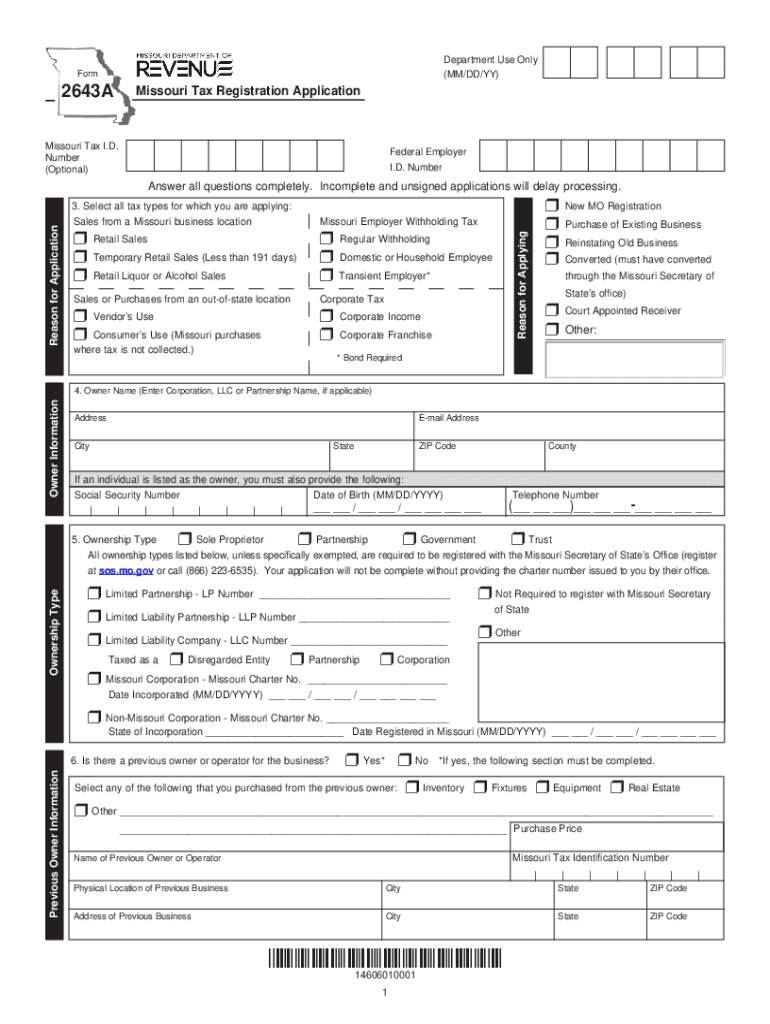
MO 2643A 2023 free printable template
pdfFiller is not affiliated with any government organization

Fill out
Complete the form online in a simple drag-and-drop editor.

eSign
Add your legally binding signature or send the form for signing.

Share
Share the form via a link, letting anyone fill it out from any device.

Export
Download, print, email, or move the form to your cloud storage.
Why pdfFiller is the best tool for your documents and forms


End-to-end document management
From editing and signing to collaboration and tracking, pdfFiller has everything you need to get your documents done quickly and efficiently.
Accessible from anywhere
pdfFiller is fully cloud-based. This means you can edit, sign, and share documents from anywhere using your computer, smartphone, or tablet.
Secure and compliant
pdfFiller lets you securely manage documents following global laws like ESIGN, CCPA, and GDPR. It's also HIPAA and SOC 2 compliant.
What is MO 2643A
The Missouri Tax Registration Application is a state tax form used by businesses and individuals to register for various tax types in Missouri.
pdfFiller scores top ratings on review platforms




Who needs MO 2643A?
Explore how professionals across industries use pdfFiller.

MO 2643A is needed by:
-
Business owners seeking to register for a Missouri tax ID.
-
Officers or partners of businesses needing to complete tax registrations.
-
Individuals filing for state income tax returns in Missouri.
-
Companies applying for sales tax registration in Missouri.
-
Employers looking to set up withholding tax accounts in Missouri.
Comprehensive Guide to MO 2643A
What is the Missouri Tax Registration Application?
The Missouri Tax Registration Application is a critical form for businesses and individuals seeking to register for various tax types in Missouri. Its primary function is to gather essential information that determines a business's tax obligations and filing frequency. This application is typically used by business owners, officers, or partners who need to comply with tax regulations in the state.
Using the Missouri tax registration application ensures that all business activities are accounted for in the state's tax system. The form helps in establishing a tax identification number and sets the groundwork for future tax filings.
Purpose and Benefits of the Missouri Tax Registration Application
Registering with the Missouri Tax Registration Application is vital for maintaining compliance with state tax laws. By properly registering, businesses can avoid potential legal issues related to tax evasion or non-compliance. Furthermore, this registration aids businesses in accurately determining their tax obligations based on the nature of their operations.
The benefits of completing this form include streamlined tax reporting, eligibility for various tax deductions, and compliance with state regulations. Proper registration ensures that businesses can participate fully in the Missouri economy.
Eligibility Criteria for the Missouri Tax Registration Application
Eligibility for the Missouri Tax Registration Application extends to various ownership structures. These include sole proprietors, partnerships, corporations, and limited liability companies (LLCs). Before applying, individuals must ensure they have the necessary documentation, which may include identification, proof of residence, and any required business licenses.
-
Sole proprietors
-
Partnerships
-
Corporations
-
Limited liability companies (LLCs)
Understanding these eligibility criteria is crucial for streamlining the registration process and avoiding unnecessary delays.
Key Features of the Missouri Tax Registration Application
The Missouri Tax Registration Application contains several key features essential for accurately capturing business information. Important sections include fields for the owner's name, business address, and Social Security Number. Each detail is vital to ensure that the application is processed effectively and without errors.
Completeness and accuracy are essential when filling out the form. It is recommended to follow the instructions provided with the application closely, as incomplete submissions can lead to delays. Specific directives emphasize the need for thorough answers to all questions posed in the application.
How to Fill Out the Missouri Tax Registration Application Online (Step-by-Step)
Filling out the Missouri Tax Registration Application online is an accessible process. To begin, navigate to the Missouri tax registration form using pdfFiller. Follow these step-by-step instructions:
-
Access the Missouri Tax Registration Application on pdfFiller.
-
Enter the required information in the designated fields including Owner Name and Address.
-
Double-check that all fields are correctly filled out for accuracy.
-
Submit the application following the required submission process.
Adhering to these steps can help avoid processing delays and ensure that your application is correctly submitted.
Common Errors and How to Avoid Them
When completing the Missouri Tax Registration Application, there are several common errors to watch out for. Incomplete applications often lead to delays; therefore, ensuring that every section is filled out correctly is crucial. Additionally, missing signatures can cause rejection, especially if the form is not signed by the owner or relevant officers.
-
Check for completeness
-
Ensure appropriate signatures are included
-
Verify all information is accurate
Before submission, double-checking all entries can significantly reduce the possibility of encountering these errors.
How to Submit the Missouri Tax Registration Application
Submitting the Missouri Tax Registration Application can be accomplished through multiple methods. These include online submission via pdfFiller and mailing the application directly to the Missouri Department of Revenue. Users should be aware of any associated fees that may apply based on the submission method they choose.
When mailing the application, ensure it is sent to the correct address, as indicated in the form instructions. Proper submission is essential for timely processing.
What Happens After You Submit the Missouri Tax Registration Application
Once the Missouri Tax Registration Application is submitted, businesses can expect a processing period during which their application is reviewed. Typically, processing times may vary depending on the volume of applications received. Users can confirm the receipt of their application by contacting the Missouri Department of Revenue.
To check the application status, follow up with the department and inquire about potential next steps if any issues arise with the submitted application.
Security and Compliance for the Missouri Tax Registration Application
When filing the Missouri Tax Registration Application online through pdfFiller, users can trust their information is secure. pdfFiller employs 256-bit encryption to protect sensitive data, ensuring compliance with regulations such as HIPAA and GDPR. This commitment to security fosters trust and confidence when handling personal and business information during the registration process.
Start Using pdfFiller to Complete Your Missouri Tax Registration Application
pdfFiller offers an efficient platform for completing the Missouri Tax Registration Application. Users benefit from the ability to easily edit and fill in necessary information, along with features that streamline the signing process. Utilizing pdfFiller not only simplifies form completion but also enhances security, making it an ideal choice for handling sensitive documents.
How to fill out the MO 2643A
-
1.Begin by accessing the Missouri Tax Registration Application form on pdfFiller by searching for the form name or using the provided link.
-
2.Open the form and familiarize yourself with the layout, which includes various fields, checkboxes, and instructions.
-
3.Before completing the application, gather necessary information such as your business owner details, address, Social Security Number, and date of birth.
-
4.Using pdfFiller's interface, start filling in the required fields, ensuring that all information is accurate and up-to-date.
-
5.Pay close attention to sections that require checks for ownership types and taxable sales or purchases.
-
6.As you fill out the document, ensure you answer all questions completely, as incomplete forms may delay processing.
-
7.After filling in all required fields, review the entire application for any errors or oversight.
-
8.Once everything is complete, electronically sign the document where required, ensuring both owners and any relevant officers sign as necessary.
-
9.Finally, to save your work, use the save function in pdfFiller. You can download the completed form or submit it directly through the platform, following any additional instructions provided.

Who is eligible to file the Missouri Tax Registration Application?
Any business owner, officer, or authorized partner/member of a company that operates in Missouri and needs to register for taxes can complete this application.
What is the deadline for submitting the Missouri Tax Registration Application?
The application should be submitted as soon as you start your business operations in Missouri or when you reach a taxable threshold that requires registration.
How do I submit the completed application?
You can submit the completed Missouri Tax Registration Application through pdfFiller by using their direct submission features or by downloading and mailing it to the appropriate state department.
What supporting documents are required with the application?
Typically, you need to provide personal identification details and any documentation that demonstrates the nature of your business, depending on the tax type for which you are registering.
What are common mistakes to avoid while filling out the form?
Ensure all fields are completed accurately and avoid leaving any sections empty, as incomplete applications can delay processing. Double-check ownership signatures and tax types selected.
How long will it take to process my application?
Processing times can vary but usually take several weeks. It's advisable to check for specific timelines on the Missouri Department of Revenue's website.
Can I modify my application after submission?
Once submitted, you typically cannot modify the application. If changes are needed, it's best to contact the Missouri Department of Revenue for guidance on how to proceed.
MO 2643A Form Versions
Related Content
Related Forms





Get the latest insights from our blog


If you believe that this page should be taken down, please follow our DMCA take down process
here
.
This form may include fields for payment information. Data entered in these fields is not covered by PCI DSS compliance.