
Last updated on
Oct 31, 2026

Frank Phillips College Safety Training Center Fit Testing Form 2009-2026 free printable template
pdfFiller is not affiliated with any government organization

Fill out
Complete the form online in a simple drag-and-drop editor.

eSign
Add your legally binding signature or send the form for signing.

Share
Share the form via a link, letting anyone fill it out from any device.

Export
Download, print, email, or move the form to your cloud storage.
Why pdfFiller is the best tool for your documents and forms


End-to-end document management
From editing and signing to collaboration and tracking, pdfFiller has everything you need to get your documents done quickly and efficiently.
Accessible from anywhere
pdfFiller is fully cloud-based. This means you can edit, sign, and share documents from anywhere using your computer, smartphone, or tablet.
Secure and compliant
pdfFiller lets you securely manage documents following global laws like ESIGN, CCPA, and GDPR. It's also HIPAA and SOC 2 compliant.
What is Frank Phillips College Safety Training Center Fit Testing Form
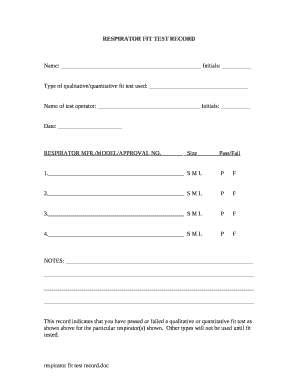
The Respirator Fit Test Registration Form is a medical consent document used by personnel to register for respirator fit testing at the Frank Phillips College Safety Training Center in Borger, Texas.
pdfFiller scores top ratings on review platforms




Who needs Frank Phillips College Safety Training Center Fit Testing Form?
Explore how professionals across industries use pdfFiller.

Frank Phillips College Safety Training Center Fit Testing Form is needed by:
-
Employees needing fit testing for respirators
-
Safety officers at companies requiring respirator compliance
-
Human resources personnel coordinating employee health and safety
-
Medical professionals conducting respirator evaluations
-
Training coordinators at safety training centers
Comprehensive Guide to Frank Phillips College Safety Training Center Fit Testing Form
What is the Respirator Fit Test Registration Form?
The Respirator Fit Test Registration Form is designed to capture essential information from personnel registering for respirator fit testing at the Frank Phillips College Safety Training Center. Its primary purpose is compliance with safety regulations that ensure both employee and employer safety. This form plays a critical role in ensuring that respirators fit properly, which is vital for effective respiratory protection in various work environments.
Purpose and Benefits of the Respirator Fit Test Registration Form
This registration form aims to streamline the process of organizing respirator fit tests, ensuring that all relevant data is collected efficiently. By completing this form, workplaces can maintain compliance with health standards that mandate respirator testing. Employers benefit from reduced liability, while employees gain peace of mind knowing they are protected properly in hazardous conditions.
Who Needs the Respirator Fit Test Registration Form?
The individuals required to fill out this form include healthcare workers, industrial personnel, and others whose roles necessitate the use of respirators. Company policies typically dictate who must undergo fit testing, and understanding these roles is crucial for maintaining workplace safety. Ensuring that the correct personnel complete the form assists in adhering to safety regulations effectively.
Eligibility Criteria for the Respirator Fit Test Registration Form
To register for testing, individuals must meet specific requirements. This includes obtaining medical clearance if necessary, particularly for those in sensitive roles. Various industries mandate fit testing, making it essential to verify eligibility before submission. Being aware of these eligibility criteria helps prevent delays in the testing process.
How to Fill Out the Respirator Fit Test Registration Form Online (Step-by-Step)
Filling out the Respirator Fit Test Registration Form can be done efficiently using the pdfFiller platform. Here’s how to navigate the process:
-
Access the form on pdfFiller’s website.
-
Fill in your 'Name' and 'Title' accurately.
-
Provide the 'PO #' as required.
-
Select the type of respirator by checking the appropriate boxes.
-
Review all entries for common mistakes before submission.
Field-by-Field Instructions for the Respirator Fit Test Registration Form
Understanding each fillable field on the Respirator Fit Test Registration Form is crucial to ensure successful completion. Key fields include:
-
Name: Full name of the participant.
-
Title: Job title to provide context for the testing.
-
Date: The date of submission.
-
PO #: Purchase order number for billing purposes.
-
Type of Respirator: Check the correct box indicating the respirator type.
Accuracy in these fields is paramount to avoid delays in the testing process.
How to Submit the Respirator Fit Test Registration Form
Submitting the Respirator Fit Test Registration Form can be done through various methods, including email and online submission via pdfFiller. It’s essential to adhere to submission deadlines to maintain compliance with testing schedules. Late submissions can result in rescheduling the test, potentially impacting workplace safety protocols.
Security and Compliance for the Respirator Fit Test Registration Form
Utilizing pdfFiller for managing the Respirator Fit Test Registration Form ensures high-level security for sensitive information. The platform complies with HIPAA and GDPR regulations, safeguarding medical and personal data during the registration process. Best practices in document security should always be followed to protect the integrity of user information.
Sample or Example of a Completed Respirator Fit Test Registration Form
Providing a visual example or detailed description of a completed Respirator Fit Test Registration Form is beneficial for users. This example serves as a guide and clarifies common areas where users may have questions, thus ensuring that they fill out the form correctly according to the specifications.
Maximize Your Efficiency with pdfFiller for Form Management
Leveraging pdfFiller for the completion and management of the Respirator Fit Test Registration Form enhances efficiency. The platform offers features like electronic signing, editing options, and secure sharing capabilities. These tools contribute to a user-friendly experience, essential for ensuring compliance during safety training.
How to fill out the Frank Phillips College Safety Training Center Fit Testing Form
-
1.To access the Respirator Fit Test Registration Form on pdfFiller, go to their website and log in or create an account if you don't have one.
-
2.Use the search bar on the portal to find the Respirator Fit Test Registration Form by entering its name.
-
3.Once you find the form, click on it to open the document in the pdfFiller editor.
-
4.Before completing the form, gather the necessary information about the employee, including their name, title, and the type of respirator they will be using.
-
5.Fill in the 'Name' and 'Title' fields with the respective information.
-
6.Enter the 'Date' of the testing and any relevant 'PO #' if applicable.
-
7.When selecting the 'Type of Respirator to test', click on the appropriate checkbox to indicate your choice.
-
8.Ensure all fillable fields are completed accurately to avoid processing delays.
-
9.Once all information is entered, review the document for any errors or missing details.
-
10.After you are satisfied with your entries, save the form by clicking the save icon in the top right corner of the editor.
-
11.To download the final document, select the download option, and choose your preferred format.
-
12.If you need to submit it directly, follow the instructions on your organization’s submission process or email it to the Safety Training Center.

Who is eligible to fill out the Respirator Fit Test Registration Form?
Any employee who requires a respirator fit test for their job duties is eligible to fill out the Respirator Fit Test Registration Form. It's essential for ensuring compliance with safety regulations.
What is the deadline for submitting the form?
It is recommended to submit the Respirator Fit Test Registration Form well in advance of the testing date to ensure scheduled participation. Check with the Safety Training Center for specific submission deadlines.
How do I submit the completed form?
After completing the Respirator Fit Test Registration Form on pdfFiller, you can email it to the Frank Phillips College Safety Training Center. Check for any required formats or guidelines for submission.
What supporting documents may be required alongside the form?
Generally, you may need to provide employee identification and any previous medical clearance documents if applicable, to ensure the process is smooth and compliant with safety standards.
What are some common mistakes to avoid when filling out the form?
Common mistakes include leaving mandatory fields blank, entering incorrect information, and not reviewing the document before submission. Ensure all fields are filled and checked for accuracy.
What is the typical processing time for this form?
Processing times may vary, but typically, results and confirmations are communicated within a few days after the completed form is submitted. Reaching out to the testing center will provide you with detailed timelines.
Can I edit the form after saving it?
Yes, you can re-access the Respirator Fit Test Registration Form on pdfFiller and edit the entries before final submission, as long as you have saved your work initially.
Related Content
Related Forms




Related Catalogs
Get the latest insights from our blog



If you believe that this page should be taken down, please follow our DMCA take down process
here
.
This form may include fields for payment information. Data entered in these fields is not covered by PCI DSS compliance.