
Last updated on
Nov 9, 2026

AU Wildlife Admission Form 2009 free printable template
We are not affiliated with any brand or entity on this form

Fill out
Complete the form online in a simple drag-and-drop editor.

eSign
Add your legally binding signature or send the form for signing.

Share
Share the form via a link, letting anyone fill it out from any device.

Export
Download, print, email, or move the form to your cloud storage.
Why pdfFiller is the best tool for your documents and forms


End-to-end document management
From editing and signing to collaboration and tracking, pdfFiller has everything you need to get your documents done quickly and efficiently.
Accessible from anywhere
pdfFiller is fully cloud-based. This means you can edit, sign, and share documents from anywhere using your computer, smartphone, or tablet.
Secure and compliant
pdfFiller lets you securely manage documents following global laws like ESIGN, CCPA, and GDPR. It's also HIPAA and SOC 2 compliant.
What is AU Wildlife Admission Form
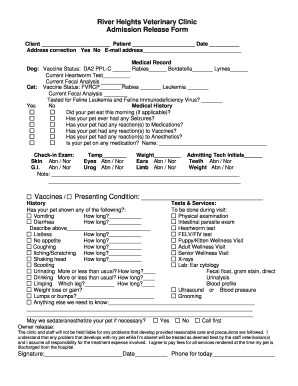
The Wildlife Admission Form is a medical consent document used by donors to provide essential information for the admission of wildlife to a veterinary clinic for evaluation and treatment.
pdfFiller scores top ratings on review platforms




Very good and interesting piece of…
Very good and interesting piece of software but sort of expensive.
Customer service is second to none
Customer service is second to none - this company's first priority is your satisfaction. I wanted to try this product and was enabled to do so because of the money-back guarantee. Great experience ;)
Liked everything
Liked everything. Easy to find the IRS forms I needed. Wish fill forms could do the math too
A great way to keep records for my…
A great way to keep records for my homeschool!
I subscribed to a trial of this…
I subscribed to a trial of this software after no longer having full access to Adobe Acrobat. It was such an easy to use alternative, and more affordable per year. They also have an excellent, and very efficient customer support team. I recommend PDFFiller to any individual or business in need of a solid pdf. editing solution.
It's great you can go back and fill in…
It's great you can go back and fill in older forms online.
Who needs AU Wildlife Admission Form?
Explore how professionals across industries use pdfFiller.

AU Wildlife Admission Form is needed by:
-
Wildlife rehabilitators seeking to document animal admissions.
-
Veterinarians managing wildlife health and treatment.
-
Donors involved in animal rescue initiatives.
-
Animal control officers needing to report wildlife cases.
-
Conservation organizations arranging animal assessments.
Comprehensive Guide to AU Wildlife Admission Form
What is the Wildlife Admission Form?
The Wildlife Admission Form serves a crucial role in documenting the admission of wildlife animals into veterinary clinics for assessment and treatment. This form is essential for ensuring accurate records of each animal's condition and care, which directly impacts the effectiveness of their treatment. It establishes a vital link between veterinary clinics and wildlife rehabilitators, facilitating coordinated care for injured or distressed animals.
By utilizing this wildlife admission form, donors contribute valuable information that aids in the overall treatment process, making it a key component in wildlife care.
Purpose and Benefits of Using the Wildlife Admission Form
This form is designed to collect accurate and relevant information about each animal, enhancing care outcomes significantly. Accurate data, such as the location where the animal was found and reasons for admission, allows veterinary clinics to tailor their treatment effectively.
Utilizing a structured documentation approach leads to improved care efficiency, ensuring that every animal receives the attention they need quickly and effectively. The animal rescue form not only streamlines the process but also enhances the overall quality of care provided.
Who Needs the Wildlife Admission Form?
The wildlife admission form is primarily for donors, including pet owners and wildlife enthusiasts, who encounter injured or orphaned wildlife. It is vital for donors to provide accurate details as these assist in the animal's treatment journey.
Specific scenarios warrant the use of this form, such as finding injured wildlife in natural habitats or reporting animals in distress. Understanding who qualifies as a donor is important for ensuring that all necessary information is provided.
How to Fill Out the Wildlife Admission Form Online (Step-by-Step)
Filling out the Wildlife Admission Form online is straightforward with pdfFiller. Follow these steps for a smooth process:
-
Access the form on pdfFiller's platform.
-
Enter your personal details in the specified fields.
-
Provide information about the wildlife animal, including its condition and location found.
-
Review all entered information before submission.
-
Utilize features such as editable fields and save options to ensure accuracy.
Common mistakes to avoid include skipping required fields and submitting without double-checking information. Ensuring all details are accurate enhances the form's effectiveness in aiding wildlife treatment.
Essential Information and Documents Required for the Wildlife Admission Form
To complete the Wildlife Admission Form accurately, certain critical fields must be filled out:
-
Details of the animal, including species and condition.
-
Location where the animal was found.
-
Reason for the animal's admission.
-
Your contact information for follow-up purposes.
A pre-filing checklist can be beneficial to ensure all necessary information and documents are gathered before starting the form. The donor's contact information is essential for any required follow-ups regarding the animal's treatment.
Digital Signing of the Wildlife Admission Form: A Quick Guide
Digital signing has become an essential feature for submitting the Wildlife Admission Form. Understanding the differences between digital and wet signatures is crucial as digital signatures are not only convenient but also secure.
To digitally sign the form using pdfFiller, follow this procedure:
-
Open the Wildlife Admission Form in pdfFiller.
-
Select the digital signing option available.
-
Follow the prompts to complete your signature.
Digital signatures are legally binding and comply with regulations, providing peace of mind regarding the security and validity of documentation.
Where to Submit the Wildlife Admission Form
After completing the Wildlife Admission Form, submission can occur at various locations depending on the chosen method. Potential submission locations include:
-
Veterinary clinics.
-
Wildlife rehabilitators and rescue organizations.
Alternate submission methods such as email or fax may also be viable options, though it is important to confirm that the chosen method complies with guidelines for timely processing. Following submission guidelines is crucial for effective outcomes in wildlife care.
What Happens After You Submit the Wildlife Admission Form?
Upon submission of the Wildlife Admission Form, a review process will commence. This typically involves evaluating the information provided and determining the necessary next steps in the treatment of the animal.
Users can expect various outcomes depending on the information submitted, with follow-up actions potentially required. It is vital for donors to keep track of their submissions and retain any necessary confirmations to ensure full understanding of the process.
Ensuring Compliance and Security of the Wildlife Admission Form
Privacy and data protection are paramount when handling the Wildlife Admission Form. pdfFiller incorporates several security measures, including encryption and compliance with regulations such as GDPR and HIPAA, to safeguard sensitive information.
Donors should be aware of record retention requirements and best practices for data security, ensuring that all personal information remains secure throughout the process.
Get Started with the Wildlife Admission Form Today
Utilizing pdfFiller for completing the Wildlife Admission Form is a simple and efficient process. The platform empowers users with the ability to eSign, edit, and share documents easily, addressing all necessary actions for optimal wildlife care documentation.
Engaging with this resource enhances the effectiveness of wildlife admissions, reinforcing the importance of accurate and thorough documentation.
How to fill out the AU Wildlife Admission Form
-
1.Access pdfFiller and search for 'Wildlife Admission Form' in the template library.
-
2.Once opened, review the instructions labeled on the form to understand required fields.
-
3.Gather necessary information such as the animal's location, any medications or food provided, and the reason for admission.
-
4.Click on each field to fill in the required information, using the provided text boxes, checkboxes, or dropdown menus as needed.
-
5.Utilize pdfFiller's auto-save feature to ensure that your information is not lost during the process.
-
6.After completing all necessary fields, review the form for accuracy, making any necessary edits or adjustments.
-
7.Click the 'Finish' button to generate a final version of the Wildlife Admission Form.
-
8.Use the download option to save the form as a PDF or submit it directly through pdfFiller to the designated veterinary clinic or agency.

Who is eligible to fill out the Wildlife Admission Form?
The Wildlife Admission Form can be filled out by any donor who has found or is responsible for a wildlife animal needing treatment at a veterinary clinic.
What information do I need to complete the Wildlife Admission Form?
You'll need to provide details about where the animal was found, any medications or food given, and the reason for admission, along with your contact information.
Is there a deadline for submitting the Wildlife Admission Form?
While there is no specific deadline, it’s crucial to submit the form as soon as possible to facilitate timely care for the animal.
How do I submit the completed form?
You can submit the completed Wildlife Admission Form through pdfFiller, either by downloading it to your device or sending it directly to the veterinary clinic via email.
What are common mistakes to avoid when filling out the form?
Common mistakes include leaving required fields blank, providing incorrect information about the animal's health, or failing to sign the release agreement.
Where can I find support if I have issues completing the form?
If you encounter issues, pdfFiller offers support resources, including live chat assistance and help guides accessible through its website.
Can I make changes after submitting the Wildlife Admission Form?
Once submitted, you may need to contact the veterinary clinic directly for any changes. It’s advised to review all information before submission.
AU Wildlife Admission Form Form Versions
Related Forms




Related Catalogs
Get the latest insights from our blog



If you believe that this page should be taken down, please follow our DMCA take down process
here
.
This form may include fields for payment information. Data entered in these fields is not covered by PCI DSS compliance.