
Last updated on
Nov 9, 2026
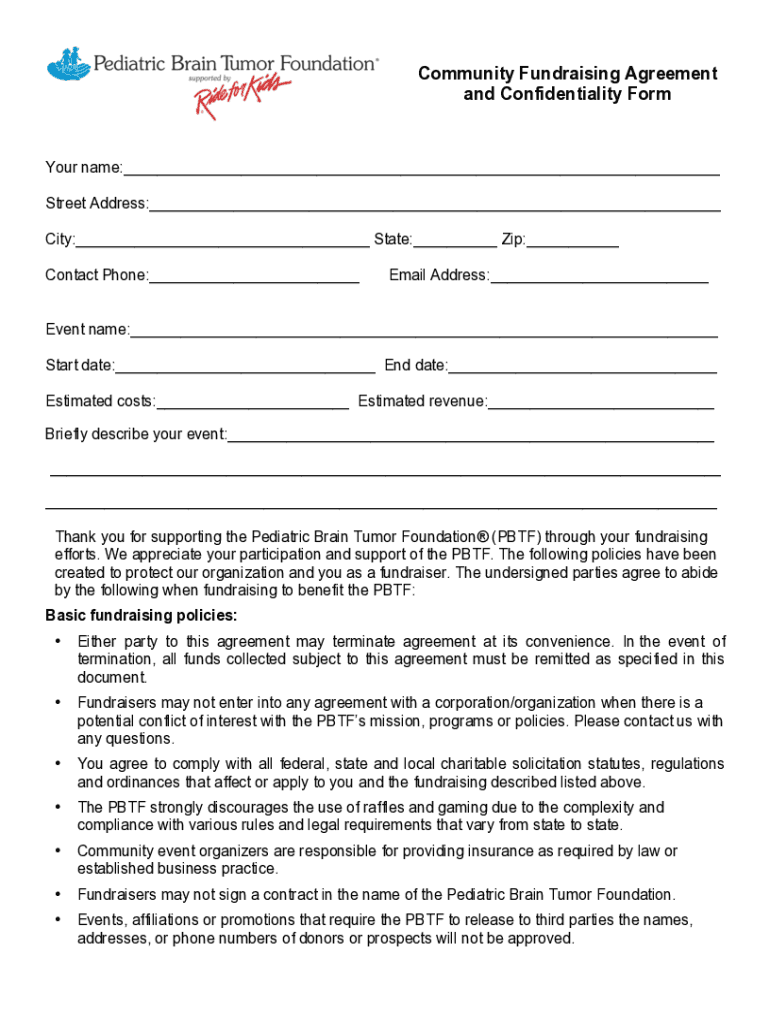
Pediatric Brain Tumor Foundation Community Fundraising Agreement and Confidentiality Form 2012 f...
pdfFiller is not affiliated with any government organization

Fill out
Complete the form online in a simple drag-and-drop editor.

eSign
Add your legally binding signature or send the form for signing.

Share
Share the form via a link, letting anyone fill it out from any device.

Export
Download, print, email, or move the form to your cloud storage.
Why pdfFiller is the best tool for your documents and forms


End-to-end document management
From editing and signing to collaboration and tracking, pdfFiller has everything you need to get your documents done quickly and efficiently.
Accessible from anywhere
pdfFiller is fully cloud-based. This means you can edit, sign, and share documents from anywhere using your computer, smartphone, or tablet.
Secure and compliant
pdfFiller lets you securely manage documents following global laws like ESIGN, CCPA, and GDPR. It's also HIPAA and SOC 2 compliant.
What is Pediatric Brain Tumor Foundation Community Fundraising Agreement and Confidentiality Form
The Community Fundraising Agreement and Confidentiality Form is a service agreement used by individuals or organizations to establish terms for fundraising events benefiting the Pediatric Brain Tumor Foundation (PBTF).
pdfFiller scores top ratings on review platforms




Who needs Pediatric Brain Tumor Foundation Community Fundraising Agreement and Confidentiality Form?
Explore how professionals across industries use pdfFiller.

Pediatric Brain Tumor Foundation Community Fundraising Agreement and Confidentiality Form is needed by:
-
Nonprofit organizations planning fundraising events
-
Individuals organizing charitable events
-
Fundraisers representing PBTF or similar foundations
-
Business entities supporting community causes
-
Volunteers involved in fundraising activities
Comprehensive Guide to Pediatric Brain Tumor Foundation Community Fundraising Agreement and Confidentiality Form
What is the Community Fundraising Agreement and Confidentiality Form?
The Community Fundraising Agreement and Confidentiality Form is a vital document used for fundraising initiatives benefitting the Pediatric Brain Tumor Foundation (PBTF). This form outlines the specific terms and conditions necessary for both fundraisers and PBTF representatives. It serves to protect the interests of both parties, ensuring that fundraising efforts align with PBTF's goals while also fostering a clear understanding of obligations.
By establishing a formal agreement, both fundraisers and PBTF representatives can engage in fundraising activities with confidence and clarity. The confidentiality aspect of the form ensures sensitive information remains protected, creating a foundation of trust.
Purpose and Benefits of the Community Fundraising Agreement and Confidentiality Form
The primary purpose of the Community Fundraising Agreement and Confidentiality Form is to facilitate successful fundraising events while providing mutual protection for both fundraisers and PBTF. This form delineates critical terms and conditions to create a well-structured fundraising framework.
Some benefits include:
-
A comprehensive liability release, which safeguards both parties during fundraising activities.
-
Clear financial management policies that guide how funds are handled and reported.
-
Defined terms that clarify responsibilities and expectations for all parties involved.
Key Features of the Community Fundraising Agreement and Confidentiality Form
This form includes several important features that are essential for its effective use:
-
Fillable fields that require specific event details, such as event name and dates.
-
Signature requirements for both fundraisers and PBTF representatives.
-
A release of liability clause that protects against potential legal issues.
Who Needs the Community Fundraising Agreement and Confidentiality Form?
The Community Fundraising Agreement and Confidentiality Form is essential for individuals and organizations planning a fundraising event that directly supports PBTF. It is critical for both the fundraiser and PBTF representatives, as it ensures proper support and oversight of the fundraising efforts.
This form aids in streamlining organizational processes, making it easier to coordinate events while adhering to the foundation's policies. By using this form, all parties involved can operate with clarity and mutual understanding.
How to Fill Out the Community Fundraising Agreement and Confidentiality Form Online
Filling out the Community Fundraising Agreement and Confidentiality Form online is a straightforward process. Follow these steps to ensure accuracy:
-
Access the form through pdfFiller.
-
Input your personal information in the designated fields, such as 'Your name:' and 'Street Address:.'
-
Fill in event-specific details like 'Event name:', 'Start date:', and 'End date:.'
-
Review the information for completeness before submission.
Review and Validation Process for the Community Fundraising Agreement Form
Before submitting the Community Fundraising Agreement and Confidentiality Form, it is crucial to conduct a thorough review. Errors can lead to misunderstandings and potential setbacks in your fundraising efforts.
Consider using the following checklist to avoid mistakes:
-
Verify that all fillable fields are completed accurately.
-
Ensure there are no missing signatures from required parties.
-
Double-check dates and event specifics for accuracy.
How to Sign and Submit the Community Fundraising Agreement and Confidentiality Form
Signing and submitting the Community Fundraising Agreement and Confidentiality Form is an essential step in the process. The form allows for both digital signatures and wet signatures, providing flexibility based on user preferences.
Submission can be done in various ways, including:
-
Directly through the pdfFiller platform, ensuring a digital record.
-
Via email if required by a PBTF representative.
Security and Compliance when Using the Community Fundraising Agreement Form
Users can feel secure knowing that pdfFiller employs robust security measures for handling sensitive documents. The platform utilizes 256-bit encryption, ensuring that data remains confidential during storage and transmission.
Moreover, pdfFiller complies with major regulations, including HIPAA, which underscores its commitment to data protection and privacy considerations. This adherence to high-security standards provides added peace of mind for users.
Next Steps After Submitting the Community Fundraising Agreement and Confidentiality Form
Once you have submitted the form, you can expect a confirmation of receipt from PBTF. Typically, this confirmation includes timelines for when you will hear back regarding your proposal.
It is advisable to track the status of your submission through the pdfFiller platform, allowing you to monitor progress and address any issues that may arise promptly.
Get Started with pdfFiller for Your Community Fundraising Agreement Needs
Utilizing pdfFiller for your Community Fundraising Agreement and Confidentiality Form needs offers numerous advantages. The platform streamlines the creation and editing processes, making it easy to manage forms effectively.
By leveraging pdfFiller, users can enhance their overall experience, ensuring that each document required for fundraising events is handled with efficiency and security.
How to fill out the Pediatric Brain Tumor Foundation Community Fundraising Agreement and Confidentiality Form
-
1.Access the Community Fundraising Agreement and Confidentiality Form on pdfFiller by searching for its name in the platform's search bar or navigating directly via the provided link.
-
2.Once the form loads, familiarize yourself with the layout of fillable fields and signature sections using pdfFiller's intuitive interface.
-
3.Gather necessary details before starting the form, such as your name, street address, event specifics, estimated costs, and proposed revenue from the fundraising activities.
-
4.Begin filling out the form by entering your details in the respective fields starting with your name and address, ensuring accuracy as this information is crucial for processing.
-
5.Input the event name, start date, and end date in the appropriate sections, paying close attention to any formatting requirements outlined.
-
6.Proceed to fill in the estimated costs associated with the fundraising event and the projected revenue, being as precise as possible for clarity.
-
7.Once all fields are complete, review the form thoroughly to ensure that all required information has been provided and is accurate.
-
8.Involve both yourself and the PBTF representative in the signing process by utilizing the signature fields within pdfFiller.
-
9.Save your completed form by clicking on the save option, then choose whether to download a copy to your device or submit it through an email or online method as specified in the guidance for your form.

Who needs to sign the Community Fundraising Agreement?
Both the Fundraiser and a representative from the Pediatric Brain Tumor Foundation (PBTF) must sign the Community Fundraising Agreement to ensure that the terms are acknowledged and legally binding.
What information is required to fill out the form?
The form requires details such as your name, address, event name, start and end dates, estimated costs, and revenue from the fundraising activities to outline the event clearly.
Is notarization required for this form?
No, notarization is not required for the Community Fundraising Agreement and Confidentiality Form, simplifying the process for fundraising representatives.
How can I submit the completed form?
You can submit the completed form through pdfFiller by downloading it for your records or emailing it directly to the concerned PBTF representative as instructed on the platform.
What are common mistakes to avoid when filling out this form?
Common mistakes include leaving required fields blank, using inaccurate information, and not obtaining the necessary signatures from both the Fundraiser and the PBTF representative. Always double-check before submission.
How long does it take to process the Community Fundraising Agreement?
Processing time can vary based on the review by PBTF representatives. Generally, you should expect confirmation of your agreement within a few business days after submission.
Where can I find additional support if I encounter issues?
For additional support, you can reach out to the Pediatric Brain Tumor Foundation directly or consult help resources on pdfFiller for assistance with technical issues regarding the form.
Pediatric Brain Tumor Foundation Community Fundraising Agreement and Confidentiality Form Form Versions
Related Forms




Get the latest insights from our blog



If you believe that this page should be taken down, please follow our DMCA take down process
here
.
This form may include fields for payment information. Data entered in these fields is not covered by PCI DSS compliance.