
Last updated on
Oct 31, 2026
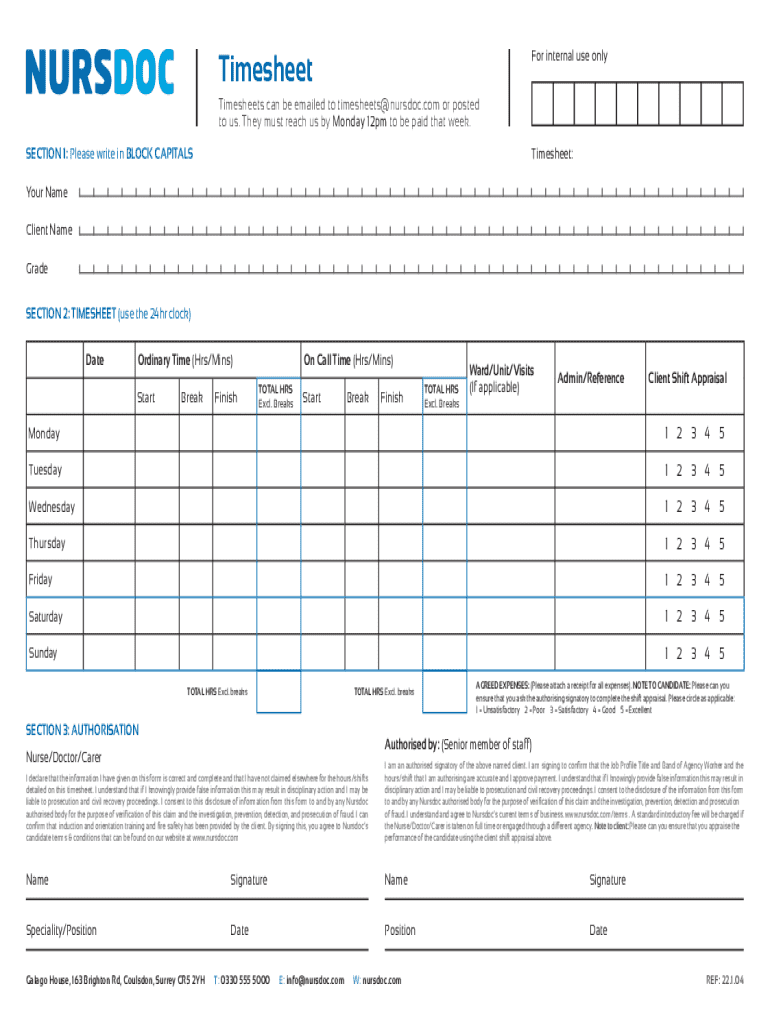
UK Nursdoc Timesheet 2022-2026 free printable template
We are not affiliated with any brand or entity on this form

Fill out
Complete the form online in a simple drag-and-drop editor.

eSign
Add your legally binding signature or send the form for signing.

Share
Share the form via a link, letting anyone fill it out from any device.

Export
Download, print, email, or move the form to your cloud storage.
Why pdfFiller is the best tool for your documents and forms


End-to-end document management
From editing and signing to collaboration and tracking, pdfFiller has everything you need to get your documents done quickly and efficiently.
Accessible from anywhere
pdfFiller is fully cloud-based. This means you can edit, sign, and share documents from anywhere using your computer, smartphone, or tablet.
Secure and compliant
pdfFiller lets you securely manage documents following global laws like ESIGN, CCPA, and GDPR. It's also HIPAA and SOC 2 compliant.
What is UK Nursdoc Timesheet
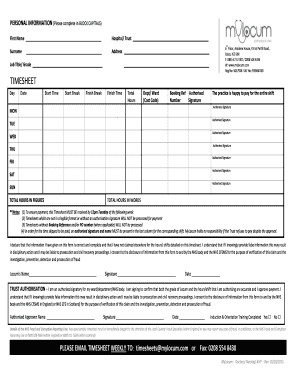
The Nursdoc Timesheet Form is a document used by healthcare professionals to record their working hours and expenses for accurate payment processing.
pdfFiller scores top ratings on review platforms




Who needs UK Nursdoc Timesheet?
Explore how professionals across industries use pdfFiller.

UK Nursdoc Timesheet is needed by:
-
Nurses submitting their hours for payment
-
Doctors recording their working time
-
Carers needing to account for shifts worked
-
Healthcare professionals in Surrey
-
Authorized signatories for form approval
-
Nursdoc management for payroll processing
Comprehensive Guide to UK Nursdoc Timesheet
What is the Nursdoc Timesheet Form?
The Nursdoc Timesheet Form serves as a critical tool for healthcare professionals to record their working hours and expenses. This healthcare timesheet template is designed to streamline the documentation process, ensuring accuracy and compliance. By facilitating detailed entries of hours worked and expenses incurred, the form significantly aids healthcare providers in efficient record-keeping.
Purpose and Benefits of the Nursdoc Timesheet Form
This form is essential for healthcare professionals as it supports accurate payroll processing and timely payments. By maintaining organized records, users can ensure compliance with various regulatory frameworks. The key benefits of using the timesheet include:
-
Ensured timely payments for services rendered
-
Improved organization of financial records
-
Compliance with healthcare regulations
Key Features of the Nursdoc Timesheet Form
One of the standout attributes of the Nursdoc Timesheet Form is its user-friendly structure. It includes vital fields such as:
-
Employee name
-
Client name
-
Hours worked broken down by day
Additionally, the form is fillable and requires authorization from a designated senior staff member, enhancing its reliability.
Eligibility Criteria for the Nursdoc Timesheet Form
The Nursdoc Timesheet Form is intended for use by specific roles, including:
-
Authorized Signatories
-
Nurses
-
Doctors
-
Carers
Each role has defined signing requirements to ensure that all entries are verified for accuracy and integrity.
How to Fill Out the Nursdoc Timesheet Form Online (Step-by-Step)
Filling out the Nursdoc Timesheet Form online is straightforward if you follow these steps:
-
Gather necessary details such as client information and hours worked.
-
Access the fillable Nursdoc timesheet form online.
-
Enter your name and the required details into the corresponding fields.
-
Ensure that all hours worked are accurately recorded for each day.
-
Add signatures where required and save the document.
Following these steps will help ensure you submit a complete and accurate form.
Common Errors and How to Avoid Them When Submitting the Nursdoc Timesheet Form
Submitting the Nursdoc Timesheet Form can come with challenges. Common errors include:
-
Omitting required fields
-
Incorrectly calculating total hours
-
Missing authorizations from relevant signatories
To prevent these mistakes, review the form thoroughly for completeness and accuracy before submitting.
Submission Methods for the Nursdoc Timesheet Form
There are various ways to submit the Nursdoc Timesheet Form, including electronic submission through platforms like pdfFiller. It’s crucial to adhere to submission deadlines, such as Monday at 12 PM, to ensure timely processing of payments.
What Happens After You Submit the Nursdoc Timesheet Form?
Once the Nursdoc Timesheet Form has been submitted, you can expect a confirmation of receipt. The tracking of your submission is vital for monitoring payment timelines, which typically align with the submission dates.
Security and Compliance for the Nursdoc Timesheet Form
Security is paramount when handling the Nursdoc Timesheet Form. Compliance with regulations such as GDPR and HIPAA is essential to protect personal data and maintain privacy. Implementing secure submission processes helps safeguard sensitive information.
Experience the Ease of Using pdfFiller for Nursdoc Timesheet Form
Using pdfFiller allows healthcare professionals to manage their Nursdoc Timesheet Form efficiently. The platform offers capabilities like easy form filling, eSigning, secure sharing, and thorough tracking, ensuring a streamlined experience for users."
How to fill out the UK Nursdoc Timesheet
-
1.First, access the Nursdoc Timesheet Form on pdfFiller by visiting the official PDF Filler website and entering the form name in the search bar.
-
2.Once you find the form, click on it to open it in pdfFiller's interface where you can edit the document.
-
3.Gather all necessary information before starting, such as your name, client details, grade, and hours worked each day to expedite the process.
-
4.Navigate through the form by clicking on each fillable field and type in the required information for your working hours and expenses.
-
5.Make use of pdfFiller's built-in tools, like adding checkboxes for shifts and uploading any relevant documents if necessary.
-
6.After entering all the information, carefully review each section for accuracy, ensuring that all required fields are filled completely.
-
7.Finalize the form by confirming that you have signed where necessary, especially in the authorization section.
-
8.Once everything is complete, save your progress, then download or directly submit the form through pdfFiller's submission options.

Who is eligible to use the Nursdoc Timesheet Form?
The Nursdoc Timesheet Form is intended for use by healthcare professionals like nurses, doctors, and carers working with Nursdoc in Surrey.
What is the deadline for submitting the timesheet?
Completed timesheets must be submitted by Monday at 12pm to ensure that payments are processed in a timely manner.
How should I submit the timesheet once completed?
You can submit your completed Nursdoc Timesheet Form directly through pdfFiller by utilizing their submission functionality or by downloading and emailing it.
Are there any supporting documents required?
Typically, supporting documents are not required with the timesheet, but ensure you document all hours and expenses accurately in the form.
What are common mistakes to avoid when filling out the form?
Be sure to double-check that all fields are filled out completely and accurately. Also, avoid submitting after the deadline to prevent payment delays.
How long does it take to process the timesheet once submitted?
Processing times can vary, but generally expect payment processing to take a few business days after submission and approval.
Can I edit the form after I have saved it?
Yes, you can revisit the saved Nursdoc Timesheet Form on pdfFiller to make edits before it is officially submitted.
UK Nursdoc Timesheet Form Versions
Related Forms





Get the latest insights from our blog


If you believe that this page should be taken down, please follow our DMCA take down process
here
.
This form may include fields for payment information. Data entered in these fields is not covered by PCI DSS compliance.