
Last updated on
Oct 2, 2026

Get the free Health and Wellness Evaluation Form
We are not affiliated with any brand or entity on this form

Fill out
Complete the form online in a simple drag-and-drop editor.

eSign
Add your legally binding signature or send the form for signing.

Share
Share the form via a link, letting anyone fill it out from any device.

Export
Download, print, email, or move the form to your cloud storage.
Why pdfFiller is the best tool for your documents and forms


End-to-end document management
From editing and signing to collaboration and tracking, pdfFiller has everything you need to get your documents done quickly and efficiently.
Accessible from anywhere
pdfFiller is fully cloud-based. This means you can edit, sign, and share documents from anywhere using your computer, smartphone, or tablet.
Secure and compliant
pdfFiller lets you securely manage documents following global laws like ESIGN, CCPA, and GDPR. It's also HIPAA and SOC 2 compliant.
What is Wellness Evaluation Form
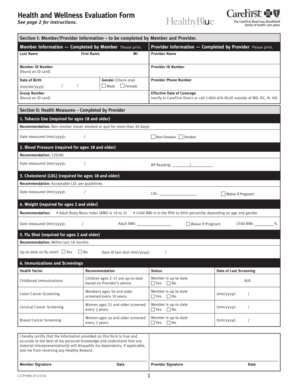
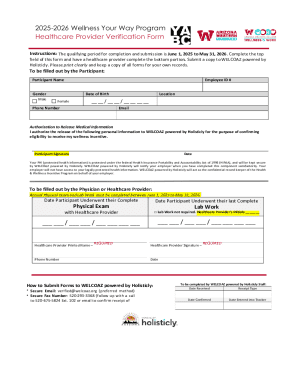
The Health and Wellness Evaluation Form is a medical history document used by CareFirst BlueChoice members and their primary care providers (PCPs) to assess and document essential health measures.
pdfFiller scores top ratings on review platforms




Who needs Wellness Evaluation Form?
Explore how professionals across industries use pdfFiller.

Wellness Evaluation Form is needed by:
-
CareFirst BlueChoice members seeking health evaluations
-
Primary Care Providers (PCPs) documenting patient screenings
-
Medical professionals assessing health history and immunizations
-
Healthcare organizations requiring patient health information
-
Insurance representatives reviewing eligibility for incentives
Comprehensive Guide to Wellness Evaluation Form
What is the Health and Wellness Evaluation Form?
The Health and Wellness Evaluation Form is a crucial document aimed at assessing and documenting health measures and screenings for CareFirst BlueChoice members in Maryland. This form plays a vital role in helping members and their primary care providers (PCPs) monitor health metrics, such as screenings and immunizations, effectively. By utilizing this CareFirst BlueChoice form, members can ensure comprehensive health assessments tailored to their individual needs.
Purpose and Benefits of the Health and Wellness Evaluation Form
Completing the health assessment form has numerous advantages for both members and their PCPs. The primary benefits include:
-
Facilitating the documentation of essential health screenings and immunizations.
-
Playing a significant role in qualifying for incentives provided by CareFirst.
-
Streamlining health assessments for effective care management.
This wellness evaluation template empowers members to actively participate in their healthcare journey while aiding PCPs in delivering quality services.
Key Features of the Health and Wellness Evaluation Form
The form comprises several key sections that ensure a comprehensive evaluation of the member's health status. Essential features include:
-
Member and PCP information sections for easy reference.
-
Specific fields addressing tobacco use, blood pressure, and cholesterol levels.
-
Signature requirements that validate the completion of the form.
Additionally, the document is designed to be fillable, allowing for user-friendly submission processes to enhance the overall experience.
Who Needs the Health and Wellness Evaluation Form?
This form is primarily for CareFirst members and their PCPs, who must complete it under various circumstances. Eligibility criteria include:
-
Being a member of CareFirst BlueChoice in Maryland.
-
Participating in routine health assessments or screenings.
-
Completing the form within a specified timeframe for incentives.
Specific situations, such as annual check-ups or when referred by the PCP, may necessitate form completion.
How to Fill Out the Health and Wellness Evaluation Form Online (Step-by-Step)
Filling out the health and wellness evaluation form online is simple and straightforward. Follow these steps:
-
Access the form via pdfFiller.
-
Gather necessary personal and health information, including your medical history.
-
Complete all fillable sections accurately.
-
Review the information for any errors or omissions.
-
Save your completed form for submission.
Utilizing pdfFiller ensures a seamless process for members aiming to complete the form efficiently.
Field-by-Field Instructions for the Health and Wellness Evaluation Form
Each section of the form includes specific fields that require attention. Key fields include:
-
'Member Information' to provide personal details accurately.
-
'PCP Information' for physician verification and communication.
-
'Tobacco Use' to assist in health risk assessments.
Understanding the significance of each data point facilitates a comprehensive health assessment and improves the overall documentation process.
How to Sign and Submit the Health and Wellness Evaluation Form
Marking and submitting the form requires certain signatures from both the member and the PCP. Consider the following:
-
Complete the signature fields designated for both parties.
-
Understand the difference between digital signatures and wet signatures, if applicable.
-
Ensure the completed form is submitted to CareFirst for processing.
Following these steps ensures compliance and proper handling of the evaluation form.
Important Deadlines and Compliance for the Health and Wellness Evaluation Form
Timely completion of the form is critical. Members must adhere to the following deadline:
-
Complete the form within 90 days of the member's effective date.
-
Avoid potential consequences associated with late submissions.
By staying informed of these deadlines, members can ensure their compliance and smooth processing of their submissions.
Security and Privacy Considerations for the Health and Wellness Evaluation Form
When handling sensitive health information, security is paramount. pdfFiller provides robust features, including:
-
256-bit encryption to protect user data.
-
HIPAA compliance for safeguarding health information.
-
Reassurance regarding data confidentiality throughout the process.
These measures ensure that users can confidently manage their health evaluation forms without concerns over information security.
Maximize Your Experience with the Health and Wellness Evaluation Form Using pdfFiller
Utilizing pdfFiller can significantly enhance your experience in completing the health and wellness evaluation form. The platform offers features such as:
-
Edit and annotate document capabilities for clarity.
-
eSigning functionalities to streamline the signing process.
-
User-friendly navigation and customer support to address any questions.
Maximizing these features can lead to an optimal form completion experience for all users.
How to fill out the Wellness Evaluation Form
-
1.Access pdfFiller and search for the 'Health and Wellness Evaluation Form' using the search bar or browse through healthcare forms.
-
2.Open the form, which will appear as an editable PDF in the interface.
-
3.Gather necessary information such as your demographic details, medical history, and your PCP's information prior to filling out the form.
-
4.Navigate through the fillable sections, ensuring you complete the 'Member Information' and 'PCP Information' fields.
-
5.Complete the initial screening section by providing information about tobacco use, blood pressure, and cholesterol levels, and mark any relevant screenings/immunizations.
-
6.Make sure both you and your PCP sign in the designated fields to validate the form.
-
7.Review all entries for accuracy and completeness by cross-checking with your gathered information.
-
8.Once completed, you can save the form directly to your pdfFiller account or download it for local storage.
-
9.If you are ready to submit, use the submission features on pdfFiller to send the form to CareFirst as instructed, ensuring you follow any supplemental submission guidelines provided.

Who is eligible to use the Health and Wellness Evaluation Form?
The Health and Wellness Evaluation Form is designed for CareFirst BlueChoice members and their Primary Care Providers (PCPs) in Maryland. Members must have an active account and require an evaluation within 90 days of their effective date.
What details are essential to complete the form?
Key details include member demographics, PCP information, health metrics like tobacco use, blood pressure, cholesterol levels, and records of any screenings or immunizations relevant for evaluation.
When should the form be completed and submitted?
The form must be filled out and submitted by the PCP within 90 days of the member's effective date to ensure eligibility for potential health incentives.
How do I submit the completed form?
The form can be electronically submitted through pdfFiller after completion. Make sure you follow the submission process provided on the platform and confirm receipt with CareFirst.
What happens if I miss the submission deadline?
Missing the deadline could result in disqualification for incentives provided by CareFirst. It is essential to adhere to the 90-day submission rule to maintain eligibility.
Can the form be filled out online?
Yes, the Health and Wellness Evaluation Form is available on pdfFiller as a fillable online document, allowing members and PCPs to complete sections digitally before submission.
Is notarization required for this form?
No, the Health and Wellness Evaluation Form does not require notarization. It must, however, be signed by both the member and their PCP.
Related Content
Related Forms





Related Catalogs
Get the latest insights from our blog


If you believe that this page should be taken down, please follow our DMCA take down process
here
.
This form may include fields for payment information. Data entered in these fields is not covered by PCI DSS compliance.