
Last updated on
Nov 6, 2026

Get the free Generic Risk Assessment Rescue Plan
We are not affiliated with any brand or entity on this form

Fill out
Complete the form online in a simple drag-and-drop editor.

eSign
Add your legally binding signature or send the form for signing.

Share
Share the form via a link, letting anyone fill it out from any device.

Export
Download, print, email, or move the form to your cloud storage.
Why pdfFiller is the best tool for your documents and forms


End-to-end document management
From editing and signing to collaboration and tracking, pdfFiller has everything you need to get your documents done quickly and efficiently.
Accessible from anywhere
pdfFiller is fully cloud-based. This means you can edit, sign, and share documents from anywhere using your computer, smartphone, or tablet.
Secure and compliant
pdfFiller lets you securely manage documents following global laws like ESIGN, CCPA, and GDPR. It's also HIPAA and SOC 2 compliant.
What is Risk Assessment Form
The Generic Risk Assessment Rescue Plan is a business form used by instructors to assess and manage risks in training environments.
pdfFiller scores top ratings on review platforms




easy to use with minimal guidance. Clear changes made to my PDF.
I really like the layout of the tool…
I really like the layout of the tool buttons.
Who needs Risk Assessment Form?
Explore how professionals across industries use pdfFiller.

Risk Assessment Form is needed by:
-
Safety officers conducting training assessments
-
Instructors evaluating training risks
-
Training center administrators
-
Risk management professionals
-
Safety compliance officers
Comprehensive Guide to Risk Assessment Form
What is the Generic Risk Assessment Rescue Plan?
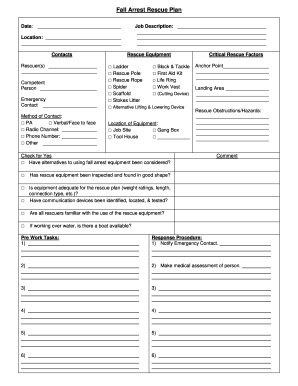
The Generic Risk Assessment Rescue Plan is a vital tool designed for effective risk management in training areas. This form facilitates the identification of potential hazards and aids in formulating appropriate rescue plans. By utilizing this safety risk assessment form, trainers can systematically evaluate risks associated with their training environments.
Purpose and Benefits of the Generic Risk Assessment Rescue Plan
Risk assessment plays a crucial role in ensuring safety within training environments. Having a clear rescue plan enhances preparedness and minimizes the potential for accidents during training sessions. The generic risk assessment rescue plan not only promotes safety but also helps streamline the training area risk assessment process.
Additionally, this risk assessment template serves as a foundational document for organizations implementing a comprehensive training safety plan.
Key Features of the Generic Risk Assessment Rescue Plan
The form consists of several key sections that facilitate thorough risk evaluation. These include:
-
Hazard identification
-
Risk evaluation
-
Control measures
Furthermore, the form necessitates the entry of instructor details and their signature for validation, ensuring accountability through the instructor safety form.
Who Needs the Generic Risk Assessment Rescue Plan?
This rescue plan is essential for a variety of audiences, including trainers, instructors, and training organizations. Scenarios where the risk assessment is critical encompass specialized training programs where risks may be higher. By utilizing the generic risk assessment rescue plan, these professionals can effectively manage training risk management practices and maintain safety standards in their training area safety assessments.
How to Fill Out the Generic Risk Assessment Rescue Plan Online (Step-by-Step)
Filling out the form correctly requires attention to detail. Follow these steps:
-
Access the form online.
-
Enter the current Date.
-
Provide information about your Training Center.
-
Specify the Location of the training.
-
Detail the Instructor, Course, and Number of Delegates.
Understanding the significance of each section, including their roles in the overall safety checklist, ensures comprehensive documentation using the risk assessment template.
Field-by-Field Instructions for the Generic Risk Assessment Rescue Plan
Each field in the generic risk assessment rescue plan serves a specific purpose. Key fields require information such as:
-
Date of assessment
-
Training Center details
-
Instructor and delegate counts
-
Hazard identification details
Common errors during form completion include leaving sections blank or misidentifying hazards. Awareness of these pitfalls helps users avoid mistakes.
How to Sign the Generic Risk Assessment Rescue Plan
The instructor's signature is essential for the validity of the form. This digital signature process can vary, with options for both digital signing and alternatives like wet signatures. Understanding the significance of signing adds a layer of accountability to the instructor safety form.
Security and Compliance for the Generic Risk Assessment Rescue Plan
Ensuring security is paramount when utilizing the generic risk assessment rescue plan. The platform implements rigorous security measures to protect sensitive information, aligning with compliance standards such as HIPAA and GDPR. This commitment to privacy and data protection fosters trust among users.
How to Download and Save the Generic Risk Assessment Rescue Plan PDF
To manage the filled-out form effectively, users should:
-
Access the completed form
-
Download it in PDF format
-
Print or share the document securely
Following these instructions enhances the usability of the risk assessment template and ensures that safety control measures form documentation is retained appropriately.
Maximize Your Risk Assessment Efficiency with pdfFiller
Users are encouraged to leverage pdfFiller for its intuitive tools and document management capabilities. Features such as editing, eSigning, and secure sharing streamline the document handling process, all while supporting the generic risk assessment rescue plan and overall training safety plan initiatives.
How to fill out the Risk Assessment Form
-
1.Access pdfFiller and search for 'Generic Risk Assessment Rescue Plan'.
-
2.Open the form by clicking on it from the search results.
-
3.Familiarize yourself with the form layout, noting the sections that need to be completed.
-
4.Before filling the form, gather necessary information, including the training center name, location, date, and instructor details.
-
5.Click on each blank field to enter the required information. Use the typed text feature to add details as needed.
-
6.For the 'Hazards' and 'Risks' sections, utilize checkboxes and text fields to specify risks associated with the training area.
-
7.After entering all information, review the form for accuracy and completeness, ensuring that all required fields are filled.
-
8.Once satisfied, click the save button to store the form data.
-
9.You can download the completed document or submit it directly through pdfFiller’s submission platform if required.

Who is required to sign the Generic Risk Assessment Rescue Plan?
The instructor must sign the form as a part of the risk assessment process, attesting to the accuracy of the provided risks and control measures.
What information is needed to complete the form?
You will need details such as the date, training center name, location, instructor’s name, and the number of delegates attending the training.
Are there deadlines for completing this risk assessment form?
While specific deadlines may vary by organization, it is generally advised to complete the Generic Risk Assessment Rescue Plan before the training session begins.
How can I submit the completed form?
You can submit the completed form via pdfFiller’s submission options, or download it and manually send it via email or print it for physical submission.
What should I do if I made a mistake while filling out the form?
If you make a mistake, you can easily edit the fields on pdfFiller. Ensure to save your changes before finalizing the document.
Is notarization required for the Generic Risk Assessment Rescue Plan?
No, notarization is not required for this form, but the instructor's signature is mandatory to validate the assessment.
How does this form help in training safety?
This form helps in identifying potential hazards, assessing risks, and implementing appropriate safety control measures to ensure a safe training environment.
Related Forms




Related Catalogs
Get the latest insights from our blog


If you believe that this page should be taken down, please follow our DMCA take down process
here
.
This form may include fields for payment information. Data entered in these fields is not covered by PCI DSS compliance.