
Last updated on
Nov 6, 2026

DoJ UFMS Vendor Request Form 2013 free printable template
pdfFiller is not affiliated with any government organization

Fill out
Complete the form online in a simple drag-and-drop editor.

eSign
Add your legally binding signature or send the form for signing.

Share
Share the form via a link, letting anyone fill it out from any device.

Export
Download, print, email, or move the form to your cloud storage.
Why pdfFiller is the best tool for your documents and forms


End-to-end document management
From editing and signing to collaboration and tracking, pdfFiller has everything you need to get your documents done quickly and efficiently.
Accessible from anywhere
pdfFiller is fully cloud-based. This means you can edit, sign, and share documents from anywhere using your computer, smartphone, or tablet.
Secure and compliant
pdfFiller lets you securely manage documents following global laws like ESIGN, CCPA, and GDPR. It's also HIPAA and SOC 2 compliant.
What is DoJ UFMS Vendor Request Form
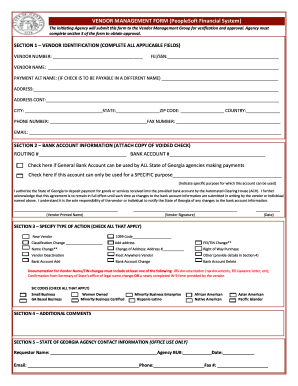
The UFMS Vendor Request Form is a document used by the US Department of Justice to request the addition, update, or deactivation of vendors in the Unified Financial Management System.
pdfFiller scores top ratings on review platforms




Finally a program that makes editing and filling out PDF's easy. Thank you. K. Lance Vail
I'm fairly new to this site but so far it's great for our business!!!
I am excited to use and learn this software, I've used it in the past and it's been super helpful
Good
great I need to get some old forms to complete and I was able to retrieve it from pdffiller
its great
Who needs DoJ UFMS Vendor Request Form?
Explore how professionals across industries use pdfFiller.

DoJ UFMS Vendor Request Form is needed by:
-
US Department of Justice employees managing vendor relationships
-
Vendors seeking registration with the US government
-
Financial departments within government agencies
-
Businesses providing goods or services to the DOJ
-
Contractors needing to update their vendor status
Comprehensive Guide to DoJ UFMS Vendor Request Form
What is the UFMS Vendor Request Form?
The UFMS Vendor Request Form is a crucial document used by the U.S. Department of Justice (DOJ) to manage vendors within the Unified Financial Management System (UFMS). This form facilitates the addition, update, or deactivation of vendors, which is essential for the efficient handling of government operations. Key identifiers required in the form include the vendor's tax identification number and banking details to ensure accurate processing of payments.
The significance of this form lies in its role in maintaining an organized vendor management system that meets federal requirements and promotes transparency in vendor relationships.
Purpose and Benefits of the UFMS Vendor Request Form
The UFMS Vendor Request Form serves several practical applications that streamline vendor registration and improve operational efficiency. Proper vendor registration allows for timely and accurate payments, contributing to smooth financial processes within the DOJ.
-
Ensures compliance with federal requirements for government vendors.
-
Facilitates streamlined payment processing through the Automated Clearing House (ACH) system.
-
Helps maintain updated vendor information for effective communication and transactions.
Who Needs the UFMS Vendor Request Form?
The form is essential for various stakeholders, particularly vendors interacting with the U.S. government. Eligible vendors include new businesses looking to register, existing vendors requiring updates, and organizations that wish to deactivate their status.
Industries frequently engaging with U.S. government contracts, such as healthcare, technology, and construction, are particularly encouraged to utilize this form to ensure compliance and timely payment processing.
How to Fill Out the UFMS Vendor Request Form Online
Completing the UFMS Vendor Request Form online is straightforward with pdfFiller’s platform. To start, access the form on the pdfFiller website and follow these steps:
-
Open the UFMS Vendor Request Form.
-
Fill in all required fields, noting that sections marked in red must be completed.
-
Utilize pdfFiller’s tools to ensure all information is legible.
-
Save your progress and review the form for any missing information.
Field-by-Field Instructions for the UFMS Vendor Request Form
Each section of the UFMS Vendor Request Form requires specific information. Important fields include vendor name, address, and banking details which are essential for processing payments and keeping accurate records.
-
Ensure all sections are filled accurately to avoid delays.
-
Pay attention to common errors, such as misspelled names or incorrect tax identification numbers.
Review and Validation Checklist for the UFMS Vendor Request Form
Before submitting the UFMS Vendor Request Form, it is vital to perform a thorough review. Check for accuracy and completeness by validating the following elements:
-
All required fields are filled.
-
Supporting documents are attached as necessary.
-
Information adheres to DOJ guidelines to avoid unnecessary processing issues.
Submission Methods for the UFMS Vendor Request Form
There are several methods to submit the UFMS Vendor Request Form. Acceptable submission avenues include both electronic and paper submissions. It is important to understand the specific submission procedures and maintain awareness of any deadlines associated with the form's submission to ensure compliance.
What Happens After You Submit the UFMS Vendor Request Form
Once you submit the UFMS Vendor Request Form, you can expect to receive confirmation communications regarding the status of your submission. Typical processing times vary, and there may be required follow-up actions from the vendor to address any issues.
-
Monitor for notifications regarding acceptance or rejection of the form.
-
Familiarize yourself with common reasons for rejection to enhance future submissions.
Why Use pdfFiller for the UFMS Vendor Request Form?
Utilizing pdfFiller for completing the UFMS Vendor Request Form offers numerous advantages. The platform provides a secure and compliant environment for document handling, employing 256-bit encryption to protect sensitive data.
-
Fillable form capabilities and eSigning features enhance user experience.
-
Cloud accessibility allows for convenient management of vendor forms.
-
Streamlined organization of submitted documents simplifies record-keeping.
Get Started with Your UFMS Vendor Request Form Today!
Access the UFMS Vendor Request Form conveniently through pdfFiller's platform, enabling an easy registration process and efficient handling of government forms. The platform emphasizes security and compliance, ensuring users can focus on providing accurate information.
How to fill out the DoJ UFMS Vendor Request Form
-
1.To begin, navigate to pdfFiller and access the UFMS Vendor Request Form from your account or upload it directly if you have a saved version.
-
2.Once the form is open, familiarize yourself with the layout. Look for fields marked with red outlines, as these indicate required information.
-
3.Before you start filling in the form, gather all necessary details, such as your vendor name, address, tax identification number, and banking information to ensure a smooth process.
-
4.Begin entering your vendor’s name in the designated field. Make sure to type or print legibly, adhering to the instructions provided.
-
5.Next, complete the address section, ensuring you include all required components such as street address, city, state, and zip code.
-
6.Enter your tax identification number in the appropriate field, verifying its accuracy to prevent processing delays.
-
7.After filling in the identification details, input the banking details as requested, including account numbers and routing numbers for ACH payments, if applicable.
-
8.Review the completed form carefully, checking each section for completeness and accuracy according to the instructions outlined in the document.
-
9.Once you are confident all required information is filled out correctly, save your changes on pdfFiller. You can download the completed form or submit it directly through the site.
-
10.If submitting through pdfFiller, ensure you select the correct submission method as per the instructions provided, and attach any necessary supporting documents if required.

Who is eligible to fill out the UFMS Vendor Request Form?
The UFMS Vendor Request Form is intended for vendors who wish to register, update, or deactivate their information in the Unified Financial Management System for the US Department of Justice. Businesses providing goods or services to the DOJ should complete this form.
Are there any deadlines for submitting the vendor request form?
While the UFMS Vendor Request Form doesn't typically have a specific deadline, timely submission is encouraged to avoid delays in the processing of payments or updates to vendor information.
What are the submission methods for the UFMS Vendor Request Form?
The form can be submitted electronically through pdfFiller, or you may need to print and mail the completed document to the appropriate department at the US Department of Justice as specified in the instructions.
What supporting documents are needed when submitting the form?
It may be necessary to provide supporting documents such as tax identification verification and banking information forms when submitting the UFMS Vendor Request Form, depending on your vendor status.
What common mistakes should I avoid when filling out the UFMS form?
Ensure you fill out all required fields accurately and legibly, especially those marked in red. Common mistakes include missing required information and errors in tax identification numbers.
How long does processing take after submitting the vendor request form?
Processing times can vary, but typically it may take several weeks for the US Department of Justice to process the UFMS Vendor Request Form, so it is recommended to submit it as soon as updates are needed.
Is notarization required for the UFMS Vendor Request Form?
No, the UFMS Vendor Request Form does not require notarization. It can be filled out and submitted directly without the need for a notary public.
DoJ UFMS Vendor Request Form Form Versions
Related Forms





Related Catalogs
Get the latest insights from our blog


If you believe that this page should be taken down, please follow our DMCA take down process
here
.
This form may include fields for payment information. Data entered in these fields is not covered by PCI DSS compliance.