
Last updated on
Oct 2, 2026

Get the free Federal Time & Effort Certification Form
We are not affiliated with any brand or entity on this form

Fill out
Complete the form online in a simple drag-and-drop editor.

eSign
Add your legally binding signature or send the form for signing.

Share
Share the form via a link, letting anyone fill it out from any device.

Export
Download, print, email, or move the form to your cloud storage.
Why pdfFiller is the best tool for your documents and forms


End-to-end document management
From editing and signing to collaboration and tracking, pdfFiller has everything you need to get your documents done quickly and efficiently.
Accessible from anywhere
pdfFiller is fully cloud-based. This means you can edit, sign, and share documents from anywhere using your computer, smartphone, or tablet.
Secure and compliant
pdfFiller lets you securely manage documents following global laws like ESIGN, CCPA, and GDPR. It's also HIPAA and SOC 2 compliant.
What is Federal Time Form
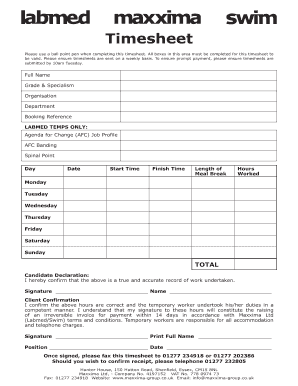
The Federal Time & Effort Certification Form is an extra time report document used by employees to report additional weekly hours worked for federal projects.
pdfFiller scores top ratings on review platforms




Who needs Federal Time Form?
Explore how professionals across industries use pdfFiller.

Federal Time Form is needed by:
-
Employees needing to certify extra hours worked
-
Supervisors or managers requiring time reports for payroll
-
Department heads overseeing funding and attendance
-
Compensation analysts reviewing time certifications
-
Human Resource teams processing payroll
-
Funding authorities validating time reports
Comprehensive Guide to Federal Time Form
What is the Federal Time & Effort Certification Form?
The Federal Time & Effort Certification Form is a critical document that employees use to report extra hours worked. Accurate reporting of these hours is essential for payroll and grant compliance. This form ensures that employees are rightly compensated for additional hours and is a vital part of the federal grant process.
Understanding the Federal Time & Effort Certification Form helps employees navigate their responsibilities, ultimately fostering compliance with federal regulations that govern payroll practices.
Purpose and Benefits of the Federal Time & Effort Certification Form
This form serves multiple purposes, from ensuring employees receive proper compensation to meeting federal grant requirements. By efficiently capturing the extra hours worked, the process helps streamline payroll operations, thus minimizing delays in employee payments.
Additionally, using the Federal Time & Effort Certification Form contributes to organizational transparency and financial accountability in managing federal funds.
Who Needs the Federal Time & Effort Certification Form?
Several key roles are involved in the completion of the Federal Time & Effort Certification Form:
-
Employee: Responsible for reporting hours and submitting the form.
-
Supervisor/Manager/Dept. Head: Must review and sign the form, verifying that reported hours are accurate.
-
Funding Authority: In some instances, required to sign the form, ensuring compliance with funding stipulations.
Each role plays a significant part in maintaining compliance and ensuring that extra hours are appropriately documented and compensated.
How to Fill Out the Federal Time & Effort Certification Form Online (Step-by-Step)
Filling out the Federal Time & Effort Certification Form requires attention to detail. Follow these steps for accuracy:
-
Open the form and enter your name and employee ID.
-
Provide your work location and job title.
-
Complete details about hours worked and hourly rate.
-
Specify the cost center and commitment item as required.
Utilizing pdfFiller to create a fillable version of the form can simplify this process. Be aware of common pitfalls, such as missing signatures or incorrect totals, which could delay payroll processing.
Field-by-Field Instructions for the Federal Time & Effort Certification Form
To ensure accurate completion, here’s a detailed breakdown of crucial fields within the form:
-
Employee Name: Your full legal name.
-
Attendance Type: Indicate the nature of your work hours (regular, overtime).
-
Commitment Item: Specify the fund or grant associated with your hours.
These fields are essential for maintaining the integrity of the reporting process and ensuring compliance with federal guidelines.
Submission Methods and Delivery for the Federal Time & Effort Certification Form
The completed Federal Time & Effort Certification Form can be submitted in various ways:
-
Electronic Submission: Send via email or an online portal.
-
Paper Submission: Physically deliver the form to the Human Resource Team.
Choose a method that suits your organization’s protocols, ensuring timely processing and compliance with internal timelines.
Consequences of Not Filing or Late Filing the Federal Time & Effort Certification Form
Failing to submit or submitting late can lead to serious repercussions, including:
-
Delays in employee payments, which may cause financial strain.
-
Potential legal ramifications and compliance issues related to federal grants.
Timely and accurate filing is not just a procedural step; it's essential for the operational integrity of payroll and grant management.
Common Errors and How to Avoid Them When Completing the Federal Time & Effort Certification Form
Many users encounter common pitfalls while completing the form. Here are mistakes to watch out for:
-
Incorrectly calculated totals for hours worked.
-
Missing required signatures from supervisors or managers.
Reviewing the completed form thoroughly can help validate that all information is accurate and complete, minimizing the risk of errors.
How pdfFiller Simplifies Completing the Federal Time & Effort Certification Form
Using pdfFiller offers several advantages when completing the Federal Time & Effort Certification Form:
-
eSigning: Securely sign documents online, ensuring compliance.
-
User-Friendly Interface: Easily create fillable forms without downloads.
-
Secure Storage: Protect sensitive information with 256-bit encryption.
These features not only enhance the user experience but also ensure document security, critical for handling sensitive information.
Start Using the Federal Time & Effort Certification Form with pdfFiller Today
Accessing and completing the Federal Time & Effort Certification Form with pdfFiller is straightforward. The platform’s features simplify the process, allowing for quick submissions.
Moreover, users can rely on robust support and extensive resources available within the platform to assist with their document management needs.
How to fill out the Federal Time Form
-
1.Access the Federal Time & Effort Certification Form on pdfFiller by searching for its name in the form templates section.
-
2.Once opened, familiarize yourself with the form layout, which contains fields for employee details and hours worked.
-
3.Gather necessary information such as your name, employee ID, job title, attendance type, and hours worked before starting.
-
4.Begin filling in the form by entering your name and ID number in the designated fields.
-
5.Input your job title, work location, and attendance type accurately to reflect your working conditions.
-
6.Record the total hours worked and specify your hourly rate based on your employment terms.
-
7.For cost center and commitment item, provide the relevant codes or identifiers as required by your department.
-
8.Ensure that all required fields are completed to avoid payment delays caused by incomplete submissions.
-
9.After filling out, review the entire form for accuracy and ensure all information is correct.
-
10.Use the review tool in pdfFiller to check for any errors before proceeding to finalize the document.
-
11.Once satisfied with the information, save your form on pdfFiller.
-
12.You can download the completed form to your device or submit it directly through pdfFiller to your HR team for processing.

Who is eligible to use the Federal Time & Effort Certification Form?
The Federal Time & Effort Certification Form is intended for employees who work extra hours on federal projects, requiring documentation for payroll and compliance.
What is the deadline for submitting this form?
Submission deadlines may vary by organization, but it is typically recommended to submit the form within the payroll processing period to avoid payment delays.
How should I submit the completed form?
You can submit the completed form by uploading it through pdfFiller directly to your HR team or downloading it for manual submission as per your organization’s process.
What supporting documents are required with this form?
Usually, no additional supporting documents are required, but some organizations may request documentation that validates extra hours, so check with your HR department.
What are common mistakes to avoid when filling this form?
Be sure to double-check entries for accuracy, particularly in hours worked and employee details to avoid submission rejections or delayed payments.
How long does it take to process the submitted form?
Processing times vary based on the HR department's workload, but typically it takes anywhere from a few days to a week for confirmation of time worked and payment.
Can I edit the form once I've completed my entries?
Yes, pdfFiller allows you to go back and edit your entries before final submission, ensuring all information is accurate before processing.
Related Content
Related Forms





Get the latest insights from our blog


If you believe that this page should be taken down, please follow our DMCA take down process
here
.
This form may include fields for payment information. Data entered in these fields is not covered by PCI DSS compliance.