
Last updated on
Oct 31, 2026

CA Respite Timesheet 2022-2026 free printable template
pdfFiller is not affiliated with any government organization

Fill out
Complete the form online in a simple drag-and-drop editor.

eSign
Add your legally binding signature or send the form for signing.

Share
Share the form via a link, letting anyone fill it out from any device.

Export
Download, print, email, or move the form to your cloud storage.
Why pdfFiller is the best tool for your documents and forms


End-to-end document management
From editing and signing to collaboration and tracking, pdfFiller has everything you need to get your documents done quickly and efficiently.
Accessible from anywhere
pdfFiller is fully cloud-based. This means you can edit, sign, and share documents from anywhere using your computer, smartphone, or tablet.
Secure and compliant
pdfFiller lets you securely manage documents following global laws like ESIGN, CCPA, and GDPR. It's also HIPAA and SOC 2 compliant.
What is CA Respite Timesheet
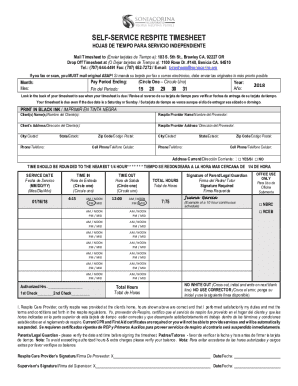
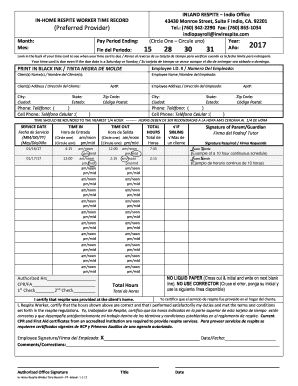
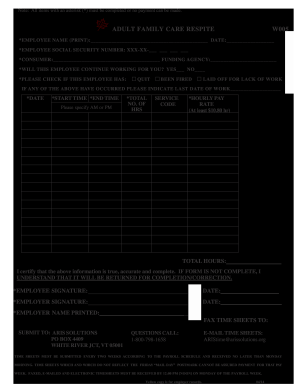
The Respite Timesheet Form is a document used by workers to track and report hours for respite care services, ensuring proper payroll management.
pdfFiller scores top ratings on review platforms




Who needs CA Respite Timesheet?
Explore how professionals across industries use pdfFiller.

CA Respite Timesheet is needed by:
-
Parents or guardians seeking respite care services
-
Care workers delivering respite services
-
Employers managing respite care payroll
-
Child care agencies overseeing respite workers
-
Legal guardians needing to document care hours
-
Financial departments focused on accurate payroll processing
Comprehensive Guide to CA Respite Timesheet
What is the Respite Timesheet Form?
The Respite Timesheet Form is a crucial document used by workers providing respite care services. Its primary purpose is to aid in tracking the care provided while ensuring accurate payment for the hours worked. Respite care is designed to provide short-term relief to primary caregivers, supporting their well-being without compromising the quality of care. This timesheet is particularly relevant in California, where it helps ensure compliance with state regulations regarding payment and service delivery.
Purpose and Benefits of the Respite Timesheet Form
The Respite Timesheet Form serves to streamline the process of tracking hours worked in respite care. One of its primary benefits for workers is the ability to accurately record their hours, which is essential for ensuring they receive timely payment. Additionally, parents and guardians play a vital role in this process by verifying and signing the timesheet, which provides an extra layer of accountability and assurance that care provided meets their expectations. This cooperation fosters a transparent relationship between workers and families.
Key Features of the Respite Timesheet Form
This form contains several essential components designed to ensure clarity and ease of use. Among the key fields are:
-
Date of service
-
Start and end times for each shift
-
Client information, including the name and contact details
-
Signature lines for both the worker and the parent/guardian
These features help in organizing information systematically, making it easier for both parties to access and review essential data.
Who Needs the Respite Timesheet Form?
Several individuals and entities are required to use the Respite Timesheet Form. Primarily, respite care workers need this form to document their service hours accurately. Additionally, parents and guardians must complete the form to manage the care provided to their loved ones effectively. This form is critical in ensuring compliance with regulations surrounding respite care and guaranteeing that payment processes are managed smoothly.
How to Fill Out the Respite Timesheet Form Online (Step-by-Step)
Completing the Respite Timesheet Form online can be straightforward when following these steps:
-
Gather all necessary information, including care dates and hours worked.
-
Access the online form suitable for California’s requirements.
-
Fill in the date, start time, end time, and client information accurately.
-
Ensure both the worker and parent/guardian sign the completed form.
-
Submit the form electronically through the designated platform.
Following these steps can help prevent errors and streamline the submission process.
Common Errors and How to Avoid Them
When filling out the Respite Timesheet Form, users may encounter several common errors. These can include:
-
Incorrectly entered date or time fields.
-
Omission of required signatures from either party.
-
Failing to verify client information before submission.
To ensure the completeness and accuracy of the form, it’s advisable to double-check entries and familiarize oneself with the validation requirements before submission.
How to Sign and Submit the Respite Timesheet Form
The signing and submission process for the Respite Timesheet Form may vary slightly depending on whether digital or wet signature methods are used. Users can opt for:
-
Digital signatures via a secure online platform.
-
Wet signatures for printed forms that need to be faxed or mailed.
Ensuring that signatures are properly executed is essential for the validity of the submission, and understanding the requirements for each method can prevent delays in processing.
What Happens After You Submit the Respite Timesheet Form?
After submitting the Respite Timesheet Form, users can expect a confirmation of receipt. It is essential to keep track of this confirmation, as it serves as proof of submission. The processing time for payment generally varies, and users should be aware of deadlines to avoid any issues. Late submissions may result in delays in compensation, emphasizing the importance of timely reporting.
Security and Compliance for the Respite Timesheet Form
Handling sensitive information within the Respite Timesheet Form necessitates adherence to security protocols. pdfFiller employs multiple security measures, including:
-
256-bit encryption to protect document integrity
-
Compliance with SOC 2 Type II standards
-
Adherence to HIPAA and GDPR regulations
These practices ensure that personal data remains secure during online services, thus providing peace of mind for users.
Your Solution for Managing the Respite Timesheet Form with pdfFiller
Utilizing pdfFiller's platform simplifies the management of the Respite Timesheet Form. The service not only allows for easy editing and filling but also offers secure eSignature options, making the process efficient. With pdfFiller, users can confidently manage their forms in a user-friendly environment while benefiting from top-notch security and convenience.
How to fill out the CA Respite Timesheet
-
1.Begin by accessing the Respite Timesheet Form on pdfFiller through your account or via a link provided by your agency.
-
2.Once the form opens, utilize the toolbar on the right to navigate through the fillable fields.
-
3.Before starting, gather necessary information including the dates of service, start and end times, client details, and payroll numbers to ensure correct data entry.
-
4.Carefully fill in the date, start time, end time, and the total hours worked in the provided fields, making sure to double-check your calculations.
-
5.Complete the worker's name, phone number, and email address in their respective fields for identification and contact purposes.
-
6.Both the parent/guardian and the worker need to sign the document; make sure to click on the signature fields to apply your digital signatures according to your agency's guidelines.
-
7.Review the entire form for accuracy, confirming that all fields are filled out correctly and signatures are applied where needed.
-
8.Once completed, save the form by clicking on the ‘Save’ button, and if required, download it for your records or submit it directly through pdfFiller.

Who is eligible to fill out the Respite Timesheet Form?
The Respite Timesheet Form must be filled out by workers providing respite care services and signed by both the worker and the parent or guardian who authorized the care.
Is there a deadline for submitting the timesheet?
Submission deadlines may vary depending on the agency's payroll schedule. It's important to check with your employer to ensure timely submission for processing.
How should I submit the completed timesheet?
You can submit the completed timesheet via pdfFiller by using the submit feature or downloading it and emailing it to your employer, as instructive guidelines suggest.
What supporting documents are required with this form?
Typically, the only required documents are the completed timesheet and any relevant TCRC authorization documents to validate the hours worked. Always confirm specific requirements with your agency.
What are common mistakes to avoid when filling out the form?
Ensure all fields are correctly filled out, particularly the signs of required boxes. Common mistakes include incorrect dates, inaccurate time entry, and forgotten signatures from parents or guardians.
How long does it take to process the timesheet after submission?
Processing times can vary by employer, but generally expect it to take 1-2 pay periods. Confirm with your agency for specific timelines.
Are there any fees associated with submitting the form?
Submitting the Respite Timesheet Form typically does not incur fees; however, check with your agency for any potential costs related to payroll processing.
CA Respite Timesheet Form Versions
Related Forms



Get the latest insights from our blog


If you believe that this page should be taken down, please follow our DMCA take down process
here
.
This form may include fields for payment information. Data entered in these fields is not covered by PCI DSS compliance.