
Last updated on
Oct 31, 2026

Get the free Carrier Profile Form
We are not affiliated with any brand or entity on this form

Fill out
Complete the form online in a simple drag-and-drop editor.

eSign
Add your legally binding signature or send the form for signing.

Share
Share the form via a link, letting anyone fill it out from any device.

Export
Download, print, email, or move the form to your cloud storage.
Why pdfFiller is the best tool for your documents and forms


End-to-end document management
From editing and signing to collaboration and tracking, pdfFiller has everything you need to get your documents done quickly and efficiently.
Accessible from anywhere
pdfFiller is fully cloud-based. This means you can edit, sign, and share documents from anywhere using your computer, smartphone, or tablet.
Secure and compliant
pdfFiller lets you securely manage documents following global laws like ESIGN, CCPA, and GDPR. It's also HIPAA and SOC 2 compliant.
What is Carrier Profile
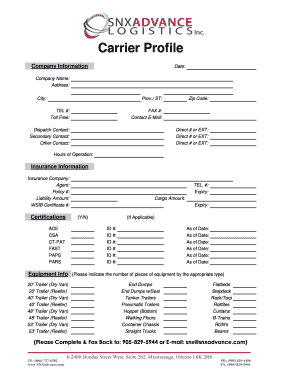
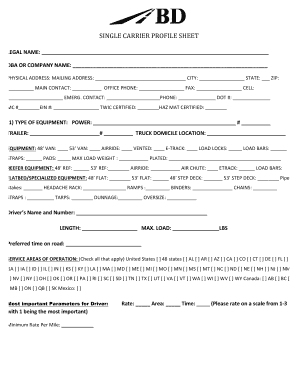
The Carrier Profile Form is a business document used by transportation companies to provide detailed information about their operations, equipment, and dispatch specifications.
pdfFiller scores top ratings on review platforms




Who needs Carrier Profile?
Explore how professionals across industries use pdfFiller.

Carrier Profile is needed by:
-
Transportation companies seeking broker approval
-
Trucking businesses needing to register with regulators
-
Dispatchers requiring detailed operational information
-
Business owners applying for licenses
-
Logistics firms involved in freight management
-
Brokers seeking complete carrier profiles
Comprehensive Guide to Carrier Profile
What is the Carrier Profile Form?
The Carrier Profile Form is an essential document utilized by transportation companies to convey detailed information about their operations. In the transportation industry, this form plays a crucial role in ensuring compliance and facilitating partnerships. It requires various types of information such as company details, equipment specifications, and contact information.
This form is integral for transportation businesses to establish a reliable profile, ensuring that brokers and other stakeholders have access to accurate data for their operations. Keywords that closely relate to this form include the "carrier profile form" and the "transportation company form."
Purpose and Benefits of the Carrier Profile Form
Completing the Carrier Profile Form is necessary for several reasons. It serves as a foundation for compliance and legal requirements within U.S. trucking operations. By providing organized and accurate information, companies can significantly enhance their credibility and connectivity with brokers and partners.
Some of the key benefits of using this form include:
-
Enhanced compliance with regulations, including the business license application.
-
Streamlined US carrier registration processes.
-
Improved clarity regarding dispatch specifications for freight operations.
Key Features of the Carrier Profile Form
The Carrier Profile Form includes a variety of critical fields designed to capture essential information effectively. Among these fields are checkboxes and specific entry requirements that ensure comprehensive data collection. The structure of this form differentiates it from other business contact information forms and equipment types forms within the sector.
Key features of the Carrier Profile Form include:
-
Fields for company identification and contact information.
-
Specifications for equipment types owned by the company.
-
Unique sections tailored for brokers and operational needs.
Who Needs the Carrier Profile Form?
The Carrier Profile Form is essential for various stakeholders in the transportation sector, including trucking companies, freight brokers, and logistics management professionals. Each of these entities requires accurate profiles for effective collaboration and operational efficiency.
Understanding the significance of complete profiles is vital for these participants, as accurate data helps in establishing trust and streamlining partnerships. This is particularly relevant for those filling out the trucking company form and broker approval form.
How to Fill Out the Carrier Profile Form Online
Filling out the Carrier Profile Form online is user-friendly, especially with the resources available through pdfFiller. For a smooth completion process, follow these steps:
-
Access the Carrier Profile Form through pdfFiller’s platform.
-
Gather necessary information such as company details, equipment specifications, and contact information.
-
Carefully fill in the required fields and double-check for accuracy.
-
Submit the completed form using the methods outlined on the platform.
Before starting, be prepared with all relevant data to enhance the effectiveness and speed of your completion.
Common Errors to Avoid When Completing the Carrier Profile Form
Completing the Carrier Profile Form correctly is crucial to avoid delays in the registration process. Some common errors that users should be cautious of include:
-
Omitting required information in key fields.
-
Incorrectly filling out checkboxes or dropdowns.
-
Failing to review all details before final submission.
By being aware of these pitfalls, users can significantly improve the accuracy of their submissions and expedite their registration process.
Submission Methods and Delivery of the Carrier Profile Form
There are several options for submitting the Carrier Profile Form effectively. Users can choose from the following methods:
-
Online submission through pdfFiller, ensuring instant processing.
-
In-person delivery to designated transportation offices.
-
Mailing the completed form directly to the appropriate authority.
Processing times may vary based on the chosen method, so understanding each option will help in planning effective follow-up actions.
Next Steps After Submitting the Carrier Profile Form
Once the Carrier Profile Form is submitted, users should be aware of several important follow-up actions. Tracking the submission status is crucial for staying informed on any responses or updates. It is advisable to allow for standard processing times as established by the governing body.
Additonally, knowing how to amend or correct any missubmitted information is essential if issues arise following submission. Being proactive in this process can save time and reduce complications.
Security and Compliance Considerations for the Carrier Profile Form
The security of sensitive information provided in the Carrier Profile Form is a top priority. pdfFiller employs robust security measures, including encryption and adherence to strict compliance regulations. This ensures that user data remains protected throughout the completion and submission processes.
Staying informed on these security practices is vital for users who handle sensitive business information. Understanding the importance of data protection further enhances trust in the form completion process.
Streamline Your Carrier Profile Form Process with pdfFiller
Utilizing pdfFiller can significantly enhance the efficiency of managing the Carrier Profile Form. This platform simplifies the process of filling out, signing, and submitting forms, ultimately leading to better accuracy and compliance.
With features designed for ease of use, pdfFiller stands out as a reliable solution for companies looking to improve their form management experience. Take advantage of these capabilities to ensure a smoother filing process.
How to fill out the Carrier Profile
-
1.Begin by accessing pdfFiller and logging into your account. If you don’t have an account, create one to proceed.
-
2.Locate the Carrier Profile Form by using the search bar or browsing through the relevant category. Open the form by clicking on it.
-
3.Familiarize yourself with the form layout. Note that there are blank fields and checkboxes requiring your input.
-
4.Gather necessary information on your transportation company, including company name, contact details, and business license information.
-
5.Fill in the required fields systematically. Select appropriate options for equipment types and broker information by clicking the checkboxes.
-
6.If there are instructions provided in the form, read them carefully to ensure all fields are properly completed.
-
7.Once you've filled in all the sections, review your entries for any mistakes or omissions. Make adjustments as necessary.
-
8.Use the toolbar to save your progress and download a copy of the form for your records if needed.
-
9.After finalizing your form, submit it through the designated method as outlined within the form or by your specific issuing agency.

Who is eligible to use the Carrier Profile Form?
Transportation companies operating within the US are eligible to use the Carrier Profile Form to provide essential business information for registration and approval with brokers.
What documents do I need to complete this form?
Gather your business license copies, contact information, details about your equipment types, and any broker-related documentation before starting the Carrier Profile Form.
How do I submit the Carrier Profile Form?
After completing the form, it can be submitted electronically through the pdfFiller platform or printed and mailed to the relevant broker or regulatory body as instructed.
Are there any deadlines associated with this form?
While specific deadlines can vary by broker, it's recommended to complete and submit the Carrier Profile Form as early as possible to avoid delays in your registration or approval process.
What are common mistakes to avoid when filling out this form?
Ensure all fields are completed accurately and double-check for typos or missing information, especially in contact details and business licenses, to avoid unnecessary processing delays.
How long does it take to process the Carrier Profile Form?
Processing times can vary based on the broker's workload. Typically, it takes anywhere from a few days to a couple of weeks to receive confirmation of your submitted profile.
Can I save my progress while filling out the form?
Yes, pdfFiller allows you to save your work at any point. You can return to finish the form later or review your entries before final submission.
Related Forms


Get the latest insights from our blog


If you believe that this page should be taken down, please follow our DMCA take down process
here
.
This form may include fields for payment information. Data entered in these fields is not covered by PCI DSS compliance.