
Last updated on
Oct 28, 2026

SG DBS Bank Form CIS-01 2010 free printable template
We are not affiliated with any brand or entity on this form

Fill out
Complete the form online in a simple drag-and-drop editor.

eSign
Add your legally binding signature or send the form for signing.

Share
Share the form via a link, letting anyone fill it out from any device.

Export
Download, print, email, or move the form to your cloud storage.
Why pdfFiller is the best tool for your documents and forms


End-to-end document management
From editing and signing to collaboration and tracking, pdfFiller has everything you need to get your documents done quickly and efficiently.
Accessible from anywhere
pdfFiller is fully cloud-based. This means you can edit, sign, and share documents from anywhere using your computer, smartphone, or tablet.
Secure and compliant
pdfFiller lets you securely manage documents following global laws like ESIGN, CCPA, and GDPR. It's also HIPAA and SOC 2 compliant.
What is SG DBS Bank Form CIS-01
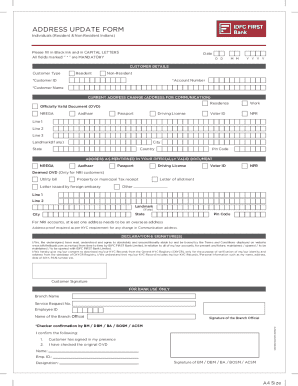
The DBS Address Update Form is a banking document used by individuals to update their addresses, contact numbers, and email addresses with DBS Bank.
pdfFiller scores top ratings on review platforms




Who needs SG DBS Bank Form CIS-01?
Explore how professionals across industries use pdfFiller.

SG DBS Bank Form CIS-01 is needed by:
-
DBS account holders looking to update their address.
-
Individuals moving within Singapore needing to change bank records.
-
Clients who have changed contact information and need to notify their bank.
-
Users looking to ensure proper communication from DBS Bank.
-
Anyone needing to keep their account information current and accurate.
Comprehensive Guide to SG DBS Bank Form CIS-01
What is the DBS Address Update Form?
The DBS Address Update Form is a crucial document enabling DBS Bank account holders to update their residential and mailing addresses, contact numbers, and email addresses. Properly maintaining contact details with the bank safeguards effective communication, allows for timely receipt of essential documents, and ensures accurate records. It's essential for DBS account holders to utilize this form, as it directly influences service continuity.
This form facilitates necessary updates to personal information, ensuring that DBS Bank has the correct details to reach clients with important notifications and marketing materials. Users should take care to complete this document accurately to avoid any disruption in banking services.
Purpose and Benefits of the DBS Address Update Form
Accurate information is pivotal for seamless communication with DBS Bank, which is why updating contact details is essential. The DBS Address Update Form offers multiple benefits that enhance the banking experience. Timely updates ensure that account holders receive critical documents and marketing materials without delay.
-
Ensures uninterrupted banking communication.
-
Prevents potential complications or delays in services.
-
Facilitates marketing material delivery for personalized offers.
Submitting this form on time helps maintain efficient service delivery and account management.
Who Needs the DBS Address Update Form?
This form is specifically designed for DBS Bank account holders, encompassing a diverse audience including individuals, businesses, and those utilizing specialized banking services. Any changes in an account holder's residential or mailing address may necessitate the use of this form.
Understanding the requirement for the DBS Address Update Form allows users to stay compliant with account management policies and ensures that services reflect their current details.
How to Fill Out the DBS Address Update Form Online
Filling out the DBS Address Update Form online via pdfFiller is straightforward. To begin, access the form digitally and follow these steps:
-
Go to the pdfFiller website and locate the DBS Address Update Form.
-
Fill in the required fields, including your NRIC/Passport No., old, and new mailing addresses.
-
Complete contact information fields, such as your mobile and email addresses.
-
Review all entries for accuracy before submission.
Each fillable field must be completed correctly to avoid future complications. Double-checking and ensuring all data matches your official records is essential for successful processing.
Common Errors When Filling Out the DBS Address Update Form
When completing the DBS Address Update Form, certain pitfalls can lead to delays in processing. Common mistakes include:
-
Submitting incomplete fields.
-
Providing mismatched signatures that don’t align with bank records.
-
Failing to validate personal information such as addresses and contact numbers.
It's advisable to carefully check all entries before submitting the form to prevent any potential hold-ups in service delivery.
Submission Methods for the DBS Address Update Form
Users can submit the completed DBS Address Update Form through various methods. Consider the following options:
-
Online submission via pdfFiller for immediate processing.
-
Physical mailing to the specified DBS Bank address.
-
In-person submission at your nearest DBS Bank branch.
Be mindful of submission deadlines to ensure prompt updates, and check how to track the submission status following your submission for peace of mind.
Security and Compliance with the DBS Address Update Form
Using the DBS Address Update Form involves handling sensitive personal data, raising concerns about security and privacy. When using pdfFiller, your documents are protected through robust security measures, including:
-
256-bit encryption for all file transfers.
-
Compliance with regulatory standards such as GDPR.
-
Assurances regarding users' rights related to personal data processing.
It is vital to ensure that your information is handled securely while filling out this form.
Utilizing pdfFiller to Complete Your DBS Address Update Form
By utilizing pdfFiller, you can efficiently fill out the DBS Address Update Form with features designed for user convenience. Highlighted features include:
-
Edit fields directly in the form.
-
eSigning options for quick completion.
-
Tools to easily manage and organize documents.
Using pdfFiller streamlines the document management process and simplifies the filling of this important form.
Sample Completed DBS Address Update Form
To assist users in properly filling out the DBS Address Update Form, a sample completed form serves as an invaluable reference. This reference demonstrates:
-
How each section should be filled out correctly.
-
The importance of including all necessary information for processing.
Accurate completion is critical to ensure prompt updates and continued service from DBS Bank.
How to fill out the SG DBS Bank Form CIS-01
-
1.Access the DBS Address Update Form on the pdfFiller website by searching for the form name in the search bar or by navigating to the templates section.
-
2.Open the form by clicking on the link; this will load it into the pdfFiller editor for customization.
-
3.Before filling out the form, gather your personal details including your NRIC/Passport number, old and new mailing addresses, and contact numbers.
-
4.Using the pdfFiller interface, click on each fillable field, such as 'Name (as in NRIC/Passport)' and enter your name exactly as required.
-
5.Proceed to fill in your NRIC/Passport No. and the address fields including Block, Level-Unit, Postal Code, and Street according to your current and new address information.
-
6.Select the appropriate account(s) or service(s) that you wish to update by checking the relevant options provided in the form.
-
7.Fill in your contact details which include your Mobile, Office, and Home phone numbers, as well as your email addresses in the designated fields.
-
8.After completing all fields, carefully review the information you entered to ensure everything is correct and up-to-date.
-
9.Include your signatures in the designated section as an account holder, confirming the accuracy of the information you provided.
-
10.Once satisfied, save your work by clicking on the save option, and download a copy for your records or submit it directly through pdfFiller if required.

Who is eligible to use the DBS Address Update Form?
The DBS Address Update Form is intended for individuals who hold an account with DBS Bank and need to update their residential and mailing details.
What information do I need to prepare before filling out the form?
You should have your NRIC/Passport number, current and new mailing addresses, phone numbers, and email addresses ready before starting to ensure a smooth completion.
Can I submit the form electronically?
Yes, after filling out the DBS Address Update Form on pdfFiller, you can submit it electronically if the online submission option is available. Otherwise, print it to mail or deliver in person.
What are common mistakes to avoid when completing the form?
Ensure all information is accurate and matches your legal documents. Avoid leaving any required fields blank, and check your signatures against past records to prevent delays.
How long does it take for DBS to process my address update?
The processing time for address updates can vary, but typically it takes several business days. You can follow up with DBS Bank for specific inquiries regarding your request.
Are there any fees associated with using the DBS Address Update Form?
Generally, there are no fees for submitting the DBS Address Update Form. However, it's advisable to check with DBS Bank for any specific conditions that may apply.
What should I do if I encounter issues while filling out the form?
If you face any issues, consult the help section on pdfFiller or contact DBS Bank customer service for assistance with the form completion process.
SG DBS Bank Form CIS-01 Form Versions
Related Content
Related Forms




Get the latest insights from our blog


If you believe that this page should be taken down, please follow our DMCA take down process
here
.
This form may include fields for payment information. Data entered in these fields is not covered by PCI DSS compliance.