
Form preview

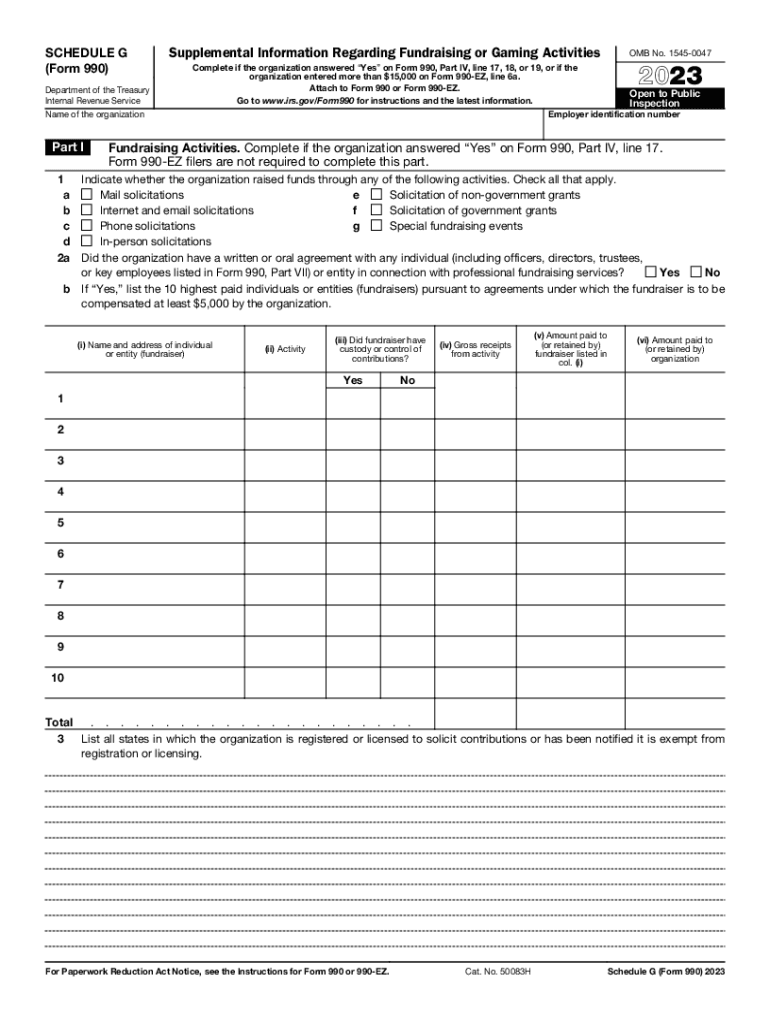
IRS 990 - Schedule G 2023 free printable template


Get Form
pdfFiller is not affiliated with IRS
Screenshot
Screenshot
Screenshot

Get, Create, Make, and Sign IRS 990 - Schedule G

Edit your IRS 990 - Schedule G online
Type text, complete fillable fields, insert images, highlight or blackout data for discretion, add comments, and more.
Screenshot
Add your legally-binding signature
Draw or type your signature, upload a signature image, or capture it with your digital camera.
Screenshot
Share your form instantly
Email, fax, or share your IRS 990 - Schedule G via URL. You can also download, print, or export forms to your preferred cloud storage service.
Screenshot

Instructions and Help about IRS 990 - Schedule G

How to edit IRS 990 - Schedule G

To edit IRS 990 - Schedule G, first obtain a blank or previously filled form from the IRS website or a reliable source. You can utilize pdfFiller's editing tools to modify the content directly. Make sure to save changes frequently and review all sections thoroughly for accuracy before finalizing.

How to fill out IRS 990 - Schedule G

Filling out IRS 990 - Schedule G involves providing detailed information about professional fundraising services used by charitable organizations. To complete the form accurately, follow these steps:
01
Identify the organization filing the form and ensure the correct EIN is used.
02
List all professional fundraising services engaged during the year, providing names, addresses, and other crucial details.
03
Complete any specific areas that require explanations regarding compensation provided to fundraising services.
It's essential to provide truthful and thorough information as inaccuracies can lead to penalties or an audit.

About IRS 990 - Schedule G 2023 previous version

What is IRS 990 - Schedule G?

IRS 990 - Schedule G is a tax form used by non-profit organizations to report on professional fundraising services. This form is supplementary to the IRS 990 and helps the IRS understand how charities are engaging fundraising services, as well as the associated costs.

Who needs the form?

Organizations that utilize professional fundraising services throughout the tax year must file IRS 990 - Schedule G. This requirement typically applies to larger charities or those that do significant fundraising and meet specific financial thresholds.

Components of the form

IRS 990 - Schedule G includes several components such as the identification of professional fundraisers, the disclosure of fundraising costs, and details about compensation arrangements. Specific sections ask for the fundraising activities conducted and the resulting outcomes.

What information do you need when you file the form?

When filing IRS 990 - Schedule G, gather the following information in advance:
01
The name and address of each professional fundraiser used.
02
Details regarding total fundraising revenue, expenses, and net amounts raised.
03
Compensation details for the professional fundraisers.
Accurate information is crucial to ensure compliance and minimize the risk of penalties.

What is the purpose of this form?

The purpose of IRS 990 - Schedule G is to provide transparency regarding the use of professional fundraising services by charities. It ensures that donors are aware of how much money is spent on fundraising activities versus the actual amount being allocated to charitable missions.

When am I exempt from filling out this form?

Filers are exempt from submitting IRS 990 - Schedule G if they do not use professional fundraising services during the tax year. Additionally, organizations that fall below certain financial thresholds may not need to include this schedule with their return.

What are the penalties for not issuing the form?

Failure to file IRS 990 - Schedule G can result in significant penalties, including monetary fines. Additionally, not adequately disclosing fundraising information can lead to scrutiny from the IRS and may jeopardize the organization’s tax-exempt status.

Is the form accompanied by other forms?

IRS 990 - Schedule G is filed along with the main IRS Form 990. It's important to ensure all relevant forms are submitted together to provide a complete picture of the organization’s finances and operations regarding fundraising.

Where do I send the form?

IRS 990 - Schedule G should be sent to the address specified in the instructions that accompany the IRS Form 990. Make sure to verify the mailing address as it may vary based on the organization’s location and whether filing by paper or electronically.

FAQ about IRS 990 - Schedule G

If you discover an error on your IRS 990 - Schedule G post-filing, you can submit an amended return to correct mistakes. Ensure to check the IRS guidelines on how to amend as there are specific procedures to follow. Document any changes accurately to maintain compliance and avoid issues in the future.

To check the status of your IRS 990 - Schedule G, you can use the IRS's online tools or contact their support. Be aware that processing times may vary; allow sufficient time after submission before checking. In case of any issues, be prepared to provide details including your EIN and submission date.

It is recommended to retain records pertaining to your IRS 990 - Schedule G for at least three years after filing. This includes any supporting documents and correspondence. Keeping these records can help in case of audits, reviews, or inquiries by the IRS, ensuring you have all necessary information at hand.

If your e-filed IRS 990 - Schedule G is rejected, carefully review the rejection code provided by the IRS. This code will indicate the specific issue that needs addressing, allowing you to correct it. Once rectified, you can re-submit the form using the appropriate process outlined by the IRS.

You can e-file your IRS 990 - Schedule G using compatible software, but it is essential to ensure that the app or service supports mobile filing. Technical requirements typically include a stable internet connection and updated software versions for optimal performance. Check user reviews for compatibility recommendations.

See what our users say

Read user feedback and try pdfFiller to explore all its benefits for yourself
Great product, meets all my needs as a solo practice lawyer and small business owne
Bruce B
More than what it says on the tin I am forever annotating drawings for the Home Improvements I offer my customers. We can assume that people understand drawings but most don't. The extra points I can make using arrows and text make it easier for my customers to understand and I know it helps me win business. The software is easy to learn (I'm old so my patience with new programmes is not good). It has never frustrated me to use. I can't think of anything about the software that I don't like
Christopher L.
See what our users say
Trust Seal
Trust Seal
Trust Seal
Trust Seal
Trust Seal
Trust Seal
Trust Seal
Trust Seal
Rate free form
4.8
satisfied
29 votes

How to Fill Out Small Business Tax Forms Online with pdfFiller

Struggling with your Schedule C or not sure how to file business taxes as a sole proprietor, LLC, or self-employed professional? This step-by-step pdfFiller tutorial walks you through completing IRS Schedule C quickly and accurately — no printing, no scanning, no stress. Whether you're handling small business tax deductions, tracking self-employed taxes, or preparing your full business tax return, pdfFiller makes it simple right in your browser.

Related Forms

If you believe that this page should be taken down, please follow our DMCA take down process here .
This form may include fields for payment information. Data entered in these fields is not covered by PCI DSS compliance.









