
Last updated on
Nov 9, 2026
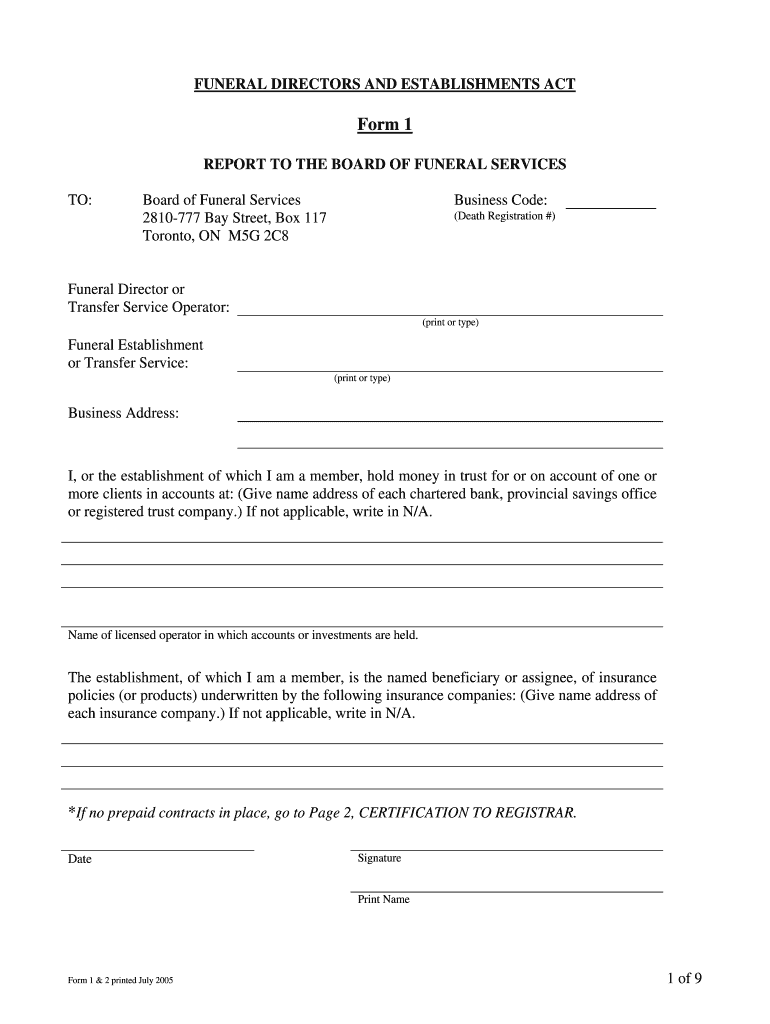
Form 1 Report to the Board of Funeral Services 2005-2026 free printable template
We are not affiliated with any brand or entity on this form

Fill out
Complete the form online in a simple drag-and-drop editor.

eSign
Add your legally binding signature or send the form for signing.

Share
Share the form via a link, letting anyone fill it out from any device.

Export
Download, print, email, or move the form to your cloud storage.
Why pdfFiller is the best tool for your documents and forms


End-to-end document management
From editing and signing to collaboration and tracking, pdfFiller has everything you need to get your documents done quickly and efficiently.
Accessible from anywhere
pdfFiller is fully cloud-based. This means you can edit, sign, and share documents from anywhere using your computer, smartphone, or tablet.
Secure and compliant
pdfFiller lets you securely manage documents following global laws like ESIGN, CCPA, and GDPR. It's also HIPAA and SOC 2 compliant.
What is Form 1 Report to the Board of Funeral Services
The Funeral Director Report Form 1 is a regulatory document used by funeral directors and transfer service operators in Ontario to report financial information to the Board of Funeral Services.
pdfFiller scores top ratings on review platforms




Who needs Form 1 Report to the Board of Funeral Services?
Explore how professionals across industries use pdfFiller.

Form 1 Report to the Board of Funeral Services is needed by:
-
Funeral Directors in Ontario
-
Transfer Service Operators
-
Accountants reviewing financial compliance
-
Funeral Establishment Administrators
-
State Regulatory Bodies
-
Business Compliance Officers
Comprehensive Guide to Form 1 Report to the Board of Funeral Services
What is the Funeral Director Report Form 1?
The Funeral Director Report Form 1 serves a vital regulatory purpose for funeral directors in Ontario. This official document is designed to report essential financial information, including trust accounts and insurance policies, ensuring compliance with the Funeral Directors and Establishments Act. It is crucial for maintaining transparency and accountability within funeral services.
Completing the form accurately is necessary for funeral directors to fulfill their responsibilities and uphold industry standards in Ontario.
Key Features of the Funeral Director Report Form 1
This form includes several critical components that streamline the reporting process for funeral directors. Key features consist of:
-
Sections dedicated to financial reporting and required certifications.
-
Fillable fields, checkboxes, and comprehensive instructions for completion.
-
Online submission capabilities through pdfFiller, enhancing accessibility.
These attributes make the form user-friendly and compliant with regulatory standards for Ontario funeral services.
Who Needs the Funeral Director Report Form 1?
The Funeral Director Report Form 1 is essential for funeral directors and transfer service operators in Ontario. Signatures from both the funeral director and their accountant are crucial for validating the form. Various scenarios necessitate the use of this form, including:
-
Establishments applying for initial licensing.
-
Routine compliance checks to adhere to regulations.
-
Financial audits to ensure proper reporting.
Understanding when to use the form helps maintain compliance and operational integrity within the industry.
Eligibility Criteria for the Funeral Director Report Form 1
To complete the Funeral Director Report Form 1, specific eligibility qualifications must be met. The prerequisites include licensing requirements in Ontario and the classification of funeral establishments, which distinguish what constitutes a funeral service establishment. Notably, some entities may be exempt from submitting the form, including non-exempt businesses that do not fall under the regulatory umbrella.
How to Fill Out the Funeral Director Report Form 1 Online
Filling out the Funeral Director Report Form 1 online is straightforward. Follow these steps for a successful submission:
-
Access the form through pdfFiller.
-
Navigate through the fields, filling in your personal and business details.
-
Provide necessary financial information regarding trust accounts and insurance policies.
To ensure accuracy, create a validation checklist to confirm all sections are completed correctly before submission.
Submission Methods for the Funeral Director Report Form 1
After completing the Funeral Director Report Form 1, you have multiple submission options. You can submit the completed form either by:
-
E-filing through pdfFiller.
-
Delivering it physically to the relevant authorities.
Be mindful of submission deadlines and potential fees, and use available tracking methods to confirm successful filing and what to anticipate afterward.
Common Errors to Avoid When Filing the Funeral Director Report Form 1
When completing the Funeral Director Report Form 1, it's common to encounter certain mistakes. Frequent errors include:
-
Omitting required fields or information.
-
Entering incorrect data in fields.
-
Forgetting to obtain necessary signatures.
To rectify issues, understand how to amend filed forms and utilize a review checklist to ensure accuracy before submission.
Security and Compliance for the Funeral Director Report Form 1
When filling out the Funeral Director Report Form 1 online, maintaining data security is critical. pdfFiller implements robust security measures, including:
-
256-bit encryption to protect your information.
-
Compliance with HIPAA and GDPR regarding the handling of sensitive data.
Take additional steps to safeguard your personal and financial information during the reporting process.
Utilizing pdfFiller for Your Funeral Director Report Form 1 Needs
Adopting pdfFiller for the Funeral Director Report Form 1 offers numerous advantages. Some of these benefits include:
-
Ease of editing, signing, and sharing documents.
-
A user-friendly experience with no downloads required.
Moreover, pdfFiller provides support services to assist users in understanding form requirements and addressing any issues that may arise during the process.
Sample Completed Funeral Director Report Form 1
For reference, you can view a sample layout of a filled Funeral Director Report Form 1. Take note of:
-
Specific sections that highlight proper data entry.
-
The importance of following correct formatting for compliance.
Using a completed example can guide you in ensuring your submission is accurate and meets regulatory expectations.
How to fill out the Form 1 Report to the Board of Funeral Services
-
1.To access the Funeral Director Report Form 1 on pdfFiller, go to the website and use the search feature to locate the form by entering its name or relevant keywords.
-
2.Open the form, and familiarize yourself with its sections, allowing for easier navigation as you start to fill it out.
-
3.Before you begin completing the form, gather required information like trust account details, insurance policy numbers, and certifications related to compliance.
-
4.Begin filling in the form by clicking on the designated fields; pdfFiller allows you to type directly into the fields.
-
5.Use the provided spaces to enter your details such as your name, the name of your funeral establishment, and the business address accurately.
-
6.Make sure to complete the sections that require signatures, ensuring that the funeral director or transfer service operator has signed as required.
-
7.Review each section carefully to confirm all information is accurately entered and corresponds with the required documentation.
-
8.Once finalized, you can either save it directly to your account or download it in your preferred format.
-
9.If necessary, submit the completed form through the provided submission options available on pdfFiller, or print it out to mail or hand-deliver to the appropriate regulatory body.

Who is eligible to complete the Funeral Director Report Form 1?
Eligible individuals include licensed funeral directors and transfer service operators in Ontario. They must provide accurate financial information as required by the Board of Funeral Services.
What is the deadline for submitting the Funeral Director Report Form 1?
Submission deadlines may vary, so it is important to check with the Board of Funeral Services. Generally, reports should be filed annually to ensure compliance with regulations.
What information is required to complete the form?
You will need details regarding trust accounts, insurance policy information, and compliance certifications. Be prepared with any supporting documents that validate your financial reporting.
How can I submit the completed form?
You can submit the completed Funeral Director Report Form 1 through pdfFiller by following the submission options, or by printing and mailing it to the Board of Funeral Services.
What are common mistakes to avoid when filling out the form?
Common mistakes include missing signatures, incorrect financial data, or failing to gather necessary documentation. Always double-check for completeness and accuracy before submission.
Is there a fee for filing the Funeral Director Report Form 1?
Typically, there may be no filing fee for this form, but it's advisable to confirm any potential costs with the Board of Funeral Services as requirements may vary.
How long does it take to process the Funeral Director Report Form 1?
Processing times can vary, but typically it may take several weeks. It's recommended to submit the form well in advance of any deadlines to allow for processing.
Related Content
Related Forms



Related Catalogs
Get the latest insights from our blog


If you believe that this page should be taken down, please follow our DMCA take down process
here
.
This form may include fields for payment information. Data entered in these fields is not covered by PCI DSS compliance.