
Last updated on
Nov 7, 2026
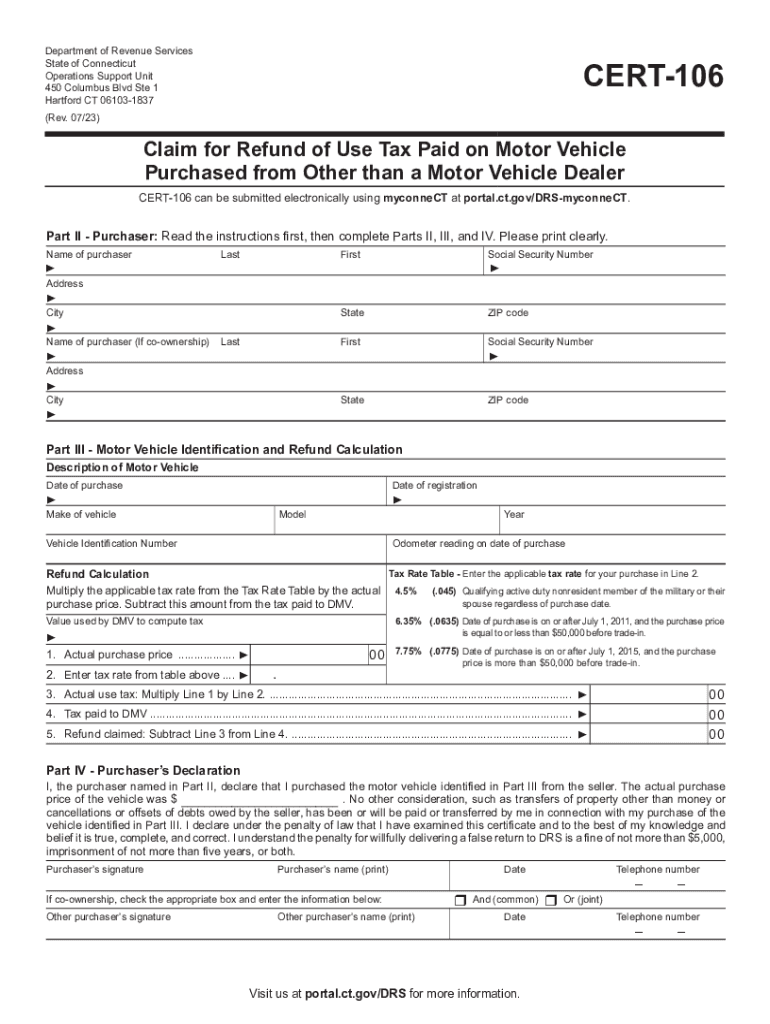
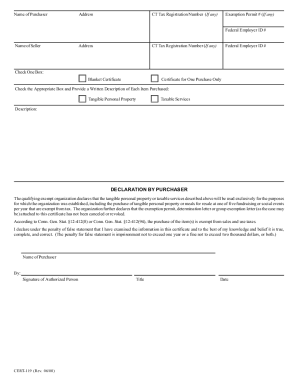
CT CERT-106 2023-2026 free printable template
pdfFiller is not affiliated with any government organization

Fill out
Complete the form online in a simple drag-and-drop editor.

eSign
Add your legally binding signature or send the form for signing.

Share
Share the form via a link, letting anyone fill it out from any device.

Export
Download, print, email, or move the form to your cloud storage.
Why pdfFiller is the best tool for your documents and forms


End-to-end document management
From editing and signing to collaboration and tracking, pdfFiller has everything you need to get your documents done quickly and efficiently.
Accessible from anywhere
pdfFiller is fully cloud-based. This means you can edit, sign, and share documents from anywhere using your computer, smartphone, or tablet.
Secure and compliant
pdfFiller lets you securely manage documents following global laws like ESIGN, CCPA, and GDPR. It's also HIPAA and SOC 2 compliant.
What is CT CERT-106
The Connecticut CERT-106 Form is a tax exemption certificate used by individuals in Connecticut to claim a refund of use tax paid on a motor vehicle purchased from a non-dealer.
pdfFiller scores top ratings on review platforms




Who needs CT CERT-106?
Explore how professionals across industries use pdfFiller.

CT CERT-106 is needed by:
-
Individuals who purchased a vehicle from a non-dealer.
-
Residents of Connecticut seeking a tax refund.
-
Taxpayers who paid use tax on motor vehicles.
-
People filing for tax exemptions related to vehicle purchases.
-
Anyone needing to recover vehicle use tax in Connecticut.
Comprehensive Guide to CT CERT-106
What is the Connecticut CERT-106 Form?
The Connecticut CERT-106 form serves as a critical document for individuals seeking to claim a tax refund on non-dealer vehicle purchases. This form is specifically designed to recover use tax that taxpayers have already paid on motor vehicles. To ensure eligibility for a refund, it is essential that forms are submitted in a timely manner.
-
The CERT-106 form facilitates tax refund claims for non-dealer vehicle purchases.
-
Timely submission is crucial for eligibility.
Purpose and Benefits of the Connecticut CERT-106 Form
The primary purpose of the Connecticut CERT-106 form is to assist taxpayers in recovering use tax on motor vehicles. By clarifying eligibility for tax exemptions, it offers significant financial benefits to residents making non-dealer purchases.
-
Enables taxpayers to reclaim use tax on motor vehicle purchases.
-
Clarifies eligibility for tax exemptions available to residents.
Who Needs to File the Connecticut CERT-106 Form?
The Connecticut CERT-106 form is essential for certain individuals involved in vehicle purchases. Specifically, both Purchasers and Other Purchasers need to understand their responsibilities regarding filing this form.
-
Roles include Purchaser, who directly files for a refund, and Other Purchaser, who may assist.
-
Common scenarios necessitating a refund claim will typically involve non-dealer purchases.
Eligibility Criteria for the Connecticut CERT-106 Form
To successfully file the Connecticut CERT-106 form, certain eligibility criteria must be met. A clear understanding of these requirements is vital for a favorable outcome.
-
Proof of purchase must be obtained from a non-dealer.
-
The form must be filed within three years of the initial tax payment.
How to Fill Out the Connecticut CERT-106 Form Online (Step-by-Step)
Completing the Connecticut CERT-106 form electronically can be streamlined using tools such as pdfFiller. Follow these steps for an efficient filing experience.
-
Open the CERT-106 form in pdfFiller.
-
Fill in the required fields, including the Name of Purchaser and Address.
-
Double-check all entries for accuracy before submitting.
Submission Methods for the Connecticut CERT-106 Form
Once the Connecticut CERT-106 form is completed, it is essential to know how to submit it properly. Various submission methods are available.
-
Submit the form online through designated platforms.
-
Alternatively, mail the completed form to the appropriate authority.
Common Errors and How to Avoid Them When Filing the Connecticut CERT-106 Form
To prevent delays or rejections, it is crucial to be aware of common filing errors. Understanding these mistakes will aid in ensuring a smooth submission process.
-
Common mistakes include leaving fields incomplete or failing to sign the form.
-
Thoroughly review entries and validate the form for accuracy.
What Happens After You Submit the Connecticut CERT-106 Form?
After submitting the Connecticut CERT-106 form, taxpayers should be aware of the next steps in the process. Understanding what to expect can alleviate concerns.
-
Processing times can vary, typically involving a wait period for refunds.
-
Tracking the application status can provide updates and next steps.
Security and Compliance When Using the Connecticut CERT-106 Form
Safety in data handling is paramount when submitting the Connecticut CERT-106 form. Understanding the security features available is essential.
-
pdfFiller employs 256-bit encryption to ensure data security.
-
Compliance with HIPAA and GDPR reinforces user privacy during submission.
Streamline Your Application Process with pdfFiller
Utilizing pdfFiller can greatly enhance the process of completing the Connecticut CERT-106 form. This platform offers several advantages for users.
-
Edit and sign documents easily within the cloud-based interface.
-
Benefit from a user-friendly experience that simplifies document management.
How to fill out the CT CERT-106
-
1.To begin, access pdfFiller and search for the Connecticut CERT-106 Form in the template library.
-
2.Once located, open the form by clicking on it to launch the editor.
-
3.Before filling it out, gather necessary information such as your personal details, vehicle purchase data, and refund calculations.
-
4.Navigate through the fillable fields in the form interface using your mouse or keyboard, and click on each field to enter the appropriate information.
-
5.Enter details in the 'Name of purchaser', 'Address', 'Date of purchase', using the clear labels provided in the form.
-
6.After completing all required fields, review the entered information to ensure accuracy and completeness.
-
7.Make sure to check that the Purchaser's declaration is signed before finalizing the submission.
-
8.Once satisfied with the form, save your progress on pdfFiller to avoid data loss.
-
9.To download a copy of the filled form, use the download option, or choose to submit it electronically through pdfFiller the instant you are ready.

Who is eligible to use the Connecticut CERT-106 Form?
Individuals who have purchased a motor vehicle from a non-dealer in Connecticut and have paid use tax are eligible to use the Connecticut CERT-106 Form to claim a refund.
What is the deadline for submitting the CERT-106 Form?
The CERT-106 Form must be submitted within three years from the date you paid the use tax on your vehicle purchase to qualify for a refund.
How can I submit the CERT-106 Form once completed?
You can submit the completed CERT-106 Form electronically through pdfFiller or print and mail it to the Connecticut Department of Revenue Services, depending on your preference.
What supporting documents are required with the CERT-106 Form?
You may need to submit copies of your vehicle purchase receipt, proof of payment of the use tax, and any other relevant documentation that supports your claim for a refund.
What are common mistakes to avoid when filling out the CERT-106 Form?
Common mistakes include omitting required information, inaccurate calculations for the tax refund, and failing to sign the declaration, which can result in processing delays or rejection.
What is the typical processing time for the CERT-106 Form?
Processing times can vary, but it generally takes a few weeks for the Connecticut Department of Revenue Services to review and process your CERT-106 Form after submission.
Can I edit the CERT-106 Form after saving it on pdfFiller?
Yes, you can edit the CERT-106 Form anytime on pdfFiller as long as it has been saved in your account. Simply locate the saved document, open it, make changes, and save again.
CT CERT-106 Form Versions
Related Forms




Get the latest insights from our blog



If you believe that this page should be taken down, please follow our DMCA take down process
here
.
This form may include fields for payment information. Data entered in these fields is not covered by PCI DSS compliance.