
Last updated on
Oct 30, 2026
WA EMS 10065 2013-2026 free printable template
pdfFiller is not affiliated with any government organization

Fill out
Complete the form online in a simple drag-and-drop editor.

eSign
Add your legally binding signature or send the form for signing.

Share
Share the form via a link, letting anyone fill it out from any device.

Export
Download, print, email, or move the form to your cloud storage.
Why pdfFiller is the best tool for your documents and forms


End-to-end document management
From editing and signing to collaboration and tracking, pdfFiller has everything you need to get your documents done quickly and efficiently.
Accessible from anywhere
pdfFiller is fully cloud-based. This means you can edit, sign, and share documents from anywhere using your computer, smartphone, or tablet.
Secure and compliant
pdfFiller lets you securely manage documents following global laws like ESIGN, CCPA, and GDPR. It's also HIPAA and SOC 2 compliant.
What is WA EMS 10065
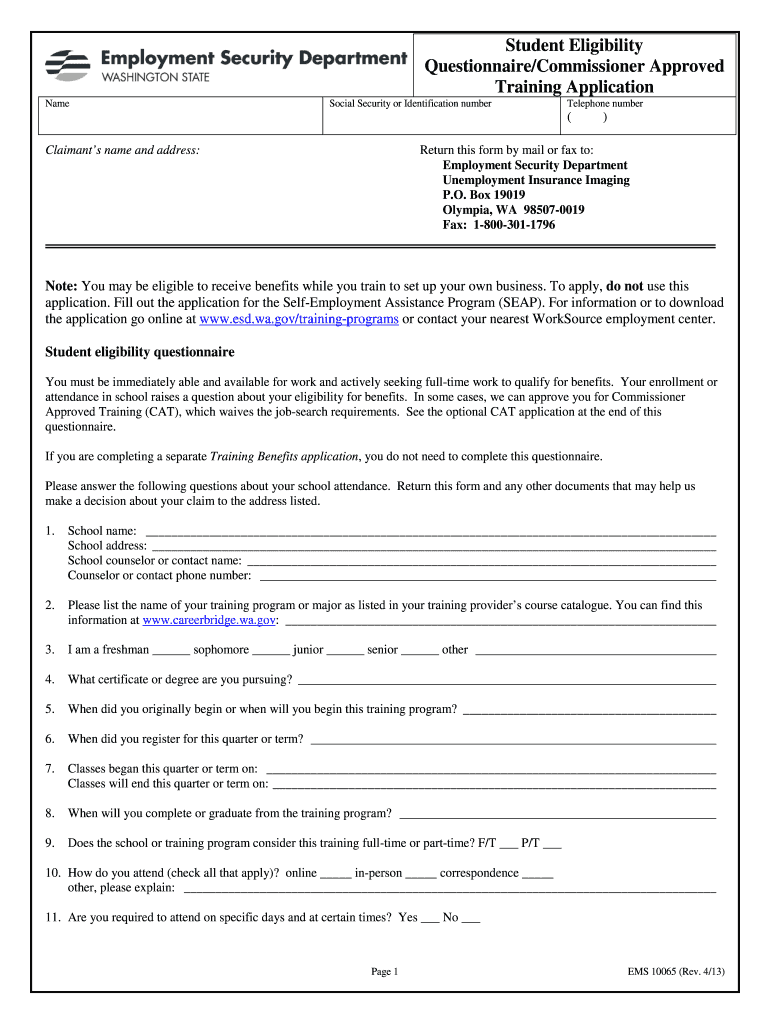
The Washington Student Eligibility Questionnaire is a government form used by students in Washington to assess their eligibility for unemployment benefits while attending educational programs.
pdfFiller scores top ratings on review platforms




Who needs WA EMS 10065?
Explore how professionals across industries use pdfFiller.

WA EMS 10065 is needed by:
-
Students in Washington seeking unemployment benefits.
-
Individuals enrolled in Commissioner Approved Training programs.
-
Educational institutions providing training programs.
-
Employment Security Department officials reviewing applications.
-
Counselors assisting students with benefit applications.
Comprehensive Guide to WA EMS 10065
What is the Washington Student Eligibility Questionnaire?
The Washington Student Eligibility Questionnaire is a crucial document that helps determine a student's eligibility for unemployment benefits while pursuing education. This form is essential for students in Washington who wish to access financial support during their training programs.
This questionnaire must be completed by students who want to assess their qualification for unemployment benefits. The Employment Security Department plays a pivotal role in reviewing the submissions for the eligibility questionnaire, ensuring that students meet the necessary criteria.
Purpose and Benefits of the Washington Student Eligibility Questionnaire
Completing the Washington Student Eligibility Questionnaire offers several advantages that can significantly aid students. A primary benefit includes the ability to receive unemployment benefits while attending school full-time or engaging in training opportunities.
Approval for the Commissioner Approved Training (CAT) program allows students to focus on their education without the immediate pressure of seeking employment. Timely completion of the questionnaire is essential, as it facilitates access to important financial support during academic pursuits.
Who Needs the Washington Student Eligibility Questionnaire?
This questionnaire is specifically designed for full-time students enrolled in training programs who seek unemployment benefits. Students engaged in specific educational paths must fill out this form to verify their eligibility.
Some exceptions and criteria may apply, and it's important for stakeholders, such as educational institutions and training programs, to be aware of which groups need to complete this form.
How to Fill Out the Washington Student Eligibility Questionnaire Online (Step-by-Step)
Filling out the Washington Student Eligibility Questionnaire online is straightforward when using pdfFiller. Follow these steps to ensure accurate completion:
-
Access the questionnaire on pdfFiller’s platform.
-
Fill in your personal information, including your school attendance status.
-
Provide details regarding your training program.
-
Indicate your work availability during your studies.
-
Double-check all entries for accuracy to avoid delays.
By accurately completing these fields, you ensure a smoother process for your application’s review.
Common Errors and How to Avoid Them
Many users encounter common pitfalls while filling out the Washington Student Eligibility Questionnaire. Typical errors include incomplete fields and providing incorrect information, which can hinder the application process.
To minimize mistakes:
-
Carefully review your answers before submission.
-
Utilize pdfFiller's features, which help identify errors and streamline corrections.
Review and Validation Checklist for the Washington Student Eligibility Questionnaire
Before submitting your application, use a checklist to ensure completeness. Important items to verify include:
-
Your personal information is current and accurate.
-
All supporting documents are included.
-
Required signatures are completed.
Gathering necessary documents such as proof of school attendance ahead of time can greatly enhance the efficiency of your submission process.
Submission Methods and Delivery
Once you have completed the Washington Student Eligibility Questionnaire, you have several options for submission. These methods include:
-
Online submission through pdfFiller for convenience.
-
Mailing the form directly to the designated address.
-
In-person delivery at local employment security offices.
Each method has its own processing time, so be sure to follow up as needed. Online submissions are backed by robust security measures to protect your sensitive information.
What Happens After You Submit the Washington Student Eligibility Questionnaire?
After submission, the Employment Security Department will review your questionnaire. The review process varies in duration, and applicants should anticipate potential outcomes ranging from approval to requests for additional information.
To stay informed, students are encouraged to track their application status and understand response times from the department.
Security and Privacy for the Washington Student Eligibility Questionnaire
Handling sensitive information is paramount when filling out the Washington Student Eligibility Questionnaire. pdfFiller implements stringent security measures, including encryption, to safeguard your data during online submissions.
Students should feel reassured about their privacy, as pdfFiller complies with industry standards such as SOC 2 Type II, HIPAA, and GDPR to protect personal information and address concerns regarding data retention.
Maximize Your Efficiency with pdfFiller for the Washington Student Eligibility Questionnaire
Utilizing pdfFiller for completing the Washington Student Eligibility Questionnaire enhances your overall experience significantly. Key features include:
-
Online editing to make changes effortlessly.
-
eSigning capabilities that simplify the signature process.
-
Document sharing options for collaborative efforts.
Creating an account with pdfFiller allows for a more personalized and efficient form-filling experience.
How to fill out the WA EMS 10065
-
1.To begin, access the Washington Student Eligibility Questionnaire on pdfFiller by searching for the form title in the search bar on the homepage.
-
2.Once you locate the form, click on it to open the document in the pdfFiller interface.
-
3.Before you start filling out the form, gather necessary information such as your school attendance records, training program details, and work availability.
-
4.Begin filling in the fields by clicking on the designated areas within the form. Use pdfFiller's features to checkboxes or dropdown menus where applicable.
-
5.To ensure accuracy, read the instructions accompanying each section carefully, such as 'Fill out the application for the Self-Employment Assistance Program (SEAP).' Answer all questions thoroughly.
-
6.After entering all required information, review your form for completeness and accuracy. Double-check all fillable fields to ensure they are filled out correctly.
-
7.Once you are satisfied with the form, you can save your progress or download the completed document by using the options available within pdfFiller.
-
8.If needed, submit the final form to the Employment Security Department as per their submission guidelines outlined on their website.

Who is eligible to complete the Washington Student Eligibility Questionnaire?
Students in Washington attending school who seek unemployment benefits while enrolled in training programs can complete this questionnaire to determine their eligibility.
What is the submission method for the Washington Student Eligibility Questionnaire?
The completed questionnaire should be submitted directly to the Employment Security Department, following their submission procedures which may include online submission or via mail.
Are there any deadlines for submitting the Washington Student Eligibility Questionnaire?
It is crucial to check for any specific deadlines related to your training program or the benefits application process. Generally, timely submission will ensure that you maintain your eligibility.
What supporting documents are required to complete the questionnaire?
You may need to provide your school attendance records, details about your training program, and any other relevant documentation that proves your eligibility for benefits.
What common mistakes should I avoid when filling out the Washington Student Eligibility Questionnaire?
Be sure to answer all questions thoroughly, avoid leaving blank fields, and double-check for accuracy to prevent delays in the review of your application.
How long does it take to process the Washington Student Eligibility Questionnaire?
Processing times may vary, but it typically takes several weeks for the Employment Security Department to review submitted questionnaires and notify applicants of their eligibility status.
Can I amend my questionnaire after submission?
If you need to make changes after submission, contact the Employment Security Department directly to discuss the procedure for correcting your form.
WA EMS 10065 Form Versions
Related Content
Related Forms




Get the latest insights from our blog


If you believe that this page should be taken down, please follow our DMCA take down process
here
.
This form may include fields for payment information. Data entered in these fields is not covered by PCI DSS compliance.