
Last updated on
Nov 9, 2026

IRS Instruction W-2 & W-3 2014 free printable template
pdfFiller is not affiliated with IRS

Fill out
Complete the form online in a simple drag-and-drop editor.

eSign
Add your legally binding signature or send the form for signing.

Share
Share the form via a link, letting anyone fill it out from any device.

Export
Download, print, email, or move the form to your cloud storage.
Why pdfFiller is the best tool for your documents and forms


End-to-end document management
From editing and signing to collaboration and tracking, pdfFiller has everything you need to get your documents done quickly and efficiently.
Accessible from anywhere
pdfFiller is fully cloud-based. This means you can edit, sign, and share documents from anywhere using your computer, smartphone, or tablet.
Secure and compliant
pdfFiller lets you securely manage documents following global laws like ESIGN, CCPA, and GDPR. It's also HIPAA and SOC 2 compliant.
What is IRS Instruction W-2 & W-3
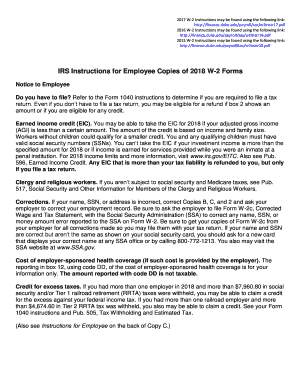
The 2014 IRS W-2 and W-3 Instructions is a tax guidance document used by employers in the US to correctly complete and file Forms W-2 and W-3 for reporting wages and taxes withheld from employees.
pdfFiller scores top ratings on review platforms




Who needs IRS Instruction W-2 & W-3?
Explore how professionals across industries use pdfFiller.

IRS Instruction W-2 & W-3 is needed by:
-
Employers preparing to file W-2 Forms
-
Tax professionals assisting clients with wage reporting
-
Payroll departments needing guidance on IRS forms
-
HR personnel responsible for employee compensation
-
Businesses filing their annual wage reports
-
Self-employed individuals reporting non-employee compensation
Comprehensive Guide to IRS Instruction W-2 & W-3
What Are the 2014 IRS W-2 and W-3 Instructions?
The 2014 IRS W-2 and W-3 Instructions provide essential guidance for employers in understanding the required forms for reporting employee wages and taxes. Accurate reporting is crucial to comply with IRS regulations and to ensure both employer and employee satisfaction. The W-2 form replicates individual employee wage reporting, while the W-3 form summarizes the total earnings and taxes withheld for the whole company.
Employers must be aware of the distinctions between these forms to avoid penalties related to incorrect filing. These instructions serve as a comprehensive IRS Form W-2 guide and IRS Form W-3 guide for ensuring compliance with reporting requirements.
Purpose and Benefits of the 2014 IRS W-2 and W-3 Instructions
The primary purpose of the 2014 IRS W-2 and W-3 Instructions is to provide clear guidelines for wage and tax reporting. Employers can benefit greatly from adhering to these instructions, as they simplify compliance with IRS requirements.
-
Minimize risks of penalties through accurate reporting.
-
Enhance employee satisfaction via correct wage documentation.
-
Streamline payroll processes for efficiency.
Who Needs the 2014 IRS W-2 and W-3 Instructions?
These instructions are essential for various professionals engaged in tax reporting in the U.S. The main audience includes:
-
Employers across various industries.
-
Payroll departments responsible for wage reporting.
-
Tax professionals assisting organizations with compliance.
How to Complete the 2014 IRS W-2 and W-3 Instructions Online
Filling out the W-2 and W-3 forms online can significantly streamline the process. Here’s a step-by-step guide for completing these forms:
-
Access the online filing system through an IRS-approved platform.
-
Fill in the required fields for each employee on the W-2 form.
-
Transfer cumulative employee data onto the W-3 form.
-
Review all entries for accuracy and compliance.
-
Submit electronically, adhering to submission guidelines.
Common Errors and How to Avoid Them When Filing the W-2 and W-3
Employers often encounter several common errors while filing these forms. Addressing these mistakes proactively can lead to smoother processing:
-
Accurate employee information is crucial; double-check all details.
-
Ensure compliance with recommended filing methods and timelines.
-
Utilize checklists or digital tools to catch common errors before submission.
Submission Methods for the 2014 IRS W-2 and W-3 Instructions
There are multiple ways to submit the completed W-2 and W-3 forms. Familiarity with these methods helps ensure timely and secure filing:
-
Electronic filing is available and preferred for efficiency.
-
Paper submission is also acceptable; however, ensure it is sent to the correct address.
-
Be aware of specific filing deadlines to avoid penalties.
Security and Compliance for IRS Form Submission
The security of tax documents is paramount to protect sensitive information. When filing, the following measures should be considered:
-
Utilize encryption methods during the submission process.
-
Confirm compliance with regulations such as HIPAA and GDPR.
-
Adopt best practices for safeguarding data throughout filing.
Why Use pdfFiller for Completing Your 2014 W-2 and W-3 Instructions?
pdfFiller offers a feature-rich platform for managing tax forms, making the process easier for users:
-
Editable fields allow users to customize entries as necessary.
-
eSigning capability enhances document management.
-
The user-friendly interface promotes efficient form completion.
After Submission: What to Expect with Your W-2 and W-3 Filing
Once your W-2 and W-3 forms have been submitted, it’s essential to know what’s next:
-
Receive confirmation of submission through your chosen filing method.
-
Understand the IRS review process for continuous monitoring.
-
Be prepared to make corrections if notified by the IRS.
Ready to Simplify Your IRS Form Filling?
As you approach the task of completing your W-2 and W-3 forms, consider utilizing the tools offered by pdfFiller to streamline the process. Efficient form filling not only saves time but also plays a critical role in ensuring accuracy in tax reporting.
How to Fill Out Small Business Tax Forms Online with pdfFiller
Struggling with your Schedule C or not sure how to file business taxes as a sole proprietor, LLC, or self-employed professional? This step-by-step pdfFiller tutorial walks you through completing IRS Schedule C quickly and accurately — no printing, no scanning, no stress. Whether you're handling small business tax deductions, tracking self-employed taxes, or preparing your full business tax return, pdfFiller makes it simple right in your browser.

How to fill out the IRS Instruction W-2 & W-3
-
1.Access the IRS W-2 and W-3 Instructions on pdfFiller by searching for the form's name or navigating to the Tax Forms category.
-
2.Open the document by clicking on it, which will load the form in the pdfFiller editor for you to work on.
-
3.Before filling out the form, gather all necessary information, such as employees' Social Security numbers, wage information, and tax withholding details.
-
4.Use the pdfFiller interface to navigate through the form. Click on each field to enter the required information, using the provided guidelines.
-
5.Ensure that you fill out the W-2 sections accurately, including employee names, addresses, and wage amounts, then proceed to the W-3 section to summarize total wage reports.
-
6.Review the completed fields for accuracy. Check for common errors such as incorrect Social Security numbers or misspelled names.
-
7.After reviewing, finalize your form in pdfFiller by clicking on the 'Finish' option, which prompts you to save your completed form.
-
8.To save, download, or submit your W-2 and W-3 Instructions through pdfFiller, select your preferred format, usually PDF, and follow the prompts to save to your device or send it directly to the IRS.

Who needs to follow these instructions?
Employers who need to accurately report wages and tax information for employees are required to adhere to the W-2 and W-3 Instructions. This includes businesses of all sizes that have employees on payroll.
When is the deadline for filing W-2 and W-3 forms?
The deadline for filing W-2 and W-3 forms with the IRS is typically January 31st of the year following the tax year being reported. Always confirm with the latest IRS guidelines for any changes.
What are the common mistakes to avoid when completing the W-2 form?
Common mistakes include entering incorrect Social Security numbers, failing to report all wages and taxes withheld, and omitting necessary employee information. Always double-check your entries.
Can I submit forms electronically?
Yes, you can submit W-2 and W-3 forms electronically through approved IRS e-file options. Check with your tax software or provider for available electronic submission methods.
What supporting documents do I need to complete the W-2 form?
To complete the W-2 form, you will need employees' earnings statements, tax withholding data, and necessary identification numbers such as the Employer Identification Number (EIN) and employees' Social Security numbers.
How can I correct errors on a filed W-2 form?
If you find errors after filing W-2 forms, you must file a corrected form. Use Form W-2c to amend the information. Ensure that you also inform your employees of the corrections made.
How long should I retain copies of the W-2 forms?
Employers are advised to keep copies of W-2 forms for at least four years to comply with IRS record-keeping requirements or longer if there's a dispute for audit purposes.
IRS Instruction W-2 & W-3 Form Versions
Related Content
Related Forms



Related Catalogs
Get the latest insights from our blog


If you believe that this page should be taken down, please follow our DMCA take down process
here
.
This form may include fields for payment information. Data entered in these fields is not covered by PCI DSS compliance.