
Last updated on
Nov 7, 2026
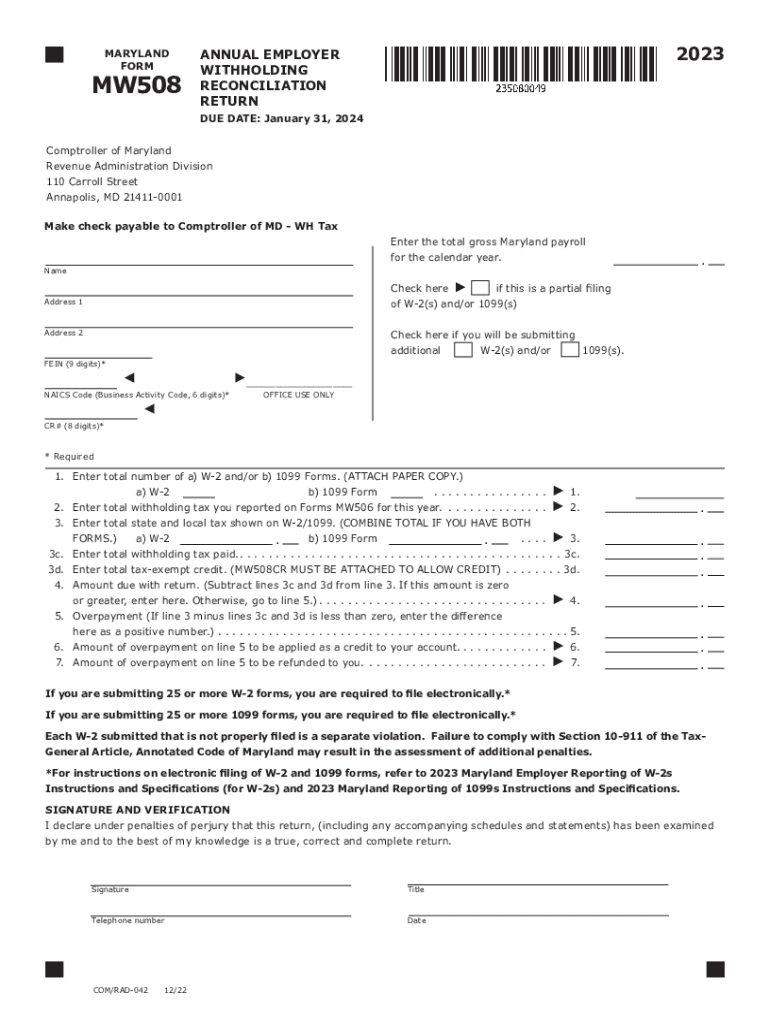
MD Comptroller MW508 2023 free printable template
pdfFiller is not affiliated with any government organization

Fill out
Complete the form online in a simple drag-and-drop editor.

eSign
Add your legally binding signature or send the form for signing.

Share
Share the form via a link, letting anyone fill it out from any device.

Export
Download, print, email, or move the form to your cloud storage.
Why pdfFiller is the best tool for your documents and forms


End-to-end document management
From editing and signing to collaboration and tracking, pdfFiller has everything you need to get your documents done quickly and efficiently.
Accessible from anywhere
pdfFiller is fully cloud-based. This means you can edit, sign, and share documents from anywhere using your computer, smartphone, or tablet.
Secure and compliant
pdfFiller lets you securely manage documents following global laws like ESIGN, CCPA, and GDPR. It's also HIPAA and SOC 2 compliant.
What is MD Comptroller MW508
The Maryland Annual Employer Withholding Reconciliation Form MW508 is a state tax document used by employers to report and reconcile total withholding tax for the calendar year.
pdfFiller scores top ratings on review platforms




Was able to get started on a project…
Was able to get started on a project easily.
So far so good importing pdf doc to…
So far so good importing pdf doc to edit Word for a children's book I'm writing. Important to have illustration (drafts) work sheet above and have critique "notes" below!
Some issues with editing documents
Some issues with editing documents. A specific example is that it can be hard to remove checks and X's from document, but overall one of the best document editors i have used.
It was easy to use.
It's very easy to use your site, thank you
I enjoy the tool and it does what I need it to
Who needs MD Comptroller MW508?
Explore how professionals across industries use pdfFiller.

MD Comptroller MW508 is needed by:
-
Maryland employers with W-2 and 1099 forms
-
Tax professionals assisting clients in Maryland
-
Business owners filing withholding tax returns
-
Payroll service providers for Maryland businesses
-
Human resources departments of Maryland companies
-
Individuals responsible for tax compliance in Maryland
Comprehensive Guide to MD Comptroller MW508
What is the Maryland Annual Employer Withholding Reconciliation Form MW508?
The Maryland Annual Employer Withholding Reconciliation Form MW508 serves a critical role in employer tax reporting for Maryland businesses. This form enables employers to accurately report withheld taxes for the year, which is essential for compliance with state tax regulations. The MW508 includes key details about taxpayer information and tax obligations.
Included in the form are specifics regarding W-2 and 1099 reporting, detailing the total number of employees and contractors to ensure accurate tax withholding. Proper use of the form fosters transparency and accountability in employer tax practices.
Purpose and Benefits of the MW508 Form
Accurate reporting through the MW508 form is vital for every employer in maintaining legal compliance and avoiding penalties. The form facilitates the reconciliation of all withheld taxes, ensuring that amounts reported align with state requirements. Failing to file timely may lead to fines or compliance issues with the Maryland State Comptroller.
By submitting the MW508 on time, employers can benefit from avoiding these penalties and ensuring their tax filings reconcile with reported earnings, an important step in navigating tax obligations successfully.
Who Needs to File the Maryland MW508 Form?
Employers in Maryland must determine if they are required to file the MW508 based on specific criteria. Generally, any business that has withheld taxes from employees or independent contractors is obligated to submit this form.
Employers must file electronically if they issue 25 or more W-2 or 1099 forms, which must be considered when preparing submissions for the annual tax reconciliation.
When and How to Submit the MW508 Form
The deadline for submitting the Maryland MW508 form is January 31, 2024; it is crucial for employers to adhere to this timeline to ensure compliance. Employers have multiple options for filing, including both electronic and paper methods.
Electronic filing is recommended for those with a larger number of forms, as it simplifies the submission process and allows for easier tracking of submission status.
How to Fill Out the Maryland MW508 Form for 2023 (Step-by-Step)
Completing the MW508 form accurately is essential to avoid common errors. Begin by ensuring that all required fields are properly filled in, including the total number of W-2 and 1099 forms submitted and the respective payroll data.
When filling out the form, pay close attention to detail, as mistakes can lead to issues with the state tax authority. A checklist of common errors includes:
-
Incorrect Employee Identification Numbers (EINs)
-
Missing signatures
-
Errors in numerical entries for tax withheld
Common Errors and How to Avoid Them
While filling out the MW508 form, employers may encounter various pitfalls. Some frequent mistakes include misreporting the number of W-2 and 1099 forms or failure to sign the document.
To ensure successful submission, consider double-checking the following:
-
Confirm that all required fields are completed
-
Review mathematical calculations for accuracy
-
Ensure timely submission by the stated deadline
Security and Compliance in Filing the MW508 Form
Maintaining security when filing the MW508 form is paramount, as sensitive tax information is involved. Employers should be aware of best practices for data protection and secure submissions.
Utilizing platforms like pdfFiller ensures compliance with regulations like HIPAA and GDPR, which maintain privacy for financial and personal information.
How to Download and Save the MW508 Form as PDF
To download and save the MW508 form, follow these simple steps:
-
Access the Maryland state tax website or pdfFiller.
-
Select the MW508 form from the available tax forms.
-
Download the PDF version of the form to your computer.
Using pdfFiller, employers can edit and manage their PDF documents seamlessly, simplifying the process of preparing tax forms.
What Happens After You Submit the MW508 Form?
After submitting the MW508 form, employers can expect a verification and processing timeline from the Maryland Comptroller's office. Understanding this process can ease potential concerns regarding submission status.
Employers can track their submissions and confirm receipt; should any issues arise, it is important to respond promptly to resolve potential rejections.
Maximize Your Efficiency with pdfFiller
Employers can greatly increase their efficiency in completing the MW508 form by utilizing pdfFiller's comprehensive features. The platform allows for easy editing and secure eSigning, making the filing process much smoother.
With a focus on user experience, pdfFiller offers numerous capabilities to help save time and enhance the accuracy of tax document submissions.
How to fill out the MD Comptroller MW508
-
1.Access pdfFiller and search for 'Maryland Annual Employer Withholding Reconciliation Form MW508'.
-
2.Open the form in the pdfFiller editor to start filling it out.
-
3.You may want to gather necessary documents like W-2 and 1099 forms and your FEIN beforehand.
-
4.Begin by entering your Federal Employer Identification Number (FEIN) in the designated field.
-
5.Complete the gross Maryland payroll total for the calendar year in the appropriate box.
-
6.Detail the total number of W-2 and 1099 forms submitted as requested.
-
7.Fill in the total withholding tax amounts reported on these forms accurately.
-
8.As you fill out each field, utilize the available instructional prompts to avoid errors.
-
9.Once all sections are complete, review your entries for accuracy and completeness.
-
10.Use the 'Save' option to keep a copy of your completed form.
-
11.When satisfied with all entries, download a copy for your records or submit electronically via pdfFiller.

What is the deadline for filing the MW508 form?
The MW508 form must be submitted to the Comptroller of Maryland by January 31, 2024. Ensure you allow sufficient time for completion and submission, especially if you're filing electronically.
Who is required to file the MW508 form?
All employers in Maryland that have withheld state income taxes must file the MW508 form. This includes those with 25 or more W-2 or 1099 forms, who are also required to file electronically.
How can I submit the MW508 form?
You can submit the MW508 form electronically through the Comptroller of Maryland's website or by using authorized software like pdfFiller. Ensure your form is completed accurately before submission.
Are there any penalties for late filing of the MW508 form?
Yes, there can be penalties for late filing the MW508 form. It's essential to adhere to the submission deadlines to avoid penalties or interest on unpaid taxes.
What information do I need to complete the MW508 form?
To complete the MW508 form, you'll need your FEIN, the total gross Maryland payroll, details of your W-2 and 1099 forms, and the total withholding tax amounts reported.
Do I need to notarize the MW508 form?
No, notarization is not required for the MW508 form. However, it must be signed by the employer before submission.
What common mistakes should I avoid when filling the MW508 form?
Ensure that all numerical entries are accurate and complete. Also, double-check that you have included all necessary forms and that the form is signed. Avoid missing the submission deadlines to prevent penalties.
MD Comptroller MW508 Form Versions
Related Content
Related Forms




Get the latest insights from our blog



If you believe that this page should be taken down, please follow our DMCA take down process
here
.
This form may include fields for payment information. Data entered in these fields is not covered by PCI DSS compliance.