Form preview

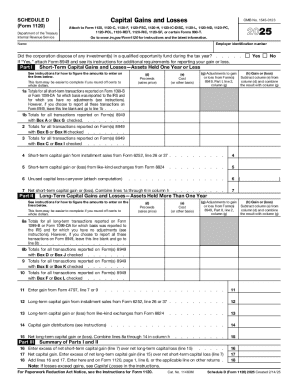
IRS 1041 - Schedule D 2023 free printable template


Get Form
pdfFiller is not affiliated with IRS
Screenshot
Screenshot
Screenshot

Get, Create, Make, and Sign IRS 1041 - Schedule D

Edit your IRS 1041 - Schedule D online
Type text, complete fillable fields, insert images, highlight or blackout data for discretion, add comments, and more.
Screenshot
Add your legally-binding signature
Draw or type your signature, upload a signature image, or capture it with your digital camera.
Screenshot
Share your form instantly
Email, fax, or share your IRS 1041 - Schedule D via URL. You can also download, print, or export forms to your preferred cloud storage service.
Screenshot

Instructions and Help about IRS 1041 - Schedule D

How to edit IRS 1041 - Schedule D

To edit IRS 1041 - Schedule D, first download the form from the IRS website or access your saved copy. Use a PDF editor like pdfFiller, which allows you to make changes directly to the form. Ensure all edited information remains accurate and complies with IRS requirements before proceeding to submission.

How to fill out IRS 1041 - Schedule D

To fill out IRS 1041 - Schedule D, follow these steps:
01
Download the form from the IRS website or access a pre-existing version.
02
Input the estate or trust's identifying information at the top.
03
List all sales and transactions along with their respective dates and proceeds.
04
Calculate the gain or loss for each transaction.
05
Follow the instructions for summarizing this information onto the main estate income tax return.

About IRS 1041 - Schedule D 2023 previous version

What is IRS 1041 - Schedule D?

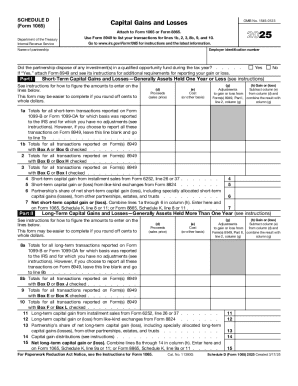
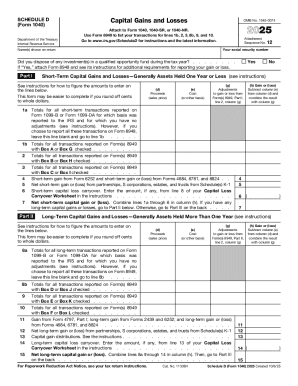
IRS 1041 - Schedule D is a tax form used to report capital gains and losses from the sale of assets held by an estate or trust. This form is essential for determining the tax implications of these transactions and is filed alongside Form 1041, the U.S. Income Tax Return for Estates and Trusts.

When am I exempt from filling out this form?

You are exempt from filling out IRS 1041 - Schedule D if the estate or trust did not have any capital asset transactions during the tax year, meaning there were no sales or exchanges of assets. Additionally, if all transactions resulted in a loss that balances out previous gains, you may not be required to use this form.

What are the penalties for not issuing the form?

Failing to issue IRS 1041 - Schedule D when required can result in penalties imposed by the IRS. This may include fines for late filings or inaccurate reporting of capital gains and losses. Moreover, the estate may face additional scrutiny during audits, leading to potential adjustments in tax liabilities.

Is the form accompanied by other forms?

IRS 1041 - Schedule D is typically filed alongside Form 1041, as it provides pertinent information regarding the capital transactions of the estate or trust. Additional supporting forms may be required depending on the specific circumstances, such as Form 8949 for reporting individual transactions in detail.

What is the purpose of this form?

The purpose of IRS 1041 - Schedule D is to provide detailed reporting of capital gains and losses from the sale of securities or other assets. This information is used to calculate the overall tax liability of the estate or trust, ensuring proper reporting to the IRS.

Who needs the form?

Individuals responsible for managing estates or trusts that have sold assets of any kind must file IRS 1041 - Schedule D. This includes executors, administrators, or trustees who are required to account for any capital gains or losses incurred during the tax year.

Components of the form

The components of IRS 1041 - Schedule D include sections for entering details about individual transactions, summarizing total gains and losses, and the overall calculation that will impact tax liabilities on Form 1041. It requires comprehensive data on all relevant sales, including dates, amounts, and relevant asset details.

What information do you need when you file the form?

When filing IRS 1041 - Schedule D, you will need the following information:
01
The details of each asset sold or exchanged, including purchase price and sale proceeds.
02
Relevant dates of acquisition and disposal for each asset.
03
The estate's overall capital gain or loss position for the tax year being reported.

Where do I send the form?

After completing IRS 1041 - Schedule D, the form should be submitted to the IRS at the address specified in the Form 1041 instructions. Ensure you check the most recent filing guidelines for any updates on submission locations, especially as they may change based on the estate’s principal place of business.

FAQ about IRS 1041 - Schedule D

If you discover an error on your IRS 1041 - Schedule D after submission, you can file an amended return using Form 1041-X. Ensure that all fields reflect accurate information and include an explanation of the changes made. It's crucial to file the amendment promptly to avoid potential penalties.

To verify the status of your IRS 1041 - Schedule D, you can use the IRS's online tracking system or call their customer service. If you filed electronically, be on the lookout for confirmation emails and check for any rejection notifications that may require your attention.

Common errors when submitting the IRS 1041 - Schedule D include misreporting capital gains, forgetting to sign the form, or failing to include necessary documentation. Double-check entries against your records and ensure that all required attachments are present before submitting.

Yes, e-signatures are accepted for the IRS 1041 - Schedule D when filed electronically. Ensure that your e-filing software supports e-signatures to comply with IRS standards and securely process your submission.

If you receive a notice from the IRS concerning your IRS 1041 - Schedule D, promptly review the notice details and gather relevant documentation. Respond to the notice within the specified timeframe, providing any requested information or clarification to resolve the issue efficiently.

See what our users say

Read user feedback and try pdfFiller to explore all its benefits for yourself
Great for businesses. Simple, yet powerful tool for anyone who finds themselves away from their desk often. I can easily fill in text fields, E-sign and add pictures to my pdfs. I've also used it to print, email or eFax pdfs and docs.
Marie G.
Very easy to use. I think the monthly subscription fee should come down a little bit but other then that I am happy.
Debra S
See what our users say
Trust Seal
Trust Seal
Trust Seal
Trust Seal
Trust Seal
Trust Seal
Trust Seal
Trust Seal
Rate free form
4.1
satisfied
48 votes

How to Fill Out Small Business Tax Forms Online with pdfFiller

Struggling with your Schedule C or not sure how to file business taxes as a sole proprietor, LLC, or self-employed professional? This step-by-step pdfFiller tutorial walks you through completing IRS Schedule C quickly and accurately — no printing, no scanning, no stress. Whether you're handling small business tax deductions, tracking self-employed taxes, or preparing your full business tax return, pdfFiller makes it simple right in your browser.

If you believe that this page should be taken down, please follow our DMCA take down process here .
This form may include fields for payment information. Data entered in these fields is not covered by PCI DSS compliance.