
Last updated on
Nov 6, 2026

MA DoR 1-NR/PY 2023 free printable template
pdfFiller is not affiliated with any government organization

Fill out
Complete the form online in a simple drag-and-drop editor.

eSign
Add your legally binding signature or send the form for signing.

Share
Share the form via a link, letting anyone fill it out from any device.

Export
Download, print, email, or move the form to your cloud storage.
Why pdfFiller is the best tool for your documents and forms


End-to-end document management
From editing and signing to collaboration and tracking, pdfFiller has everything you need to get your documents done quickly and efficiently.
Accessible from anywhere
pdfFiller is fully cloud-based. This means you can edit, sign, and share documents from anywhere using your computer, smartphone, or tablet.
Secure and compliant
pdfFiller lets you securely manage documents following global laws like ESIGN, CCPA, and GDPR. It's also HIPAA and SOC 2 compliant.
What is MA DoR 1-NR/PY
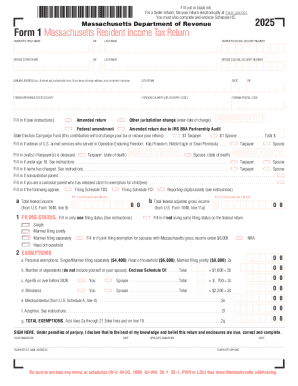
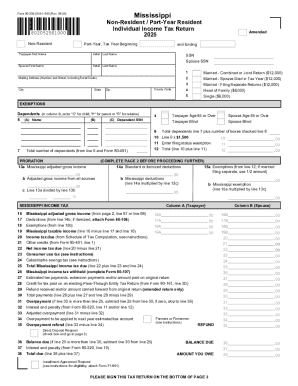
The Massachusetts Nonresident/Part-Year Tax Return is a tax document used by nonresidents and part-year residents of Massachusetts to report income and calculate the tax due to the state.
pdfFiller scores top ratings on review platforms




I really enjoy PDF filler. It is way more user friendly than Adobe Pro and it is so convenient for it to be a website that I can access from anywhere. Who ever created this is a genius!!!!!!!!!!!!
I absolutely love this program - helps tremendously
Only work with app for a few moments and like it so far purchase a annual membersip
Nice tool for editing PDFs or converting to word/excel. Statements from vendors a good example.
very helpful sending faxes and reading documents in PDF form
Great platform for editing pdf's hassle free
Who needs MA DoR 1-NR/PY?
Explore how professionals across industries use pdfFiller.

MA DoR 1-NR/PY is needed by:
-
Nonresidents earning income in Massachusetts
-
Part-year residents filing for the current tax year
-
Taxpayers needing to report state income for 2023
-
Spouses filing jointly with a nonresident
-
Individuals seeking state deductions and credits
-
Tax professionals assisting clients with MA tax returns
Comprehensive Guide to MA DoR 1-NR/PY
What is the Massachusetts Nonresident/Part-Year Tax Return?
The Massachusetts Nonresident/Part-Year Tax Return (Form 1-NR/PY) is essential for those who reside outside Massachusetts or have lived in the state for only part of the tax year. Taxpayers must use this form to report their income to determine the tax due to Massachusetts, which is vital for complying with state income tax laws applicable for the tax year 2023.
This form is specifically designed for nonresidents and part-year residents who earn income from Massachusetts sources. Understanding the use of this tax form assists in accurately filing state income taxes and ensures adherence to Massachusetts tax regulations.
Eligibility Criteria for the Massachusetts Nonresident/Part-Year Tax Return
To qualify for the Massachusetts Nonresident/Part-Year Tax Return, individuals must meet specific conditions that categorize them as nonresidents or part-year residents. A nonresident is defined as someone who does not maintain a permanent home in Massachusetts, while a part-year resident has lived in the state for only a portion of the tax year.
-
Individuals who earned income in Massachusetts while residing in another state.
-
Part-year residents who were last domiciled in Massachusetts and have income sourced from the state.
Taxpayers should also consider any income thresholds that may impact their eligibility to file this return.
Purpose and Benefits of the Massachusetts Nonresident/Part-Year Tax Return
Filing the Massachusetts Nonresident/Part-Year Tax Return allows taxpayers to fulfill their state tax responsibilities by accurately reporting income and calculating potential refunds. Meeting state tax obligations is crucial for avoiding penalties associated with underreporting or late submissions.
-
Compliance with state tax laws to prevent fines.
-
Potential refunds from overpaid taxes.
Correctly utilizing this form safeguards taxpayers, providing an opportunity to demonstrate responsible financial stewardship in accordance with local regulations.
How to Fill Out the Massachusetts Nonresident/Part-Year Tax Return Online
Filling out the Massachusetts Nonresident/Part-Year Tax Return using pdfFiller is streamlined and user-friendly. Follow these steps to complete the form:
-
Create an account or log into pdfFiller.
-
Select the Massachusetts Nonresident/Part-Year Tax Return form.
-
Enter personal details, including your first name and Social Security Number.
-
Input your income information and deductions as prompted by the form.
This digital platform simplifies the filing process, making it more accessible for nonresidents and part-year residents.
Field-by-Field Instructions for the Massachusetts Nonresident/Part-Year Tax Return
When completing Form 1-NR/PY, it’s essential to understand each section’s purpose and requirements. Key sections include:
-
Income details: Clearly report all income earned from Massachusetts sources.
-
Deductions: Specify any applicable deductions that can reduce taxable income.
-
Signatures: Ensure that both taxpayer and spouse (if applicable) sign the form.
To avoid errors, familiarize yourself with common pitfalls such as misreporting income or neglecting to sign the form, which can delay processing.
Where to Submit the Massachusetts Nonresident/Part-Year Tax Return
Taxpayers have multiple options for submitting the Massachusetts Nonresident/Part-Year Tax Return. Accepted methods include:
-
Electronic submission via the Massachusetts Department of Revenue website.
-
Mailing a paper form to the appropriate Massachusetts tax office.
Be aware of submission deadlines to ensure timely processing and avoid late penalties for the tax year.
What Happens After You Submit Your Massachusetts Nonresident/Part-Year Tax Return?
After submitting your Massachusetts Nonresident/Part-Year Tax Return, monitoring its status is crucial. Processing times may vary, but taxpayers can generally expect confirmation of receipt through:
-
Email notifications from the Massachusetts Department of Revenue.
-
Online tracking options available on their official website.
Stay informed about the next steps and any additional information required post-filing.
Security and Compliance for the Massachusetts Nonresident/Part-Year Tax Return
Protecting sensitive personal data while filling out tax returns is paramount. pdfFiller implements robust security measures to safeguard users' information through:
-
256-bit encryption for data protection.
-
Compliance with privacy regulations including HIPAA and GDPR.
Users can confidently fill out their forms, knowing that their data is secure.
How pdfFiller Helps You with the Massachusetts Nonresident/Part-Year Tax Return
Using pdfFiller to complete the Massachusetts Nonresident/Part-Year Tax Return provides several advantages. Its features include:
-
Easily edit and fill out forms digitally.
-
Utilize eSigning capabilities for faster submission.
The platform's user-friendly interface enhances the experience of filling out the Massachusetts tax form, simplifying the overall filing process.
Get Started with Your Massachusetts Nonresident/Part-Year Tax Return Today
Users can easily begin the process of filling out the Massachusetts Nonresident/Part-Year Tax Return by visiting pdfFiller. Simply create an account to access the necessary forms and experience the convenience of online tax documentation.
How to fill out the MA DoR 1-NR/PY
-
1.To access the Massachusetts Nonresident/Part-Year Tax Return on pdfFiller, go to the pdfFiller website and use the search bar to find 'Massachusetts Nonresident/Part-Year Tax Return'.
-
2.Open the form by clicking on it in the search results, and allow the pdfFiller editor to load fully.
-
3.Before you begin filling out the form, gather the necessary information such as your first name, Social Security Number, income details, and any applicable deductions.
-
4.Navigate through the form using the editing tools on the right; click on each field to enter your information.
-
5.Fill in personal details like your name, address, and Social Security Number in the corresponding sections.
-
6.Report your total income and any deductions you may qualify for in the designated areas.
-
7.If applicable, include your spouse’s information and signature if filing jointly.
-
8.Once you have completed all necessary fields, carefully review the form for any errors or missing information.
-
9.After confirmation, save your work by clicking the 'Save' button.
-
10.To download or submit your completed form, select the 'Download' option for a PDF version or utilize the submission features available on pdfFiller.

Who is eligible to file the Massachusetts Nonresident/Part-Year Tax Return?
Anyone who earned income in Massachusetts but does not reside there, or individuals who were part-year residents during the tax year 2023, is eligible to file this return.
What is the deadline for submitting the Massachusetts Nonresident/Part-Year Tax Return?
The typical deadline for filing your Massachusetts Nonresident/Part-Year Tax Return is April 15 for the tax year 2023. However, if it falls on a weekend or holiday, the deadline may be extended.
What documents are required to submit with this form?
When submitting the Massachusetts Nonresident/Part-Year Tax Return, you will need documents such as W-2 forms, 1099s, and any records of deductions or credits you intend to claim.
How do I submit the Massachusetts Nonresident/Part-Year Tax Return?
You can submit the Massachusetts Nonresident/Part-Year Tax Return by mailing it to the state’s Department of Revenue or electronically filing through approved tax software.
What common mistakes should I avoid when filling out this tax return?
Common mistakes include incorrect Social Security Numbers, missed signatures, and failing to report all sources of income. Always double-check your work to avoid penalties.
How long does it take to process the Massachusetts Nonresident/Part-Year Tax Return?
Typically, processing times for tax returns filed with the Massachusetts Department of Revenue can range from 4 to 6 weeks, depending on the method of submission and the volume of returns.
Are there fees associated with filing the Massachusetts Nonresident/Part-Year Tax Return?
There are no filing fees for the Massachusetts Nonresident/Part-Year Tax Return itself, but you may incur fees if you use a tax preparation service or digital filing platforms.
MA DoR 1-NR/PY Form Versions
Related Content
Related Forms




Get the latest insights from our blog


If you believe that this page should be taken down, please follow our DMCA take down process
here
.
This form may include fields for payment information. Data entered in these fields is not covered by PCI DSS compliance.