
Last updated on
Oct 31, 2026
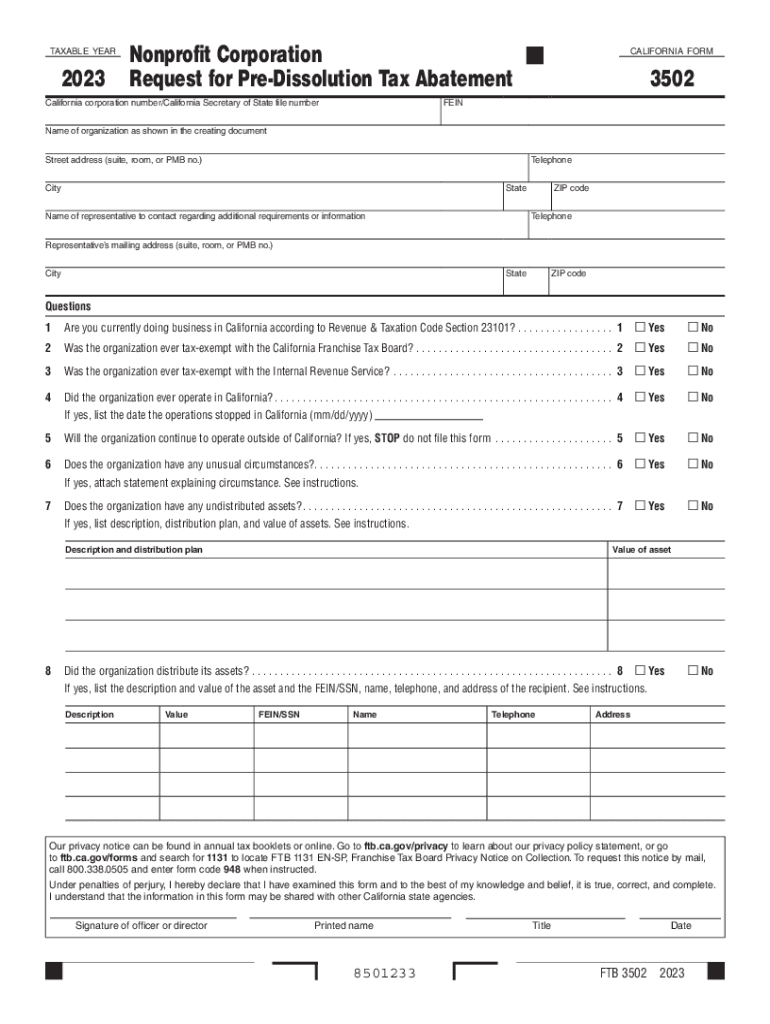
CA FTB 3502 2023 free printable template
pdfFiller is not affiliated with any government organization

Fill out
Complete the form online in a simple drag-and-drop editor.

eSign
Add your legally binding signature or send the form for signing.

Share
Share the form via a link, letting anyone fill it out from any device.

Export
Download, print, email, or move the form to your cloud storage.
Why pdfFiller is the best tool for your documents and forms


End-to-end document management
From editing and signing to collaboration and tracking, pdfFiller has everything you need to get your documents done quickly and efficiently.
Accessible from anywhere
pdfFiller is fully cloud-based. This means you can edit, sign, and share documents from anywhere using your computer, smartphone, or tablet.
Secure and compliant
pdfFiller lets you securely manage documents following global laws like ESIGN, CCPA, and GDPR. It's also HIPAA and SOC 2 compliant.
What is CA FTB 3502
The California Form 3502 2023 is a tax document used by nonprofit corporations in California to request pre-dissolution tax abatement.
pdfFiller scores top ratings on review platforms




Who needs CA FTB 3502?
Explore how professionals across industries use pdfFiller.

CA FTB 3502 is needed by:
-
Nonprofit organizations planning dissolution in California
-
Officers or directors of nonprofit entities
-
Tax professionals assisting nonprofit clients
-
Legal advisors for nonprofit organizations
-
Accountants filing for nonprofit tax exemptions
Comprehensive Guide to CA FTB 3502
What is the California Form 3?
The California Form 3, also known as the California Form 3, serves as a crucial tax document for nonprofit corporations in California. Its primary purpose is to request pre-dissolution tax abatement, ensuring compliance with state tax laws. For nonprofit organizations, this form is essential for maintaining their tax-exempt status during the dissolution process.
This form must be signed by an officer or director, attesting to the accuracy of the information provided. The signing requirement underlines the significance of accountability and the legal implications associated with incorrect filings.
Purpose and Benefits of the California Form 3
The main objectives of completing the California Form 3 include facilitating tax exemption for nonprofit corporations prior to dissolution. By filing this form, organizations can avoid potential financial setbacks that may arise from improper asset distribution under state regulations.
Completing the form also simplifies the asset distribution process, ensuring that all activities comply with California law. Neglecting to file could lead to substantial financial consequences, reinforcing the importance of timely submission to safeguard the organization’s interests.
Who Needs the California Form 3?
Nonprofit organizations that are considering dissolution must complete the California Form 3. The eligibility criteria specify that any nonprofit seeking pre-dissolution tax abatement must adhere to the compliance requirements outlined within the form.
Examples of situations necessitating the completion of this form include any nonprofit organization legally dissolving its operations or reallocating assets. Proper authorization from an officer or director is crucial, ensuring that the filing is legitimate and recognized by the state.
How to Fill Out the California Form 3 Online (Step-by-Step)
To fill out the California Form 3 online, follow these essential steps:
-
Access the form through pdfFiller’s platform.
-
Begin by entering the organization's name and address in the designated fields.
-
Provide information regarding tax-exempt status and asset distribution.
-
Double-check for any common errors, especially incorrect signatures or missing information.
This step-by-step guide is designed to streamline the process and eliminate common pitfalls during form completion.
Required Documents and Supporting Materials
When submitting the California Form 3, organizations must gather certain prerequisite documents to support their application. Essential documents may include:
-
Tax exemption certificates that establish the nonprofit’s status.
-
Detailed records of operations and financial statements.
-
Documentation of assets to ensure proper distribution.
Compiling these materials beforehand can significantly ease the completion and filing process.
Submission Methods for the California Form 3
Nonprofit organizations have various submission options for the California Form 3. These methods include:
-
Submitting the form online through pdfFiller for convenience.
-
Mailing the completed form to the designated state office.
Be sure to note the associated fees and deadlines for each method to ensure a timely submission. Tracking features may also be available post-submission, enhancing the ability to confirm receipt.
What Happens After You Submit the California Form 3?
Upon submission of the California Form 3, organizations can expect typical processing times to vary. Tracking the application status can provide valuable insights into whether the form has been processed or if additional actions are required.
In cases of rejection, understanding common reasons can aid organizations in correcting any issues swiftly. It's essential to have a procedure in place for addressing any discrepancies that may arise from submitted information.
Security and Compliance Considerations for the California Form 3
When handling the California Form 3, it’s crucial to prioritize security and compliance. pdfFiller offers robust security features, providing peace of mind when submitting sensitive documents.
Moreover, compliance with both state and federal regulations is imperative during the filing process. Organizations should also consider implementing strategies for maintaining data privacy and retaining essential records.
How pdfFiller Can Help You with the California Form 3
pdfFiller enhances the form-filling experience for users by offering a user-friendly interface and fillable forms. The platform streamlines the process with features like eSigning and document sharing capabilities, making it easier to manage submissions.
Many users have successfully utilized pdfFiller for their form submissions, often noting how simple it is to edit and save documents securely within the platform. This convenience can significantly improve the overall filing experience.
Example of a Completed California Form 3
Providing a sample of a completed California Form 3 can serve as a valuable reference for organizations. This example illustrates key sections, allowing users to better understand the required information and filling out the form appropriately.
Utilizing the sample can help clarify any questions while ensuring accurate submission, guiding organizations towards successful completion of the form.
How to fill out the CA FTB 3502
-
1.To start, access the California Form 3502 2023 on pdfFiller. You can do this by searching for the form's name in the pdfFiller search bar or navigating to the California state tax forms section.
-
2.Once you have the form open, familiarize yourself with the layout and available fields. The form is designed to be fillable, allowing you to enter information directly into the designated areas.
-
3.Before filling out the form, gather all necessary information such as the organization’s name, street address, tax-exempt status, and details about asset distribution. This ensures a smooth completion process.
-
4.Begin completing the form by entering the organization’s name and address in the appropriate fields. Utilize checkboxes and blank sections as required, ensuring accuracy in your entries.
-
5.Make sure to fill in any required fields, notably those that must be signed by an officer or director. This includes using your mouse or trackpad to navigate and click throughout the document.
-
6.After completing all fields, review the form thoroughly. Check for any missing information and double-check the accuracy of each entry to prevent any common mistakes.
-
7.Once you are satisfied that all information is correct, save your completed form. You can either download it directly to your device in PDF format or use pdfFiller's submission options if available.

Who is eligible to file the California Form 3502 2023?
Nonprofit corporations in California that are planning to dissolve can file the California Form 3502 2023 to request pre-dissolution tax abatement. This includes organizations that have been granted tax-exempt status.
What is the deadline for submitting California Form 3502 2023?
While the form does not specify a particular deadline, it is advisable to submit the California Form 3502 2023 before the official dissolution process of your nonprofit to ensure all tax matters are settled.
How can I submit the completed California Form 3502 2023?
You can submit the completed California Form 3502 2023 by either downloading it from pdfFiller and mailing it to the appropriate tax authority, or using the submission features on pdfFiller if they provide that service.
Are there any supporting documents required with this form?
Typically, you may need to include documentation supporting your tax-exempt status and details about asset distribution. It is best to check with the California tax authority for any specific requirements.
What common mistakes should I avoid when filling out this form?
Common mistakes include omitting necessary information, failing to sign the form, or incorrectly stating the organization's tax-exempt status. Always review your entries before submission.
How long does it take to process the California Form 3502 2023?
Processing times can vary based on the tax authority's current workload. Typically, you might expect processing to take several weeks, so it is best to submit your form sooner rather than later.
What happens if I submit the form late?
Submitting the California Form 3502 2023 late may result in penalties or complications with your organization's dissolution and tax status. Always aim to file on time to avoid issues.
CA FTB 3502 Form Versions
Related Forms




Get the latest insights from our blog


If you believe that this page should be taken down, please follow our DMCA take down process
here
.
This form may include fields for payment information. Data entered in these fields is not covered by PCI DSS compliance.