
Last updated on
Oct 19, 2026
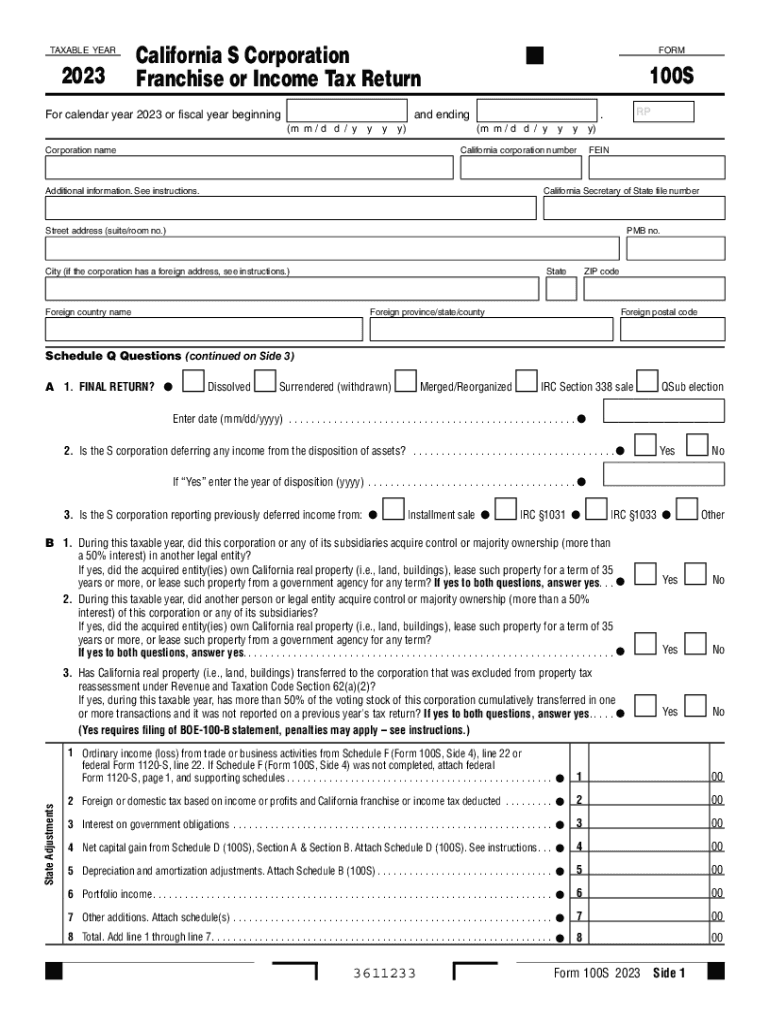
CA FTB 100S 2023 free printable template
pdfFiller is not affiliated with any government organization

Fill out
Complete the form online in a simple drag-and-drop editor.

eSign
Add your legally binding signature or send the form for signing.

Share
Share the form via a link, letting anyone fill it out from any device.

Export
Download, print, email, or move the form to your cloud storage.
Why pdfFiller is the best tool for your documents and forms


End-to-end document management
From editing and signing to collaboration and tracking, pdfFiller has everything you need to get your documents done quickly and efficiently.
Accessible from anywhere
pdfFiller is fully cloud-based. This means you can edit, sign, and share documents from anywhere using your computer, smartphone, or tablet.
Secure and compliant
pdfFiller lets you securely manage documents following global laws like ESIGN, CCPA, and GDPR. It's also HIPAA and SOC 2 compliant.
What is CA FTB 100S
The California S Corporation 100S Form 2023 is a state income tax return used by S corporations in California to report income, deductions, and tax liabilities for the tax year 2023.
pdfFiller scores top ratings on review platforms




Who needs CA FTB 100S?
Explore how professionals across industries use pdfFiller.

CA FTB 100S is needed by:
-
S Corporation owners in California
-
Tax professionals handling California taxes
-
Accountants advising businesses in California
-
Financial planners dealing with corporate taxation
-
Legal representatives of S corporations
Comprehensive Guide to CA FTB 100S
What is the California S Corporation 100S Form 2023?
The California S Corporation 100S Form is a crucial state income tax return specifically designed for S corporations operating within California. This form plays a significant role in reporting various financial details that include income, deductions, and tax liabilities for the taxable year 2023. Its importance cannot be overstated, as it ensures S corporations comply with California tax laws while providing essential data to state tax authorities.
This form collects key information such as gross receipts, cost of goods sold, and other income or losses. Moreover, it includes sections for state adjustments and credits, which are crucial for accurate tax reporting. Understanding the California S Corporation 100S Form is vital for any corporation intending to engage in business operations in California.
Purpose and Benefits of the California S Corporation 100S Form 2023
The California S Corporation 100S Form serves a vital role in the tax ecosystem by reporting a corporation's income, deductions, and tax liabilities accurately. By ensuring that this form is completed correctly, corporations can achieve tax compliance, which significantly reduces the risk of incurring penalties for incorrect reporting.
Accurate filing also brings potential advantages for corporations, such as the possibility of lower tax rates applicable to S corporations. Filing correctly may lead to the maximum allowable deductions and credits, ultimately benefiting the corporation's financial health.
Who Needs the California S Corporation 100S Form 2023?
Entities that must file the California S Corporation 100S Form include S corporations operating in California. This requirement extends to various business structures that qualify for S corporation status under IRS guidelines.
Key stakeholders involved in submitting this form include corporate officers and shareholders, who must ensure its accurate completion. Failure to file this form or incorrect submissions can lead to significant repercussions, including financial penalties and tax liabilities that can adversely impact the corporation's operations.
Eligibility Criteria for the California S Corporation 100S Form 2023
To qualify for filing the California S Corporation 100S Form, corporations must meet specific eligibility criteria. These qualifications typically relate to their business structure, income levels, and residency status in California.
For instance, only corporations that have made an S election with the IRS and fulfill local state requirements are eligible to file this form. Any deviations from these requirements could affect a corporation's ability to submit the 100S Form, emphasizing the necessity of thorough understanding prior to filing.
How to Fill Out the California S Corporation 100S Form 2023 Online (Step-by-Step)
-
Access the California S Corporation 100S Form electronically through a reliable source.
-
Begin by entering basic corporate information, including the corporation's name and Tax ID number.
-
Proceed to report income, ensuring to provide detailed information regarding gross receipts.
-
Report deductions by filling in the relevant fields accurately to maximize allowable deductions.
-
Review the entire form for accuracy and completeness before submitting.
It is crucial to avoid common pitfalls such as missing fields or incorrect calculations, which can lead to processing delays or rejections. Double-checking all entries can help ensure a smooth submission process.
Key Features of the California S Corporation 100S Form 2023
-
Fillable sections making it easier to input data directly into the form.
-
Checkboxes for specific tax situations and selections that simplify decision-making.
-
Clear instructions within the form to guide users through the filing process.
-
Sections designed for reporting state adjustments, credits, and payments.
For assistance, users can seek guidance online or consult with tax professionals familiar with the form's specifics to ensure proper compliance and completion.
When to File or Submit the California S Corporation 100S Form 2023
Filing deadlines for the California S Corporation 100S Form are critical to avoid incurring late penalties. The standard deadline aligns with federal tax returns, typically on March 15, unless an extension is filed.
Corporations can apply for extensions under certain circumstances, but understanding the implications of late filings is essential. Late submissions can lead to penalties that can affect the corporation’s overall financial standing and tax obligations.
How to Download and Save the California S Corporation 100S Form 2023 PDF
Downloading the California S Corporation 100S Form is straightforward. Users should access reputable online sources that offer the form in PDF format. Once downloaded, it is essential to save the form securely on a device for future use or editing.
Retaining a backup copy of the form is recommended, as it serves as a critical document for tax records and can be vital in case of any auditing or inquiries from tax authorities.
Utilizing pdfFiller for the California S Corporation 100S Form 2023
pdfFiller provides a robust platform for editing and filling out the California S Corporation 100S Form. With features designed for user convenience, pdfFiller ensures secure handling of sensitive information through 256-bit encryption and compliance with security standards.
Using pdfFiller streamlines the completion process, allowing users to edit text, add annotations, and eSign the document efficiently, which significantly enhances the accuracy and speed of form submission.
What Happens After You Submit the California S Corporation 100S Form 2023?
After filing the California S Corporation 100S Form, corporations can expect confirmation of submission. Tracking the status of the form is advisable to ensure that it has been processed correctly by the tax authorities.
Corporations should be prepared for potential follow-up communications from tax authorities, and it is crucial to address any issues promptly to prevent complications with filed returns, ensuring seamless compliance with state tax regulations.
How to fill out the CA FTB 100S
-
1.Access the California S Corporation 100S Form 2023 by visiting the pdfFiller website and logging into your account. Use the search bar to find the form quickly.
-
2.Open the form to begin filling it out. Navigate through the fields using your cursor. Click on each blank area to start inputting your information.
-
3.Before you fill out the form, gather all necessary documents, including financial statements, gross receipts, and details about deductions and tax credits relevant to your S corporation.
-
4.Fill in your corporation’s gross income, cost of goods sold, and any other income or losses accurately. Pay attention to the detailed instructions next to each section.
-
5.Incorporate any necessary state adjustments, credits, and payments detailed in the form's designated areas. Double-check each entry for accuracy.
-
6.Once you have completed all sections of the form, review your entries carefully. Ensure that all figures are correct and that you have included your corporation's identifying information.
-
7.After completing your review, save your form on pdfFiller. Choose the 'Save' option, then select 'Download' or 'Submit' if you're ready to send it to the tax authorities.

Who is eligible to file the California S Corporation 100S Form 2023?
The California S Corporation 100S Form 2023 is designed for S corporations that operate in California, and must be filed by these entities to report their income and tax liabilities.
What is the deadline for submitting the California S Corporation 100S Form?
The form is typically due on the 15th day of the 3rd month after the corporation's fiscal year ends. For most corporations with a calendar year ending December 31, the deadline is March 15th.
How can I submit the California S Corporation 100S Form 2023?
You can submit the form electronically through the California Franchise Tax Board's website or by mailing a printed copy of the completed form to the appropriate tax authority address.
What supporting documents are needed when filing this form?
When filing the California S Corporation 100S Form, gather financial records, including income statements, expense records, and any relevant tax credits or adjustments that apply to your corporation.
What common mistakes should I avoid when completing the form?
Common mistakes include incorrect financial figures, missing signatures, and failure to include supporting documents. Always double-check for accuracy before submission.
How long does it take to process the California S Corporation 100S Form?
Processing times can vary, but typically, taxpayers should expect about 4-6 weeks after submission, depending on the volume of filings and if there are no issues.
Is notarization required for the California S Corporation 100S Form?
No, notarization is not required for the California S Corporation 100S Form 2023. However, an officer of the corporation must sign the form before submission.
CA FTB 100S Form Versions
Related Content
Related Forms



Get the latest insights from our blog


If you believe that this page should be taken down, please follow our DMCA take down process
here
.
This form may include fields for payment information. Data entered in these fields is not covered by PCI DSS compliance.