
Last updated on
Nov 6, 2026
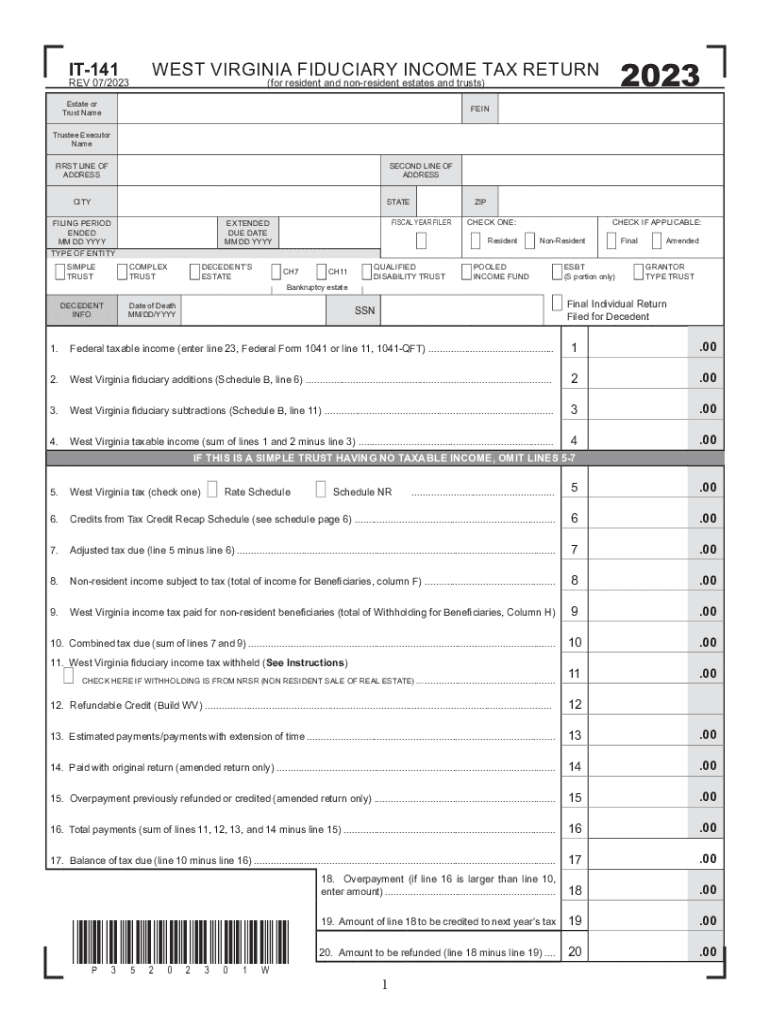
WV DoR IT-141 2023 free printable template
pdfFiller is not affiliated with any government organization

Fill out
Complete the form online in a simple drag-and-drop editor.

eSign
Add your legally binding signature or send the form for signing.

Share
Share the form via a link, letting anyone fill it out from any device.

Export
Download, print, email, or move the form to your cloud storage.
Why pdfFiller is the best tool for your documents and forms


End-to-end document management
From editing and signing to collaboration and tracking, pdfFiller has everything you need to get your documents done quickly and efficiently.
Accessible from anywhere
pdfFiller is fully cloud-based. This means you can edit, sign, and share documents from anywhere using your computer, smartphone, or tablet.
Secure and compliant
pdfFiller lets you securely manage documents following global laws like ESIGN, CCPA, and GDPR. It's also HIPAA and SOC 2 compliant.
What is WV DoR IT-141
The West Virginia Fiduciary Income Tax Return is a tax document used by estates and trusts to report their income and calculate tax liabilities in West Virginia.
pdfFiller scores top ratings on review platforms




Had PDFfiller for a couple of months now and has been very helpful. A Great Service
Just made my form and contract Distribution much easier. Thank you
Dennis Campbell, President,COO
My Landscaper LLC. Denver, CO
Am pleased with ease of use. This program has been extremely helpful
Very easy to do, instructions are always available.
Incredible tool
Incredible tool, big posibilities!
Excellent program and very easy to use…
Excellent program and very easy to use and navigate.
Who needs WV DoR IT-141?
Explore how professionals across industries use pdfFiller.

WV DoR IT-141 is needed by:
-
Fiduciaries managing estates and trusts
-
Tax preparers for west Virginia trust returns
-
Executors handling estate financial matters
-
Individuals responsible for filing tax returns for estates
-
Organizations operating under fiduciary agreements
Comprehensive Guide to WV DoR IT-141
What is the West Virginia Fiduciary Income Tax Return?
The West Virginia Fiduciary Income Tax Return, known as Form IT-141, serves a critical role in the state's tax system. This form is utilized by estates and trusts to report their income and comply with state tax obligations. Estates and trusts must accurately report various types of income that are necessary for calculating the tax due.
Form IT-141 includes important sections that detail federal taxable income, West Virginia fiduciary additions, and subtractions. Understanding the terminology and sections of the form is crucial for accurate completion, especially for fiduciaries managing estates and trusts.
Purpose and Benefits of the West Virginia Fiduciary Income Tax Return
The primary purpose of the West Virginia Fiduciary Income Tax Return is to ensure that fiduciaries and estates comply with state tax laws. Accurately reporting income can yield several benefits for taxpayers, including eligibility for various tax credits and payments.
-
Promotes transparency in estate and trust management.
-
Ensures that funds are allocated correctly for state tax obligations.
-
Potential tax credits can reduce overall tax liability.
Who Needs to File the West Virginia Fiduciary Income Tax Return?
Entities required to file the West Virginia Fiduciary Income Tax Return primarily include estates and trusts. It's important to distinguish between the filing obligations for residents and non-residents, as this impacts compliance with state regulations.
Additionally, fiduciaries or officers representing fiduciaries must ensure that the return is filed properly. This includes complying with specific guidelines depending on the status of the estate or trust.
When and How to File the West Virginia Fiduciary Income Tax Return
Filing deadlines for the West Virginia Fiduciary Income Tax Return are essential for compliance and vary based on the specific circumstances of the estate or trust. Key dates include the initial filing deadline and the potential for filing extensions.
-
Initial filing deadline details.
-
Conditions under which filing extensions apply.
-
Methods of submission—either online or by mail.
How to Fill Out the West Virginia Fiduciary Income Tax Return Online
To complete Form IT-141 online, a step-by-step approach helps ensure accuracy. Detailed field-by-field instructions guide users through the process and highlight common pitfalls to avoid during completion.
-
Accurately enter the 'Estate or Trust Name FEIN'.
-
Provide the correct 'Trustee Executor Name'.
-
Address any required fields to prevent delays in processing.
Common Errors and How to Avoid Them
When completing the West Virginia Fiduciary Income Tax Return, common mistakes can lead to frustration and delays. Being aware of these errors allows fiduciaries to submit a complete and accurate return.
-
Ensure all required sections are filled out.
-
Double-check that calculations are correct.
-
Review signatures and ensure compliance with signing requirements.
How to Sign the West Virginia Fiduciary Income Tax Return
Signing the West Virginia Fiduciary Income Tax Return is a crucial step, and requirements differ based on whether the signature is electronic or physical. Fiduciaries and preparers must adhere to specific guidelines when signing the document.
It’s essential not to skip the signature section, as this can invalidate the return.
Required Documents and Supporting Materials
To adequately complete the West Virginia Fiduciary Income Tax Return, certain documents are necessary. Knowing what is required can streamline the preparation process.
-
Federal Employer Identification Number (FEIN).
-
Income statements relevant to the estate or trust.
-
A comprehensive pre-filing checklist to enhance efficiency.
Security and Compliance for Handling the West Virginia Fiduciary Income Tax Return
Handling the West Virginia Fiduciary Income Tax Return involves stringent security measures to protect sensitive information. Compliance with regulations such as HIPAA and GDPR is crucial in maintaining privacy throughout the filing process.
Securing sensitive financial information not only protects taxpayers but also ensures compliance with state and federal guidelines.
Discover How pdfFiller Streamlines Your Filing Process
pdfFiller significantly simplifies the process of filling out and submitting the West Virginia Fiduciary Income Tax Return. The platform offers various features, including editing tools, eSigning capabilities, and document management options.
Utilizing pdfFiller can enhance your experience when managing important documents like Form IT-141.
How to fill out the WV DoR IT-141
-
1.To begin, access pdfFiller and search for the West Virginia Fiduciary Income Tax Return by entering 'Form IT-141' in the search bar.
-
2.Once you've located the form, click to open it within the pdfFiller interface, where you can view all sections and fields available for completion.
-
3.Before you start filling out the form, gather essential information such as the estate or trust name, Federal Employer Identification Number (FEIN), and financial details relevant to income reporting.
-
4.As you navigate through the form, use the fillable fields to enter information. Click on each relevant box to type your responses and checkboxes to select options, following the explicit instructions provided in the document.
-
5.Ensure to add any necessary fiduciary additions or subtractions as indicated on the form. Review the total taxable income and list any applicable credits and payments.
-
6.Once the form is completed, carefully review all entries for accuracy and ensure that signatures are provided where required—both from the fiduciary or officer and the preparer.
-
7.To finalize, save your completed form by clicking on the save option. You can then download it for your records or submit it electronically if the option is available through pdfFiller.

Who needs to file the West Virginia Fiduciary Income Tax Return?
This form needs to be filed by fiduciaries managing estates and trusts in West Virginia, executors of estates, and tax preparers who handle fiduciary tax matters on behalf of clients.
What is the deadline for submitting the form?
The submission deadline for the West Virginia Fiduciary Income Tax Return generally aligns with the April 15th deadline for individual income tax returns unless an extension is filed.
What documents are required to complete this form?
To complete the West Virginia Fiduciary Income Tax Return, gather financial records such as income statements, expenses, and any supporting documents for deductions or credits claimed.
How can I submit the West Virginia Fiduciary Income Tax Return?
You can submit the completed form by mailing it to the West Virginia State Tax Department or electronically if e-filing options are available for the form in your scenario.
What are common mistakes to avoid when filling out this form?
Common mistakes include inaccurate entry of the FEIN, overlooking required signatures, and failing to include all sources of income or deductions. Double-check all information before submission.
How long does it take to process the West Virginia Fiduciary Income Tax Return?
Processing times can vary but are typically 4-8 weeks after submission, depending on the workload of the West Virginia State Tax Department.
Is notarization required for this form?
No, the West Virginia Fiduciary Income Tax Return does not require notarization; however, it must be signed by the fiduciary or officer and the preparer.
WV DoR IT-141 Form Versions
Related Content
Related Forms








Get the latest insights from our blog


If you believe that this page should be taken down, please follow our DMCA take down process
here
.
This form may include fields for payment information. Data entered in these fields is not covered by PCI DSS compliance.