
Last updated on
Oct 19, 2026
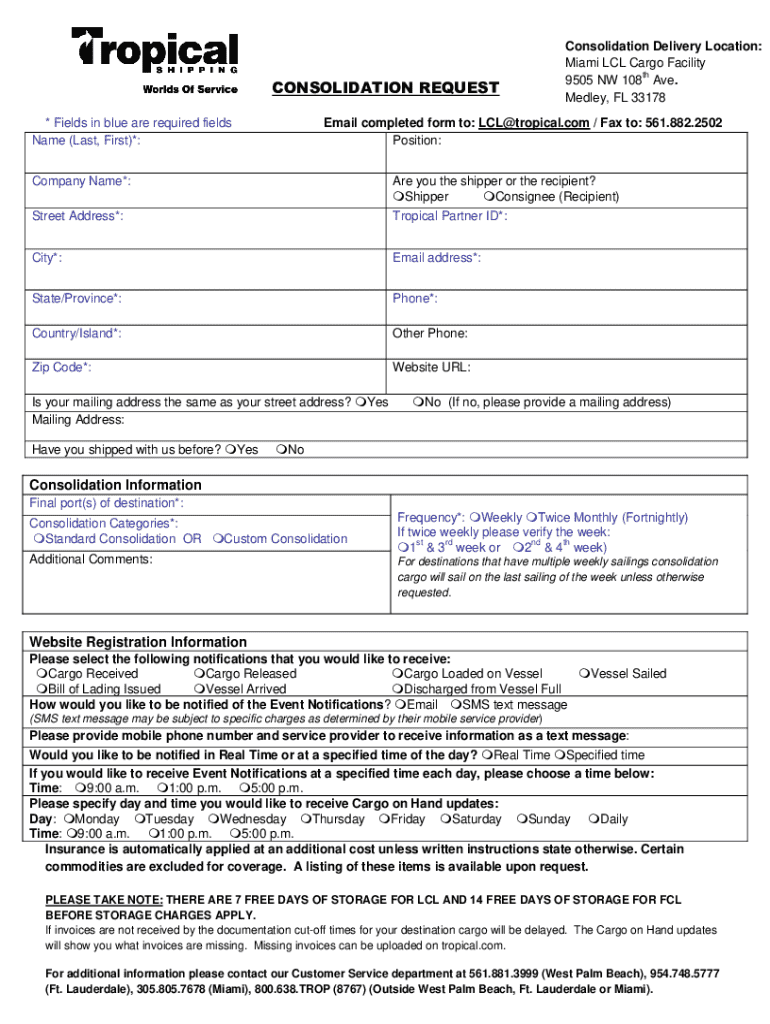
Tropical Shipping Consolidation Request 2022-2026 free printable template
pdfFiller is not affiliated with any government organization

Fill out
Complete the form online in a simple drag-and-drop editor.

eSign
Add your legally binding signature or send the form for signing.

Share
Share the form via a link, letting anyone fill it out from any device.

Export
Download, print, email, or move the form to your cloud storage.
Why pdfFiller is the best tool for your documents and forms


End-to-end document management
From editing and signing to collaboration and tracking, pdfFiller has everything you need to get your documents done quickly and efficiently.
Accessible from anywhere
pdfFiller is fully cloud-based. This means you can edit, sign, and share documents from anywhere using your computer, smartphone, or tablet.
Secure and compliant
pdfFiller lets you securely manage documents following global laws like ESIGN, CCPA, and GDPR. It's also HIPAA and SOC 2 compliant.
What is Tropical Shipping Consolidation Request
The Consolidation Request Form is a logistics document used by shippers and consignees to request cargo consolidation for shipping purposes.
pdfFiller scores top ratings on review platforms




Who needs Tropical Shipping Consolidation Request?
Explore how professionals across industries use pdfFiller.

Tropical Shipping Consolidation Request is needed by:
-
Shipping companies needing to consolidate cargo.
-
Freight forwarders managing multiple shipments.
-
Businesses involved in logistics and supply chain management.
-
Importers looking to streamline cargo handling.
-
Exporters coordinating delivery of goods.
Comprehensive Guide to Tropical Shipping Consolidation Request
What is the Consolidation Request Form?
The Consolidation Request Form is an essential tool in cargo shipping, serving to streamline the process of freight consolidation. This form is designed for shippers and consignees to input vital information such as cargo details and final destinations, ensuring effective management of shipments. By using the form, users can consolidate freight more efficiently, minimizing delays and logistical challenges.
Key information required in the form includes specifics about the cargo, such as type, quantity, and final destination, which are critical for efficient freight handling.
Benefits of Using the Consolidation Request Form
Utilizing the Consolidation Request Form brings significant advantages to shippers. One major benefit is the time and cost savings achieved through consolidated shipping. By combining multiple shipments into one, users can reduce shipping expenses and enhance delivery speed. Additionally, the form improves organization and tracking of cargo shipments, providing a clearer overview of shipments in transit.
Accessing and using the form through pdfFiller's platform enhances the user experience, simplifying the process of managing your shipping needs.
Key Features of the Consolidation Request Form
The Consolidation Request Form includes multiple user-friendly features that make it simple to complete. Fillable fields allow users to enter essential data easily, while checkboxes streamline common selections. Important instructions are also provided within the form to guide users throughout the process.
Key features include:
-
Fields for entering insurance details
-
Options to specify contact information
-
Preferences for notifications regarding shipment status
Who Should Use the Consolidation Request Form?
This form is primarily aimed at shippers and consignees involved in cargo shipping. It is especially beneficial for specific industries that frequently send or receive shipments. Users who regularly manage cargo shipments or deal in logistics can greatly benefit from the structured approach the form provides to their consolidation needs.
How to Fill Out the Consolidation Request Form Online
Completing the Consolidation Request Form online is straightforward when using pdfFiller. To ensure a smooth process, follow these field-by-field instructions:
-
Start by entering your name and company name in the designated fields.
-
Provide accurate cargo details, including the final port of destination.
-
Fill in your insurance information if applicable.
-
Review all information for accuracy before submission.
Additionally, here are some tips to avoid common errors during completion:
-
Double-check all fields for missing information.
-
Ensure that contact information is current and complete.
Submission Methods for the Consolidation Request Form
Once the Consolidation Request Form is filled out, there are multiple submission methods available for sending it securely. Users can choose to email or fax the completed form to the designated addresses. It's also important to keep track of submissions to ensure they are processed timely.
Consider these points when submitting the form:
-
Verify the correct email or fax number.
-
Stay aware of any deadlines or fees associated with submission.
Security and Compliance When Using the Consolidation Request Form
When using the Consolidation Request Form, users can trust that their data is secure. pdfFiller implements 256-bit encryption and adheres to compliance regulations, including SOC 2 Type II, HIPAA, and GDPR. This means user information is protected throughout the filling and submission process.
Users should also be mindful of data protection measures while completing the form and understand the record retention requirements necessary after submission.
What Happens After You Submit Your Consolidation Request Form?
After submitting the Consolidation Request Form, users typically experience certain processing times depending on the shipping provider. Keep an eye on the status of your submission to ensure everything is in order.
In case of rejection, common reasons may include:
-
Missing or inaccurate cargo details
-
Inadequate contact information provided
Staying informed about these possibilities can help facilitate a smoother submission process next time.
Use pdfFiller for Your Consolidation Request Form Needs
For an enhanced experience with the Consolidation Request Form, consider utilizing pdfFiller, where you can effortlessly edit, fill, and sign the form online without needing downloads. The platform provides intuitive features that simplify the filling and submission process, ensuring that sensitive documents are handled securely and in compliance with regulations.
How to fill out the Tropical Shipping Consolidation Request
-
1.To access the Consolidation Request Form on pdfFiller, visit the pdfFiller website and use the search bar to find the form by name.
-
2.Once you have located the form, click on it to open it in the pdfFiller interface, allowing you to start filling it out directly online.
-
3.Gather all necessary information, including your name, company details, final port of destination, and any special instructions regarding the cargo.
-
4.Using pdfFiller's intuitive tools, click on each fillable field, such as 'Name (Last, First)*' and enter the required information accurately.
-
5.Utilize checkboxes for relevant options, ensuring you select any necessary categories for consolidation.
-
6.Throughout the process, refer to the included instructions to make sure you complete each field correctly, especially mandatory sections.
-
7.Once you have filled in all required information and reviewed your entries for accuracy, click on the review tab to ensure everything is finalized.
-
8.Finally, save your completed form by clicking the download button or choosing a submit option to email or fax it directly from pdfFiller.

Who is eligible to use the Consolidation Request Form?
The Consolidation Request Form is designed for shippers, consignees, and businesses involved in shipping and logistics. If you handle cargo shipment, this form is essential for your consolidation needs.
What is the deadline for submitting the form?
While the Consolidation Request Form does not specify a deadline, it should be submitted as soon as possible before the scheduled shipping date to ensure timely processing of your cargo consolidation.
How do I submit the completed form?
You can submit the completed Consolidation Request Form through pdfFiller by downloading it and emailing or faxing it to the designated addresses provided within the form.
What supporting documents are required with the form?
Typically, no additional documents are required when submitting the Consolidation Request Form. However, it's prudent to have any relevant shipping documentation handy in case you're asked to provide extra information.
What are common mistakes to avoid when filling out the form?
Common mistakes include incomplete fields, incorrect contact information, and failing to select necessary options for consolidation. Make sure all required sections are filled out before submitting.
How long does it take to process the request after submission?
Processing times can vary based on the shipping company's policies and workload. Generally, expect confirmation within a few business days after submitting the Consolidation Request Form.
Can I edit the form after submission?
Once the Consolidation Request Form is submitted, you will need to contact the shipping provider directly to make any amendments. It’s best to double-check all information before sending.
Tropical Shipping Consolidation Request Form Versions
Related Forms




Get the latest insights from our blog


If you believe that this page should be taken down, please follow our DMCA take down process
here
.
This form may include fields for payment information. Data entered in these fields is not covered by PCI DSS compliance.