
Last updated on
Oct 29, 2026
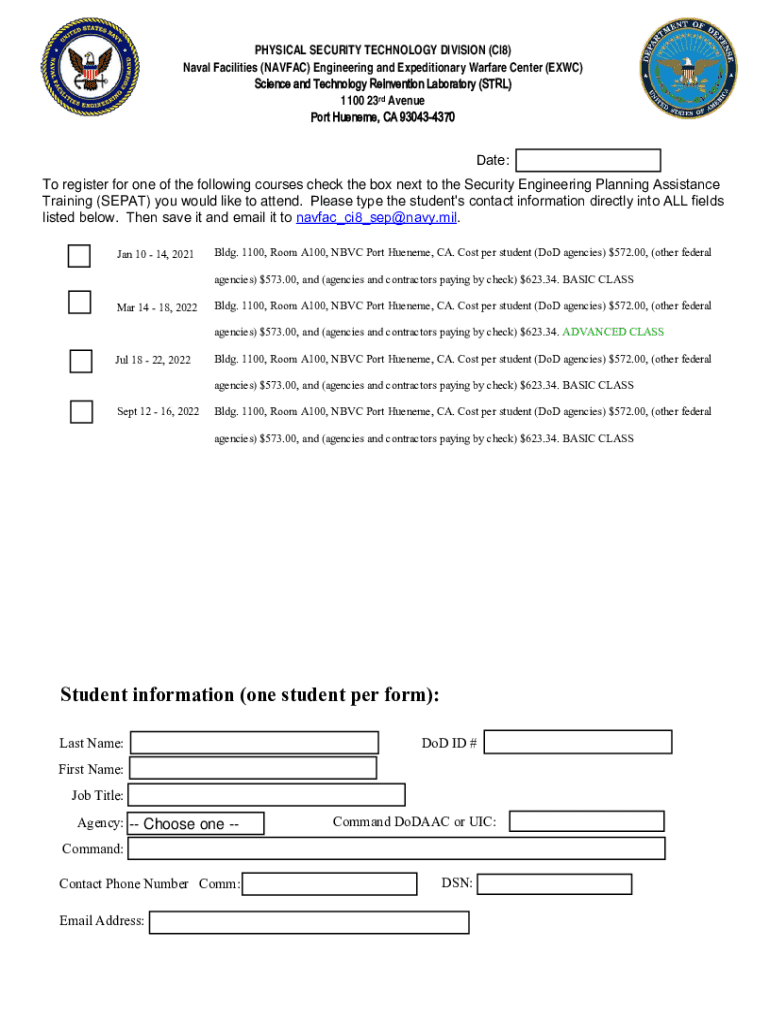
Registration Form for Security Engineering Planning Assistance Training 2022-2026 free printable...
We are not affiliated with any brand or entity on this form

Fill out
Complete the form online in a simple drag-and-drop editor.

eSign
Add your legally binding signature or send the form for signing.

Share
Share the form via a link, letting anyone fill it out from any device.

Export
Download, print, email, or move the form to your cloud storage.
Why pdfFiller is the best tool for your documents and forms


End-to-end document management
From editing and signing to collaboration and tracking, pdfFiller has everything you need to get your documents done quickly and efficiently.
Accessible from anywhere
pdfFiller is fully cloud-based. This means you can edit, sign, and share documents from anywhere using your computer, smartphone, or tablet.
Secure and compliant
pdfFiller lets you securely manage documents following global laws like ESIGN, CCPA, and GDPR. It's also HIPAA and SOC 2 compliant.
What is Registration Form for Security Engineering Planning Assistance Training
The Security Engineering Planning Assistance Training Registration Form is a document used by individuals to register for security engineering courses provided by NAVFAC Engineering and Expeditionary Warfare Center in California.
pdfFiller scores top ratings on review platforms




Who needs Registration Form for Security Engineering Planning Assistance Training?
Explore how professionals across industries use pdfFiller.

Registration Form for Security Engineering Planning Assistance Training is needed by:
-
Government Agency Employees
-
Military Personnel seeking specialized training
-
Civilian Contractors in security engineering
-
Training Coordinators within defense organizations
-
Students in engineering disciplines focusing on security
Comprehensive Guide to Registration Form for Security Engineering Planning Assistance Training
Understanding the Security Engineering Planning Assistance Training Registration Form
The Security Engineering Planning Assistance Training Registration Form is an essential document used by Navy professionals and contractors to register for specialized security engineering courses. This form facilitates the registration process, ensuring that the necessary details are submitted efficiently. The completion of this form is vital for professionals seeking to enhance their skills through training opportunities specifically designed for the Navy.
By filling out the security engineering training registration form accurately, users play a crucial role in participating in these essential courses.
Benefits of Using the Security Engineering Planning Assistance Training Registration Form
Utilizing the registration form offers numerous benefits that streamline the process of enrolling in security engineering courses. Firstly, it simplifies the submission of necessary details along with payments. This efficiency ensures that candidates are eligible for courses that significantly enhance their professional skills and capabilities.
Moreover, a correctly completed form fosters a smoother experience for both the registrants and the administrators
Eligibility and Requirements for the Security Engineering Planning Assistance Training Registration Form
The training registration form is aimed at a specific audience, including government agencies, professionals, and contractors seeking training in security engineering. Individuals must provide essential information such as:
-
Contact details
-
Job title
-
Agency
-
Command
-
Funding information
It is important for registrants to be aware of payment timelines and minimum class requirements to ensure their successful enrollment in training sessions.
How to Fill Out the Security Engineering Planning Assistance Training Registration Form Online
Filling out the security engineering planning assistance training registration form online is a straightforward process when following a few key steps:
-
Access the form via the designated link.
-
Complete the required fields, paying special attention to contact information and course selection.
-
Double-check all entries for accuracy before submitting.
Taking the time to ensure correctness can help avoid common errors during registration.
Submission Process for the Security Engineering Planning Assistance Training Registration Form
Once the registration form is completed, users have several options for submission, including electronic methods or email. It’s crucial to be aware of deadlines for both submission and payment to secure a spot in the desired course.
After submission, tracking the registration status is advisable to ensure that all necessary steps have been completed on time.
Payment Methods and Processing Information for the Security Engineering Planning Assistance Training Registration Form
Understanding the financial obligations associated with the training registration is essential. Acceptable payment methods include various options, and all fees must be submitted by specific deadlines. Registrants should also be informed about the implications should the minimum number of students for a class not be met.
Awareness of potential fee waivers and structures can further facilitate the registration process.
Why Choose pdfFiller for Your Security Engineering Planning Assistance Training Registration Form
pdfFiller provides users with an efficient platform for managing their registration documents. The cloud-based service offers robust features for editing and filling out PDF forms, ensuring that users can handle their documents securely and conveniently from any device.
With enhanced security features and document protection, pdfFiller allows individuals to focus on completing their forms without worry.
Common Errors and Solutions When Filling Out the Security Engineering Planning Assistance Training Registration Form
Common mistakes encountered when filling out the security engineering planning assistance training registration form can hinder the registration process. Users frequently overlook the need for accuracy in their entries, which can lead to issues with their applications. To avoid these errors, it is recommended to:
-
Review all completed sections carefully.
-
Ensure all required fields are filled out completely.
Taking proactive measures to validate information can greatly increase the chances of successful registration.
Next Steps After Submitting the Security Engineering Planning Assistance Training Registration Form
After submitting the registration form, users should stay alert for course notifications and any further information required. In the event that corrections are needed on the submitted form, clear instructions should be followed to amend those errors swiftly.
Maintaining records of both submissions and payments is also essential for future reference, ensuring organized tracking of the registration process.
Get Started with pdfFiller to Simplify Your Training Registration Process
To begin utilizing the security engineering planning assistance training registration form, pdfFiller offers a user-friendly experience that emphasizes ease and security in document management. Accessing the form is straightforward, allowing users to start their registration process promptly and efficiently.
Choosing pdfFiller enhances the likelihood of successful form submission and simplifies training registration.
How to fill out the Registration Form for Security Engineering Planning Assistance Training
-
1.To access the form, visit pdfFiller and search for 'Security Engineering Planning Assistance Training Registration Form'. Open the document to begin filling it out.
-
2.Once the form is open, navigate through the various fields. Click on each field to enter your contact information, job title, agency, and command.
-
3.Before starting, gather necessary documents that may include your funding details and any identification required for the course.
-
4.Use the fillable fields to input accurate information and checkboxes to select courses based on your training needs. Ensure all sections are completed.
-
5.After filling out the form, review your entries carefully. Look for any blanks or errors before proceeding to finalize your submission.
-
6.Once you are satisfied with the information, either save the form directly to your device, download it, or use the email function to send it directly to the provided email address.

Who is eligible to fill out the Security Engineering Planning Assistance Training Registration Form?
Eligibility typically includes government employees, military personnel, and civilian contractors working in security engineering. Ensure you meet any specific prerequisites listed by the NAVFAC training programs.
What is the deadline for submitting the registration form?
Payment and registration must be completed at least 45 days prior to the class start date. Submissions received after this period may not be accepted.
How can I submit the completed form?
You can submit the completed Security Engineering Planning Assistance Training Registration Form by emailing it directly as specified in the instructions. Always verify the correct submission email address on the form.
What supporting documents are required with the form?
You may need to provide proof of funding along with your completed registration details. Check the course requirements for any additional documents required.
What are common mistakes to avoid when filling out the form?
Common mistakes include missing fields, incorrect information inputs, or failing to select the appropriate courses. Double-check all filled information before submission to avoid delays.
How long does it take to process the registration form?
Processing times can vary, but you should expect confirmation or further communication within a few weeks. Early submission is advisable to ensure a spot in the course.
What if the class is canceled after I submit my registration?
Courses may be canceled if minimum registration numbers are not met. You will be notified via email, and if payment was made, refunds will be processed according to NAVFAC policy.
Related Forms



Get the latest insights from our blog


If you believe that this page should be taken down, please follow our DMCA take down process
here
.
This form may include fields for payment information. Data entered in these fields is not covered by PCI DSS compliance.