
Last updated on
Nov 7, 2026
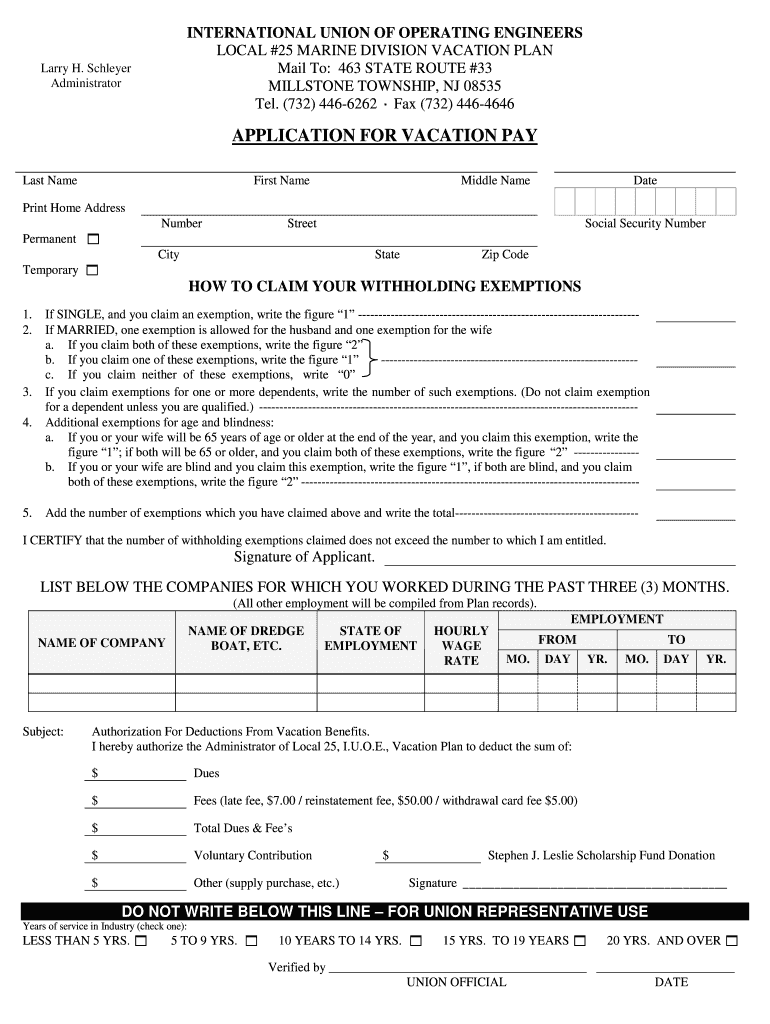
Get the free Vacation Pay Application
pdfFiller is not affiliated with any government organization

Fill out
Complete the form online in a simple drag-and-drop editor.

eSign
Add your legally binding signature or send the form for signing.

Share
Share the form via a link, letting anyone fill it out from any device.

Export
Download, print, email, or move the form to your cloud storage.
Why pdfFiller is the best tool for your documents and forms


End-to-end document management
From editing and signing to collaboration and tracking, pdfFiller has everything you need to get your documents done quickly and efficiently.
Accessible from anywhere
pdfFiller is fully cloud-based. This means you can edit, sign, and share documents from anywhere using your computer, smartphone, or tablet.
Secure and compliant
pdfFiller lets you securely manage documents following global laws like ESIGN, CCPA, and GDPR. It's also HIPAA and SOC 2 compliant.
What is Vacation Pay Application
The Vacation Pay Application is an employment form used by members of the International Union of Operating Engineers Local #25 to claim vacation pay.
pdfFiller scores top ratings on review platforms




Who needs Vacation Pay Application?
Explore how professionals across industries use pdfFiller.

Vacation Pay Application is needed by:
-
Union members seeking vacation pay benefits.
-
Union officials responsible for verifying applications.
-
Employees within New Jersey under union agreements.
-
Payroll departments needing processed vacation claims.
-
Individuals managing employment benefits documentation.
Comprehensive Guide to Vacation Pay Application
What is the Vacation Pay Application?
The Vacation Pay Application is a critical document for members of IUOE Local 25 Marine Division. This form serves the purpose of claiming vacation pay, making it essential for union members who wish to utilize their earned benefits. To ensure proper processing, the application requires key personal details, including your name, address, and social security number.
Purpose and Benefits of the Vacation Pay Application
Completing the Vacation Pay Application brings several benefits for union members. Primarily, it secures vacation pay benefits that are owed to eligible applicants. Additionally, this application plays a crucial role in ensuring the processing accuracy of payments, as it includes authorization for deductions related to union dues and contributions.
Who Needs the Vacation Pay Application?
This application is tailored specifically for members of IUOE Local 25 Marine Division who qualify for vacation pay. Both the applicant and a union official must sign the form, which highlights its importance in ensuring accuracy and accountability. It is vital to understand who should fill out this form based on employment status to avoid submission errors.
How to Fill Out the Vacation Pay Application Online
To successfully complete the Vacation Pay Application online, follow these steps:
-
Visit the pdfFiller platform to access the form.
-
Begin by entering your Last Name and First Name.
-
Input your Social Security Number accurately to avoid future issues.
-
Certify any withholding exemptions as necessary.
-
Authorize deductions for union dues and contributions.
-
Review all entered information before the final submission to ensure accuracy.
Common Errors and How to Avoid Them
Applicants often face hurdles while filling out the Vacation Pay Application. Some common mistakes include:
-
Providing an incorrect social security number.
-
Omitting required signatures from the applicant or union official.
To minimize these errors, it is essential to double-check all provided information and ensure that every field is thoroughly completed before submission.
How to Sign and Submit the Vacation Pay Application
Once the form is filled out, it's important to follow the proper signing and submission processes. Both the applicant and the union official are required to sign the application. Options for signing include:
-
Using digital signatures through pdfFiller.
-
Providing a wet signature if needed.
The submission can be performed either online or by mailing in the completed form, offering flexibility to users.
Processing Time and Confirmation of Submission
After submitting the Vacation Pay Application, applicants can expect typical processing times specific to New Jersey. To confirm submission and track its status, follow these guidelines:
-
Utilize any confirmation received via email.
-
Check the online portal for status updates.
If there are any delays or issues, contact the relevant union officials for assistance.
Security and Compliance for the Vacation Pay Application
When using pdfFiller, users can have confidence in the security of their information during the form filling process. The platform employs robust document security measures, including:
-
256-bit encryption for data protection.
-
Compliance with data protection regulations such as HIPAA and GDPR.
Best practices include remaining cautious when sharing personal information and ensuring only secure connections are used while filling out the form.
Using pdfFiller to Simplify Your Vacation Pay Application Process
pdfFiller stands out as an efficient tool for simplifying the Vacation Pay Application process. Notable features that assist users include:
-
Creating fillable forms to streamline data entry.
-
Access to cloud-based document management for easy retrieval of files.
Utilizing pdfFiller can lead to a hassle-free experience in completing the form online, providing users with convenience and efficiency.
How to fill out the Vacation Pay Application
-
1.Access the Vacation Pay Application by visiting pdfFiller and searching for the form name in the search bar.
-
2.Open the form in pdfFiller's editor where you will see fillable fields ready for your information.
-
3.Before starting, gather necessary information such as your name, social security number, address, and employment details.
-
4.Fill in personal details like Last Name, First Name, and Middle Name in the designated fields.
-
5.Enter your Social Security Number and complete the checkbox for 'Years of service in Industry', continuing through the form's prompts.
-
6.Review each checked box and completed field for accuracy to ensure all required information is provided.
-
7.Once completed, use the built-in tools to finalize your document, ensuring all details are correct.
-
8.Save your form by clicking on the download option, which allows you to keep a copy on your device, or choose to submit it directly through pdfFiller.

Who is eligible to complete the Vacation Pay Application?
Eligibility for the Vacation Pay Application is limited to members of the International Union of Operating Engineers Local #25 who are claiming vacation pay.
Are there deadlines for submitting this application?
While specific deadlines may vary, it's crucial to submit your Vacation Pay Application as soon as possible to avoid missing any payment cycles.
How should I submit the completed Vacation Pay Application?
You can submit your completed Vacation Pay Application through pdfFiller by using the direct submission option or by downloading and sending it via mail to the appropriate union office.
What supporting documents do I need?
Typically, you need to provide personal identification information and proof of employment details. It's advisable to confirm any specific requirements with your union representative.
What common mistakes should I avoid while filling out the form?
Common mistakes include omitting required fields, providing incorrect social security numbers, and failing to sign the application, which can delay your benefits.
How long does it take to process my Vacation Pay Application?
Processing times vary but generally range from a few weeks to a month. Be sure to check with your union for specific timelines.
What if I need to change information after submission?
If you need to change details on your application after submission, contact your union's office immediately for guidance on the amendment process.
Related Forms




Related Catalogs
Get the latest insights from our blog


If you believe that this page should be taken down, please follow our DMCA take down process
here
.
This form may include fields for payment information. Data entered in these fields is not covered by PCI DSS compliance.