
Last updated on
Oct 19, 2026
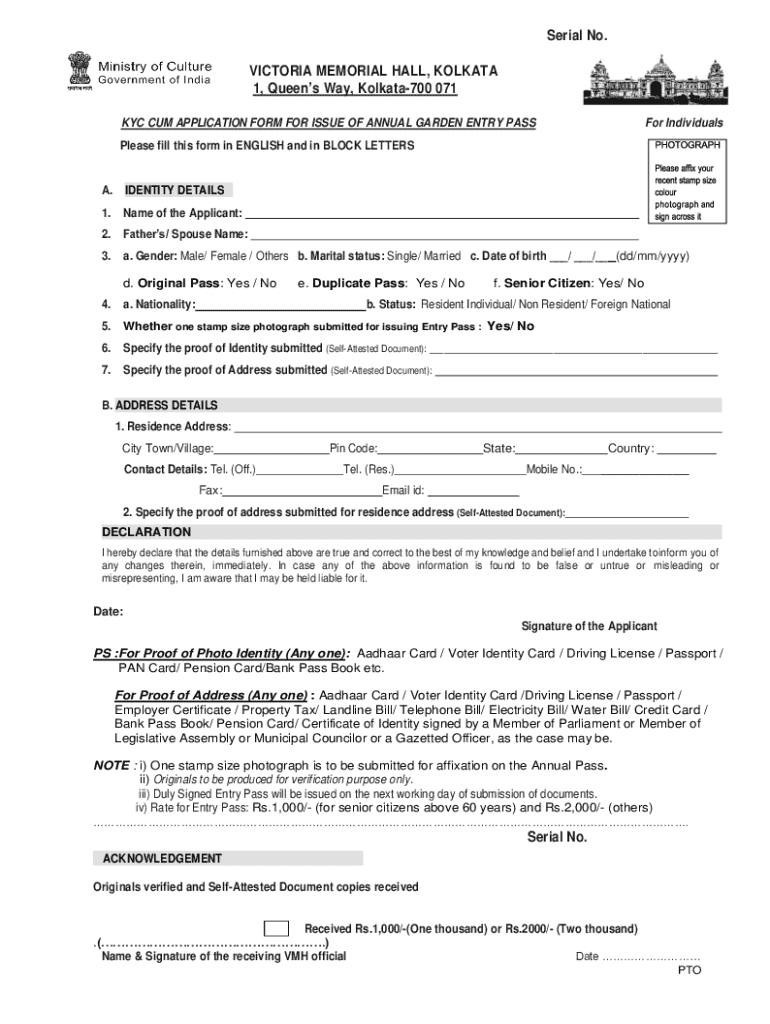
Get the free KYC Application for Annual Garden Entry Pass
We are not affiliated with any brand or entity on this form

Fill out
Complete the form online in a simple drag-and-drop editor.

eSign
Add your legally binding signature or send the form for signing.

Share
Share the form via a link, letting anyone fill it out from any device.

Export
Download, print, email, or move the form to your cloud storage.
Why pdfFiller is the best tool for your documents and forms


End-to-end document management
From editing and signing to collaboration and tracking, pdfFiller has everything you need to get your documents done quickly and efficiently.
Accessible from anywhere
pdfFiller is fully cloud-based. This means you can edit, sign, and share documents from anywhere using your computer, smartphone, or tablet.
Secure and compliant
pdfFiller lets you securely manage documents following global laws like ESIGN, CCPA, and GDPR. It's also HIPAA and SOC 2 compliant.
What is KYC Entry Pass Form
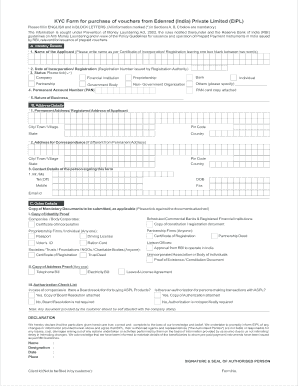
The KYC Application for Annual Garden Entry Pass is a personal document used by individuals to apply for an annual garden entry pass to the Victoria Memorial Hall in Kolkata, India.
pdfFiller scores top ratings on review platforms




Who needs KYC Entry Pass Form?
Explore how professionals across industries use pdfFiller.

KYC Entry Pass Form is needed by:
-
Individuals seeking entry to Victoria Memorial Hall
-
Families applying for garden access passes
-
Local residents in West Bengal
-
Tourists visiting Kolkata
-
Garden enthusiasts and nature lovers
-
Educational institutions organizing visits
Comprehensive Guide to KYC Entry Pass Form
What is the KYC Application for Annual Garden Entry Pass?
The KYC application for the Annual Garden Entry Pass at the Victoria Memorial Hall serves to authenticate visitors, enhancing security and ensuring proper identification. By completing this application, visitors can gain access to the scenic gardens and participate in a variety of events throughout the year. The process reinforces the significance of visitor verification in maintaining a safe and organized environment.
Purpose and Benefits of the KYC Application for Annual Garden Entry Pass
Individuals must fill out the KYC application to enjoy the numerous benefits associated with the Annual Garden Entry Pass. This pass not only facilitates access to exclusive events and exhibitions but also allows families and individuals to explore the rich historical significance of the Victoria Memorial Hall. Holding the pass enhances the overall experience of visiting this landmark.
Who Needs the KYC Application for Annual Garden Entry Pass?
The target audience for the KYC application includes individuals of all ages, from families to senior citizens, who wish to visit the Victoria Memorial Hall regularly. Whether you are a solo traveler or part of a group, applying for the entry pass ensures that you have the right identification to access the gardens and enjoy the various activities available.
Eligibility Criteria for the KYC Application for Annual Garden Entry Pass
To qualify for the KYC application, applicants must meet specific age and residency requirements. Generally, individuals must provide valid documentation such as a personal identity form and an address proof form to verify their eligibility for the Annual Garden Entry Pass.
How to Fill Out the KYC Application for Annual Garden Entry Pass Online (Step-by-Step)
Filling out the KYC application online is straightforward. Follow these steps for a successful submission:
-
Visit the designated online application portal.
-
Complete the required fields, such as your name and date of birth.
-
Review all information for accuracy to avoid delays.
-
Submit the form electronically after signing it where required.
-
Receive an official acknowledgment confirming your submission.
Required Documents and Supporting Materials
Applicants must submit several key documents alongside the KYC application, including:
-
Identity proof, such as an Aadhaar card or passport.
-
Address proof, which may include utility bills or bank statements.
-
Any additional documentation required by the Victoria Memorial Hall.
Submission Methods and Delivery of the KYC Application for Annual Garden Entry Pass
Applicants can submit their KYC application forms either online or in person at the Victoria Memorial Hall. Be aware that there may be a nominal fee associated with the pass, which can typically be paid through various methods, ensuring convenience for applicants.
What Happens After You Submit the KYC Application for Annual Garden Entry Pass?
After submitting the KYC application, it enters a review process where officials assess the provided information. Applicants can track the status of their submission through the official portal, with updates regarding processing times and notifications sent upon completion of the review.
Renewal or Resubmission Process for the KYC Application for Annual Garden Entry Pass
To renew the entry pass after one year, applicants must reapply and ensure any necessary updates to personal information are included. If discrepancies arise from previous applications, these must be addressed promptly during the resubmission process to prevent issues with the new application.
Enhanced Security and Compliance for Your KYC Application
pdfFiller implements robust security measures when processing KYC applications to safeguard sensitive documents. Compliance with relevant privacy regulations ensures that user data is protected, giving applicants peace of mind throughout the process.
Experience Hassle-Free Form Filling with pdfFiller
Utilize pdfFiller’s platform to effortlessly complete the KYC application for the Annual Garden Entry Pass. The features include eSigning and secure document management, streamlining the entire application process while ensuring that all information remains protected.
How to fill out the KYC Entry Pass Form
-
1.Access the KYC Application for Annual Garden Entry Pass on pdfFiller by navigating to the website and searching for the form in the search bar.
-
2.Once the form is open, familiarize yourself with the layout, including the blank fields and checkboxes that will require your input.
-
3.Gather all necessary information before starting, including your personal details, identity proof, and address proof, ensuring you have documents ready for reference.
-
4.Begin filling in the fields by clicking within each box to enter your name, date of birth, and other required details.
-
5.Use the signature field to create an electronic signature by following the on-screen instructions to ensure it is correctly placed and meets the necessary requirements.
-
6.After filling out all sections, carefully review the entered information for accuracy. Consider using pdfFiller's review tools for easy verification.
-
7.Finalize your form by selecting the save option in pdfFiller and choose to download a copy for your records or submit it directly through the platform as required.

Who is eligible to apply for the Annual Garden Entry Pass?
Any individual, including local residents and tourists, can apply for the Annual Garden Entry Pass, provided they meet the personal information and identification requirements.
What documents do I need before filling out the form?
You will need to gather personal identification documents, address proof, and any other information required to complete the KYC Application accurately and thoroughly.
How can I submit the KYC Application for Annual Garden Entry Pass?
You can submit the application through pdfFiller by completing the form online, saving it, and downloading or directly submitting it as instructed within the platform.
Is there a submission deadline for the application?
While specific deadlines may vary, it is advisable to submit your KYC Application for Annual Garden Entry Pass as early as possible, especially during peak seasons.
What common mistakes should I avoid while applying?
Ensure that all fields are completed accurately, verify your signature placement, and double-check documents for any missing information to avoid delays in processing.
How long does it take to process the application?
Processing times for the Annual Garden Entry Pass application can vary. Typically, you can expect a response within a few weeks, depending on volume and verification processes.
Can I update my application after submission?
Generally, submissions are final; however, if you need to make changes after submission, contact the issuing authority promptly for guidance on how to proceed.
Related Forms


Get the latest insights from our blog


If you believe that this page should be taken down, please follow our DMCA take down process
here
.
This form may include fields for payment information. Data entered in these fields is not covered by PCI DSS compliance.