
Last updated on
Oct 19, 2026
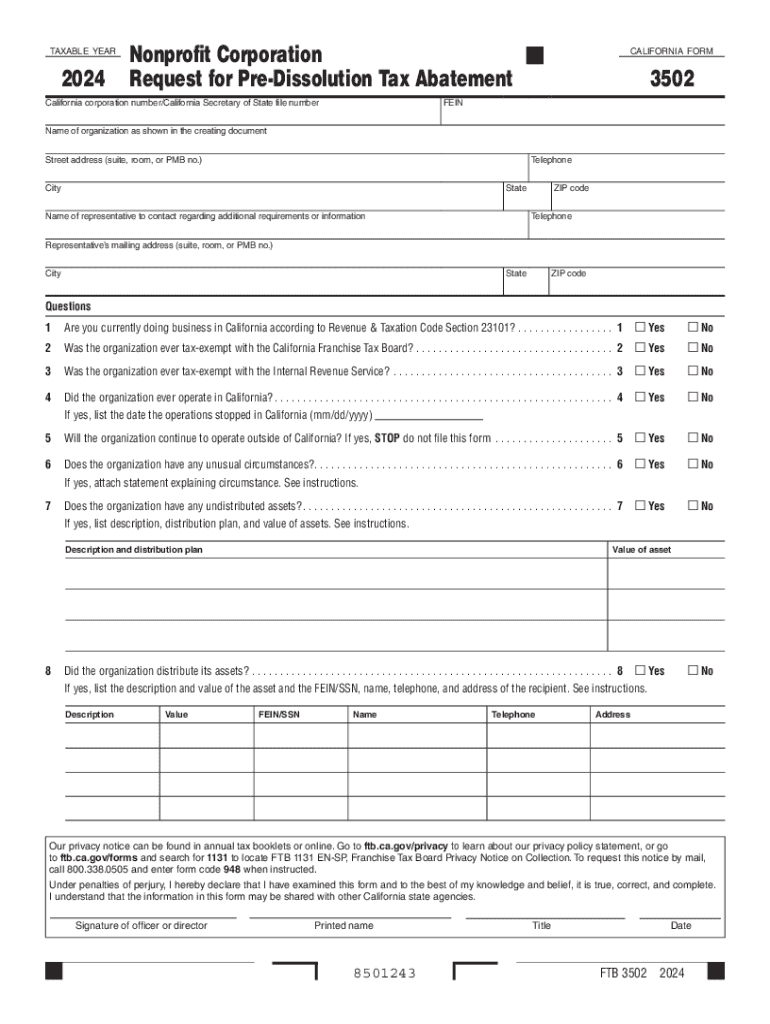
CA FTB 3502 2024 free printable template
pdfFiller is not affiliated with any government organization

Fill out
Complete the form online in a simple drag-and-drop editor.

eSign
Add your legally binding signature or send the form for signing.

Share
Share the form via a link, letting anyone fill it out from any device.

Export
Download, print, email, or move the form to your cloud storage.
Why pdfFiller is the best tool for your documents and forms


End-to-end document management
From editing and signing to collaboration and tracking, pdfFiller has everything you need to get your documents done quickly and efficiently.
Accessible from anywhere
pdfFiller is fully cloud-based. This means you can edit, sign, and share documents from anywhere using your computer, smartphone, or tablet.
Secure and compliant
pdfFiller lets you securely manage documents following global laws like ESIGN, CCPA, and GDPR. It's also HIPAA and SOC 2 compliant.
What is CA FTB 3502
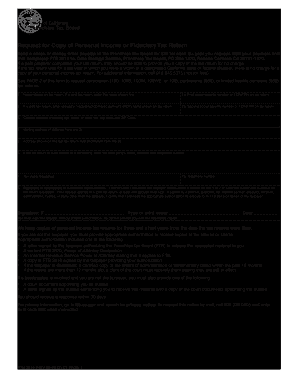
The California Form 3502 2024 is a tax document used by nonprofit corporations to request a pre-dissolution tax abatement.
pdfFiller scores top ratings on review platforms




Who needs CA FTB 3502?
Explore how professionals across industries use pdfFiller.

CA FTB 3502 is needed by:
-
Nonprofit corporations in California
-
Officers or directors of nonprofit organizations
-
Tax professionals assisting nonprofits
-
Individuals handling dissolution processes
-
Franchise Tax Board compliance officers
Comprehensive Guide to CA FTB 3502
What is the California Form 3?
The California Form 3 serves as a request for pre-dissolution tax abatement by nonprofit organizations. This form is essential for ensuring tax compliance during the dissolution process, allowing nonprofits to address their tax liabilities appropriately before ceasing operations. By submitting the form, organizations can potentially save on taxes and mitigate issues that may arise during dissolution.
Purpose and Benefits of the California Form 3 Request for Pre-Dissolution Tax Abatement
Filing the California Form 3 presents several benefits, particularly in achieving tax savings and adhering to California tax laws. Nonprofits typically seek tax abatement when they are planning to dissolve and wish to ensure all tax obligations are managed efficiently. The form minimizes the risk of ongoing tax liabilities post-dissolution.
Who Needs the California Form 3?
The California Form 3 is primarily required by officers or directors responsible for its submission. Eligibility for completing this form generally includes nonprofit organizations in California that are in the process of dissolution. Situations that trigger the need for this form include the organization’s decision to dissolve or any ongoing tax obligations that must be addressed beforehand.
Key Features of the California Form 3
This form is well-structured, consisting of various sections and fields designed for straightforward completion. Notable features include:
-
Multiple checkboxes for easy selection of options
-
Blank fields for entering specific data such as addresses and dates
-
A designated signature line for an officer or director
The fillable nature of the California Form 3 enhances usability, making it accessible for organizations during their dissolution process.
How to Fill Out the California Form 3 Online (Step-by-Step)
To successfully complete the California Form 3, follow these steps:
-
Access the form online and ensure you have the necessary documents ready.
-
Begin filling out the organization’s name and tax identification number in the specified fields.
-
Complete sections detailing the organization's operational history and assets.
-
Provide information related to the dissolution plans and ensure all fields are filled accurately.
-
Review for any unusual circumstances requiring additional attachments before submission.
Proper handling of unusual circumstances is essential to avoid common mistakes, ensuring compliance and accuracy in the submission.
Submission Methods for the California Form 3
Organizations can submit the California Form 3 through various methods:
-
Online submission through the California Franchise Tax Board's website
-
By mail to the designated board address
-
In-person at a local Franchise Tax Board office
Be aware of any associated fees and ensure compliance with deadlines for filing to avoid penalties during the dissolution process.
What Happens After You Submit the California Form 3?
After submitting the California Form 3, organizations can expect the following:
-
A designated processing time during which the Franchise Tax Board reviews the submission
-
Confirmation of receipt, which can be tracked through the board’s system
-
Potential outcomes including approval, requests for additional information, or denial based on eligibility
Following up on the submission helps organizations stay informed of their status and any required actions.
Common Errors and How to Avoid Them When Filing the California Form 3
Many users encounter common errors when filing the California Form 3. To avoid these mistakes, consider the following strategies:
-
Ensure all fields are completely and accurately filled out
-
Double check math and calculations related to asset values
-
Follow the checklist to validate all information before submission
Implementing these strategies can streamline the filing process and enhance compliance.
Security and Compliance When Handling the California Form 3
When dealing with sensitive information on the California Form 3, security is a priority. Users can rest assured that necessary security measures, including 256-bit encryption, are in place when using platforms like pdfFiller for submission. Additionally, compliance with data protection regulations such as HIPAA and GDPR helps safeguard user information during the filing process.
Enhance Your Experience with pdfFiller for the California Form 3
Utilizing pdfFiller to fill out and submit the California Form 3 offers several advantages. Users can efficiently edit and sign the form, securely store documents in the cloud, and enjoy a user-friendly interface that simplifies the process of managing tax forms. Embracing these capabilities can lead to a smoother experience when dealing with tax compliance issues.
How to fill out the CA FTB 3502
-
1.Access pdfFiller and search for 'California Form 3502 2024 Request for Pre-Dissolution Tax Abatement' in the template library.
-
2.Open the form to display the interactive fields within the pdfFiller interface.
-
3.Ensure you have your organization’s details including tax-exempt status, assets, and dissolution plans ready before starting to fill out the form.
-
4.Navigate through the form and click on each field to fill in the required information like addresses and organization details.
-
5.Use the checkbox options provided for any yes/no questions and ensure they are appropriately checked according to your organization's situation.
-
6.Review all the completed sections for accuracy and completeness before moving forward to the signature area.
-
7.Once all sections are filled out and reviewed, individuals with the necessary authority can sign directly within pdfFiller using electronic signature options.
-
8.Finalize your form by following the prompt to save and download it. Ensure you keep a copy for your records and submit it per guidelines provided by the California Franchise Tax Board.

Who needs to file the California Form 3502 2024?
The California Form 3502 2024 should be completed by nonprofit corporations in California that are seeking a pre-dissolution tax abatement, specifically by their officers or directors responsible for the organization.
What is the deadline for submitting the form?
There is no specific deadline mentioned for submitting the California Form 3502 2024, but it is advisable to submit it promptly as part of the dissolution process to avoid potential penalties or delays.
How do I submit the completed form?
After completing the California Form 3502 2024 on pdfFiller, save your document. It must be submitted to the California Franchise Tax Board, usually via mail or electronic filing if available.
What supporting documents are required with the form?
You may need to attach documents that provide evidence of your nonprofit's operations, tax-exempt status, and details regarding any undistributed assets. Check the form instructions for specifics.
What common mistakes should I avoid when filling out this form?
Common mistakes include incomplete sections, missing signatures, and submitting without required documentation. Always double-check the form for accuracy before submission.
How long does it take to process the form after submission?
Processing times for the California Form 3502 2024 can vary; generally, expect several weeks. It's best to confirm directly with the California Franchise Tax Board for their specific timelines.
Do I need to notarize the form?
No, the California Form 3502 2024 does not require notarization; however, it must be signed by an authorized officer or director of the organization.
CA FTB 3502 Form Versions
Related Forms




Get the latest insights from our blog


If you believe that this page should be taken down, please follow our DMCA take down process
here
.
This form may include fields for payment information. Data entered in these fields is not covered by PCI DSS compliance.