
Last updated on
Nov 7, 2026
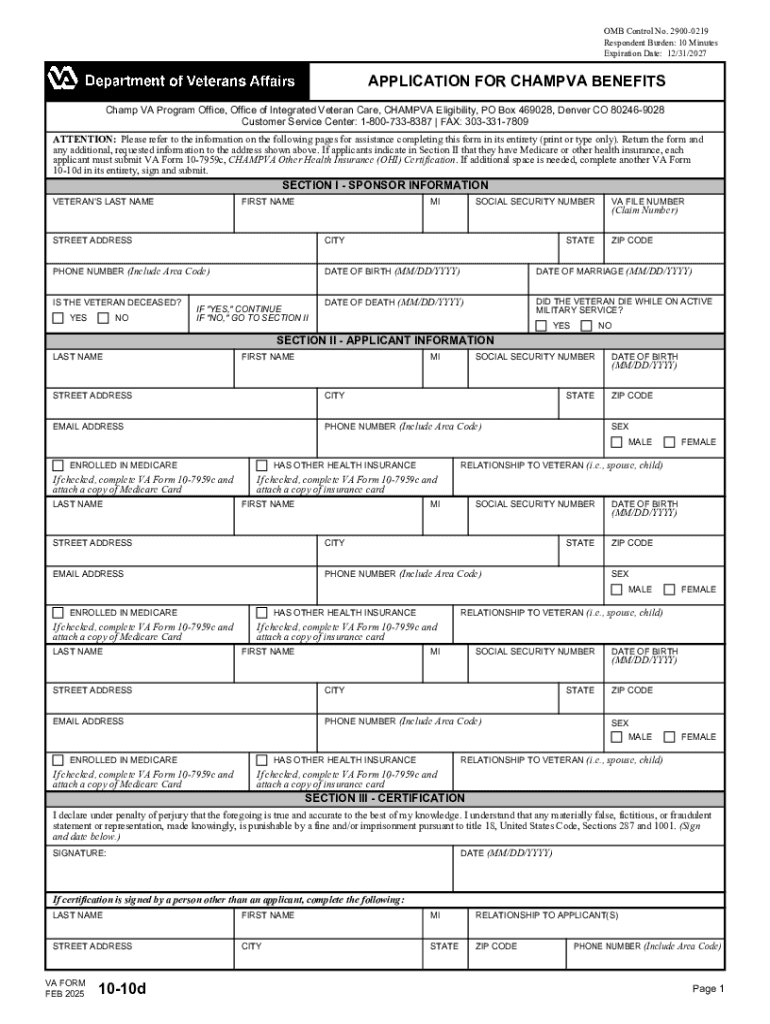
VA 10-10D 2025 free printable template
We are not affiliated with any brand or entity on this form

Fill out
Complete the form online in a simple drag-and-drop editor.

eSign
Add your legally binding signature or send the form for signing.

Share
Share the form via a link, letting anyone fill it out from any device.

Export
Download, print, email, or move the form to your cloud storage.
Why pdfFiller is the best tool for your documents and forms


End-to-end document management
From editing and signing to collaboration and tracking, pdfFiller has everything you need to get your documents done quickly and efficiently.
Accessible from anywhere
pdfFiller is fully cloud-based. This means you can edit, sign, and share documents from anywhere using your computer, smartphone, or tablet.
Secure and compliant
pdfFiller lets you securely manage documents following global laws like ESIGN, CCPA, and GDPR. It's also HIPAA and SOC 2 compliant.
What is VA 10-10D
The Application for CHAMPVA Benefits is a government form used by eligible dependents of veterans to apply for healthcare benefits.
pdfFiller scores top ratings on review platforms




Great PDFfiller
This tool is very helpful to me. I can easily edit the PDF file using this tool. Very easy to use and I can used it anywhere.
So far I have no negative feedback in this tool. Easy manage and it can be used via phone. Good for all kind of business.
So useful
PDF Filler is so useful and easy to use.
Sometimes lining up the boxes to be filled can be a little wonky
This is a lifesaver
This program has made such a difference. We use it to edit our PDF documents online all the time. Great!
The learning curve was steep but we are now over it and everything is working fine. Just remember to save your docs frequently.
Outstanding Tool To Fill Out PDFs.
Enjoy it.
Pdf filler does exactly what it says. It allows you to fill out that important PDF without having to print or use old school tactics (namely pen and ink) to get work done.
No cons whatsoever. It delivers and I definitely downloaded it at some point in life and was satisfied with whatever reason I did.
Fill in the Blank
Love what this has done for making my job so much easier at a very reasonable rate.
For my business this was and is the best tool I have for putting together insurance reports. Build or scan in a template and fill in the blanks when you need to send a report out. BAHM! DONE!
Probably something I have not spent enough time to figure out yet but as of now each time I fill in a blank template it auto saves it so my original always has to be cleared before new entry.
Fill PDF easily
Filler software for life with the best features available to fill out pdf documents anywhere and anytime. The google docs addon save me a lot of time to fill out pdf's online and sending is easy after editing. Easy to use cloud based pdf editor which enhance productivity while I am working.
They don't have all language support. They should add more language support.
Who needs VA 10-10D?
Explore how professionals across industries use pdfFiller.

VA 10-10D is needed by:
-
Veteran spouses seeking healthcare coverage
-
Veteran children wanting health insurance benefits
-
Military dependents needing medical assistance
-
Veterans requiring support for their dependents
-
Individuals applying for veteran-related healthcare programs
Comprehensive Guide to VA 10-10D
What is the Application for CHAMPVA Benefits?
The CHAMPVA (Civilian Health and Medical Program of the Department of Veterans Affairs) offers essential healthcare benefits to eligible dependents of veterans. The application for CHAMPVA benefits is initiated using VA Form 10-10d, which collectors required personal details about both the veteran and the applicant. This veteran healthcare form is crucial for securing medical coverage for those who qualify.
Purpose and Benefits of CHAMPVA Benefits
CHAMPVA benefits provide significant support for eligible dependents of veterans, covering a variety of healthcare services that can help alleviate rising medical costs. Military dependent benefits, such as hospital care, outpatient services, and preventive care, ensure that families don’t have to bear these costs alone. Applying for these benefits is an important step to gain access to necessary health insurance application resources that can significantly enhance overall health and well-being.
Eligibility Criteria for the Application for CHAMPVA Benefits
To qualify for CHAMPVA benefits, applicants must meet specific eligibility criteria. Dependents including spouses and children of veterans are eligible, but they must demonstrate their relationship to the veteran. Additionally, the applicant's Medicare status will also influence eligibility; those not enrolled in Medicare may have different benefits accessible to them. Understanding veteran spouse benefits and veteran child benefits is essential for maximizing healthcare options.
Required Documents to Complete the Application
Completing the VA Form 10-10d necessitates specific documents and supporting materials. Key items include:
-
Proof of relationship to the veteran (e.g., marriage certificate, birth certificate)
-
The veteran’s Social Security number or claim number
-
Medicare certification form if applicable
Applicants who possess other health insurance must submit additional forms to ensure comprehensive coverage.
How to Fill Out the Application for CHAMPVA Benefits Online
Filling out VA Form 10-10d online, particularly with tools like pdfFiller, involves several straightforward steps:
-
Access the form through the pdfFiller platform.
-
Enter required fields such as the veteran's last name and Social Security number.
-
Provide personal details and sign the document digitally.
Managing potential errors during the filling process can prevent delays, ensuring all necessary fields are accurately completed.
Submission Methods for the Application for CHAMPVA Benefits
Once the CHAMPVA application is fully completed, applicants can submit the form to the CHAMPVA Program Office through various methods. Submission options include mail and electronic upload through specific channels outlined by the VA. It is essential to review any associated fees, submission methods, and deadlines to ensure timely processing of applications.
What Happens After You Submit the CHAMPVA Application?
After submission, applicants can track their application status through the designated VA resources. It’s vital to be aware of common rejection reasons, such as incomplete documentation or eligibility issues, to improve chances of approval in subsequent applications.
Why Use pdfFiller for Your CHAMPVA Application?
Using pdfFiller for the CHAMPVA application simplifies the form-filling process. This platform offers valuable features such as:
-
Cloud-based accessibility that enables form management from any device
-
256-bit encryption to protect sensitive information
-
eSigning capabilities that streamline the approval process
These characteristics make pdfFiller a beneficial choice for handling important documents efficiently.
Sample Completed Application for CHAMPVA Benefits
To assist users, a sample completed VA Form 10-10d is available, providing a visual reference to ensure accurate submissions. Additionally, users can find tutorials or visual aids on pdfFiller that guide them through the process step-by-step.
Start Your CHAMPVA Application Effortlessly with pdfFiller
Leveraging pdfFiller for the CHAMPVA application allows users to experience a seamless and secure application process. With ease of use and robust safety features, getting started on healthcare applications is more manageable than ever.
How to fill out the VA 10-10D
-
1.Access the Application for CHAMPVA Benefits on pdfFiller by navigating to the official website and searching for the form.
-
2.Open the form in pdfFiller's interface where you can edit and fill it out.
-
3.Before starting, gather necessary information such as the veteran's name, social security number, Medicare status, and details regarding any other health insurance.
-
4.Begin filling in the form by entering the veteran's last name in the designated field, followed by their social security number.
-
5.Move through the form by clicking on each field. Use pdfFiller’s tools to input information accurately and check boxes as needed.
-
6.Continue to detailed sections regarding your relationship to the veteran and other requested personal information, ensuring you provide complete answers.
-
7.Review the information entered on the form to ensure accuracy. Double-check all fields and confirm any entries, especially the signature area.
-
8.Once the form is complete, save your progress and choose the download option to get a copy for your records.
-
9.You can also submit the completed form directly through pdfFiller by using the e-sign feature, which allows for secure online submission.

Who is eligible to apply for CHAMPVA benefits?
Eligible applicants include dependents of veterans who are not otherwise eligible for Medicare. This typically includes spouses and children of veterans.
Where do I submit the completed CHAMPVA application?
After completing the application, submit it to the CHAMPVA Program Office in Denver, Colorado. Be sure to check for any specific local requirements.
What documents are required to accompany the CHAMPVA application?
You must provide a valid proof of your relationship to the veteran, along with any details about other health insurance you may have.
Are there any common mistakes to avoid while filling out the form?
Ensure all fields are filled out legibly and accurately, and double-check signature requirements. Avoid leaving required fields blank.
What is the typical processing time for the CHAMPVA benefits application?
The processing time can vary, but it usually takes several weeks. Be sure to follow up if you do not receive confirmation of your application.
Can I submit the application online?
Yes, pdfFiller provides an option for online submission through their platform, making it easy to deliver your application electronically.
Is there a fee associated with submitting the CHAMPVA application?
There are typically no fees for applying for CHAMPVA benefits. However, verify any potential costs involved in gathering necessary documents.
VA 10-10D Form Versions
Related Content
Related Forms




Get the latest insights from our blog


If you believe that this page should be taken down, please follow our DMCA take down process
here
.
This form may include fields for payment information. Data entered in these fields is not covered by PCI DSS compliance.