
Last updated on
Nov 6, 2026
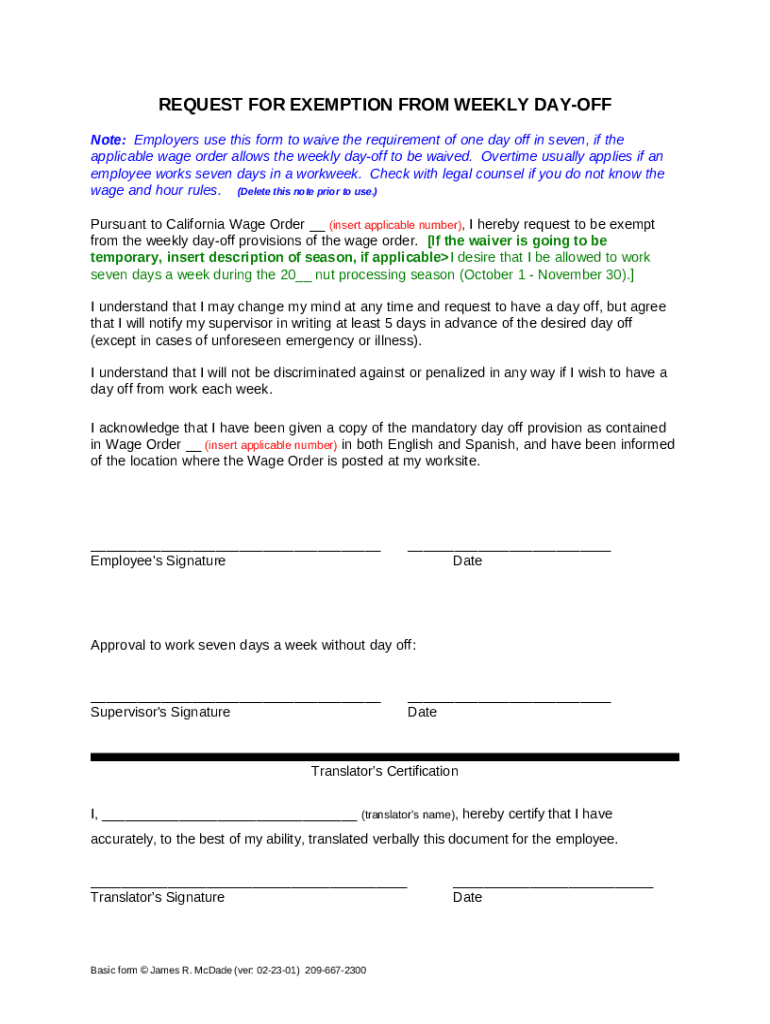
Get the free California Request for Exemption from Weekly Day-Off
We are not affiliated with any brand or entity on this form

Fill out
Complete the form online in a simple drag-and-drop editor.

eSign
Add your legally binding signature or send the form for signing.

Share
Share the form via a link, letting anyone fill it out from any device.

Export
Download, print, email, or move the form to your cloud storage.
Why pdfFiller is the best tool for your documents and forms


End-to-end document management
From editing and signing to collaboration and tracking, pdfFiller has everything you need to get your documents done quickly and efficiently.
Accessible from anywhere
pdfFiller is fully cloud-based. This means you can edit, sign, and share documents from anywhere using your computer, smartphone, or tablet.
Secure and compliant
pdfFiller lets you securely manage documents following global laws like ESIGN, CCPA, and GDPR. It's also HIPAA and SOC 2 compliant.
What is CA Day-Off Waiver
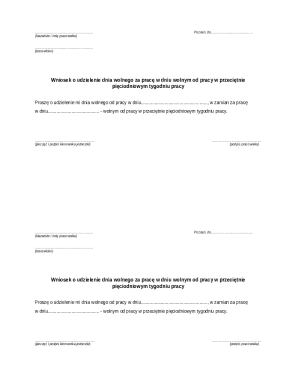
The California Request for Exemption from Weekly Day-Off is an employment form used by employers and employees to waive the requirement of one day off in seven, allowing continuous work schedules under certain conditions.
pdfFiller scores top ratings on review platforms




Excellent in Service and everything else.
Fairly easy to use. Without this program, I'd have to handwrite or type info onto the form.
I love to be able to use the pdf filler app much easier and it has become very important for us in documents we need to fill out and sign and send. I would like to see some ease in the selecting the editing of a document, can the display of boxes for each section be less overlapping each other, this may be difficult to do. Sometimes when you have a saved pdf document you do updates rather than create a whole new document, we use them as templates. Right now the easiest way is to create a document in Word, save it as a Word doc and as a PDF doc. Which is okay, often, time is a factor and to quickly update a pdf file would be faster. Thanks for listening.
Good so far on day one and second document.
Einfach verständlich, viele Optionen
What do you like best?
The upside is that it's very efficient and expedites completing forms effectively. I have used other software and didn't find them to be easy to navigate or efficient.
What do you dislike?
The downside is that sometimes the text doesn't align when filling in forms I have to complete from other service industries. Also, when PDFfiller is the default PDF it does not print without having to refresh several times.
Recommendations to others considering the product:
This software is really good and does make my administrative work easier and less tedious. There are some quirks but when I have experienced them, the support received was expedient and exceeded my expectations.
What problems are you solving with the product? What benefits have you realized?
It has really helped me to complete the necessary documents in a timely manner when there are no glitches. I love the easy access to my documents when completed.
Who needs CA Day-Off Waiver?
Explore how professionals across industries use pdfFiller.

CA Day-Off Waiver is needed by:
-
California employees seeking to work seven days a week
-
Supervisors managing employee work schedules
-
Translators assisting employees with language needs
-
Employers familiar with California wage orders
-
Human resources professionals overseeing compliance
Comprehensive Guide to CA Day-Off Waiver
What is the California Request for Exemption from Weekly Day-Off?
The California Request for Exemption from Weekly Day-Off is a specific employment form utilized within the state of California. This form is integral to the state's employment law framework, allowing employees to waive their statutory right to a weekly day off under certain conditions. By completing this document, employees can formally notify their employers of their intent to forgo a designated day off, which can be particularly crucial in industries experiencing seasonal demands. Understanding this request is essential for both employers and employees to ensure compliance with California's complex labor regulations.
Purpose and Benefits of the California Request for Exemption from Weekly Day-Off
This form is commonly employed in scenarios such as seasonal work, where the need for staff availability is heightened. The primary benefits of the Request for Exemption include increased flexibility for employees and operational advantages for employers, who can better adapt to fluctuating workload demands. Furthermore, this exemption aligns with the requirements of California wage order laws, allowing businesses to operate efficiently while respecting employees' choices regarding their work schedules.
Who Needs the California Request for Exemption from Weekly Day-Off?
The key participants in the California Request for Exemption process include employees, their supervisors, and translators, when applicable. Each role is crucial in ensuring the request is properly initiated and documented. Employees must complete the request, supervisors need to give their approval, and translators provide assistance in understanding the terms of the waiver. Signatures from these parties validate the agreement, emphasizing the importance of mutual understanding throughout the request process.
Eligibility Criteria for the California Request for Exemption from Weekly Day-Off
To be eligible to file this request, employees must meet certain conditions outlined in California's labor laws. These criteria may include specifics related to the nature of the work, the duration of the exemption, or limitations imposed by relevant wage orders. It is crucial for all parties involved to clearly communicate these eligibility requirements, ensuring that employees are fully aware of the implications of their decisions and the legal context of the exemption.
How to Fill Out the California Request for Exemption from Weekly Day-Off (Step-by-Step)
-
Begin by accessing the California Request for Exemption form online through a reliable platform.
-
Carefully read the accompanying instructions to understand the requirements of the form.
-
Fill out personal identification fields, ensuring accuracy of all entered information.
-
Obtain necessary signatures from supervisors and any required translator, if applicable.
-
Review the completed form for completeness and accuracy before submission.
-
Submit the form in your chosen format, either online or via paper.
Common Errors and How to Avoid Them
When filling out the exemption request, employees often make several common mistakes, which can lead to complications in processing. Frequent errors include incomplete sections, missing signatures, and misinterpretation of eligibility criteria. Such inaccuracies can hinder the approval process, causing unnecessary delays. To minimize these issues, individuals should double-check all entries and ensure that no required fields are overlooked before submitting the form.
How to Submit the California Request for Exemption from Weekly Day-Off
There are various submission methods available for the California Request for Exemption, including online submission and traditional paper delivery. It is important to adhere to any relevant deadlines associated with filing the request, as well as to understand the processing times you can expect once the form is submitted. After submission, applicants can anticipate receiving confirmation of receipt or tracking information to monitor the progress of their request.
Security and Compliance for the California Request for Exemption from Weekly Day-Off
Ensuring the security of sensitive information during the submission process is of paramount importance. pdfFiller employs robust security measures, such as 256-bit encryption, to protect documents throughout their handling. Compliance with regulations like HIPAA and GDPR further emphasizes the commitment to data privacy and protection. Maintaining confidentiality is essential for all parties involved in the exemption process.
Leveraging pdfFiller for Your California Request for Exemption from Weekly Day-Off
pdfFiller offers significant advantages to users completing the California Request for Exemption. The platform simplifies the process of filling out and managing this form, allowing for easy eSigning and document sharing. Users are encouraged to take advantage of pdfFiller's extensive resources to edit and securely submit their exemption requests, streamlining the entire experience from start to finish.
How to fill out the CA Day-Off Waiver
-
1.To access the California Request for Exemption from Weekly Day-Off form on pdfFiller, visit the pdfFiller website and use the search bar to locate the specific form by entering its name.
-
2.Once the form appears in the search results, click on it to open the document in pdfFiller's editing interface, where you can begin filling it out.
-
3.Before completing the form, gather essential information such as the employee's name, job title, reason for exemption, and supervisor's details to ensure you can fill the form accurately.
-
4.Begin by clicking on the designated fields to enter information. You will notice fillable fields for signatures, dates, and relevant notes for the exemption request; make sure to fill these out completely.
-
5.As you proceed, utilize the available tools in pdfFiller to adjust font size, highlight fields, and add any necessary comments for clarity on the form.
-
6.Once all fields are filled, take a moment to review the completed form for any discrepancies or mistakes to ensure total accuracy.
-
7.To finalize the process, use the options available in pdfFiller to save the document, download it, or send it directly for submission through email or printing methods.

Who is eligible to complete the California Request for Exemption from Weekly Day-Off?
Any California employee wishing to work seven days a week can submit this request, given it aligns with their employer's and applicable wage orders' guidelines.
Is there a deadline for submitting this exemption request?
While the form does not specify a deadline, it is advisable to submit the California Request for Exemption well in advance of when you wish to start a work schedule without a required day off.
How should I submit the completed California exemption form?
The completed form can be submitted directly to your supervisor for approval. Ensure you follow any additional submission protocols set by your employer.
What supporting documents might I need when submitting this form?
While specific documents are not outlined, it is recommended to include any relevant agreements or communications that support your request, especially if a translator's input is required.
What common mistakes should I avoid when filling out this form?
Ensure that all signatures are obtained and fields are completed correctly. Common errors include leaving required fields blank or forgetting to include the supervisor's approval.
What is the processing time for the exemption request once submitted?
Processing times can vary based on employer policy; typically, it's best to check with your supervisor or HR department for expected timelines.
How do I confirm that my exemption request has been approved?
After submission, follow up with your supervisor to confirm your request status. It's important to maintain communication to ensure all requirements have been met.
Related Forms


Get the latest insights from our blog



If you believe that this page should be taken down, please follow our DMCA take down process
here
.
This form may include fields for payment information. Data entered in these fields is not covered by PCI DSS compliance.