
Last updated on
Nov 6, 2026
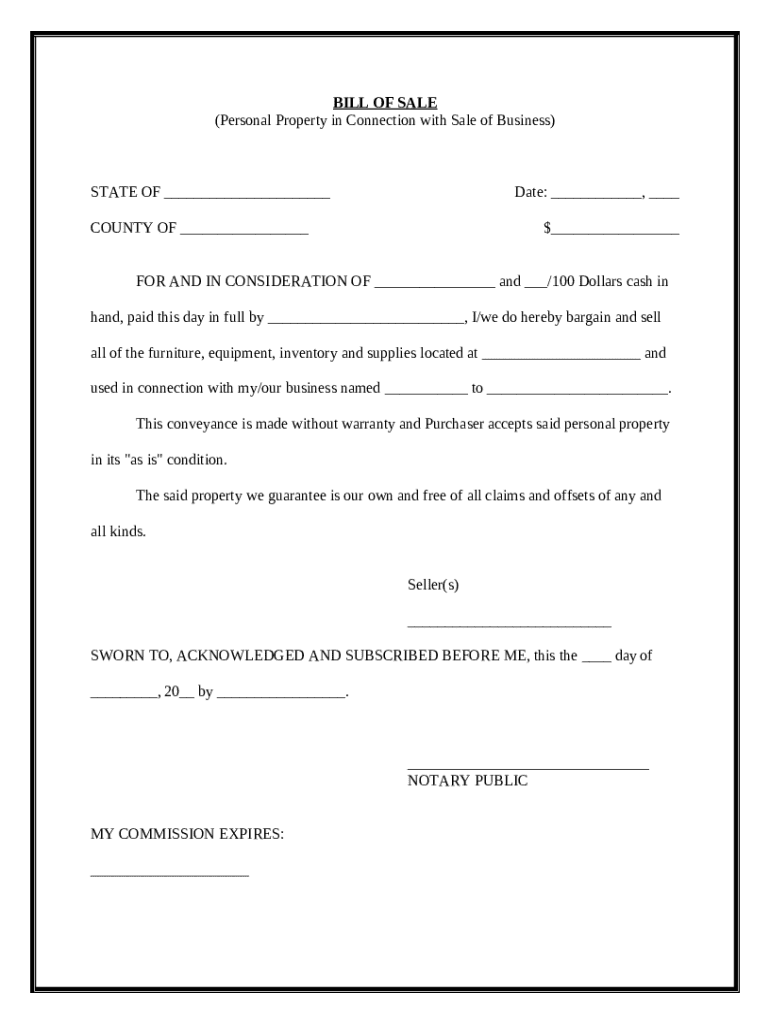
Get the free Bill of Sale for Business Assets
We are not affiliated with any brand or entity on this form

Fill out
Complete the form online in a simple drag-and-drop editor.

eSign
Add your legally binding signature or send the form for signing.

Share
Share the form via a link, letting anyone fill it out from any device.

Export
Download, print, email, or move the form to your cloud storage.
Why pdfFiller is the best tool for your documents and forms


End-to-end document management
From editing and signing to collaboration and tracking, pdfFiller has everything you need to get your documents done quickly and efficiently.
Accessible from anywhere
pdfFiller is fully cloud-based. This means you can edit, sign, and share documents from anywhere using your computer, smartphone, or tablet.
Secure and compliant
pdfFiller lets you securely manage documents following global laws like ESIGN, CCPA, and GDPR. It's also HIPAA and SOC 2 compliant.
What is Business Bill of Sale
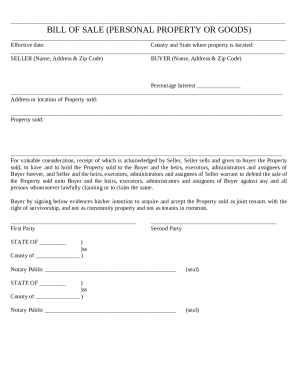
The Bill of Sale for Business Assets is a legal document used by sellers to transfer ownership of personal property associated with the sale of a business.
pdfFiller scores top ratings on review platforms




Great useful application, I use it for keeping my exercise log for the 'Get Active' programme.
Fast and efficient program. A very much needed system.
Very easy to use. Enjoy using this program.
Super easy to use, loved being able to file electronically to IRS
Once I figured out how to format what I needed the result were impressive. 100% recommended.
PDF filler makes filling out paperwork…
PDF filler makes filling out paperwork super easy. It is user friendly has many different features for such a small cost.
Who needs Business Bill of Sale?
Explore how professionals across industries use pdfFiller.

Business Bill of Sale is needed by:
-
Business owners selling assets
-
Buyers acquiring business inventory
-
Notaries involved in property transactions
-
Legal professionals managing sales agreements
-
Accountants overseeing business transfers
Comprehensive Guide to Business Bill of Sale
What is the Bill of Sale for Business Assets?
A Bill of Sale for Business Assets is a legal document that facilitates the transfer of ownership of personal property involved in a business transaction. This document plays a crucial role in confirming that the seller has the right to sell the specified assets, such as furniture, inventory, and equipment. It also ensures that these assets are free from any claims, securing the interests of both the buyer and seller in a business deal.
By clearly outlining the conditions of the sale, the Bill of Sale helps to protect all parties involved. It prevents future disputes and provides a formal record of the transaction.
Why Use a Bill of Sale for Business Assets?
Utilizing a Bill of Sale for Business Assets offers significant legal protection for both buyers and sellers during transactions. This document serves as a clear record of asset transfer, essential for accounting and compliance purposes.
-
Provides evidence of the transaction, supporting audit trails.
-
Helps mitigate risks of disputes by documenting the specifics of the sale.
In addition to protecting parties, this formalized instrument streamlines the process of asset liquidation or transfer, ensuring all legal aspects are addressed.
Key Features of the Bill of Sale for Business Assets
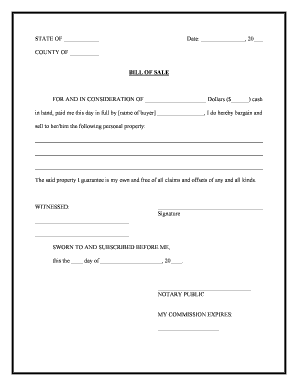
The Bill of Sale for Business Assets includes several key features that enhance its usability. Users can customize the document with essential details, such as the date of transfer, consideration amount, and the names of involved parties. Signature lines are provided for both the seller and notary, ensuring proper validation.
-
Multiple blank fields for customization
-
Clear signature requirements for both seller and notary
-
Detailed instructions for notarization
Who Needs the Bill of Sale for Business Assets?
This document is essential for various stakeholders in a business transaction. Sellers and buyers of business assets must utilize this form to formalize their agreement. Notaries also play a critical role by witnessing the signing, ensuring that the document is legally binding.
Businesses involved in asset liquidation or transfer will find this Bill of Sale indispensable for processed sales.
How to Fill Out the Bill of Sale for Business Assets Online (Step-by-Step Guide)
Filling out the Bill of Sale for Business Assets online is a straightforward process. Follow these steps:
-
Access the form through the pdfFiller platform.
-
Edit the form to include all required fields accurately.
-
Review your entries to ensure correct information.
-
Follow the provided instructions to complete the notarization process.
Be cautious of common errors, such as omitting the seller's signature or failing to notarize the document properly.
Navigating the Notarization Process for the Bill of Sale for Business Assets
Notarization is a critical aspect of validating the Bill of Sale for Business Assets. It requires specific steps to ensure that the document is compliant with legal standards.
-
Ensure you have all necessary documents ready for notarization.
-
Choose authorized personnel capable of notarizing the Bill of Sale.
-
Understand the differences between digital and wet signatures.
Following the right procedures ensures the document is properly notarized and legally recognized.
Where and How to Submit the Bill of Sale for Business Assets
Submitting the Bill of Sale can be done in various ways, depending on state regulations. Users can opt for in-person submissions or utilize electronic options for convenience.
-
Check for submission fees that may apply.
-
Be aware of deadlines for submission to avoid penalties.
-
Understand the consequences of late submissions or failure to submit the document.
Ensuring Security and Compliance with the Bill of Sale for Business Assets
Handling sensitive documents like the Bill of Sale for Business Assets requires attention to security and compliance. Proper measures must be taken to protect personal information throughout the process.
-
Utilize secure document management systems to prevent unauthorized access.
-
Ensure compliance with data protection regulations such as HIPAA and GDPR.
By prioritizing document integrity, users can maintain security standards while managing asset transfers.
Sample of a Completed Bill of Sale for Business Assets
Providing a filled-out example can serve as valuable guidance. A completed Bill of Sale illustrates all necessary fields and can aid users in understanding how to interpret the document.
Additionally, highlighting common pitfalls, such as inconsistently filled fields, can help users avoid issues during completion.
Streamline Your Bill of Sale for Business Assets with pdfFiller
pdfFiller offers an array of features that simplify the management of the Bill of Sale for Business Assets. With tools for document editing, eSigning, and secure storage, users can efficiently handle their business transactions.
User testimonials often reflect positive outcomes when utilizing pdfFiller for completing essential forms and ensuring document security.
How to fill out the Business Bill of Sale
-
1.To access the Bill of Sale for Business Assets form on pdfFiller, visit the platform's website and use the search bar to locate the form by its name.
-
2.Open the form, and you'll see several blank fields that need to be filled, including state, date, consideration amount, and names of the parties involved.
-
3.Before starting, gather all necessary information such as the details of the property being sold, personal information of the seller and buyer, and any financial considerations.
-
4.Navigate through the fields using pdfFiller's user-friendly interface; click on each blank field to input the required information.
-
5.As you fill out the form, ensure that all details are accurate, especially the seller's guarantee that the property is free of claims, and the buyer’s acceptance of the property 'as is.'
-
6.After completing the form, review all the entered information carefully to ensure there are no mistakes or missing fields.
-
7.Once satisfied, finalize the form by clicking the 'Save' button, which allows you to keep a copy in your pdfFiller account.
-
8.You can also download a copy of the completed form by selecting the 'Download' option or submit it directly through pdfFiller if your recipient accepts electronic signatures.

Who is eligible to use the Bill of Sale for Business Assets?
Any business owner selling personal property related to their business, along with the buyer, can use this form. It is vital that both parties are legally recognized entities capable of entering into a contract.
What information do I need before filling out the form?
You should gather the details of the property being sold, including descriptions, the agreed consideration amount, and the names and contact information of all involved parties before starting to fill out the form.
Is notarization required for this Bill of Sale?
Yes, the Bill of Sale for Business Assets requires notarization to ensure the authenticity of the signatures and the legitimacy of the transaction, providing legal protection to both parties.
How do I submit the completed form?
Once completed, the Bill of Sale can be saved and downloaded or submitted electronically via email or through pdfFiller's submission options if the recipient accepts digital documents.
What are common mistakes to avoid when filling out the form?
Make sure all fields are accurately filled, especially dates and identification details. Avoid leaving any required sections blank, and ensure the seller's guarantee is properly stated.
How long does it take to process the Bill of Sale?
The processing time mainly depends on how quickly the seller and buyer finalize the information, sign the document, and get it notarized. Typically, it can be completed within a few hours if both parties are available.
Can I edit the Bill of Sale once it's filled out?
Yes, if you’re using pdfFiller, you can edit the Bill of Sale anytime before saving or submitting it. Just click on the edit option to make any necessary changes before finalizing.
Related Forms


Get the latest insights from our blog



If you believe that this page should be taken down, please follow our DMCA take down process
here
.
This form may include fields for payment information. Data entered in these fields is not covered by PCI DSS compliance.